
h555lux
Uživatelská příručka k digitálnímu přijímači Hawks 555 Lux
Model: h555lux
Zavedení
This manual provides comprehensive instructions for the setup, operation, and maintenance of your Hawks 555 Lux Digital Receiver. Please read this manual carefully before using the device to ensure optimal performance and longevity.
Konec produktuview
The Hawks 555 Lux is an advanced digital receiver designed for high-definition entertainment. It features 1GB RAM, 8MB internal flash memory, external Wi-Fi, and Bluetooth connectivity. It supports HD 1080 resolution and can store up to 8000 channels. Its robust design ensures durability and high utility.

Figure 1: Hawks 555 Lux Digital Receiver and its packaging.
Obsah balení
Ujistěte se, že v balení jsou přítomny všechny položky:
- Hawks 555 Lux Digital Receiver
- Bluetooth dálkové ovládání
- Power Adapter (2 Amp)
- External Wi-Fi Adapter
- HDMI kabel (pokud je součástí dodávky)
- Uživatelská příručka (tento dokument)

Figure 2: All components included in the Hawks 555 Lux package.
Průvodce nastavením
1. Připojení přijímače
- Připojení napájení: Connect the power adapter to the DC 12V port on the back of the receiver and plug it into a power outlet.
- Video výstup: Connect an HDMI cable from the HD OUT port on the receiver to the HDMI input on your TV.
- Antenna/LNB Input: Connect your satellite dish LNB cable to the LNB IN port on the receiver.
- External Wi-Fi: Insert the external Wi-Fi adapter into one of the USB ports.
- Bluetooth dálkové ovládání: Ensure the Bluetooth remote control is paired. Refer to the "Operating" section for pairing instructions if needed.
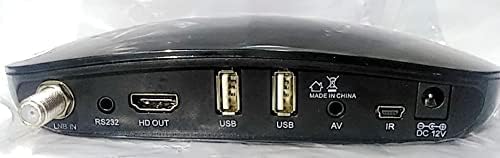
Figure 3: Rear panel connections of the Hawks 555 Lux receiver.
2. Počáteční zapnutí a skenování kanálů
- Zapněte televizor a vyberte správný vstup HDMI.
- The receiver will power on automatically. Follow the on-screen instructions for initial setup, including language selection and network configuration.
- Perform a channel scan to find available satellite channels. This process may take several minutes.
Návod k obsluze
Funkce dálkového ovládání
The Hawks 555 Lux comes with a Bluetooth remote control. Ensure it is paired with the receiver for full functionality.
- Vypínač: Zapíná/vypíná přijímač.
- Navigační tlačítka (nahoru/dolů/vlevo/vpravo/OK): Procházení nabídek a potvrzování výběrů.
- Hlasitost +/-: Upravuje hlasitost zvuku.
- Kanál +/-: Mění kanály.
- Tlačítko nabídky: Přístup k hlavní nabídce s nastaveními a funkcemi.
- Tlačítko Konec: Návrat na předchozí obrazovku nebo opuštění menu.
- Numerická klávesnice: Přímý vstup kanálu.
- Media Playback Buttons: Play, Pause, Stop, Fast Forward, Rewind for multimedia content.
Network Connectivity (Wi-Fi)
- Přejít na Menu > Network Settings > Wi-Fi.
- Ze seznamu vyberte svou síť Wi-Fi.
- Enter the password using the on-screen keyboard and confirm.
- Once connected, the receiver can access online features and updates.
Správa kanálů
- Adding/Editing Channels: Access the channel management menu to scan for new channels, edit existing ones, or delete unwanted channels.
- Seznamy oblíbených: Create custom favorite channel lists for quick access to your preferred channels.
Údržba
- Čištění: Use a soft, dry cloth to clean the receiver's exterior. Do not use liquid cleaners or abrasive materials.
- Větrání: Ensure the receiver has adequate ventilation. Do not block ventilation openings.
- Aktualizace firmwaru: Periodically check for firmware updates via the network settings to ensure optimal performance and access to new features.
- Skladování: Pokud zařízení skladujete delší dobu, odpojte jej od napájení a uložte jej na chladném a suchém místě.
Odstraňování problémů
| Problém | Možná příčina | Řešení |
|---|---|---|
| Žádná síla | Odpojený napájecí kabel; Problém se zásuvkou. | Zkontrolujte připojení k napájení; zkuste jinou zásuvku. |
| Žádný signál / Prázdná obrazovka | Incorrect HDMI input selected on TV; LNB cable disconnected; No channels scanned. | Select correct TV input; Check LNB connection; Perform channel scan. |
| Dálkové ovládání nereaguje | Batteries low/dead; Remote not paired. | Replace batteries; Re-pair Bluetooth remote (refer to Operating section). |
| Špatná kvalita obrazu | Weak signal; Incorrect display settings. | Check LNB alignment; Adjust display settings in receiver menu. |
Specifikace
| Značka | Obecný |
| Model | h555lux |
| ASIN | B09K93WPX6 |
| BERAN | 1 GB |
| Flash paměť | 8 MB (Internal) |
| Technologie připojení | Bluetooth, External Wi-Fi |
| Video výstup | HD 1080 (1 Total Video Output Port) |
| Režim zvukového výstupu | Stereo nebo prostorový zvuk |
| Podporované zvukové formáty | Dolby Digital, DTS, AAC, MP3, PCM |
| Proud | 2 Amp |
| Kompatibilní zařízení | Televize |
| Barva | Černý |
| První dostupný termín | 25. října 2021 |
Záruka a podpora
Informace o záruce a technickou podporu získáte na kontaktních údajích poskytnutých vaším prodejcem nebo oficiálním zástupcem výrobce. webUschovejte si účtenku jako doklad o koupi pro případ reklamace.
For further assistance, you may contact the seller through the Amazon platform or visit the product page for updated support information.
Ask a question about this manual
Ask about setup, troubleshooting, compatibility, parts, safety, or missing instructions. Manuals+ will review the question and use this page’s manual context to help answer it.