
Zavedení
The Padmate S26 Open-Ear Air Conduction Bluetooth Headphones are designed to provide a unique audio experience while maintaining awareness of your surroundings. Utilizing air conduction technology, these headphones deliver sound without obstructing your ear canals, enhancing safety during outdoor activities. They feature Bluetooth 5.0 for stable connectivity, IP67 waterproofing for durability, and a lightweight, foldable design for comfort and portability.
Co je v krabici
- Padmate S26 Open-Ear Air Conduction Bluetooth Headphones
- Nabíjecí kabel
- Uživatelská příručka
Konec produktuview

Figure 1: Padmate S26 Headphones - General View
Klíčové vlastnosti
- Design s otevřeným uchem: Air conduction technology allows you to hear ambient sounds for increased safety.
- Bluetooth 5.0: Provides a fast and stable wireless connection with multipoint pairing capability.
- Vodotěsnost IP67: Resistant to sweat and rain, suitable for various activities including workouts.
- Dlouhá výdrž baterie: Up to 8 hours of continuous music playback or call time.
- Lehký a skládací: Weighing only 18g with a memory titanium alloy back-hook, offering comfort and easy storage.
Ovládací prvky a komponenty

Figure 2: Close-up of the control buttons on the headphone band.
- Vypínač: Používá se k zapnutí/vypnutí a párování.
- Tlačítko pro zvýšení hlasitosti/následující skladbu: Krátkým stisknutím se hlasitost zvýší, dlouhým stisknutím se přeskočí na další skladbu.
- Tlačítko pro snížení hlasitosti/předchozí skladba: Krátkým stisknutím snížíte hlasitost, dlouhým stisknutím přejdete na předchozí skladbu.
- Mikrofon: Integrované pro handsfree hovory.
- Nabíjecí port: Micro USB port pro nabíjení zařízení.
Video 1: Product demonstration and review of the Padmate Open-Ear Air Conduction Bluetooth Headphones.
Nastavení
Počáteční nabíjení
- Připojte nabíjecí kabel k nabíjecímu portu sluchátek.
- Druhý konec kabelu zapojte do USB napájecího adaptéru (není součástí balení) nebo do USB portu počítače.
- Charge the headphones fully before first use. The indicator light will change to show charging status.
Párování pomocí Bluetooth

Figure 3: Headphones demonstrating multipoint pairing with multiple devices.
- Ujistěte se, že jsou sluchátka vypnutá.
- Stiskněte a podržte tlačítko napájení, dokud kontrolka nezačne blikat červeně a modře, což signalizuje režim párování.
- Na svém zařízení (chytrý telefon, tablet, počítač) povolte Bluetooth a vyhledejte dostupná zařízení.
- Select "Padmate S26" from the list of found devices.
- Po připojení se kontrolka rozsvítí modře nebo zhasne v závislosti na modelu.
- For multipoint pairing, after connecting to the first device, disable Bluetooth on that device. Put the headphones back into pairing mode and connect to the second device. Then re-enable Bluetooth on the first device; the headphones should automatically connect to both.
Návod k obsluze
Zapnutí/vypnutí
- Zapnutí: Stiskněte a podržte tlačítko Napájení po dobu 3 sekund.
- Vypnout: Stiskněte a podržte tlačítko Napájení po dobu 5 sekund.
Přehrávání hudby
- Přehrát/pozastavit: Krátce stiskněte tlačítko Napájení.
- Další skladba: Dlouze stiskněte tlačítko pro zvýšení hlasitosti.
- Předchozí skladba: Dlouze stiskněte tlačítko pro snížení hlasitosti.
- Zvýšit hlasitost: Krátce stiskněte tlačítko pro zvýšení hlasitosti.
- Snížit hlasitost: Krátce stiskněte tlačítko pro snížení hlasitosti.
Správa hovorů
- Přijmout/ukončit hovor: Krátce stiskněte tlačítko Napájení.
- Odmítnout hovor: Dlouze stiskněte tlačítko napájení.
- Hlasový asistent: Dvakrát stiskněte tlačítko napájení (pokud je vaše zařízení podporováno).
Údržba
Čištění
- Otřete sluchátka měkkým, damp tkanina.
- Nepoužívejte abrazivní čisticí prostředky nebo rozpouštědla.
- Před nabíjením se ujistěte, že je nabíjecí port suchý.
Skladování
- Sluchátka skladujte na chladném a suchém místě mimo dosah přímého slunečního záření.
- Vyhněte se extrémním teplotám.
- The flexible design allows for compact storage.
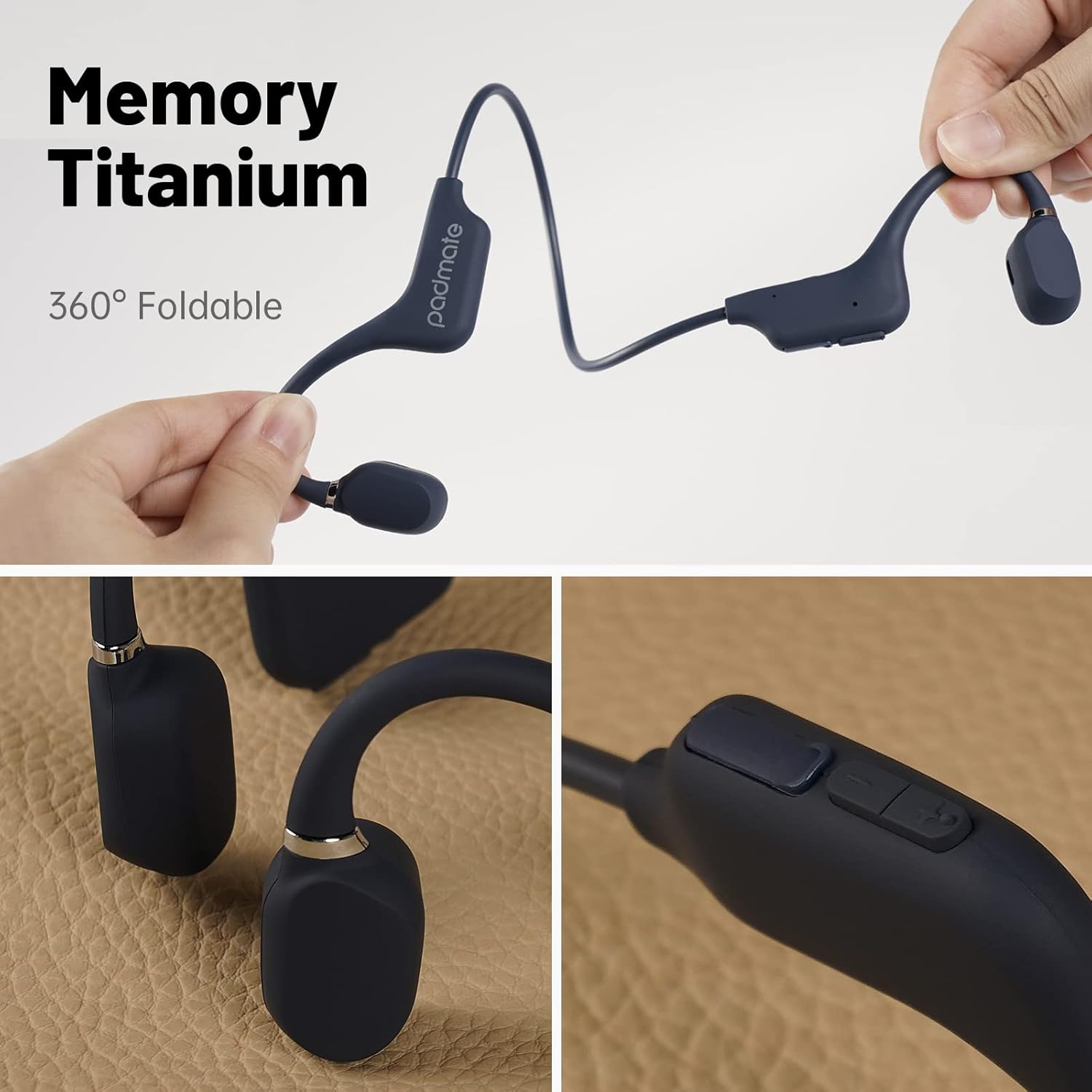
Figure 4: The headphones feature a flexible, foldable design for easy storage.
Odstraňování problémů
| Problém | Možná příčina | Řešení |
|---|---|---|
| Sluchátka se nezapínají. | Slabá baterie. | Plně nabijte sluchátka. |
| Nelze spárovat se zařízením. | Headphones not in pairing mode or device Bluetooth off. | Ensure headphones are in pairing mode (flashing red/blue light) and device Bluetooth is enabled. Try restarting both devices. |
| Žádný zvuk nebo špatná kvalita zvuku. | Volume too low, device not connected, or interference. | Increase volume on both headphones and device. Re-pair the headphones. Move closer to the connected device. |
| Mikrofon nefunguje. | Device settings or microphone obstruction. | Check device audio input settings. Ensure microphone port is clear. |
Specifikace
| Funkce | Detail |
|---|---|
| Značka | Padmate |
| Číslo modelu | S26 |
| Umístění uší | Otevřete ucho |
| Technologie připojení | Bezdrátové připojení (Bluetooth 5.0) |
| Dosah Bluetooth | 10 metrů |
| Úroveň odolnosti proti vodě | IP67 Vodotěsný |
| Průměrná životnost baterie | 8 hodiny |
| Doba nabíjení baterie | 16 Hours (Note: This value seems unusually high for charge time compared to 8 hours playtime. Please refer to product packaging for most accurate charge time.) |
| Kontrolní metoda | Dotyk / tlačítko |
| Materiál | Silikon |
| Hmotnost | Approximately 18g (as per product features) |
| Kompatibilní zařízení | Bluetooth-enabled devices (iPhone, Android, smartphones, tablets, Mac, PCs, laptops) |
Záruka a podpora
For warranty information and customer support, please refer to the documentation included with your product or visit the official Padmate webwebu. Konkrétní záruční podmínky se mohou lišit v závislosti na regionu a prodejci.