
Zavedení
The Antec Symphony 360 ARGB AIO liquid cooler delivers a cooling solution with unique ARGB lighting. The mirror ARGB lighting bar gives a subtle and beautiful color scheme. Specifically designed using EPDM+IIP high-density tubes and 14 dense cooling fins, the Symphony ARGB not only extends its lifespan but also enhances the entire cooling performance. The Symphony ARGB is ready to bring you a brand-new user experience.
Konec produktuview
Komponenty
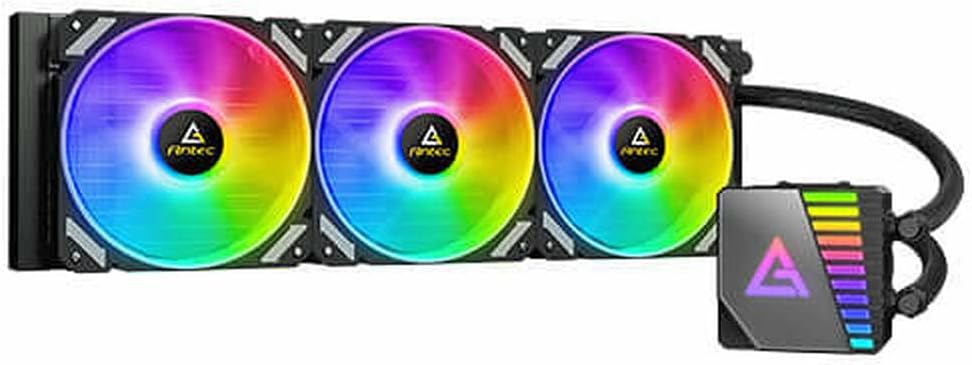
The Antec Symphony 360 ARGB Liquid Cooler showcasing its vibrant RGB fan illumination and pump unit.

The Antec Symphony 360 ARGB Liquid Cooler with its fans in a non-illuminated, white state.
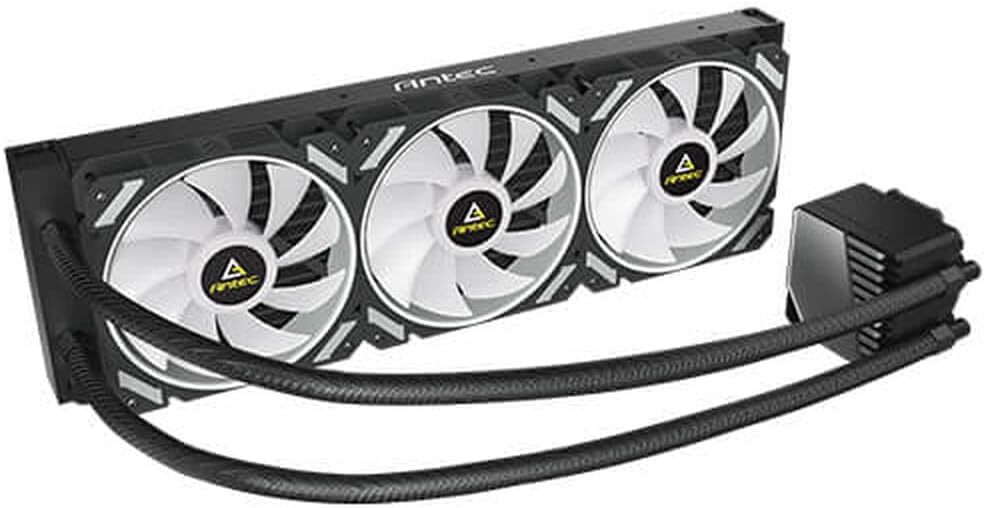
An angled perspective of the cooler, highlighting the radiator, fans, and durable tubing.

Shora dolů view of the Antec Symphony 360 ARGB Liquid Cooler, showing the three fans and pump unit layout.

Detailní view of the radiator section, featuring the Antec branding and fan mounts.

Another perspective shot emphasizing the design of the fan blades and the radiator's structure.

A close-up of the pump unit, showcasing its mirror ARGB lighting bar with a dynamic rainbow effect.

Strana view of the radiator, illustrating its slim profile and dense fin array for efficient heat dissipation.

The underside of the pump unit, revealing the polished copper cold plate designed for optimal thermal transfer from the CPU.
Pokyny pro nastavení
Než začnete
- Ensure your motherboard and PC case are compatible with a 360mm radiator.
- Vybalte všechny součásti a zkontrolujte jejich obsah podle dodacího listu.
- Gather necessary tools: screwdriver, thermal paste (if not pre-applied).
- Refer to your motherboard's manual for CPU socket type and mounting bracket requirements.
Kroky instalace
- Příprava patice CPU: Install the appropriate backplate and standoffs for your CPU socket (Intel/AMD) onto the motherboard.
- Namontujte radiátor: Secure the 360mm radiator to an available mounting location in your PC case (typically top or front) using the provided screws. Ensure proper airflow direction.
- Nainstalujte ventilátory: Attach the three 120mm ARGB fans to the radiator using the included fan screws. Pay attention to the fan's airflow direction (usually blowing through the radiator).
- Naneste termální pastu: If the cold plate does not have pre-applied thermal paste, apply a small pea-sized amount to the center of your CPU's integrated heat spreader (IHS).
- Mount the Pump/Cold Plate: Carefully align the pump's cold plate with the CPU and secure it to the standoffs using the retention bracket and thumb screws. Apply even pressure.
- Připojit kabely:
- Connect the pump's power cable to the motherboard's dedicated AIO_PUMP or CPU_FAN header.
- Connect the fan power cables to available fan headers on your motherboard or a fan controller.
- Connect the ARGB cables from the fans and pump to a compatible 3-pin 5V ARGB header on your motherboard or an ARGB controller.
- Správa kabelů: Všechny kabely úhledně veďte, abyste zajistili správné proudění vzduchu a čistou konstrukci.
Návod k obsluze
Once installed, the Antec Symphony 360 ARGB Liquid Cooler operates automatically to maintain optimal CPU temperatures. The pump and fans will adjust their speed based on CPU load and temperature, as controlled by your motherboard's BIOS/UEFI settings or dedicated fan control software.
For ARGB lighting control, use your motherboard's RGB synchronization software (e.g., ASUS Aura Sync, MSI Mystic Light Sync, GIGABYTE RGB Fusion, ASRock Polychrome Sync) or the included ARGB controller (if applicable) to customize lighting effects and colors.
Údržba
- Čištění prachu: Periodically clean dust from the radiator fins and fan blades using compressed air or a soft brush. This helps maintain optimal cooling performance.
- Zkontrolujte potrubí a připojení: Visually inspect the tubing and connections for any signs of leaks or damage. While AIO coolers are sealed, regular checks are recommended.
- Hlučnost ventilátoru: If fans become excessively noisy, check for dust buildup or ensure they are securely mounted.
- Hlučnost čerpadla: A slight hum from the pump is normal. Excessive gurgling or grinding noises may indicate air bubbles or an issue with the pump. Refer to the troubleshooting section.
Odstraňování problémů
- Vysoké teploty procesoru:
- Ensure the pump is running and connected to the correct header (AIO_PUMP or CPU_FAN).
- Verify fans are spinning and oriented correctly for airflow.
- Check if the cold plate is making proper contact with the CPU and thermal paste is applied correctly.
- Očistěte veškerý prach usazený na žebrech chladiče.
- Bez ARGB osvětlení:
- Confirm ARGB cables are securely connected to the motherboard's 3-pin 5V ARGB header or controller.
- Ujistěte se, že je software ARGB vaší základní desky správně nainstalován a nakonfigurován.
- Check for any physical damage to the ARGB cables or connectors.
- Pump Noise (Gurgling/Grinding):
- This can indicate air bubbles in the loop. Try gently tilting your PC case while the system is running to help move air bubbles to the radiator.
- Ensure the pump is not the highest point in the loop, if possible, to prevent air from settling in the pump.
- If noise persists and performance is affected, contact Antec support.
- Ventilátory se netočí:
- Check fan power cable connections to the motherboard or fan controller.
- Verify fan speed settings in BIOS/UEFI or fan control software.
Technické specifikace
| Funkce | Specifikace |
|---|---|
| Značka | Antec |
| Číslo modelu | 0-761345-74044-9 |
| Způsob chlazení | Liquid (AIO) |
| Velikost chladiče | 360 mm |
| Velikost ventilátoru | 120 mm (x3) |
| Úroveň hluku | 36 dB |
| Typ napájecího konektoru | 4-pin |
| svtage | 12 voltů |
| Wattage | 150 wattů |
| Materiál | Hliník |
| Kompatibilní zařízení | Desktop |
| Rozměry položky (DxŠxV) | 12.87 x 8.5 x 6.22 palce |
| Hmotnost položky | 3.53 unce |
Záruka a podpora
Antec products are designed for reliability and performance. For specific warranty terms and conditions, please refer to the warranty information provided with your product packaging or visit the official Antec website. For technical support, troubleshooting assistance, or to inquire about replacement parts, please contact Antec customer service through their official support channels.
Více informací a podpůrných zdrojů naleznete na Obchod Antec na Amazonu.