
1. Důležité bezpečnostní informace
Operating a laser engraver requires adherence to safety protocols to prevent injury. Please read and understand all safety guidelines before operating the SCULPFUN S9.
- Always install the laser protective cover when operating the machine. If the cover is not installed, wear appropriate laser safety goggles.
- Do not touch the laser emitter with bare hands, as it can cause burns.
- Avoid strong impacts to the machine to prevent damage and ensure proper function.
- Children under 14 years of age are not permitted to use this product. Children over 14 require adult supervision.
- The laser engraver should not be used on mirror-reflecting objects, as this can cause laser reflection and potential injury to the operator or damage to the laser module.
- The integrated laser filter cover blocks 98% of UV light, allowing observation of the engraving process without additional goggles in most cases. However, always exercise caution.
- A dedicated power switch is provided for emergency shutdown.
- Utilize the included A4 size steel pad to protect your work surface from laser damage.

Image: The SCULPFUN S9 laser engraver shown with a metal safety pad positioned beneath the laser module to protect the work surface.

Obrázek: Detailní záběr view of the laser module, highlighting the protective cover and the laser beam during operation.
2. Konec produktuview
The SCULPFUN S9 is a full-metal CNC laser engraving machine designed for high-precision engraving and cutting tasks. It features a 5.5W diode laser with advanced beam shaping technology.
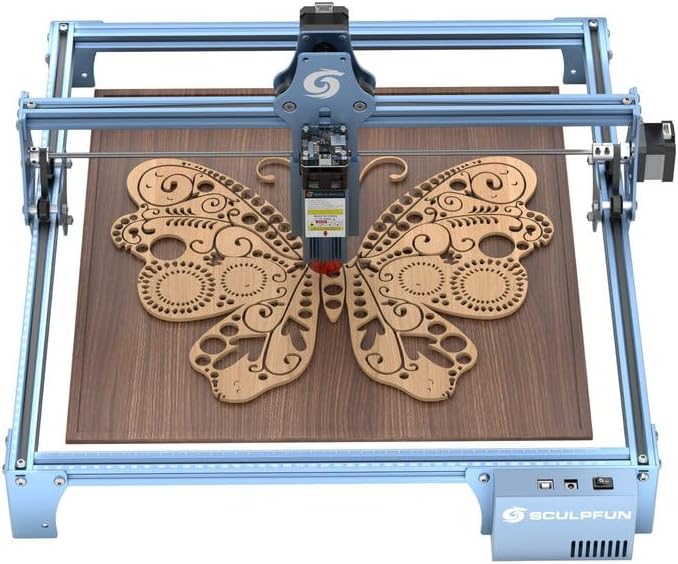
Image: The SCULPFUN S9 laser engraver in operation, showcasing a detailed butterfly design engraved on a wooden board.
Klíčové vlastnosti:
- Ultra-thin Laser Beam: Equipped with a 5.5W diode laser utilizing beam shaping technology, producing an ultra-fine 0.06mm laser focus for high precision.
- Řezná kapacita: Capable of cutting up to 15mm thick lightwood, 10mm black acrylic, and engraving on ceramics, stainless steel, and dark stone.
- Rychlé ostření: Features a fixed focus lens and sliding design for quick and easy focusing.
- Vysoká přesnost: X and Y-axis include precise scale lines for accurate measurement of engraving objects.
- Robustní konstrukce: All-metal structure design ensures stability, durability, and longevity.
- Velká gravírovací plocha: Offers a generous 410x420mm working area to accommodate various project sizes.

Image: An illustration detailing the laser beam shaping technology, emphasizing its precision and cutting power.
3. Nastavení a montáž
The SCULPFUN S9 laser engraver is designed for straightforward assembly. Typically, installation and setup can be completed within 10-20 minutes.
Montážní kroky:
- Vybalte všechny součásti a ověřte je podle dodacího listu.
- Follow the detailed pictorial instructions provided in the included User Manual (PDF) for step-by-step assembly.
- Ensure all screws and connections are securely fastened for stable operation.
- Place the assembled machine on a stable, level surface, preferably with the A4 steel pad underneath.
For a comprehensive guide, please refer to the official Uživatelská příručka (PDF).
4. Návod k obsluze
4.1 Kompatibilita softwaru
The S9 laser engraver is compatible with various engraving software and operating systems:
- Operační software: LaserGRBL, LightBurn, Benbox, GrblController, LiteFire
- Podporované systémy: Windows XP, 7, 8, 10, and MAC systems
- Podporováno File Formáty: NC, BMP, JPG, PNG, DXF, SVG, G-code, and other image formats.

Image: Demonstrates the broad software compatibility of the SCULPFUN S9, including LaserGRBL and LightBurn.
4.2 Kompatibilita materiálů
The SCULPFUN S9 can engrave and cut a wide range of materials:
- Materiály pro gravírování: Wood, paper, cardboard, plastic, leather, PCB board, aluminum oxide, 304 stainless steel, ceramic, dark stone.
- Řezné materiály: Wood (up to 15mm lightwood), acrylic (up to 10mm black acrylic), cardboard, fabric, bamboo, plastic board, KT board.

Image: Visual representation of the cutting capabilities on various materials, including wood, plywood, and acrylic, with thickness measurements.

Obrázek: Přamples of engraving and cutting on diverse materials such as wood, leather, acrylic, and cloth.
4.3 Focusing and Measurement
- Rychlé ostření: To achieve optimal focus, slide the laser module to the desired height and then tighten the screw. The fixed focus lens design simplifies this process.
- Precise Measurement: The X and Y-axes are equipped with precise scale lines, allowing for accurate positioning and measurement of your engraving or cutting objects.

Obrázek: Pohled shora dolů view illustrating the large 410x420mm working area of the engraver.
5. Údržba
Regular maintenance ensures the longevity and optimal performance of your SCULPFUN S9 laser engraver.
- Čištění: Periodically clean the laser lens and the machine's rails to prevent dust and debris buildup, which can affect performance. Use a soft, lint-free cloth.
- Mazání: Apply a small amount of appropriate lubricant to the moving parts and rails as needed to ensure smooth operation.
- Inspekce: Regularly inspect all cables, connections, and structural components for any signs of wear or damage. Tighten any loose screws.
- Skladování: Pokud gravírku nepoužíváte, skladujte ji v čistém a suchém prostředí mimo dosah přímého slunečního záření a extrémních teplot.
6. Řešení problémů
Tato část se zabývá běžnými problémy, které se vyskytují během provozu.
6.1 Software Connection Issues
Problém: The SCULPFUN S9 laser engraver cannot connect to LaserGRBL or LightBurn software.
Řešení: This issue is often caused by a missing driver. When connecting the machine to your computer for the first time, install and open your engraving software. Navigate to "Tools" (or a similar menu option) and select "Install CH340 Driver." After installation, restart your computer to establish the connection.
6.2 Engraving/Cutting Quality Issues
Problém: Engraving or cutting is not smooth or effective.
Řešení: Optimal engraving and cutting results depend on correct parameter settings for your specific material. If you encounter issues, consider the following:
- Ověřte, zda je laserové zaostření správně nastaveno pro tloušťku materiálu.
- Adjust power and speed settings in your software (LaserGRBL or LightBurn) according to the material type and thickness. Refer to the User Manual for recommended starting parameters.
- Ensure the material is flat and securely positioned on the work surface.
- Clean the laser lens for any obstructions.
If problems persist, document your software settings (screenshots), material type, and thickness, and contact customer support for further assistance.
7. Specifikace
| Specifikace | Detail |
|---|---|
| Číslo modelu | SCULPFUN S9 |
| Výstupní výkon laseru | 5000 mW (5.5 W) |
| Laserová třída | IV |
| Laserové ostření | 0.06 mm ultratenký |
| Oblast gravírování | Rozměr 410 mm x 420 mm |
| Hmotnost položky | 10.13 libry |
| Rozměry balení | 24 x 14 x 5.5 palce |
| Výrobce | SCULPFUN |
| Datum první dostupnosti | 29. října 2021 |
8. Záruka a podpora
For warranty information, please refer to the documentation included with your product or contact the seller directly. SCULPFUN is committed to providing support for its products.
Další zdroje:
- Certificate of Analysis (PDF)
- Bezpečnostní informace (PDF)
- Prohlášení o shodě (PDF)
- Uživatelská příručka (PDF)
For technical support or inquiries, please contact your retailer or the manufacturer directly. Provide your product model and purchase details for efficient service.