
Zavedení
Welcome to your DORTALA Ergonomic Sit Stand Desk. This manual provides essential information for the safe and efficient assembly, operation, and maintenance of your new desk. Please read all instructions carefully before assembly and use, and retain this manual for future reference.
This adjustable desk is designed to promote a healthier working posture by allowing seamless transitions between sitting and standing positions. Its mobile design offers flexibility for various environments.
Obsah balení
Before beginning assembly, ensure all parts listed below are present and undamaged. If any parts are missing or damaged, please contact DORTALA customer support.
- Desktop (1)
- Lifting Columns (2)
- Base Legs (2)
- Kolečka (4)
- Hardware Kit (Screws, Allen Wrench) (1)
- Uživatelský manuál (1)
Pokyny k instalaci a montáži
Follow these steps carefully to assemble your DORTALA Ergonomic Sit Stand Desk. It is recommended to assemble the desk on a soft, clean surface to prevent scratches.
-
Step 1: Attach Casters to Base Legs.
Insert the four casters into the designated holes at the ends of the two base legs. Ensure they are securely fitted. Two of the casters are lockable; position them on the same side for easier access.

Image: Detail of the lockable casters, highlighting their smooth and stable movement.
-
Step 2: Assemble the H-Shaped Base.
Connect the two base legs using the central support bar and the provided screws from the hardware kit. Tighten all screws firmly to create a stable H-shaped base.
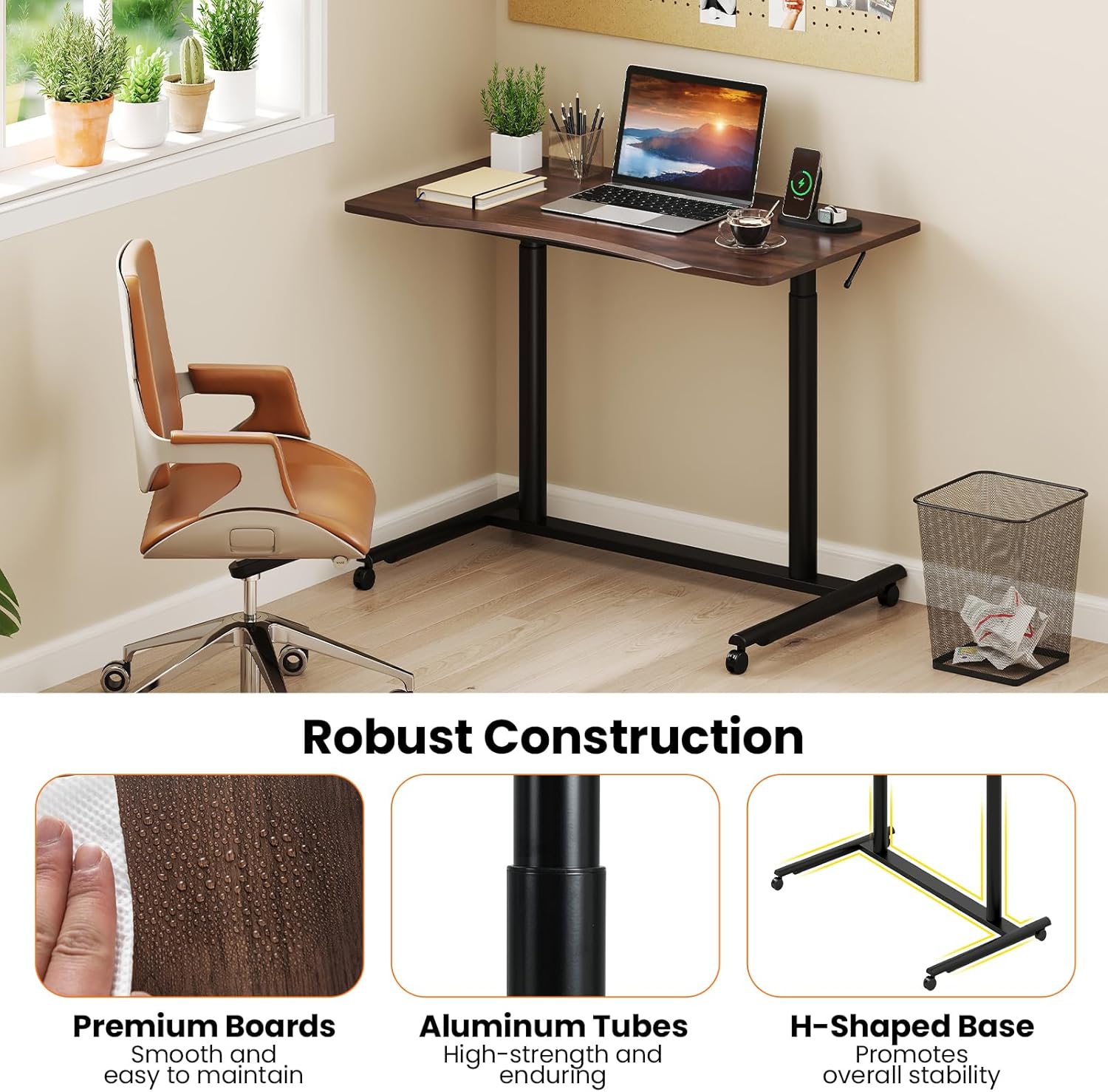
Image: Illustration of the desk's robust construction, including the H-shaped base.
-
Step 3: Attach Lifting Columns to the Base.
Secure the two lifting columns to the assembled H-shaped base using the appropriate screws. Ensure the columns are oriented correctly for the desktop attachment in the next step.
-
Step 4: Attach the Desktop.
Carefully place the desktop onto the top of the lifting columns. Align the pre-drilled holes on the desktop with the holes on the lifting columns. Secure the desktop using the remaining screws. Ensure all connections are tight and stable.

Image: The spacious and ergonomic desktop, featuring rounded corners for comfort.
-
Krok 5: Závěrečná kontrola.
Verify that all screws are tightened and the desk is stable. Test the height adjustment mechanism before placing any heavy items on the desk.
Návod k obsluze
Nastavení výšky
The DORTALA Ergonomic Sit Stand Desk features a gas spring mechanism for smooth and quiet height adjustment. To adjust the desk height:
- Locate the adjustment handle(s) on the underside of the desktop.
- Gently pull the handle(s) upwards.
- While holding the handle(s), apply slight pressure downwards to lower the desk, or allow the gas spring to lift the desk upwards to your desired height.
- Release the handle(s) to lock the desk in position. Ensure it is securely locked before use.

Image: The desk demonstrating its adjustable height range from 27.5 inches to 42 inches, with visible adjustment handles.
Mobilita a aretační kolečka
Your desk is equipped with four universal casters for easy movement. Two of these casters are lockable to secure the desk in place.
- Přesunout: Ensure both lockable casters are in the unlocked position. Gently push the desk to your desired location.
- Zamknout: Once the desk is in position, press down on the lever of each lockable caster until it clicks into place. This will prevent the desk from rolling.
- Odemknutí: Lift the lever on each lockable caster until it clicks into the unlocked position.
Image: Detail of the lockable casters, showing the 360-degree movement and locking mechanism.
Údržba
Čištění
The desk's smooth tabletop is designed for easy cleaning. Use a soft, damp cloth to wipe down the surface. For stubborn marks, a mild soap solution can be used, followed by wiping with a clean, dry cloth. Avoid abrasive cleaners or harsh chemicals that may damage the finish.
Obecná péče
- Pravidelně kontrolujte všechny šrouby a spoje, zda jsou pevně utažené. V případě potřeby je dotáhněte.
- Nepokládejte extrémně horké nebo studené předměty přímo na pracovní plochu bez ochranných podložek.
- Do not overload the desk beyond its maximum weight capacity.
Odstraňování problémů
-
Issue: Desk is wobbly.
Řešení: Check all assembly screws, especially those connecting the desktop to the lifting columns and the lifting columns to the base. Ensure they are fully tightened. Also, verify that the casters are securely installed.
-
Issue: Height adjustment is not smooth or desk does not stay at desired height.
Řešení: Ensure the adjustment handle(s) are fully engaged when attempting to adjust and fully released to lock. If the issue persists, the gas spring may require inspection. Contact customer support.
-
Issue: Casters are not rolling smoothly or not locking.
Řešení: Check casters for any debris or obstructions. Ensure the locking mechanism is fully engaged or disengaged. If a caster is damaged, it may need replacement.
Specifikace
| Atribut | Detail |
|---|---|
| Značka | DORTALA |
| Číslo modelu | DO-HW65631BN-CA |
| Rozměry produktu (D x Š x V) | 37.5'' x 20.5'' x 27.5'' - 42'' |
| Nastavitelný rozsah výšky | 27.5 palců až 42 palců |
| Maximální nosnost | 200 liber |
| Materiál | MDF, PVC, Steel |
| Barva | Hnědý |
| Montáž Vyžadována | Ano |

Image: Visual representation of the desk's dimensions and maximum load capacity.
Záruka a podpora
Informace o záruce
This DORTALA Ergonomic Sit Stand Desk comes with a Omezená záruka. Please refer to the warranty card included in your package or contact DORTALA customer service for specific terms and conditions.
Zákaznická podpora
For any questions, assistance with assembly, troubleshooting, or warranty claims, please contact DORTALA customer support. You can typically find contact information on the DORTALA webna místě nebo na obalových materiálech.
Manufacturer: DORTALA