
1. Úvod
The RODOT Universal WiFi Ceiling Fan Light Remote Control Kit is designed to upgrade your traditional ceiling fan and light into a smart, controllable device. This kit allows for convenient control via a handheld remote, a mobile application, and voice commands through smart home assistants like Amazon Alexa and Google Home.
It is compatible with most three-speed motor ceiling fans and lights, offering enhanced functionality including fan speed control, light on/off, and timing features.

Obrázek: Overview of the RODOT Universal WiFi Ceiling Fan Light Remote Control Kit, showing the remote, receiver, and a smartphone displaying the control app, alongside a ceiling fan.
2. Obsah balení
- 1 x dálkový ovladač
- 1 x Přijímací jednotka
- Wire Nuts (for installation)
- Návod k použití

Image: Detailed dimensions of the remote control (1.96 x 5.15 x 0.78 inches) and the receiver unit (2.12 x 4.56 x 1.1 inches).
3. Specifikace
| Funkce | Detail |
|---|---|
| Číslo modelu | RODOT Alpha |
| Rozměry přijímače | 4.56 x 2.13 x 1.1 palce |
| Hmotnost položky | 7.8 unce |
| Vzdálená frekvence | 433 MHz |
| Provozní frekvence | 50-60Hz |
| Otáčky ventilátoru | 3 Levels (1/2/3) |
| Nastavení časování | 1H/2H/4H/8H |
| Vzdálená baterie | 2 x AAA baterie (nejsou součástí balení) |
| Konektivita | Wi-Fi (2.4Ghz only), RF |
| Kompatibilita hlasového ovládání | Amazon Alexa, Google Assistant, IFTTT |
| Podpora aplikací | Smart Life App (iOS & Android) |
4. Bezpečnostní informace
- Před instalací nebo údržbou vždy vypněte napájení jističem.
- Ujistěte se, že všechny kabelové spoje jsou bezpečné a řádně izolované.
- Nepřekračujte maximální elektrické jmenovité hodnoty zařízení.
- Pokud si nejste jisti některou částí instalace, poraďte se s kvalifikovaným elektrikářem.
- Keep the remote control and receiver away from water and excessive heat.
5. Instalace
This kit is designed to replace the traditional driver of your non-smart LED ceiling fan. The receiver unit must be installed within the canopy of the ceiling fan.
5.1 Schéma zapojení

Image: Wiring diagram showing connections from main power to the receiver (White: AC Neutral Line, Black: AC Live Line) and from the receiver to the fan (Black: Live Line to FAN, Blue: Live Line to LIGHT).
5.2 Postup instalace
- Odpojit napájení: Before starting, ensure the power to the ceiling fan is turned off at the main circuit breaker.
- Přístupové zapojení: Remove the canopy cover of your ceiling fan to expose the wiring.
- Připojení přijímače: Follow the wiring diagram carefully. Connect the receiver's wires to the corresponding fan and power supply wires using the provided wire nuts. Ensure secure connections.
- Přijímač pozice: Carefully tuck the receiver unit into the fan canopy. Ensure it fits without pinching wires.
- Bezpečná stříška: Reattach the canopy cover to the ceiling fan.
- Obnovit napájení: Znovu zapněte napájení na jističi.
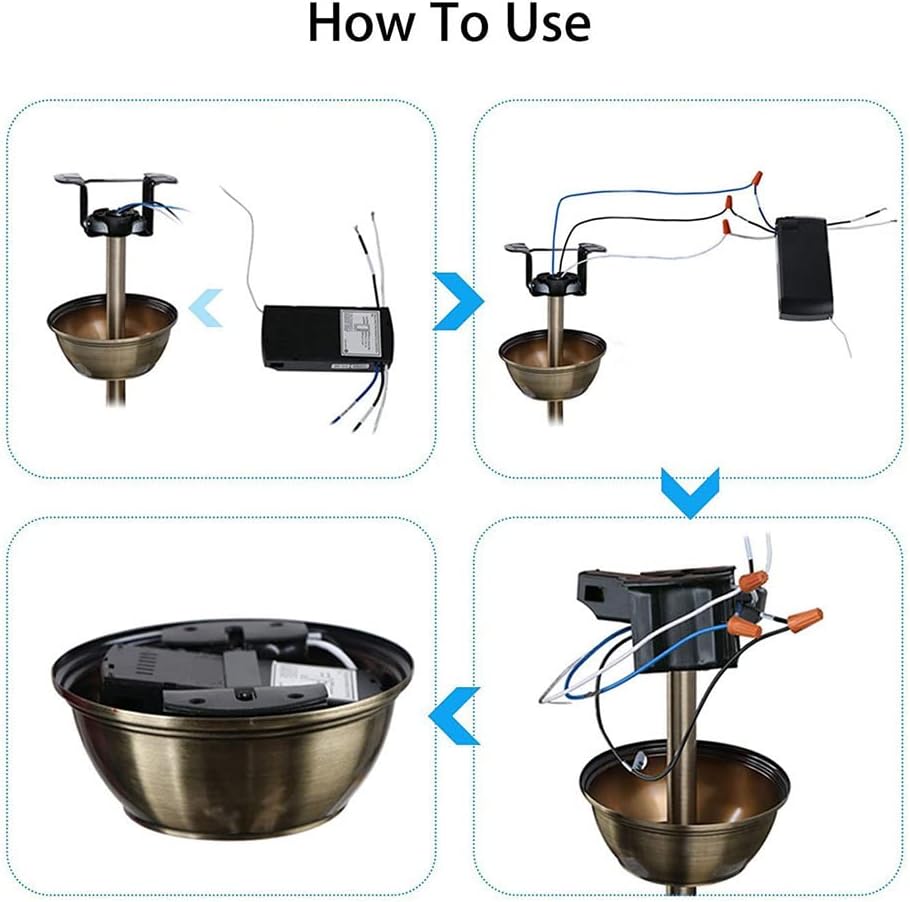
Image: Visual guide illustrating the installation process: 1) Opening the fan canopy, 2) Connecting the receiver, 3) Placing the receiver inside, and 4) Closing the canopy.
Video: A tutorial demonstrating the physical installation and basic use of the fan light remote control kit, including wiring and initial testing.
6. Nastavení a párování
6.1 Párování dálkového ovládání
- Ujistěte se, že je přijímač zapnutý.
- Within 5 seconds of power-on, press and hold the 'LIGHT' + 'HI' buttons on the remote control until you hear a beep. This indicates successful pairing.
6.2 Nastavení aplikace Smart Life
- Stáhnout aplikaci: Download and open the 'Smart Life' mobile application from your device's app store.
- Registrace/Přihlášení: Zaregistrujte si nový účet nebo se přihlaste k existujícímu.
- Přidat zařízení: Tap 'Add Device' or the '+' icon in the app. Select 'Fan' or 'Ceiling Fan Light' from the electrical category.
- Připojení k 2.4GHz Wi-Fi: Ensure your mobile phone is connected to a 2.4GHz Wi-Fi network. The device does not support 5GHz or 5.8GHz networks. Enter your Wi-Fi network name and password in the app.
- Reset Device for Pairing: Turn on the power to the fan light receiver. After 10 seconds, press and hold the 'LIGHT' and 'HI' buttons on the remote control simultaneously until you hear 3 LONG 'BE-EP' sounds from the receiver. If you hear 3 SHORT 'BEEP' sounds, release and press again until you hear the long beeps.
- Confirm Indicator Blinking: In the app, confirm that the indicator on the receiver is blinking rapidly.
- Zahájit připojení: Tap 'Next' in the app to begin the connection process. The app will scan for and add the device.
- Přidané zařízení: Po úspěšném přidání můžete zařízení v aplikaci přejmenovat.

Image: Smart Life App interface showing initial steps for adding a device, including Wi-Fi settings and device selection.

Image: Smart Life App interface for entering 2.4GHz Wi-Fi network name and password, with a note about 5GHz incompatibility.

Image: Smart Life App interface showing the device reset prompt, device adding progress, and successful device addition.
Video: A detailed demonstration of setting up the WiFi Fan Light Remote Control Kit with the Smart Life App, including Wi-Fi connection and device pairing.
7. Návod k obsluze
7.1 Handheld Remote Control

Image: Diagram of the remote control with labels for Fan Speed (LOW, MED, HI), Light On/Off, Fan Off (STOP), and Timing Off (1H, 2H, 4H, 8H).
- Světlo zapnuto/vypnuto: Press the 'LIGHT ON/OFF' button to toggle the light.
- Rychlost ventilátoru: Use 'LOW', 'MED', 'HI' buttons to adjust fan speed.
- Vypnutí ventilátoru: Press 'STOP' to turn off the fan.
- Čas vypnutí: Select 1H, 2H, 4H, or 8H to set a timer for the fan to turn off automatically.
7.2 Ovládání pomocí aplikace Smart Life
Once the device is added to the Smart Life App, you can control it from your smartphone.
- Ovládání světla: Tap the light icon to turn the light on or off.
- Ovládání rychlosti ventilátoru: Adjust the slider or select predefined levels (e.g., Level 1, 2, 3) to change fan speed.
- Časový harmonogram/Plánování: Use the app's scheduling features to set specific times for the fan or light to turn on/off, or to activate the countdown timer.
- Funkce ztlumení: The 'Smart Life' APP can be used to implement the mute function for the device.
7.3 Hlasové ovládání (Alexa/Google Home)
After linking your Smart Life account with Amazon Alexa or Google Home, you can use voice commands.
- Povolit dovednost: In the Alexa or Google Home app, search for and enable the 'Smart Life' skill.
- Propojit účet: Link your Smart Life account using your credentials.
- Objevte zařízení: Discover new devices in the smart home app.
- Běžné příkazy:
- „Alexo, rozsviť světlo v ložnici.“
- „Hej Google, vypni ventilátor.“
- „Alexo, nastav rychlost ventilátoru na střední.“
8. Řešení problémů
- Dálkové ovládání nereaguje: Check battery in remote. Ensure receiver is powered. Re-pair the remote control (see Section 6.1).
- Problémy s připojením Wi-Fi: Ensure your Wi-Fi network is 2.4GHz. Check Wi-Fi signal strength near the receiver. Re-attempt app pairing process.
- Hlasové ovládání nefunguje: Verify Smart Life skill is enabled and linked in Alexa/Google Home app. Ensure device name is easily recognizable. Check internet connection.
- Fan/Light not working after installation: Double-check all wiring connections according to the diagram. Ensure power is restored at the circuit breaker.
- Receiver size: Note that the receiver size is 4.56 x 2.13 x 1.1 inches. Ensure your fan canopy has sufficient space.
9. Údržba
The RODOT Ceiling Fan Light Remote Control Kit requires minimal maintenance.
- Periodically check the remote control batteries and replace them when needed.
- Keep the remote control clean and free from dust.
- Ensure the receiver unit remains dry and free from moisture.
10. Záruka a podpora
RODOT offers a 12-month warranty for hardware-related issues. For any problems encountered during product use, please contact customer support. Support is available 24/7 via email.
Pro další pomoc prosím navštivte RODOT Store on Amazon.