
1. Bezpečnostní pokyny
Před použitím výrobku si pečlivě přečtěte tyto bezpečnostní pokyny. Uschovejte si tento návod pro budoucí použití.
- Tento výrobek je určen pouze pro použití v interiéru. Nevystavujte vlhkost ani extrémním teplotám.
- Nepokoušejte se zařízení otevírat ani upravovat. Mohlo by dojít ke zrušení záruky a k ohrožení bezpečnosti.
- Udržujte zařízení mimo dosah dětí.
- Use only the provided micro-USB cable for charging.
- Nedívejte se přímo do zdroje světla LED.
2. Obsah balení
Ujistěte se, že v balení jsou přítomny všechny položky:
- ANSMANN Under-Cabinet Light M
- Micro-USB nabíjecí kabel
- Návod k použití
3. Konec produktuview
The ANSMANN Under-Cabinet Light M is a versatile, rechargeable LED lamp designed for various indoor applications. It features a motion sensor, adjustable color temperatures, and a slim design for discreet placement.

Image 1: The ANSMANN Under-Cabinet Light M, showcasing its sleek, white design and integrated motion sensor.
Klíčové vlastnosti:
- PIR Motion Sensor: Automatically activates the light when motion is detected in low-light conditions.
- Twilight Sensor: Ensures the light only activates in dark environments, conserving battery life.
- Nastavitelná teplota barev: Choose between 3 color temperatures (cool white, neutral white, warm white) or activate all LEDs for maximum brightness.
- Plynulé stmívání: Adjust brightness by holding down the control button.
- Dobíjecí baterie: Integrated battery for cordless operation, charged via micro-USB.
- Magnetická montáž: Easy installation and removal with a magnetic strip.

Image 2: Diagram illustrating the Micro-USB Port, On/Off button, and PIR motion sensor on the device.
4. Nastavení a instalace
The Under-Cabinet Light M offers flexible installation options using its integrated magnetic strip.
Magnetická montáž:
- Identify a suitable, clean, and dry surface for installation (e.g., inside a cabinet, under a shelf).
- The light comes with a fixed magnetic strip on its back. For non-metallic surfaces, use the included adhesive strip.
- Peel off the protective film from the adhesive strip and firmly press it onto the desired surface.
- Attach the Under-Cabinet Light M to the adhesive strip. The magnetic connection will hold it in place.
Obrázek 3: Detail view of the magnetic strip and the removable adhesive strip, demonstrating the mounting mechanism.

Obrázek 4: Příkladample of the under-cabinet light installed in a modern kitchen setting, providing illumination over a countertop.
5. Provoz
The Under-Cabinet Light M offers intuitive control for its lighting functions.
Zapnutí/vypnutí:
- Locate the On/Off button (refer to Image 2).
- Press the button once to turn the light on or off.
Úprava teploty barev:
- With the light on, short press the control button repeatedly to cycle through the 3 available color temperatures: cool white, neutral white, and warm white.
- A fourth press will activate all LEDs for maximum brightness.
Funkce stmívání:
- To adjust the brightness, press and hold the control button. The light will gradually dim or brighten. Release the button when the desired brightness level is reached.
Motion and Twilight Sensor:
- When the light is in motion sensor mode, it will automatically turn on when movement is detected within its range.
- The integrated twilight sensor ensures that the motion sensor only activates the light in dark environments, preventing unnecessary illumination during daylight hours.
6. Nabíjení
The Under-Cabinet Light M is equipped with a rechargeable battery for convenient cordless use.
- When the battery is low, the light output may decrease or the light may not turn on.
- Gently detach the light from its magnetic mounting surface.
- Connect the provided micro-USB cable to the micro-USB port on the light (refer to Image 2).
- Connect the other end of the micro-USB cable to a suitable USB power source (e.g., USB wall adapter, computer USB port).
- An indicator light will show the charging status (e.g., red for charging, green for fully charged).
- Once fully charged, disconnect the cable and reattach the light to its mounting surface.

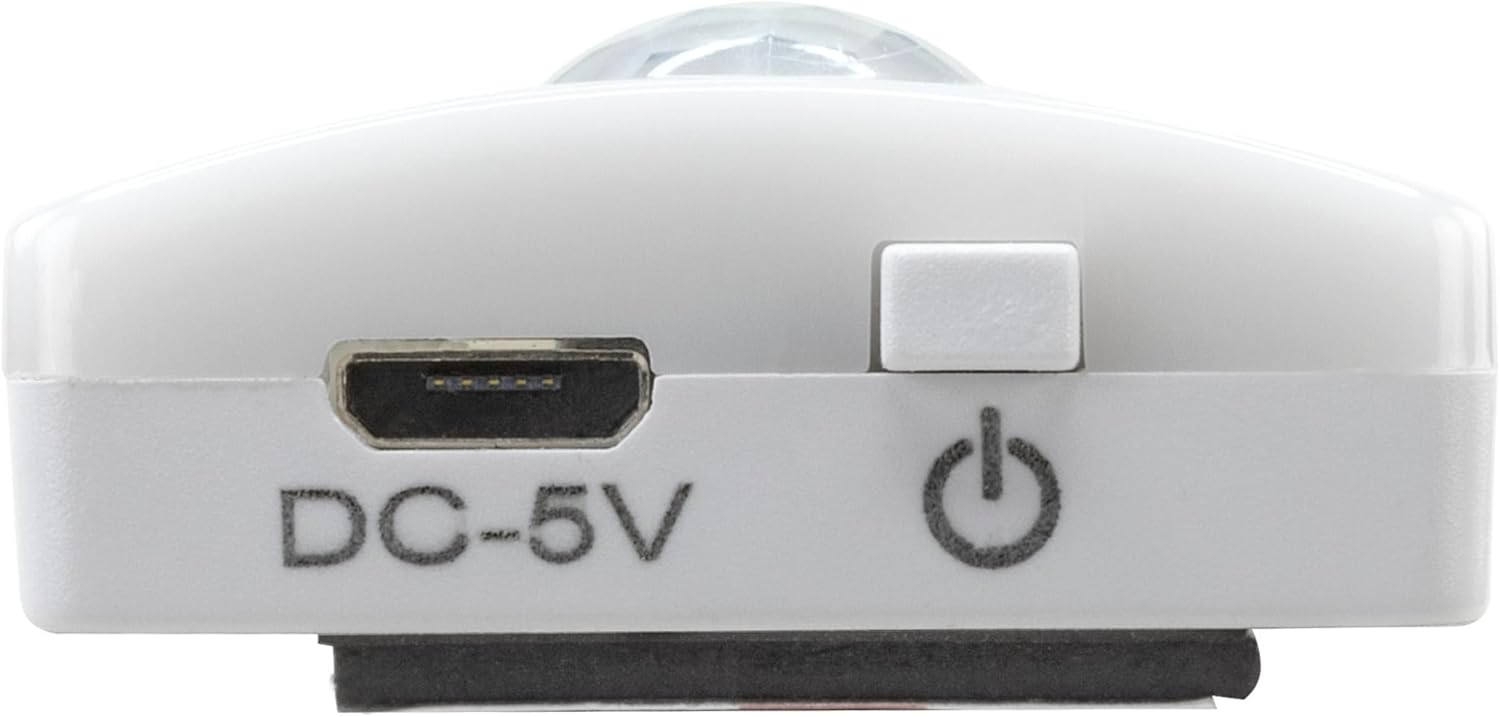
Obrázek 5: Detailní view of the Micro-USB charging port and the On/Off button, essential for charging and operation.
7. Údržba
To ensure the longevity and optimal performance of your Under-Cabinet Light M, follow these simple maintenance guidelines:
- Světlo pravidelně čistěte měkkým, suchým hadříkem. Nepoužívejte abrazivní čisticí prostředky ani rozpouštědla.
- Ensure the motion sensor lens is kept clean and free from obstructions for proper function.
- Store the light in a cool, dry place if not in use for extended periods.
8. Řešení problémů
If you encounter issues with your Under-Cabinet Light M, refer to the following common problems and solutions:
| Problém | Možná příčina | Řešení |
|---|---|---|
| Světlo se nerozsvítí. | Baterie je vybitá. | Charge the light using the micro-USB cable. |
| Pohybový senzor nedetekuje pohyb. | Ensure the sensor is clean and unobstructed. Check if the environment is dark enough for the twilight sensor to activate. | |
| Světlo se nenabíjí. | Vadný kabel nebo zdroj napájení. | Try a different micro-USB cable or USB power adapter. |
| Nabíjecí port je znečištěný. | Gently clean the micro-USB port with a dry, soft brush. | |
| Světlo bliká nebo je tlumené. | Slabá baterie. | Nabijte zařízení. |
Pokud problém přetrvává i po vyzkoušení těchto řešení, kontaktujte zákaznickou podporu.
9. Specifikace
| Funkce | Detail |
|---|---|
| Číslo modelu | 1600-0438 |
| Rozměry produktu | 25D x 3.5Š x 1.3V cm (9.84D x 1.38Š x 0.51V palce) |
| Hmotnost položky | 112 gramů (0.25 lb) |
| Zdroj napájení | Napájení z baterie |
| Nabíjecí port | Micro-USB (DC-5V) |
| Materiál | Plast |
| Barva | Bílý |
| Typ instalace | Nástěnný držák (magnetický) |
| Typ pokoje | Dining Room, Kitchen, Wardrobe, Hallway, etc. |
10. Záruka a podpora
ANSMANN products are manufactured with high-quality standards. For information regarding warranty terms and conditions, please refer to the documentation provided with your purchase or visit the official ANSMANN webmísto.
For technical support or inquiries, please contact ANSMANN customer service through their official channels.