
Zavedení
The New Bee M50 Bluetooth Headset is designed for clear communication and comfortable wear throughout your day. Featuring advanced Dual Mic Noise Cancelling technology and Bluetooth 5.2 connectivity, it ensures stable signal transmission and superior audio quality. This manual provides detailed instructions for setting up, operating, and maintaining your headset.
Obsah balení
Zaškrtněte prosím políčko u následujících položek:
- Nový Bluetooth headset Bee M50
- USB nabíjecí kabel
- 3 x Optional Eartips (Small, Medium, Large)
- Přenosné pouzdro
- Uživatelská příručka

Image: New Bee M50 Bluetooth Headset with its accessories, including the charging cable, various eartips, and a protective carry case.
Konec produktuview
Familiarize yourself with the buttons and components of your New Bee M50 headset.

Image: A detailed diagram highlighting the control buttons on the New Bee M50 Bluetooth Headset, including volume, multi-function, and mute buttons.
- Multifunkční tlačítko: For Music Play/Pause, Answer/Hang up calls.
- Volume Up (+)/Next Track Button: Zvýšení hlasitosti, přechod na další skladbu.
- Volume Down (-)/Previous Track Button: Snížení hlasitosti, přechod na předchozí skladbu.
- Tlačítko ztlumení: Mute/unmute microphone during calls.
- Mikrofon: Flexible arm for optimal voice capture.
- Háček na ucho: Rotatable for left or right ear wearing.
Nastavení
1. Nabíjení náhlavní soupravy
Before first use, fully charge your headset. Connect the provided USB charging cable to the headset's charging port and to a USB power source (e.g., computer, wall adapter).
- Doba nabíjení: Přibližně 2-3 hodiny.
- The indicator light will change to show charging status (refer to product for specific light indicators).
2. Zapnutí/vypnutí
- Zapnutí: Press and hold the Multi-function Button until the indicator light flashes (e.g., blue).
- Vypnout: Press and hold the Multi-function Button until the indicator light turns off (e.g., red).
3. Párování Bluetooth
Připojení náhlavní soupravy k zařízení:
- Zkontrolujte, zda je náhlavní souprava vypnutá.
- Press and hold the Multi-function Button for approximately 5-7 seconds until the indicator light flashes red and blue alternately, indicating pairing mode.
- Na svém zařízení (chytrý telefon, tablet, notebook) povolte Bluetooth a vyhledejte dostupná zařízení.
- Select "New Bee M50" from the list of devices.
- Once connected, the indicator light on the headset will typically flash blue slowly.
The headset supports pairing with two Bluetooth devices simultaneously. After connecting the first device, disable its Bluetooth, pair the second device, then re-enable Bluetooth on the first device to connect both.

Image: The New Bee M50 Bluetooth Headset demonstrating its compatibility with various devices such as music players, Android phones, iPhones, iPads, laptops, and desktop computers, highlighting Bluetooth 5.2 technology.
Návod k obsluze
Funkce volání
- Přijmout/ukončit hovor: Stiskněte jednou multifunkční tlačítko.
- Odmítnout hovor: Stiskněte a podržte multifunkční tlačítko po dobu 2 sekund.
- Znovu vytočit poslední číslo: Dvakrát stiskněte multifunkční tlačítko.
- Ztlumit/Zapnout: During a call, press the Mute Button once. Note: Mute function is only supported on mobile phones.

Image: A visual representation of the mute function on the New Bee M50 headset, indicating how to protect privacy during calls.
Ovládání hudby
- Přehrát/pozastavit: Stiskněte jednou multifunkční tlačítko.
- Další skladba: Press the Volume Up (+) button once.
- Předchozí skladba: Press the Volume Down (-) button once.
- Nastavení hlasitosti: Press and hold the Volume Up (+) or Volume Down (-) buttons.
Hlasový asistent
To activate your device's voice assistant (e.g., Siri), press the Mute Button for 2 seconds. This feature enhances safety, especially while driving.
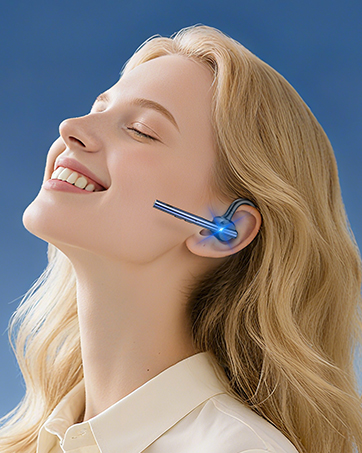
Image: A user activating the Siri voice assistant using the New Bee M50 headset, emphasizing hands-free operation for driving safety.
Nošení náhlavní soupravy
The New Bee M50 headset is designed for comfort and versatility.
- The ear hook is rotatable by 180 degrees, allowing you to wear the headset on either your left or right ear.
- The microphone arm is flexible and can be rotated 270 degrees to position it optimally for voice capture.
- Choose from the three provided eartip sizes to find the most secure and comfortable fit for your ear.
- Weighing only 16g, the headset is lightweight for extended wear.

Image: A diagram illustrating the 270-degree rotatable microphone and 180-degree rotatable ear hook of the New Bee M50 headset, demonstrating its adaptable design for comfortable wearing on either ear.

Image: A visual guide demonstrating the correct way to wear the New Bee M50 headset for optimal sound and microphone performance, contrasting with incorrect positions.
Údržba
To ensure the longevity and optimal performance of your New Bee M50 Bluetooth Headset, follow these maintenance guidelines:
- Čištění: K čištění sluchátek s mikrofonem používejte měkký, suchý hadřík. Nepoužívejte agresivní chemikálie ani abrazivní materiály.
- Skladování: When not in use, store the headset in its portable carry case to protect it from dust, moisture, and physical damage.
- Vyhněte se extrémním podmínkám: Do not expose the headset to extreme temperatures, direct sunlight, or high humidity.
- Nabíjení: Používejte pouze dodaný nabíjecí kabel nebo jeho ekvivalent. Zabraňte přebíjení baterie.
- Voděodolnost: The headset is not water resistant. Avoid contact with liquids.
Odstraňování problémů
Pokud narazíte na problémy s náhlavní soupravou, podívejte se na následující běžná řešení:
| Problém | Možné řešení |
|---|---|
| Sluchátka se nezapnou | Ensure the headset is fully charged. Press and hold the Multi-function Button for a longer duration (5 seconds). |
| Nelze spárovat se zařízením | Make sure the headset is in pairing mode (flashing red and blue). Turn off Bluetooth on other nearby devices. Restart your device and the headset. Ensure the headset is within 49 feet of your device. |
| Žádný zvuk nebo nízká hlasitost | Check the volume levels on both the headset and your connected device. Ensure the headset is properly connected. Try re-pairing the headset. |
| Mikrofon nefunguje | Ensure the microphone is not muted. Check microphone settings on your connected device. Adjust the microphone arm for optimal positioning. |
| Přerušované připojení | Move closer to your connected device. Avoid obstacles between the headset and device. Ensure no other devices are causing interference. |
Specifikace
| Funkce | Detail |
|---|---|
| Název modelu | M50 |
| Technologie připojení | Bezdrátové připojení (Bluetooth 5.2) |
| Dosah Bluetooth | Až 49 stop (15 metrů) |
| Kontrola hluku | Active Noise Cancellation (Dual Mic DSP) |
| Doba hovoru | Až 24 hodin |
| Doba přehrávání hudby | Až 20 hodin |
| Pohotovostní doba | Až 1440 hodin |
| Doba nabíjení | 2-3 hodin |
| Hmotnost položky | 16 gramů (0.564 unce) |
| Tvar sluchátka | In Ear, Ear Hook |
| Materiál | Silikon |
| Kompatibilní zařízení | Smartphones, Tablets, Laptops (iOS and Android systems) |
Záruka a podpora
New Bee provides a 3-letá záruka for the M50 Bluetooth Headset, ensuring peace of mind regarding product quality and performance.
If you encounter any problems or have suggestions, please contact our customer service team. Our professional technical team is available 24 hours to assist you.

Image: Icons representing the 3-year warranty and 30-day free returns policy for New Bee products.
Video o produktu
Video: Official product video demonstrating the features and usage of the New Bee M50 Bluetooth Headset.