
1. Úvod
This manual provides essential information for the proper use and care of your Rollei Actioncam 7S Plus. Please read it thoroughly before operating the device to ensure optimal performance and longevity. The Rollei Actioncam 7S Plus is a versatile 4K action camera designed for capturing high-quality video and photos in various environments, including underwater, thanks to its robust waterproof housing.

Figure 1.1: Rollei Actioncam 7S Plus. This image shows the front view of the camera, highlighting its compact design and lens.
2. Obsah balení
Ověřte, zda jsou všechny níže uvedené položky součástí balení. Pokud některé položky chybí nebo jsou poškozené, kontaktujte zákaznickou podporu.
- Rollei Actioncam 7S Plus Camera
- Podvodní bydlení
- Dálkové ovládání
- Replaceable Lithium-Ion Battery (850 mAh)
- Montážní rám
- Tripod Thread Adapter
- Držák na kolo
- Helma Mount
- Pásky na suchý zip
- Samolepky
- Stahovací pásky
- USB kabel
- Objektiv čistící hadřík

Figure 2.1: Included accessories for the Rollei Actioncam 7S Plus. This image displays the camera along with various mounts, straps, cables, and the remote control.
3. Nastavení
3.1. Instalace a nabíjení baterie
- Otevřete kryt přihrádky na baterie na spodní straně fotoaparátu.
- Insert the provided 850 mAh Lithium-Ion battery, ensuring the contacts align correctly.
- Bezpečně zavřete kryt bateriového prostoru.
- Connect the camera to a USB power source using the supplied USB cable to charge the battery. The charging indicator light will illuminate.
- Plné nabití obvykle trvá přibližně 2–3 hodiny.
3.2. Instalace karty MicroSD
The camera requires a MicroSD card (Class 10 or U3 recommended) for storing recordings.
- Vyhledejte slot pro kartu MicroSD na boku fotoaparátu.
- Insert the MicroSD card with the gold contacts facing the front of the camera until it clicks into place.
- Chcete-li kartu vyjmout, jemně ji zatlačte, dokud nevyskočí.
3.3. Zapnutí/vypnutí
- Zapnutí: Stiskněte a několik sekund podržte tlačítko Napájení/Režim.
- Vypnutí: Znovu stiskněte a podržte tlačítko Napájení/Režim, dokud se fotoaparát nevypne.
3.4. Počáteční nastavení
Upon first use, or after a factory reset, you may need to set the language, date, and time via the touchscreen menu.
4. Ovládání fotoaparátu
4.1. Fotoaparát skončilview a ovládací prvky

Obrázek 4.1: Zadní view of the Rollei Actioncam 7S Plus in its waterproof housing, showing the 2-inch touchscreen display.
The Rollei Actioncam 7S Plus features a 2-inch touchscreen for intuitive navigation and settings adjustment. Physical buttons are typically for power/mode and shutter/OK functions.
4.2. Nahrávání videa
The camera supports various video resolutions and frame rates:
- 4K při 30 snímcích za sekundu (fps)
- Full HD (1080p) at 120 fps for smooth slow-motion playback
- Other resolutions and frame rates available via settings.
Available video modes include: Normal, Time-Lapse, Idle, and Loop Recording.
4.3. Fotografování
Capture high-resolution still images up to 16 Megapixels (4608 x 3456 pixels).
Photo modes include: Single Shot, Burst, Delay, Time-Lapse, and Long Exposure.
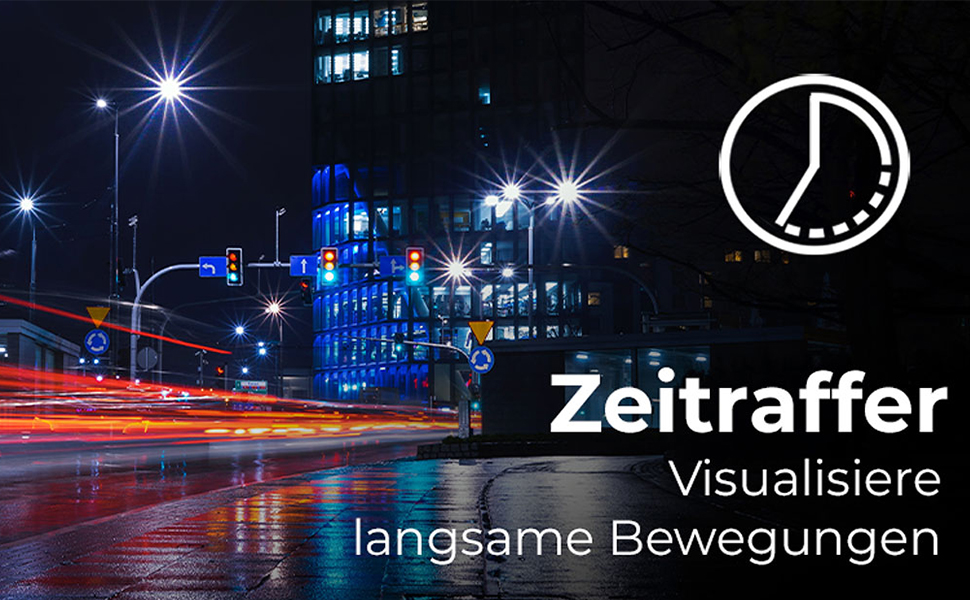
Figure 4.2: Illustration of the Time-Lapse feature. This image depicts a city night scene with light trails, demonstrating the camera's ability to capture time-lapse videos.

Figure 4.3: Illustration of the Slow Motion feature. This image shows colorful powder being thrown, emphasizing the camera's capability to capture detailed slow-motion footage.
4.4. Elektronická stabilizace obrazu (EIS)
The camera features electronic image stabilization to reduce blur and shake in your recordings, especially during active use.
4.5. Připojení k Wi-Fi a WebFunkce vačky
Connect your Actioncam to a smartphone or tablet via Wi-Fi using the dedicated app for remote control and file transfer. The camera also supports a webcam function for live streaming or video calls when connected to a computer.
4.6. Použití pod vodou
The included waterproof housing allows the Actioncam 7S Plus to be used at depths of up to 30 meters (approximately 98 feet).

Figure 4.4: The camera in its waterproof housing being used underwater. This image shows a diver interacting with a shark, demonstrating the camera's waterproof capability up to 30m.
4.7. Dálkové ovládání
Use the included remote control to start/stop recording or take photos from a distance, enhancing convenience during various activities.
5. Údržba
5.1. Čištění fotoaparátu a objektivu
- Use the provided lens cleaning cloth to gently wipe the lens and display.
- For the camera body, use a soft, dry cloth. Do not use chemical cleaners.
- Ensure the waterproof housing is clean and free of debris before each underwater use to maintain its seal. Rinse with fresh water after saltwater exposure.
5.2. Péče o baterie
- Baterie skladujte na chladném a suchém místě.
- Vyhněte se delšímu úplnému vybíjení baterie.
- Pokud baterii skladujete delší dobu, nabijte ji každé několik měsíců přibližně na 50 %.
5.3. Skladování
When not in use, store the camera and accessories in a protective case in a dry environment, away from direct sunlight and extreme temperatures.
6. Řešení problémů
| Problém | Možná příčina | Řešení |
|---|---|---|
| Fotoaparát se nezapne. | Baterie je vybitá nebo není správně vložena. | Plně nabijte baterii. Ujistěte se, že je baterie vložena se správnou polaritou. |
| Nelze nahrávat video/fotit. | MicroSD card is full, corrupted, or not inserted. | Insert a MicroSD card. Format the card (this will erase all data). Replace the card if corrupted. |
| Špatná kvalita videa/fotek. | Lens is dirty, insufficient lighting, incorrect settings. | Vyčistěte objektiv. Zajistěte dostatečné osvětlení. Upravte rozlišení a expozici. |
| Problémy s připojením k Wi-Fi. | Nesprávné nastavení Wi-Fi, problémy s aplikací, vzdálenost od zařízení. | Ensure Wi-Fi is enabled on camera and device. Reinstall the app. Reduce distance between camera and device. |
| Fotoaparát se zasekne nebo přestane reagovat. | Softwarová závada. | Press and hold the Power button for 10 seconds to force a shutdown. Restart the camera. |
7. Specifikace
| Funkce | Detail |
|---|---|
| Značka | Rollei |
| Název modelu | Actioncam 7S Plus |
| technologie Sensor | CMOS |
| Rozlišení videa | 4K (3840x2160) at 30fps, Full HD (1080p) at 120fps |
| Rozlišení fotografie | 16 MP (4608 x 3456) |
| Max. Clona | F 2.8 |
| Typ objektivu | Wide Angle (120 degrees) |
| Typ paměti Flash | Micro SD (Class 10, U3 recommended) |
| Formát videa | MP4 |
| Formát zvuku | AAC |
| Velikost obrazovky | 2 palce (dotyková obrazovka) |
| Konektivita | USB, Wi-Fi (802.11b/g) |
| Speciální funkce | Touchscreen, Time-Lapse, Slow Motion, Remote Control, WebFunkce vačky |
| Vodotěsná úroveň | Waterproof with housing up to 30 meters |
| Stabilizace obrazu | elektronické (EIS) |
| Hmotnost | 61 gramů |
| Životnost baterie | Up to 75 Minutes (850 mAh Li-ion battery) |
| Rozměry (D x Š x V) | 3.2 x 6 x 4.2 cm |
| Operační systém | Proprietary operating system developed by Rollei |
8. Záruka a podpora
8.1. Informace o záruce
The Rollei Actioncam 7S Plus comes with a Záruka 24 měsíců from the date of purchase. This warranty covers manufacturing defects and material faults. It does not cover damage caused by improper use, accidents, unauthorized repairs, or normal wear and tear.
8.2. Zákaznická podpora
For technical assistance, warranty claims, or further inquiries, please refer to the official Rollei webwebu nebo kontaktujte jejich oddělení zákaznických služeb. Při kontaktování podpory mějte po ruce doklad o koupi.
Official Rollei Webmísto: www.rollei.com