
Zavedení
Thank you for choosing the VETEK AF6 4K Video Camera Camcorder. This manual provides comprehensive instructions for the proper setup, operation, and maintenance of your device. Please read this manual thoroughly before using the camcorder to ensure optimal performance and longevity.
Obsah balení
Ověřte, zda jsou v balení obsaženy všechny níže uvedené položky:
- 1x VETEK AF6 4K Camcorder
- 1x USB kabel
- 1x HDMI kabel
- 1x sluneční clona
- 1x Fill Light (External LED Light)
- 1x USB nabíječka
- 1x Dálkové ovládání
- 1x 32GB SD karta
- 1x mikrofonní kabel
- 1x externí mikrofon
- 1x Reusable Camera Bag
- 2x dobíjecí lithiové baterie
- 1x Dual External Battery Charger
- 1x Camera Instruction Manual
- 1x Microphone Instruction Manual
- 1x Ruční stabilizátor

Konec produktuview
Familiarize yourself with the main components of your VETEK AF6 camcorder.

Klíčové vlastnosti:
- Rozlišení videa 4K: Records videos at 3840*2160.
- 48.0 MP Image Resolution: Captures still images at 7920*5940.
- 3.0-inch 270° Rotatable Touch Screen: Poskytuje flexibilní viewúhly záběru a intuitivní ovládání.
- 18x digitální zoom: Allows for closer shots of distant subjects.
- Wi-Fi připojení: Enables remote control and file transfer via a smartphone app.
- Funkce PC kamery: Lze použít jako webkamera pro živé vysílání a videohovory.
- Podpora externího mikrofonu: Zlepšuje kvalitu zvuku.
- External Fill Light Support: Improves illumination in low-light conditions.
- Handheld Stabilizer Compatibility: Reduces camera shake for smoother footage.
- Special Shooting Modes: Includes Slow Motion and Time-Lapse.
Nastavení
1. Instalace a nabíjení baterie
- Otevřete kryt prostoru pro baterie na videokameře.
- Insert a rechargeable lithium battery, ensuring correct polarity.
- Zavřete kryt prostoru pro baterie.
- To charge, insert the batteries into the dual external battery charger. Connect the charger to a power source using the provided USB cable and charger. The indicator lights will show charging status.
Poznámka: Ensure batteries are fully charged before first use for optimal performance. If indicator lights flicker or do not show a stable charging status, ensure the batteries are correctly seated in the charger and the power connection is stable.
2. Instalace SD karty
- Vyhledejte slot pro SD kartu na videokameře.
- Insert the 32GB SD card (included) into the slot with the metal contacts facing the correct direction, until it clicks into place.
- To remove, gently press the SD card until it pops out.
Důležité: Format the SD card in the camcorder's menu before initial use to ensure compatibility and prevent data corruption.
3. Připevnění příslušenství
- Externí mikrofon: Slide the external microphone onto the hot shoe mount on top of the camcorder. Connect the microphone cable to the MIC input port.
- Sluneční clona: Attach the lens hood to the front of the camcorder lens by twisting it clockwise until secure. The lens hood helps reduce glare and protects the lens.
- External LED Light: Slide the external fill light onto the hot shoe mount. Ensure it is securely fastened. This light provides additional illumination.
- Ruční stabilizátor: Attach the camcorder to the handheld stabilizer using the screw mount at the bottom of the camcorder. The stabilizer helps maintain steady footage.



Návod k obsluze
1. Zapnutí/vypnutí
Open the LCD screen to power on the camcorder. Close the LCD screen to power off. Alternatively, use the power button located on the device.
2. Základní nahrávání (video/fotografie)
- Přepnout režimy: Use the Mode button to switch between video recording mode and photo capture mode.
- Spustit/ukončit nahrávání: In video mode, press the Record button to start recording. Press it again to stop.
- Vyfotit: In photo mode, press the Photo button to capture a still image.

3. Funkce zoomu
Use the T (Telephoto) and W (Wide) buttons on the camcorder or the zoom controls on the remote control to adjust the 18X digital zoom.
4. Ovládání dotykové obrazovky
The 3.0-inch LCD screen is rotatable up to 270 degrees and supports touch input. Navigate menus, adjust settings, and review footage by tapping or swiping on the screen.
5. Wi-Fi Connection & App
Download the specified app (refer to the camera's manual for the app name) on your smartphone or tablet. Enable Wi-Fi on the camcorder and connect your mobile device to the camcorder's Wi-Fi network (SSID: 4K_WIFI1079, Password: 12345678). This allows for remote viewing, image capture, video shooting, and sharing to social media.

6. PC Camera Mode (Webcam Function)
Connect the camcorder to your PC using the USB cable. Select "PC CAM" mode on the camcorder. Your computer will recognize the camcorder as a webcam, enabling its use for video chatting and live streaming on platforms like YouTube or Facebook.

7. Speciální funkce
- Zpomalený pohyb: Access this mode through the camcorder's menu to record videos at a higher frame rate, allowing for slow-motion playback.
- Časově omezená fotografie: Select this option in the menu to capture a series of still images at set intervals, which can then be compiled into a time-lapse video.
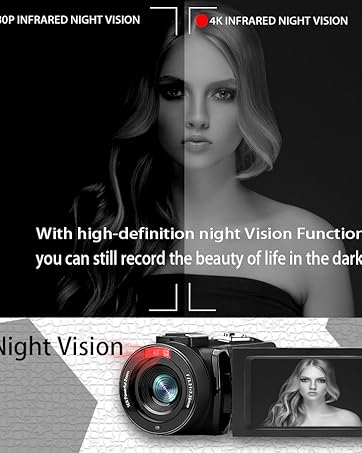
- Noční vidění: The camcorder features an infrared night vision function, enabling recording in low-light or dark environments. Activate this feature via the menu.


8. Dálkové ovládání
The included remote control allows you to operate the camcorder from a distance, controlling functions such as recording, photo capture, and zoom without touching the device.

Údržba
- Čištění: K čištění těla videokamery používejte měkký, suchý hadřík. Na objektiv použijte speciální hadřík a roztok na čištění objektivů. Nepoužívejte abrazivní materiály ani agresivní chemikálie.
- Skladování: Videokameru skladujte na chladném a suchém místě mimo dosah přímého slunečního záření a extrémních teplot. Pokud ji skladujete delší dobu, vyjměte baterie.
- Voděodolnost: This camcorder is není voděodolnýZabraňte vystavení vodě nebo vysoké vlhkosti.
Odstraňování problémů
| Problém | Možná příčina | Řešení |
|---|---|---|
| Videokamera se nezapne. | Baterie je vybitá nebo nesprávně nainstalovaná. | Ujistěte se, že jsou baterie plně nabité a správně vložené. |
| Battery charger indicator lights flicker. | Poor contact between battery and charger, or unstable power supply. | Re-seat batteries firmly in the charger. Check USB cable and power adapter connection. Try a different USB port or power source. |
| Nelze nahrávat video ani fotografovat. | SD karta je plná, není vložena nebo je poškozená. Je vybrán nesprávný režim. | Check SD card status, ensure it's inserted and has free space. Format the SD card if necessary (this will erase all data). Verify camcorder is in the correct mode. |
| Špatná kvalita videa/fotek. | Objektiv je znečištěný. Nedostatečné osvětlení. Nesprávné nastavení. | Clean the lens. Use the external fill light or shoot in better-lit conditions. Adjust resolution and other settings in the menu. |
| Problémy s připojením k Wi-Fi. | Incorrect Wi-Fi password or app not installed. | Ensure correct SSID (4K_WIFI1079) and password (12345678). Download and install the correct app. |
Specifikace
- Značka: VETEK
- Číslo modelu: AF6
- Rozlišení záznamu videa: 4K (3840*2160)
- Efektivní statické rozlišení: 48.0 MP (7920*5940)
- Digitální zoom: 18X
- Velikost obrazovky: 3.0 palce
- Typ displeje: 270° Rotatable Touch Screen
- Typ flash paměti: SD (supports up to 128GB, 32GB included)
- Formát záznamu videa: MP4
- Podporovaný formát zvuku: MP4
- Technologie připojení: USB, HDMI, Wi-Fi
- Kompatibilita operačního systému: Windows XP/7/8/10, MAC
- Stabilizace obrazu: Digitální
- Úroveň odolnosti proti vodě: Není odolný vůči vodě
- Počet baterií: 2 lithium-polymerová baterie (součástí balení)
- Rozměry položky (D x Š x V): 3.9"H x 6.2"Š x 7.8"V
Záruka a podpora
For warranty information and technical support, please refer to the contact details provided in the separate warranty card or visit the official VETEK webPokud narazíte na jakékoli problémy, které nejsou uvedeny v této příručce, obraťte se na zákaznický servis.