
1. Úvod
This manual provides essential information for setting up, operating, maintaining, and troubleshooting your HP EliteDesk 800 G8 Desktop Mini computer. Please read this manual thoroughly before using the product to ensure proper functionality and longevity.

Obrázek 1: Přední strana view of the HP EliteDesk 800 G8 Desktop Mini.
2. Průvodce nastavením
Follow these steps to set up your HP EliteDesk 800 G8 Desktop Mini.
2.1 Rozbalení krabice
Opatrně vyjměte všechny součásti z obalu. Krabice by měla obsahovat:
- HP EliteDesk 800 G8 Desktop Mini
- AC adaptér
- Klávesnice
- Myš
- Dokumentace (včetně této příručky)
2.2 Připojení periferních zařízení
Connect your monitor, keyboard, mouse, and other devices to the appropriate ports.

Figure 2: Front panel ports. Includes USB-C, USB-A, headphone jack, and power button.
- Přední porty:
- USB-C (SuperSpeed USB 10Gbps signaling rate): Connect compatible USB-C devices.
- USB-A (SuperSpeed USB 10Gbps signaling rate): Connect USB devices like keyboards, mice, or external drives.
- Kombinovaný konektor pro sluchátka/mikrofon: Připojte sluchátka nebo náhlavní soupravu.
- Vypínač: Zapnutí nebo vypnutí počítače.
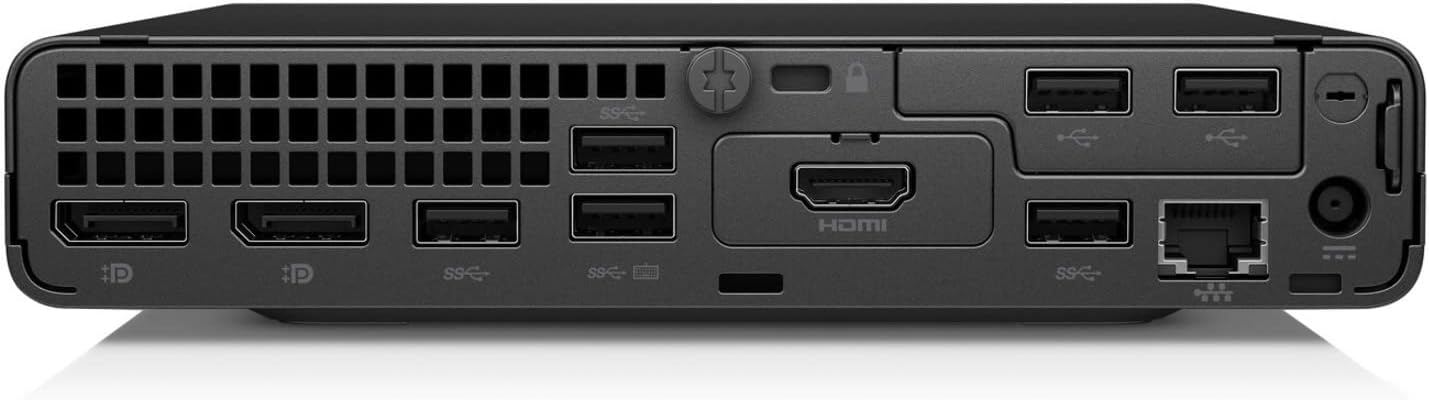
Figure 3: Rear panel ports. Includes DisplayPort, HDMI, USB-A, and Ethernet.
- Zadní porty:
- DisplayPort: Připojte monitor.
- HDMI: Connect a monitor or TV.
- USB-A (SuperSpeed USB 10Gbps signaling rate): Connect additional USB devices.
- Ethernet (RJ-45): Připojte se ke kabelové síti.
- Napájecí konektor: Připojte napájecí adaptér.
2.3 Zapnutí
- Connect the AC adapter to the power connector on the rear of the computer, then plug the adapter into a power outlet.
- Stiskněte tlačítko napájení na předním panelu. Rozsvítí se kontrolka napájení.
- The computer will boot up, and the operating system (Windows 10 Pro) will load.
3. Návod k obsluze
This section covers basic operation of your HP EliteDesk 800 G8 Desktop Mini.
3.1 První použití
Upon first power-on, you may be prompted to complete the Windows 10 Pro setup process. Follow the on-screen instructions to configure your language, region, network settings, and user account.
3.2 Řízení spotřeby
- Vypnout: Klikněte na tlačítko Start, poté na Napájení a vyberte „Vypnout“.
- Restartovat: Klikněte na tlačítko Start, poté na Napájení a vyberte „Restartovat“.
- Spát: Klikněte na tlačítko Start, poté na Napájení a vyberte „Spánek“.
- Vynucené vypnutí: If the system is unresponsive, press and hold the power button for approximately 10 seconds until the computer turns off. Use this only as a last resort.
3.3 Připojení k síti
- Kabelové připojení: Connect an Ethernet cable from your router or modem to the Ethernet port on the rear of the computer.
- Bezdrátové připojení:
- Click the network icon in the system tray (usually bottom-right of the screen).
- Vyberte ze seznamu požadovanou síť Wi-Fi.
- Klikněte na „Připojit“ a v případě potřeby zadejte bezpečnostní klíč sítě (heslo).
4. Údržba
Regular maintenance helps ensure the optimal performance and longevity of your HP EliteDesk 800 G8 Desktop Mini.
4.1 Čištění zařízení
- Vnější: Použijte měkký hadřík, který nepouští vlákna dampOmyjte vodou nebo jemným čisticím roztokem. Vyhněte se agresivním chemikáliím nebo abrazivním materiálům.
- Průduchy: Periodically use compressed air to clear dust from the ventilation openings to prevent overheating. Ensure the computer is powered off before cleaning vents.
- Porty: Udržujte porty bez prachu a nečistot.
4.2 Aktualizace softwaru
Regularly check for and install operating system updates (Windows Update) and driver updates from the HP support website to ensure security and performance.
4.3 Zálohování dat
Doporučuje se pravidelně zálohovat důležitá data na externí disk nebo cloudové úložiště, abyste předešli jejich ztrátě.
5. Řešení problémů
This section addresses common issues you might encounter with your HP EliteDesk 800 G8 Desktop Mini.
| Problém | Možná příčina | Řešení |
|---|---|---|
| Počítač se nezapne. | Žádné napájení, vadný napájecí adaptér, uvolněné připojení. |
|
| Žádné zobrazení na monitoru. | Loose video cable, incorrect input source, monitor off. |
|
| Klávesnice nebo myš nereaguje. | Volné připojení, vadné zařízení, problém s ovladačem. |
|
| Žádné připojení k internetu. | Network cable disconnected, Wi-Fi off, router issue. |
|
6. Specifikace
Detailed technical specifications for the HP EliteDesk 800 G8 Desktop Mini.
| Funkce | Detail |
|---|---|
| Model | HP EliteDesk 800 G8 Desktop Mini (499W7UT#ABA) |
| Procesor | Intel Core i7-11700T Octa-core (8 Core) 1.40 GHz |
| BERAN | 16 GB DDR4 SDRAM |
| Skladování | 512 GB M.2 PCI Express NVMe SSD |
| Grafika | Intel UHD Graphics 750 (Shared) |
| Operační systém | Windows 10 Pro |
| Bezdrátové připojení | 802.11ax, Bluetooth |
| Porty (přední) | USB-C (SuperSpeed USB 10Gbps), USB-A (SuperSpeed USB 10Gbps), Headphone/Microphone Combo |
| Porty (zadní) | DisplayPort, HDMI, USB-A (SuperSpeed USB 10Gbps), Ethernet (RJ-45) |
| Rozměry (DxŠxV) | 6.9 x 7 x 1.4 palce |
| Hmotnost | 3.13 libry |
7. Záruka a podpora
Your HP EliteDesk 800 G8 Desktop Mini comes with a standard manufacturer's warranty. For specific warranty terms and conditions, please refer to the warranty documentation included with your product or visit the official HP support webmísto.
Technickou podporu, ovladače ke stažení a další zdroje naleznete na adrese:
Oficiální podpora HP Webmísto
When contacting support, please have your product model number (EliteDesk 800 G8) and serial number ready.