
1. Úvod
This manual provides comprehensive instructions for the installation, operation, maintenance, and troubleshooting of the Axis Communications M7116 Video Encoder. The M7116 is designed to integrate analog video surveillance systems into an IP-based network, allowing for remote monitoring and management of up to 16 analog cameras.
2. Bezpečnostní informace
Please read all safety instructions carefully before installing or operating the device. Keep this manual for future reference.
- Ujistěte se, že napájecí zdroj odpovídá specifikovanému objemutage požadavky.
- Nevystavujte zařízení vlhkosti nebo extrémním teplotám.
- Neblokujte ventilační otvory, aby nedošlo k přehřátí.
- Only use accessories specified by Axis Communications.
- Veškeré opravy svěřte kvalifikovanému servisnímu personálu.
3. Obsah balení
Ověřte, zda jsou v balení přítomny všechny položky:
- Axis Communications M7116 Video Encoder
- Napájecí adaptér
- Průvodce instalací
- Montážní sada (pokud je k dispozici)
4. Konec produktuview
The Axis M7116 is a 16-channel video encoder that digitizes analog video signals for network transmission. It features multiple BNC inputs for analog cameras, an Ethernet port for network connectivity, and serial ports for PTZ control.
4.1 Přední panel
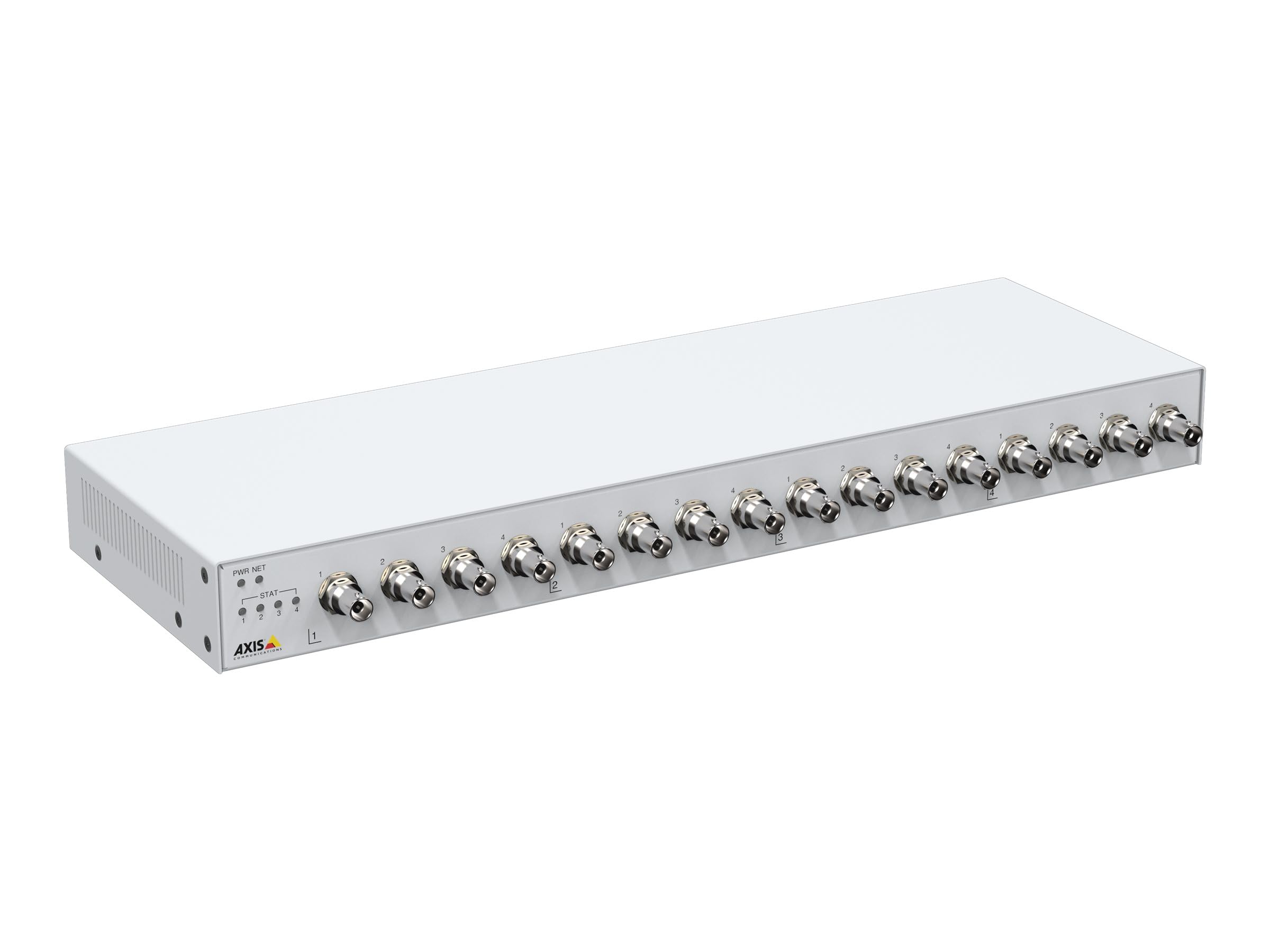
Obrázek 1: Přední view of the Axis M7116 Encoder, showing 16 BNC video input connectors and status indicator LEDs on the left side.

Obrázek 2: Close-up of the front panel, highlighting the Power (PWR), Network (NET), and Status (STAT) LEDs, along with the first four BNC video input ports.
4.2 Zadní panel

Obrázek 3: Zadní view of the Axis M7116 Encoder, showing the Ethernet port, power input, and RS-485/422 serial communication ports.
4.3 Indikátory
- PWR (Power) LED: Indikuje stav napájení. Svítí zeleně pro normální provoz.
- NET (Network) LED: Indicates network activity. Flashing green for data transmission.
- STAT (Status) LED: Indicates device status. Refer to the online help for detailed status codes.
5. Nastavení
Follow these steps to set up your Axis M7116 Encoder:
- Montáž: Securely mount the encoder in a suitable location, ensuring adequate ventilation. The device is suitable for both indoor and outdoor usage, but ensure proper environmental protection if used outdoors.
- Připojení analogových kamer: Connect up to 16 analog cameras to the BNC input connectors on the front panel.
- Připojit k síti: Connect an Ethernet cable (Cat 5e or higher) from the encoder's NET port to your network switch or router.
- Připojte napájení: Connect the power adapter to the power input on the rear panel and then plug it into a power outlet. The PWR LED should illuminate.
- Počáteční konfigurace: Použijte nástroj Axis IP Utility nebo web browser to discover the device on your network and assign an IP address. Access the device's web interface for further configuration, including video settings, user management, and network parameters.
6. Návod k obsluze
Once the M7116 Encoder is set up and configured, it will begin encoding video streams from the connected analog cameras. You can access and manage these streams through the device's web interface or compatible video management software.
- Přístup k Web Rozhraní: Otevřete a web browser and enter the IP address of the encoder. Log in with your credentials to access live views, recordings, and system settings.
- Živé vysílání videa: The encoder provides H.264 and MJPEG video streams. Configure resolution, frame rate, and compression settings as needed for each channel.
- Ovládání PTZ: If PTZ (Pan/Tilt/Zoom) cameras are connected via the RS-485/422 ports, you can control them through the web interface or integrated VMS.
- Správa akcí: Set up event triggers and actions, such as motion detection, tampering alarms, and scheduled recordings.
7. Údržba
Regular maintenance ensures optimal performance and longevity of your Axis M7116 Encoder.
- Čištění: Gently clean the exterior of the device with a soft, dry cloth. Do not use liquid cleaners or aerosols. Ensure ventilation openings are free from dust and debris.
- Aktualizace firmwaru: Pravidelně kontrolujte systém Axis Communications webweb s aktualizacemi firmwaru. Udržování firmwaru aktuálního zajišťuje přístup k nejnovějším funkcím, bezpečnostním záplatám a vylepšením výkonu.
- Sledování systému: Regularly check system logs and status indicators for any anomalies.
8. Řešení problémů
This section addresses common issues you might encounter with the M7116 Encoder.
| Problém | Možná příčina | Řešení |
|---|---|---|
| Bez napájení (LED dioda PWR nesvítí) | Napájecí adaptér není připojen nebo je vadný; problém se zásuvkou. | Check power cable connections. Test power outlet. Replace power adapter if necessary. |
| No network connection (NET LED off/no activity) | Ethernet cable disconnected or faulty; network configuration issue. | Verify Ethernet cable connection. Check network switch/router status. Confirm IP address settings. |
| No video from a camera channel | Analog camera not connected or faulty; BNC cable issue; encoder channel misconfigured. | Check camera power and functionality. Inspect BNC cable. Verify channel settings in the web rozhraní. |
| Nelze získat přístup web rozhraní | Nesprávná IP adresa; problém s připojením k síti; firewall blokuje přístup. | Ensure correct IP address. Check network connection. Temporarily disable firewall for testing. |
9. Specifikace
Key technical specifications for the Axis Communications M7116 Encoder (Model 02036-003):
- Značka: Axis Communications
- Číslo modelu: 02036-003
- Rozměry produktu: 19.69 x 19.69 x 11.02 palce
- Hmotnost položky: 4.4 libry
- Typ konektoru: Ethernet, BNC
- Typ kabelu: Ethernet (Cat 5e recommended)
- Kompatibilní zařízení: Analog cameras, Network Video Recorders (NVRs), Video Management Systems (VMS)
- Speciální funkce: Tangle Free (referring to internal cabling/design)
- Doporučená použití: Connecting electronic devices, specifically for integrating analog video into IP networks
- Pohlaví konektoru: Male-to-Female (for specific cable types)
- Počet pinů: 8 (for Ethernet)
- Počet jednotek: 1.0 Počet
- Specifikace splněna: RoHS
- Vnitřní/venkovní použití: Indoor, Outdoor (with appropriate environmental protection)
- Počet položek: 1
- Výrobce: AXIS - ENCODER/DECODER
- První dostupné datum: 22. října 2021
10. Záruka a podpora
The Axis Communications M7116 Encoder comes with a 2-letá záruka from the date of purchase, covering defects in materials and workmanship under normal use. For warranty claims or technical support, please contact Axis Communications customer service or visit their official webweb s zdrojovými zdroji podpory, častými dotazy a kontaktními informacemi.
Nejnovější informace o podpoře naleznete na adrese: www.axis.com/support