
Zavedení
Thank you for choosing the SOMIC MS300 Over-Ear Wireless Bluetooth Headphones. This manual provides essential information for setting up, operating, and maintaining your headphones to ensure optimal performance and longevity. Please read this manual thoroughly before using the product.
Obsah balení
- SOMIC MS300 Over-Ear Wireless Bluetooth Headphones
- USB nabíjecí kabel
- 3.5mm audio kabel
- Uživatelská příručka (tento dokument)
Konec produktuview
Familiarize yourself with the various components and controls of your SOMIC MS300 headphones.
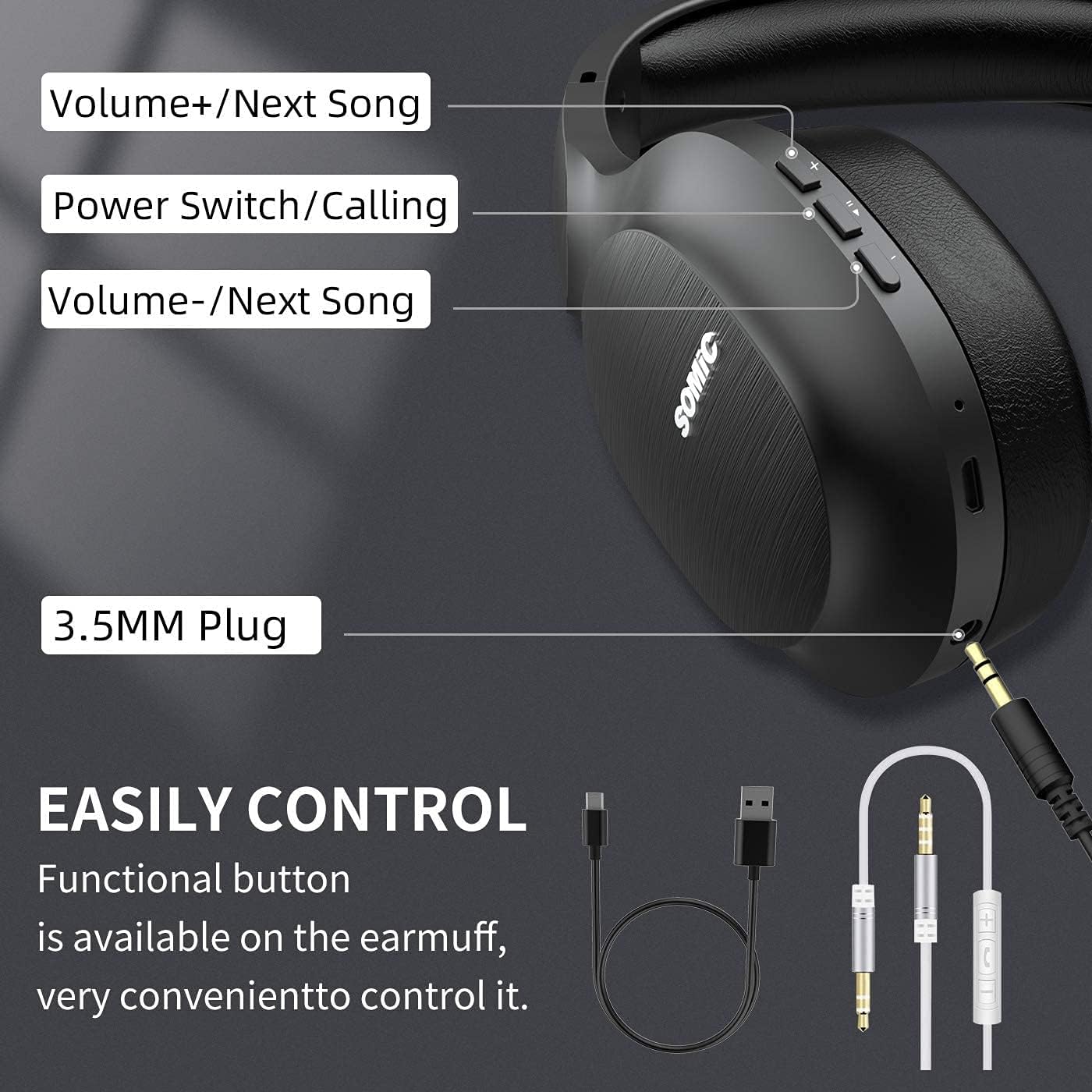
Obraz: Nadview of the SOMIC MS300 headphone controls, including volume buttons, power switch, and 3.5mm audio jack.
Ovládací prvky a porty
- Hlasitost + / Další skladba: Press briefly to increase volume, press and hold to skip to the next song.
- Power Switch / Calling: Press and hold to power on/off. Briefly press to play/pause music. During a call, press to answer/end a call.
- Hlasitost - / Předchozí skladba: Press briefly to decrease volume, press and hold to go to the previous song.
- 3.5mm audio jack: Pro kabelové připojení pomocí dodaného 3.5mm audio kabelu.
- USB nabíjecí port: For charging the headphones using the included USB cable.
- Mikrofon: Vestavěné pro handsfree volání.
Nastavení
Nabíjení sluchátek

Obraz: The SOMIC MS300 headphones illustrating the fast charging capability: 5 minutes of charge provides 2 hours of playback.
- Připojte menší konec nabíjecího kabelu USB k nabíjecímu portu USB na sluchátkách.
- Připojte větší konec nabíjecího kabelu USB k napájecímu adaptéru USB (není součástí balení) nebo k portu USB počítače.
- LED indikátor bude zobrazovat stav nabíjení (např. červená pro nabíjení, modrá pro plné nabití).
- A full charge takes approximately 2-3 hours. For quick use, a 5-minute charge provides up to 2 hours of playtime.

Obraz: The SOMIC MS300 headphones highlighting their strong endurance with up to 72 hours of playtime on a single charge.
Zapnutí/vypnutí
- Zapnutí: Press and hold the Power Switch button for approximately 3 seconds until the LED indicator flashes blue.
- Vypnutí: Press and hold the Power Switch button for approximately 3 seconds until the LED indicator turns off.
Párování pomocí Bluetooth
- Ujistěte se, že jsou sluchátka vypnutá.
- Press and hold the Power Switch button for about 5-7 seconds until the LED indicator flashes red and blue alternately, indicating pairing mode.
- Na svém zařízení (chytrý telefon, tablet, počítač) povolte Bluetooth a vyhledejte dostupná zařízení.
- Select "SOMIC MS300" from the list of devices.
- Po připojení bude LED indikátor pomalu blikat modře.
Kabelové připojení (3.5mm audio kabel)

Obraz: The SOMIC MS300 headphones demonstrating their versatility with both wireless Bluetooth connectivity and a wired option via a 3.5mm audio cable.
The SOMIC MS300 headphones can also be used with a wired connection, even if the battery is depleted.
- Připojte jeden konec 3.5mm audio kabelu k 3.5mm audio konektoru na sluchátkách.
- Connect the other end of the 3.5mm audio cable to the audio output port of your device.
- Sluchátka se automaticky přepnou do kabelového režimu. Funkce Bluetooth bude deaktivována.
Návod k obsluze
Přehrávání hudby
- Přehrát/pozastavit: Briefly press the Power Switch button.
- Zvýšit hlasitost: Briefly press the Volume + button.
- Snížit hlasitost: Briefly press the Volume - button.
- Další skladba: Stiskněte a podržte tlačítko Hlasitost +.
- Předchozí skladba: Stiskněte a podržte tlačítko Hlasitost -.
Telefonní hovory
- Přijmout/ukončit hovor: Briefly press the Power Switch button.
- Odmítnout hovor: Press and hold the Power Switch button for 2 seconds.
- Znovu vytočit poslední číslo: Double-press the Power Switch button.
Připojení dvou zařízení
The SOMIC MS300 headphones support connecting to two Bluetooth devices simultaneously.
- Připojte sluchátka k prvnímu zařízení, jak je popsáno v části „Párování Bluetooth“.
- Vypněte Bluetooth na prvním zařízení. Sluchátka se znovu přepnou do režimu párování.
- Připojte sluchátka k druhému zařízení.
- Re-enable Bluetooth on the first device. The headphones should automatically reconnect to both devices.
- Audio will play from the device that is actively playing media or receiving a call.
Noise Cancellation (CVC 8.0)

Obraz: A person wearing SOMIC MS300 headphones in a public setting, demonstrating the effectiveness of CVC Noise Cancelling Technology in reducing ambient noise.
The SOMIC MS300 headphones feature CVC 8.0 noise cancelling technology, which helps reduce ambient noise during calls for clearer communication. This feature is automatically active when using the built-in microphone.
Údržba
Čištění
- Sluchátka otřete měkkým, suchým hadříkem, který nepouští vlákna.
- Nepoužívejte abrazivní čisticí prostředky, rozpouštědla ani čisticí spreje.
- Zabraňte vniknutí vlhkosti do jakýchkoli otvorů.
Skladování
- Sluchátka skladujte na chladném a suchém místě mimo dosah extrémních teplot a přímého slunečního záření.
- When not in use for extended periods, charge the headphones at least once every three months to preserve battery life.
Péče o baterie
- Nepokoušejte se baterii vyměnit sami. V případě problémů s baterií kontaktujte zákaznickou podporu.
- Vyhněte se častému úplnému vybíjení baterie, protože to může zkrátit její celkovou životnost.
Odstraňování problémů
| Problém | Možné řešení |
|---|---|
| Sluchátka se nezapínají. | Ujistěte se, že jsou sluchátka nabitá. Připojte je ke zdroji napájení pomocí kabelu USB. |
| Nelze spárovat se zařízením. | Ensure headphones are in pairing mode (LED flashing red and blue). Turn off and on Bluetooth on your device. Move headphones closer to the device. |
| Žádný zvuk nebo nízká hlasitost. | Zkontrolujte úroveň hlasitosti na obou sluchátkách i na připojeném zařízení. Ujistěte se, že jsou sluchátka správně spárována nebo že je 3.5mm kabel zcela zasunut. |
| Kvalita zvuku je nízká. | Move closer to the connected device to avoid interference. Ensure there are no obstacles between the headphones and the device. |
| Mikrofon nefunguje. | Ujistěte se, že jsou sluchátka připojena přes Bluetooth. Zkontrolujte nastavení mikrofonu v zařízení. |
Specifikace

Obraz: Explodoval view of the 40mm dynamic driver and the Qualcomm QCC Bluetooth 5.0 chip, highlighting the audio technology within the SOMIC MS300 headphones.
| Funkce | Detail |
|---|---|
| Model | MS300 |
| Značka | SOMIC |
| Konektivita | Wireless (Bluetooth 5.0), Wired (3.5mm Audio Jack) |
| Bluetooth čip | Qualcomm QCC Bluetooth 5.0 |
| Velikost ovladače | 40mm dynamické ovladače |
| Kontrola hluku | Zrušení šumu CVC 8.0 |
| Kapacita baterie | 1000 XNUMX mAh |
| Prázdno | Až 72 hodin |
| Rychlé nabíjení | 5 minut nabíjení pro 2 hodiny přehrávání |
| Materiál náušníků | Memory Foam Protein |
| Hmotnost | 208 g |
| Barva | Černý |
| Voděodolnost | Není odolný vůči vodě |
Záruka a podpora
Informace o záruce
SOMIC products are designed and manufactured to the highest quality standards. This product is covered by a limited warranty from the date of purchase. Please refer to the warranty card included in your package for specific terms and conditions. Keep your proof of purchase for warranty claims.
Zákaznická podpora
If you encounter any issues or have questions regarding your SOMIC MS300 headphones, please contact our customer support team. Contact details can typically be found on the warranty card or the official SOMIC website. Please have your model number (MS300) and purchase information ready when contacting support.