
FLEXISPOT E4 Classic
FLEXISPOT E4 Classic Electric Standing Desk User Manual
Model: E4 Classic | Brand: FLEXISPOT
Zavedení
This manual provides detailed instructions for the assembly, operation, and maintenance of your FLEXISPOT E4 Classic Electric Standing Desk. Please read this manual thoroughly before use to ensure proper function and longevity of your product.

Figure 1: The FLEXISPOT E4 Classic Electric Standing Desk, featuring a bamboo contour desktop and silver frame, set up with dual monitors in an office environment.
Bezpečnostní informace
- Před použitím se ujistěte, že jsou všechny součásti bezpečně upevněny.
- Během provozu držte děti a domácí zvířata v dostatečné vzdálenosti od stolu.
- Do not overload the desk beyond its specified weight capacity (220 lbs).
- Zabraňte přímému kontaktu tekutin s ovládacím panelem nebo součástmi motoru.
- Před čištěním nebo údržbou odpojte napájení.
- Používejte pouze dodaný napájecí adaptér.
Obsah balení
Před zahájením montáže zkontrolujte, zda jsou všechny díly přítomny. Pokud některé díly chybí nebo jsou poškozené, kontaktujte zákaznickou podporu.
- Bamboo Contour Whole-Piece Desktop (55"x28")
- Silver Frame Legs (Dual Motor)
- Ovládací panel
- Napájecí adaptér a kabel
- Montážní materiál (šrouby, nástroje atd.)
- Návod k použití (tento dokument)
Nastavení a montáž
Pro tento produkt je nutná montáž. Prosím, pečlivě dodržujte tyto kroky.
- Rozbalte komponenty: Opatrně vyjměte všechny díly z obalu a položte je na čistý, měkký povrch, abyste zabránili poškrábání.
- Připevnění nohou k pracovní ploše: Position the desktop upside down. Align the leg frames with the pre-drilled holes on the underside of the desktop. Secure them using the provided screws and tools.
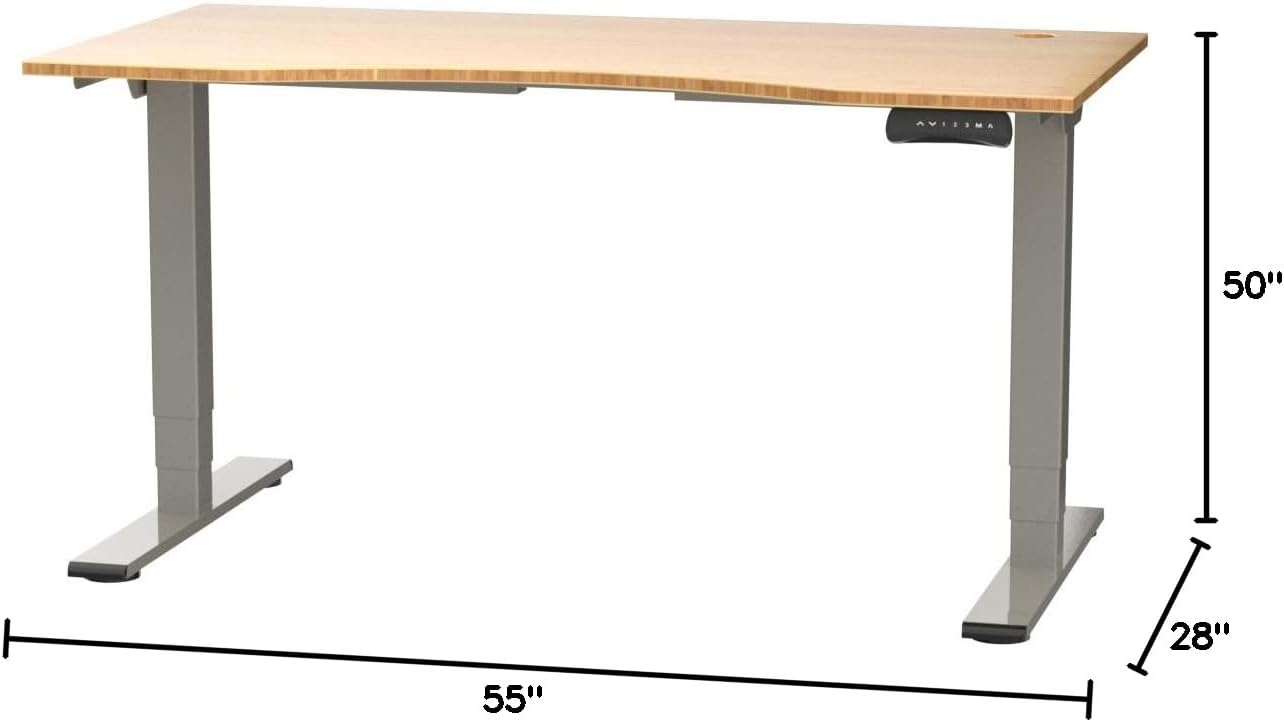
Figure 2: Desk dimensions indicating 55 inches width, 28 inches depth, and adjustable height up to 50 inches.
- Instalace ovládacího panelu: Mount the control panel to the desired location on the underside of the desktop, typically on the front edge for easy access. Connect the control panel cable to the motor control box.

Figure 3: The programmable control panel with LED display, up/down buttons, and memory presets (1, 2, 3, M, A).
- Připojte napájení: Plug the power adapter into the control box, and then plug the power cable into a standard electrical outlet.
- Správa kabelů: Utilize the two cable management holes on the desktop to route and organize your cables, preventing clutter.

Figure 4: Detail showing the integrated cable management holes and the water-resistant surface of the bamboo desktop.
- Počáteční kalibrace: After assembly and power connection, the desk may require an initial calibration. Refer to the "Operating Instructions" section for details on resetting or calibrating the desk.
Návod k obsluze
Nastavení výšky
The FLEXISPOT E4 Classic desk features a dual-motor lift system for smooth and quiet height adjustments.
- Zvedněte stůl: Stiskněte a podržte Šipka nahoru button (▲) on the control panel. The desk will move upwards.
- Spodní stůl: Stiskněte a podržte Šipka dolů button (▼) on the control panel. The desk will move downwards.
- Uvolněte tlačítko v požadované výšce. Stůl lze nastavit od 24.4 do 50 palců.
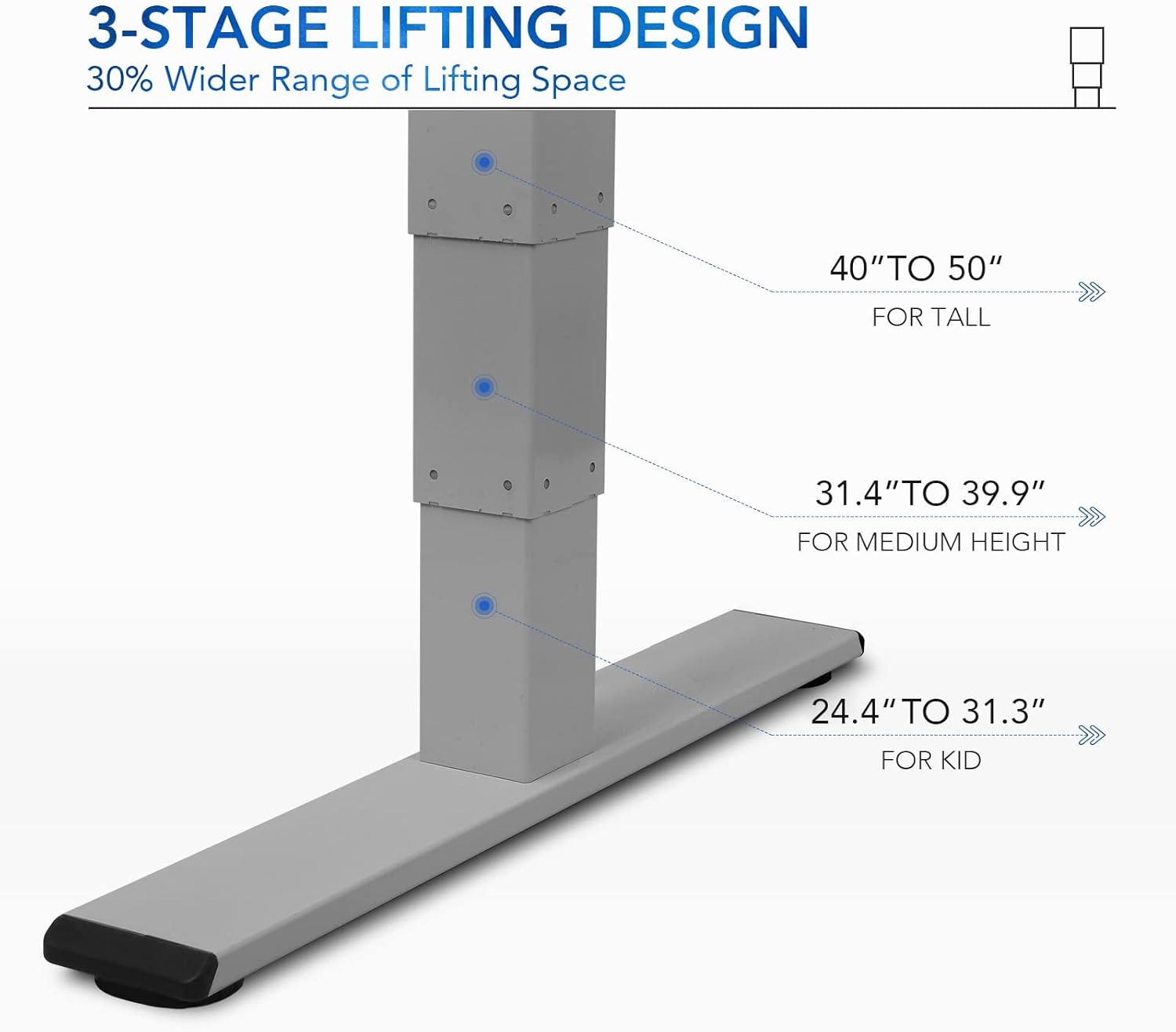
Obrázek 5: Trojkytage lifting design provides a wide range of height adjustments, suitable for various user heights, from 24.4" (kid) to 50" (tall).
Programmable Memory Presets
Ovládací panel umožňuje uložit až tři preferovaná nastavení výšky pro rychlé úpravy.
- Nastavení pozice v paměti:
- Nastavte stůl do požadované výšky pomocí tlačítek Nahoru/Dolů.
- Stiskněte tlačítko „M“ button. The LED display will show "S-".
- Během 3 sekund stiskněte jedno z číselných tlačítek ("1", "2"nebo "3") to save the current height to that preset. The display will show "S-1", "S-2", or "S-3" to confirm.
- Vyvolání pozice z paměti: Jednoduše stiskněte odpovídající číselné tlačítko ("1", "2"nebo "3"). Stůl se automaticky přesune do uložené výšky.
Sit/Stand Reminder
The "A" button can be used to set a reminder to switch between sitting and standing positions.
- Consult the full manual for detailed instructions on setting and customizing the sit/stand reminder function.
Ergonomic Curved Design
The 55"x28" desktop features an ergonomic curved design for enhanced comfort and efficiency during work or study.

Figure 6: The ergonomic curved edge of the desktop, designed to provide a more comfortable and natural working posture.
Údržba
- Čištění: Otřete povrch stolu a rám měkkým hadříkemamp cloth. Avoid abrasive cleaners or harsh chemicals. The bamboo surface is designed to be water-resistant, making it easy to clean.
- Péče o motor: The dual-motor system is designed for low noise and durability. No specific user maintenance is required for the motors.
- Správa kabelů: Periodically check that all cables are neatly routed through the cable management holes and are not pinched or tangled.
- Kontrola upevňovacích prvků: Občas zkontrolujte všechny šrouby a upevňovací prvky, zda jsou pevně utažené. V případě potřeby je dotáhněte.
Odstraňování problémů
| Problém | Možná příčina | Řešení |
|---|---|---|
| Stůl se nehýbe. | Power cable disconnected; overload protection activated; motor error. | Check power connections. Reduce weight on desk. Unplug and replug power after 10 minutes. Perform a reset (see below). |
| Stůl se pohybuje nerovnoměrně nebo vydává neobvyklé zvuky. | Loose fasteners; obstruction; motor synchronization issue. | Check and tighten all assembly screws. Ensure no obstructions under the desk. Perform a reset. |
| LED display shows an error code (e.g., "E01", "RST"). | System error; need for reset. | Postup resetování: Press and hold the Down Arrow button until the desk reaches its lowest position and then slightly rises. Release the button. If the error persists, unplug the desk for 10 minutes and try again. |
| Předvolby paměti nefungují. | Předvolby nebyly správně uloženy. | Re-save your desired memory positions following the "Programmable Memory Presets" instructions. |
If the issue persists after attempting these solutions, please contact FLEXISPOT customer support.
Specifikace
| Funkce | Detail |
|---|---|
| Model | E4 Classic |
| Značka | FLEXISPOT |
| Materiál pro stolní počítače | Bamboo Contour Whole-Piece Board |
| Materiál rámu | Alloy Steel (Silver Frame) |
| Rozměry produktu (D x Š x V) | 28 cm H x 55 cm Š x 50 cm V (max. výška) |
| Rozsah nastavení výšky | 24.4" až 50" |
| Zvedací systém | Dual Motor, 3-Stage Lifting |
| Hmotnostní kapacita | Až 220 liber |
| Speciální funkce | Electric Height Adjustment, Programmable Memory Presets, Sit/Stand Reminder, Curved Ergonomic Design, Cable Management Holes, Waterproof Surface |
| Montáž Vyžadována | Ano |
Záruka a podpora
FLEXISPOT products are designed for durability and performance. For specific warranty details regarding your E4 Classic Electric Standing Desk, please refer to the warranty card included with your purchase or visit the official FLEXISPOT webmísto.
For technical support, troubleshooting assistance, or to inquire about replacement parts, please contact FLEXISPOT customer service:
- Webmísto: www.flexispot.com
- E-mail: support@flexispot.com
- Telefon: Obraťte se na úředníka webmísto pro regionální kontaktní čísla.
When contacting support, please have your product model (E4 Classic) and purchase information ready.
Ask a question about this manual
Ask about setup, troubleshooting, compatibility, parts, safety, or missing instructions. Manuals+ will review the question and use this page’s manual context to help answer it.