
Zavedení
The SJCAM C100 is a compact and versatile action camera designed for capturing high-quality video and photos in various environments. Its small size, waterproof capabilities, and wireless connectivity make it suitable for sports, travel, and daily vlogging. This manual provides essential information for setting up, operating, and maintaining your C100 camera.

Image: The SJCAM C100 Action Camera, a compact device for capturing video and photos.
Nastavení
1. Vložení Micro SD karty
The SJCAM C100 requires a Micro SD card (not included) for storing recordings. Ensure the camera is powered off before inserting or removing the card.
- Vyhledejte slot pro kartu Micro SD na boku fotoaparátu.
- Opatrně zasuňte kartu Micro SD do slotu, dokud nezapadne na místo.
- Chcete-li kartu vyjmout, zatlačte ji dovnitř, dokud nevyskočí.
Video: Demonstrates how to insert the Micro SD card into the SJCAM C100 camera.
2. Nabíjení fotoaparátu
The C100 camera has a built-in battery. Connect the camera to a power source using the provided USB cable. The camera can record while charging.
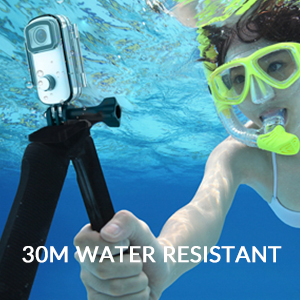
Image: The SJCAM C100 camera connected to a power bank, illustrating its ability to operate while charging. This extends recording time for longer sessions.
Obsluha fotoaparátu
1. Zapnutí/vypnutí
- To power on: Press and hold the main button for 5 seconds. The camera will vibrate once, and a blue light will illuminate, indicating it is on.
- To power off: Press and hold the main button for 2 seconds. The blue light will turn off.
2. Spusťte/Zastavte záznam
- To start recording: With the camera powered on, click the main button once. The blue light will flash, indicating recording has started.
- To stop recording: Click the main button again. The blue light will stop flashing, and the recording will be saved.
3. Connecting to the Mobile App (SJCAM Zone)
The SJCAM C100 can be controlled and managed via the "SJCAM Zone" app on your smartphone (Android or iOS).
- Download the "SJCAM Zone" app from the App Store (iOS) or Android download link.
- On the camera, double-click the main button to activate Wi-Fi. A green light will flash.
- On your mobile phone, go to Wi-Fi settings and connect to the network named "C100+_XXXXXX" (where XXXXXX is a unique identifier). The default password is 12345678.
- Once connected, open the "SJCAM Zone" app and click "Connect Camera" to establish a connection.

Image: Instructions for connecting the SJCAM C100 to the SJCAM Zone mobile application, including QR codes for app download.
4. Advanced Functions via App
Through the SJCAM Zone app, you can access and adjust various settings and modes:
- Nahrávání ve smyčce: Continuously records, overwriting older footage když je paměťová karta plná.
- Slow-Motion Photography: Captures video at a higher frame rate for slow-motion playback.
- Jízdní režim: Automatically starts recording when the vehicle starts and stops when it turns off.
- Obracení obrázku: Adjusts image orientation.
- Časosběrný režim: Captures a sequence of images at set intervals to create a time-lapse video.
- Úprava expozice: Controls the brightness of your recordings.
- Nastavení vyvážení bílé: Corrects color temperature for accurate color representation.

Obrázek: Bývalý/áample of a time-lapse video captured with an action camera, demonstrating the creative possibilities of this mode.
Klíčové vlastnosti
- Vodotěsný design: The C100 comes with an IPX65 waterproof case, allowing for underwater use up to 30 meters.
- EIS Anti-Shaking: Advanced Electronic Image Stabilization (EIS) helps produce stable and clear videos, even during fast movements.
- Širokoúhlý objektiv 115°: Zachycuje široké pole view, ideal for immersive action shots.
- Magnetic Body: The camera body features integrated magnets, allowing for easy attachment to metallic surfaces without additional accessories.
- Wearable Accessories: Includes a back clip for attaching the camera to clothing or gear, enhancing portability and hands-free recording.
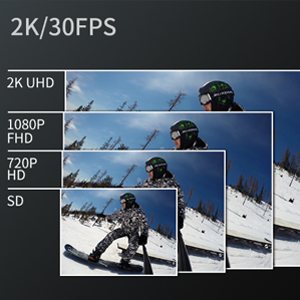
Image: The SJCAM C100 camera enclosed in its waterproof case, submerged in water, highlighting its water-resistant capability.
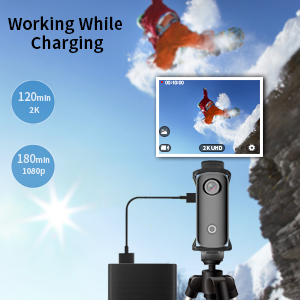
Image: A visual representation of the 115-degree wide-angle view captured by the SJCAM C100, showing a panoramic landscape.
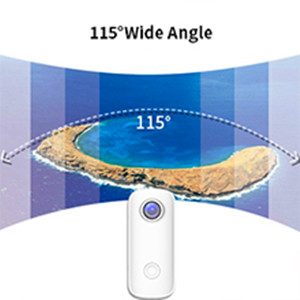
Image: The SJCAM C100 camera magnetically attached to a surface, demonstrating its versatile mounting options.

Image: A person wearing the SJCAM C100 camera attached to a backpack strap using the included wearable back clip.
Specifikace
| Značka | SJCAM |
| Název modelu | C100 |
| Číslo modelu | C100+ |
| Efektivní rozlišení | 15 MP |
| Rozlišení záznamu videa | 1080P (1920*1080) 30FPS |
| Úroveň odolnosti proti vodě | Voděodolný (s pouzdrem) |
| Stabilizace obrazu | Digitální (EIS) |
| Typ média | Micro SD |
| Konektivita | WiFi |
| Průměrná životnost baterie | 2 hours (1080P recording) |
| Hmotnost položky | 1.4 uncí |
Údržba
- Čištění: K čištění těla fotoaparátu použijte měkký, suchý hadřík. Na objektiv použijte speciální hadřík a roztok na čištění objektivů.
- Skladování: Fotoaparát skladujte na chladném a suchém místě mimo dosah přímého slunečního záření a extrémních teplot.
- Péče o baterie: Pro optimální výdrž baterie se vyvarujte častého úplného vybíjení. Fotoaparát pravidelně nabíjejte, i když jej nepoužíváte, abyste zabránili jejímu hlubokému vybití.
- Vodotěsné pouzdro: After using the waterproof case in saltwater, rinse it with fresh water and allow it to air dry. Inspect the O-ring seal for any debris or damage before each use.
Odstraňování problémů
- Kamera se nezapíná: Ensure the battery is charged. If the camera does not respond, connect it to a power source and try again. Verify a Micro SD card is inserted, as the camera may not operate without one.
- Recording stops randomly: This can often be caused by an incompatible or slow Micro SD card. Use a high-speed (U3 or higher) Micro SD card from a reputable brand. Format the card regularly.
- Problémy s připojením Wi-Fi: Ensure the camera's Wi-Fi is enabled (green light flashing). Check that you are connecting to the correct Wi-Fi network name and entering the correct password (12345678). Restart both the camera and your mobile device if issues persist.
- Poor image stabilization: While the camera features EIS, extreme vibrations or rapid movements may still result in some blur. Ensure the camera is securely mounted.
Záruka a podpora
Informace o záruce a technickou podporu získáte na oficiálních stránkách SJCAM. webnebo se obraťte na prodejce. Uschovejte si doklad o koupi pro případ reklamace.