
1. Úvod
The UNIWA V909T 4G Flip Phone is designed for ease of use, particularly for seniors. It features large buttons, a clear display, and essential functions to ensure reliable communication. This manual provides detailed instructions for setting up, operating, and maintaining your device.
2. Co je v krabici
Zkontrolujte prosím obsah balení a ujistěte se, že jsou v něm přítomny všechny položky:
- UNIWA V909T 4G Flip Phone
- Nabíjecí dok
- Adaptér
- USB kabel
- Baterie (předinstalovaná nebo samostatná)
3. Konec produktuview
The UNIWA V909T is equipped with features designed for convenience and accessibility.
Klíčové vlastnosti:
- Dvě obrazovky: A 2.8-inch QVGA main screen and a 1.77-inch QVGA outer screen for quick information display.
- Large Buttons & Display: Oversized buttons and a large font for easy dialing and menu navigation.
- Nouzové tlačítko SOS: A dedicated button on the back for quick access to emergency contacts.
- Hearing Aid Compatible (HAC): Designed to work seamlessly with hearing aid devices (M4/T4 compatibility).
- Loud Speaker & Ringtones: High-quality speaker and loud ringtones to prevent missed calls.
- Nabíjecí dok: Convenient charging solution, eliminating the need to plug in cables directly.
- FM rádio: Enjoy listening to news and music.
- 4G konektivita: Supports 2G(GSM)/3G(WCDMA)/4G(FDD-LTE) global network bands.

The phone features a dual-screen design, with a 2.8-inch main screen and a 1.77-inch outer screen for checking time, date, calls, and messages without opening the phone.

Large, easy-to-press buttons with clear numbering and big font for improved readability and navigation.

A dedicated SOS button on the back of the phone allows for quick contact with pre-set emergency numbers.

The phone is Hearing Aid Compatible (HAC), ensuring clear call quality for users with hearing aids.
Konec produktuview Video
Toto video poskytuje obecný přehledview of the UNIWA 4G Unlocked Flip Phone, highlighting its key features and benefits for elderly users.
4. Nastavení
4.1. Instalace SIM karty
To use your phone for calls and messages, you must install a SIM card. Ensure the phone is powered off before installation.
- Odstraňte zadní kryt telefonu.
- Najděte slot pro SIM kartu.
- Unlock the SIM card clip by sliding it to the left or lifting it, depending on the mechanism.
- Carefully insert your SIM card into the slot, ensuring the gold contacts face downwards and the cut corner aligns correctly.
- Close the SIM card clip and slide it to the right to lock it in place.
- Nasaďte zadní kryt.
SIM Card Installation Video
This video demonstrates the correct procedure for installing the SIM card slot cover on the UNIWA V909T 4G Flip Senior Phone.
4.2. Nabíjení telefonu
The phone comes with a convenient charging dock. To charge:
- Connect the USB cable to the adapter, then plug the adapter into a power outlet.
- Připojte druhý konec kabelu USB k nabíjecí stanici.
- Place the UNIWA V909T phone into the charging dock. Ensure it is seated correctly and the charging indicator light illuminates.
- Plné nabití obvykle trvá přibližně 8 hodiny.

The UNIWA V909T phone placed in its charging dock, indicating a convenient way to recharge the device.
5. Provoz
5.1. Zapnutí/vypnutí
- To power on: Press and hold the red power button until the screen lights up.
- To power off: Press and hold the red power button, then confirm power off on the screen.
5.2. Uskutečňování a přijímání hovorů
- Chcete-li zavolat: Open the phone, dial the number using the large keypad, and press the green call button.
- Chcete-li přijmout hovor: Open the phone when it rings, or press the green call button.
- Ukončení hovoru: Close the phone or press the red hang-up button.
- Rychlé vytáčení: Numbers 2-9 can be set as speed dial buttons. Refer to the phone's menu for speed dial setup.
5.3. Odesílání a přijímání zpráv
- Navigate to the 'Messages' menu using the navigation buttons.
- Select 'Write message' to compose a new text.
- Zadejte číslo příjemce a vaši zprávu.
- Stiskněte tlačítko „Odeslat“.
5.4. Funkce nouzového volání SOS
The SOS button provides a quick way to contact emergency numbers.
- Nastavení tísňových kontaktů: Access the SOS settings in the phone's menu. You can preset up to 5 contacts to be called or sent a text message during an emergency.
- Using the SOS button: In an emergency, press and hold the SOS button on the back of the phone. The phone will automatically call and/or send a pre-written text message to your designated emergency contacts.
5.5. FM rádio
Chcete-li používat rádio FM:
- Navigate to the 'FM Radio' icon in the menu.
- Select to open the radio application.
- Use the navigation buttons to scan for stations or adjust the volume.
6. Kompatibilita se sítí
The UNIWA V909T is an unlocked 4G phone supporting 2G(GSM)/3G(WCDMA)/4G(FDD-LTE) global network bands. Please verify your carrier's compatibility before use.
Podporovaní operátoři:
- T-Mobile & T-Mobile MVNOs (Mint, Metro, Ultra, Boost, Tello)
Not Supported Carriers:
- AT&T
- Verizon
- Sprint
- US Cellular
- GCI Wireless
- Google Project Fi
- FreedomPop
- C Věž
- Cricket Network
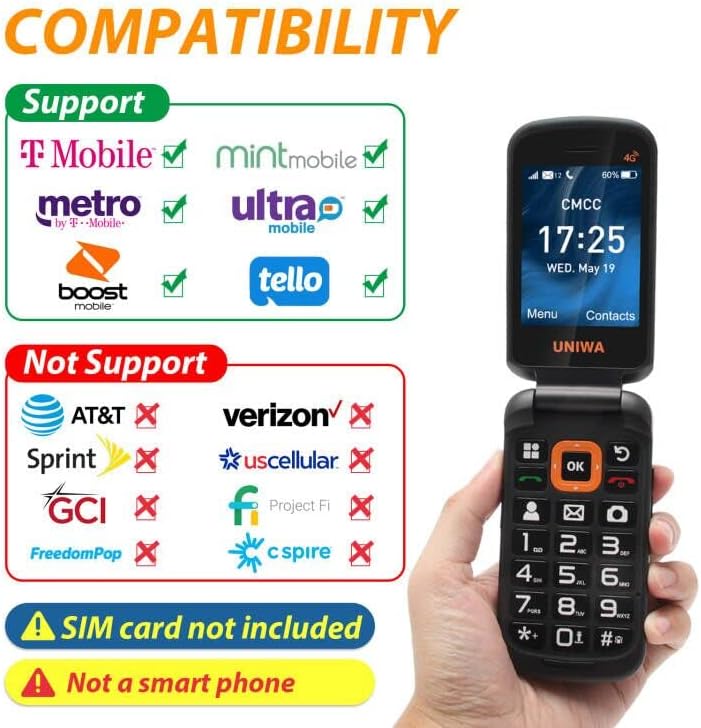
A visual guide to network compatibility for the UNIWA V909T phone, showing supported and unsupported carriers.
7. Specifikace
| Funkce | Specifikace |
|---|---|
| Rozměry produktu | 2.2 x 0.88 x 4.33 palce |
| Hmotnost položky | 9.9 unce |
| Číslo modelu položky | V909T |
| Baterie | 1 lithium-iontová baterie (součástí balení) |
| Operační systém | RTOS |
| BERAN | 48 MB |
| Bezdrátové komunikační technologie | Buněčný |
| Technologie připojení | Wi-Fi |
| Speciální funkce | Basic Phone, Camera, LTE |
| Vstup lidského rozhraní | Buttons, Microphone |
| Audio Jack | Žádný konektor pro sluchátka |
| Form Factor | Skládací obrazovka |
| Výkon baterie | 2250 miliamp hodiny |
| Doba hovoru po telefonu | 6 hodiny |
| Kapacita paměti | 48 MB |
| Velikost stálé obrazovky | 2.8 palce |
| Doba nabíjení | 8 hodiny |
| Buněčná technologie | LTE |
8. Řešení problémů
If you encounter issues with your UNIWA V909T phone, try the following basic troubleshooting steps:
- Telefon se nezapíná: Ensure the battery is charged. Connect the phone to the charging dock and wait a few minutes before attempting to power on again.
- Žádný síťový signál: Check if the SIM card is correctly inserted and locked. Ensure you are within your carrier's service area.
- Nelze uskutečňovat/přijímat hovory: Verify that your SIM card is active and has sufficient credit/plan. Check network signal strength.
- Problémy se zvukem: Ensure the volume is adjusted correctly. If using a hearing aid, confirm HAC settings are enabled if available.
- Tlačítko SOS nefunguje: Confirm that emergency contacts are correctly set up in the SOS settings menu.
For more complex issues, please refer to the manufacturer's support resources or contact customer service.
9. Údržba
To ensure the longevity and optimal performance of your UNIWA V909T phone, follow these maintenance guidelines:
- Čištění: K čištění vnější strany telefonu používejte měkký, suchý hadřík. Nepoužívejte tekuté čisticí prostředky ani abrazivní materiály.
- Péče o baterie: Avoid extreme temperatures. Do not leave the phone fully discharged for extended periods. Use only the provided charger and battery.
- Skladování: Pokud telefon nepoužíváte, skladujte jej na chladném a suchém místě mimo dosah přímého slunečního záření a vlhkosti.
- Ochrana: Consider using a protective case to prevent scratches and damage from accidental drops.
10. Záruka a podpora
For information regarding warranty coverage, technical support, or service, please refer to the warranty card included with your product or visit the official UNIWA webwebu. Uschovejte si účtenku jako doklad o koupi.