
Zavedení
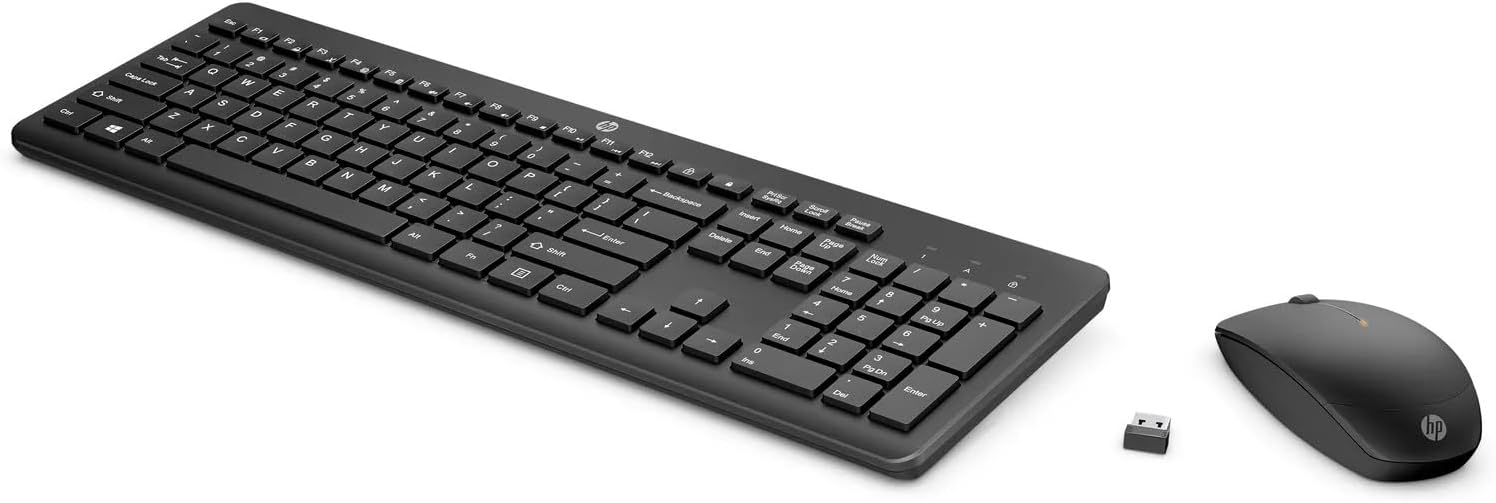
This manual provides instructions for setting up, operating, and maintaining your HP 235 Wireless Keyboard and Mouse Combo. Please read this guide thoroughly before using the product to ensure proper functionality and longevity.
Obsah balení
- HP Wireless Keyboard
- HP Wireless Mouse
- Bezdrátový přijímač s USB typu A
- Baterie AA (předinstalované nebo dodávané samostatně)
Nastavení
Follow these steps to set up your HP 235 Wireless Keyboard and Mouse Combo:
- Vložte baterie: If not already installed, open the battery compartments on the underside of both the keyboard and the mouse. Insert the AA batteries, ensuring correct polarity. Close the compartments.
- Připojení USB přijímače: Locate an available USB Type-A port on your computer. Insert the USB wireless receiver into the port. Your computer should automatically detect the device.
- Zapnutí: Turn on the keyboard and mouse using their respective power switches, usually located on the underside. The devices should connect automatically to the receiver.

Ovládání klávesnice
The HP 235 Wireless Keyboard features a standard layout with additional function keys.
- Standardní klíče: Use the alphanumeric keys for typing text and numbers.
- Funkční klávesy (F1–F12): These keys may have secondary functions (e.g., volume control, media playback, brightness adjustment) when pressed in combination with the Fn key. Refer to your computer's documentation for specific Fn key combinations.
- Numerická klávesnice: The dedicated numeric keypad on the right provides quick entry for numbers and calculations. Ensure Num Lock is active for numeric input.
Ovládání myši
The HP 235 Wireless Mouse provides precise cursor control.
- Levé tlačítko: Primary click function, typically used for selecting items or opening applications.
- Pravé tlačítko: Secondary click function, typically used for context menus.
- Rolovací kolečko: Roll the wheel to scroll through documents or web stránky. Rolovací kolečko může také fungovat jako prostřední tlačítko.
Údržba
Proper maintenance ensures the longevity of your wireless combo.
- Čištění: K čištění povrchů klávesnice a myši používejte měkký, suchý hadřík. V případě odolných nečistot lehceamphadřík vodou. Vyhněte se agresivním chemikáliím nebo abrazivním materiálům.
- Výměna baterie: When performance degrades (e.g., delayed response, intermittent connection), replace the batteries in both the keyboard and mouse with new AA batteries. Dispose of old batteries according to local regulations.
- Skladování: When not in use for extended periods, turn off the devices to conserve battery life. Store the USB receiver in a safe place, possibly inside the mouse's battery compartment if available.
Odstraňování problémů
If you encounter issues with your HP 235 Wireless Combo, try the following solutions:
| Problém | Řešení |
|---|---|
| Klávesnice/myš nereaguje |
|
| Přerušované připojení |
|
| Kurzor myši se pohybuje nepravidelně nebo se nepohybuje plynule |
|
Specifikace
- Značka: HP
- Model: 235
- Technologie připojení: Wireless (USB Type A receiver)
- Kompatibilita operačního systému: Windows 10
- Hmotnost položky: Přibližně 1.83 libry (0.83 kg)
- Rozměry produktu (DxŠxV): Přibližně 18 x 8.8 x 1.9 palce (45.7 x 22.4 x 4.8 cm)
- Zdroj napájení: Napájení z baterií (AA baterie)
Záruka a podpora
For warranty information and technical support, please visit the official HP support webnebo se obraťte na zákaznický servis HP. Uschovejte si účtenku o koupi pro případ reklamace.
Více informací a podpůrných zdrojů naleznete na www.hp.com/support.