
1. Úvod
This user manual provides detailed instructions for the SHREYANS 1D Wired Barcode Scanner, Model KP_306 NEW. It covers essential information regarding product setup, operation, maintenance, and troubleshooting to ensure optimal performance and longevity of your device. Please read this manual thoroughly before using the scanner.
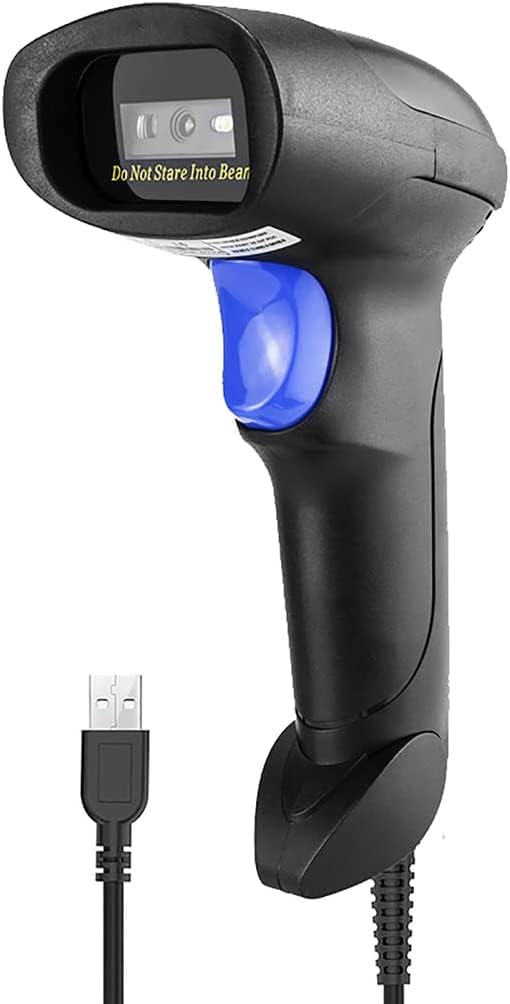
Figure 1: SHREYANS 1D Wired Barcode Scanner, Model KP_306 NEW.
2. Klíčové vlastnosti
- Advanced CCD Image Scanning Technology: Equipped with a CCD sensor for quick and accurate capture of 1D barcodes from both paper and digital screens.
- Durable and Anti-Shock Design: Constructed with high-quality ABS material, designed to withstand drops from up to 2 meters onto concrete surfaces, ensuring long-term reliability.
- Více režimů skenování: Features Key Trigger Mode, Auto-Induction Mode, and Continuous Mode for versatile operation.
- Broad 1D Barcode Compatibility: Supports a wide range of 1D barcode types including UPC-A, UPC-E, EAN-8, EAN-13, ISSN, ISBN, Code 128, GS1-128, Code39, Code93, Code32, Code11, UCC/EAN128, Interleaved 2 of 5, Industrial 2 of 5, Codabar(NW-7), MSI, Plessey, RSS, and China Post.
- Připojení typu „plug and play“: Simple USB 2.0 wired connection for immediate use with PCs and laptops, requiring no additional driver installation.

Figure 2: The scanner's robust anti-shock design, capable of withstanding drops.

Figure 3: The scanner's ability to decode damaged, reflective, colorful, and distorted barcodes.
3. Nastavení
3.1 Obsah balení
Ověřte, zda jsou v balení přítomny všechny položky:
- 1 x SHREYANS 1D Wired Barcode Scanner
- 1 x USB kabel
- 1 x Uživatelská příručka (tento dokument)
3.2 Připojení skeneru
The SHREYANS 1D Wired Barcode Scanner is designed for plug-and-play functionality. Follow these steps to connect it to your computer:
- Vyhledejte volný USB port na vašem počítači nebo notebooku.
- Připojte kabel USB k portu skeneru.
- Plug the other end of the USB cable into the USB port on your computer.
- The scanner will automatically install necessary drivers (if required) and be ready for use. No additional software installation is typically needed.

Figure 4: Illustrates the simple USB 2.0 wired connection process for the scanner.
4. Návod k obsluze
4.1 Režimy skenování
Skener podporuje tři provozní režimy:
- Režim spouštění kláves: Press the trigger button to activate the scan beam and read a barcode. Release the button to stop scanning.
- Auto-Induction Mode: The scanner automatically detects a barcode placed within its scanning range and activates the beam to read it without requiring a trigger press.
- Nepřetržitý režim: The scan beam remains continuously active, allowing for rapid, successive scanning of multiple barcodes without repeatedly pressing the trigger.
4.2 Skenování čárových kódů
Chcete-li naskenovat čárový kód:
- Ensure the scanner is properly connected to your computer.
- Open a text editor, spreadsheet, or POS application where you want the scanned data to appear.
- Namiřte okénko skeneru na čárový kód, který chcete naskenovat.
- Activate the scan beam according to your selected scanning mode (press trigger, or allow auto-induction/continuous mode to activate).
- A successful scan will typically be indicated by an audible beep and/or a visual confirmation (e.g., LED indicator). The barcode data will then appear in your active application.

Figure 5: Demonstrating the scanner's ability to read various 1D barcodes, including those that are damaged or distorted.
4.3 Supported 1D Barcode Types
The SHREYANS 1D Wired Barcode Scanner is compatible with the following 1D barcode symbologies:
- UPC-A, UPC-E, EAN-8, EAN-13
- ISSN, ISBN
- Code 128, GS1-128, Code39, Code93, Code32, Code11
- UCC/EAN128
- Interleaved 2 of 5, Industrial 2 of 5
- Codabar (NW-7)
- MSI, Plessey, RSS
- Čínská pošta
5. Péče a údržba
Proper care ensures the longevity and optimal performance of your barcode scanner:
- Čištění: K čištění vnější strany skeneru použijte měkký, suchý hadřík. Pro skenovací okénko použijte měkký hadřík bez žmolků, který lehce osušíte.ampened with a mild, non-abrasive cleaner. Avoid harsh chemicals or abrasive materials.
- Skladování: Skener skladujte na chladném a suchém místě mimo dosah přímého slunečního záření a extrémních teplot.
- Zacházení: While the scanner has an anti-shock design, avoid unnecessary drops or impacts to prevent potential damage.
- Péče o kabely: Do not bend or twist the USB cable excessively. Ensure it is not pinched or placed under heavy objects.
6. Řešení problémů
If you encounter issues with your SHREYANS barcode scanner, refer to the following table for common problems and solutions:
| Problém | Možná příčina | Řešení |
|---|---|---|
| Skener se nezapne. | USB kabel není správně připojen nebo je USB port vadný. | Ujistěte se, že je kabel USB bezpečně připojen ke skeneru i k počítači. Zkuste jiný port USB. |
| Skener nečte čárové kódy. | Barcode is damaged, poorly printed, or not a supported 1D type. Incorrect scanning mode. | Ensure the barcode is clear and undamaged. Verify it is a supported 1D barcode type. Check the selected scanning mode and adjust if necessary. Ensure the scanner is aimed correctly. |
| Naskenovaná data se zobrazují nesprávně. | Keyboard language settings mismatch or scanner configuration issue. | Check your computer's keyboard language settings. Refer to the scanner's programming guide (if available) for advanced configuration options. |
| Skener je pomalý nebo nereaguje. | Interference from other devices or system resource issues. | Disconnect and reconnect the scanner. Restart your computer. Ensure no other applications are heavily utilizing system resources. |
Pokud problém přetrvává, kontaktujte prosím zákaznickou podporu pro další pomoc.
7. Technické specifikace
| Funkce | Specifikace |
|---|---|
| Značka | SHREYANS |
| Číslo modelu | KP_306 NEW |
| Technologie připojení | USB kabel |
| Zdroj napájení | Elektrický kabel |
| Kompatibilní zařízení | Notebook, PC |
| Hmotnost položky | 200 g |
| Rozměry položky (DxŠxV) | 8 x 5 x 9 centimetrů |
| Výrobce | Shreyans Retail Solutions |
| Země původu | Indie |
8. Záruka a zákaznická podpora
8.1 Informace o záruce
This product comes with a standard manufacturer's warranty. For specific details regarding warranty coverage, duration, and terms, please refer to the warranty card included in your product packaging or contact SHREYANS customer support.
8.2 Zákaznická podpora
For technical support, installation assistance, or any other inquiries, please contact our customer support team:
- Telefon: +91 22-40041231
- Mobile/WhatsApp: +91 9324776246
- E-mail: shreyanspos@gmail.com
Our support team is available 24/7 to assist you with any technical faults or problems.

Figure 6: SHREYANS 24/7 Customer Support Service details.