
TrolMaster DSP-2
TrolMaster DSP-2 240V Program Device Station User Manual
Značka: TrolMaster
Model: DSP-2
1. Úvod a konecview
The TrolMaster DSP-2 240V Program Device Station is an essential module designed to extend the control capabilities of your Hydro X controller. It enables precise on/off programming for connected 240V appliances, offering seamless integration and ease of use within your environmental control system. This device is built for reliability and simple plug-and-play functionality, making it an ideal addition for managing various 240V equipment.

Obrázek 1: Přední strana view of the TrolMaster DSP-2 240V Program Device Station, showing the 240V receptacle and indicator light.
2. Bezpečnostní informace
Please read and understand all safety instructions before installing or operating the DSP-2 module. Failure to do so may result in electric shock, fire, or damage to the device or connected equipment.
- Elektrická bezpečnost: Always ensure the device and the Hydro X controller are disconnected from the main power supply before performing any installation, connection, or maintenance.
- svtage Kompatibilita: This device is designed for 240V applications only. Do not connect it to 120V power sources or appliances.
- Pouze pro vnitřní použití: The DSP-2 is intended for indoor use in dry environments. Do not expose it to water, high humidity, or extreme temperatures.
- Správná připojení: Ensure all cables and plugs are securely connected. Loose connections can cause overheating or malfunction.
- Kvalifikovaný personál: If you are unsure about any part of the installation or operation, consult a qualified electrician or contact TrolMaster support.
3. Obsah balení
Po otevření balení se prosím ujistěte, že obsahuje všechny následující položky:
- 1 x DSP-2 Device Station
- 1 x 16 ft RJ12 Cable
- 1 x 4 ft RJ12 Cable
- 1 x RJ12 T-splitter

Figure 2: Product packaging for the DSP-2, indicating the included components.
4. Vlastnosti produktu
The DSP-2 240V Program Device Station offers the following key features:
- Module for programming on/off cycles for connected 240V appliances.
- Extends control capabilities over any device connected to a TrolMaster Hydro X controller.
- Designed for plug-and-play installation and easy setup.
- Kompaktní a odolný design.
5. Nastavení a instalace
The DSP-2 is designed for simple integration with your existing TrolMaster Hydro X control system. Follow these steps for proper installation:
- Vypnout: Ensure your Hydro X controller and all connected appliances are powered off before beginning installation. This is crucial for safety.
- Connect to Hydro X: Use one of the provided RJ12 cables to connect the DSP-2 module to an available port on your Hydro X controller. If all ports are occupied, use the included RJ12 T-splitter to create an additional connection point.
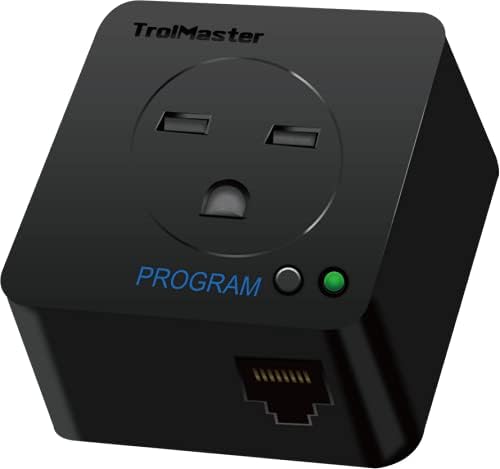
Obrázek 3: Shora dolů view of the DSP-2, highlighting the RJ12 communication port.
- Připojit spotřebič: Plug your 240V appliance into the receptacle on the DSP-2 module. Ensure the appliance's plug is fully inserted and secure.

Obrázek 4: Strana view of the DSP-2, showing the 240V electrical prongs for connection to a power source.
- Zapnutí: Restore power to your Hydro X controller. The DSP-2 module will be automatically detected by the system.
- Konfigurace: Refer to your Hydro X controller's user manual for detailed instructions on how to program and manage the connected 240V appliance through the controller's interface. The DSP-2 acts as an extension, and all control is managed centrally by the Hydro X system.
6. Provoz
The DSP-2 module operates under the command of your TrolMaster Hydro X controller. Once connected and configured, the Hydro X controller will manage the on/off cycles of the 240V appliance plugged into the DSP-2.
- Programování: All programming, scheduling, and manual control of the connected appliance are performed directly through the Hydro X controller's user interface. The DSP-2 does not have independent controls.
- Indikátor stavu: The DSP-2 features a small LED indicator light on its front face. This light provides visual feedback on the module's status (e.g., power on, active output). Refer to your Hydro X controller's manual for specific indicator meanings and troubleshooting based on LED behavior.
7. Údržba
The DSP-2 module is designed for long-term reliability and requires minimal maintenance.
- Čištění: Periodically wipe the exterior of the device with a soft, dry cloth to remove dust and debris. Do not use liquid cleaners, solvents, or abrasive materials, as these can damage the casing nebo vnitřních součástí.
- Spojení: Regularly inspect all RJ12 and power connections to ensure they remain secure and free from damage. Loose connections can lead to intermittent operation or electrical hazards.
- Skladování: If storing the device, keep it in a cool, dry place away from direct sunlight and extreme temperatures.
8. Řešení problémů
If you encounter issues with your DSP-2 module, consider the following troubleshooting steps:
- Device Not Detected by Hydro X:
- Verify the RJ12 cable is securely connected to both the DSP-2 and an active port on the Hydro X controller.
- Try connecting the DSP-2 to a different RJ12 port on the Hydro X controller.
- Ensure the Hydro X controller is powered on and functioning correctly.
- Check the RJ12 cable for any visible damage; try a different cable if available.
- Connected Appliance Not Responding:
- Confirm the 240V appliance is properly plugged into the DSP-2 receptacle.
- Test the appliance by plugging it directly into a known working 240V outlet to ensure the appliance itself is functional.
- Review the programming settings for the DSP-2 within your Hydro X controller to ensure they are correctly configured for the desired operation (e.g., schedule, manual override).
- No Power Indicator Light on DSP-2:
- The DSP-2 receives power through the RJ12 connection from the Hydro X controller. Ensure the DSP-2 is correctly connected to the Hydro X controller.
- Check the power supply to your Hydro X controller to ensure it is receiving power.
If these steps do not resolve the issue, please contact TrolMaster customer support for further assistance.
9. Specifikace
| Model | DSP-2 |
| Rozměry (D x Š x V) | 3 x 3 x 3 palce (7.62 x 7.62 x 7.62 cm) |
| Hmotnost | 0.14 unce (4 gramů) |
| svtage | 240 voltů |
| Barva | Černý |
| Zahrnuté komponenty | Device Module, 16ft RJ12 Cable, 4ft RJ12 Cable, RJ12 T-splitter |
| Konektivita | RJ12 (for Hydro X controller communication) |
| UPC | 606795351732 |
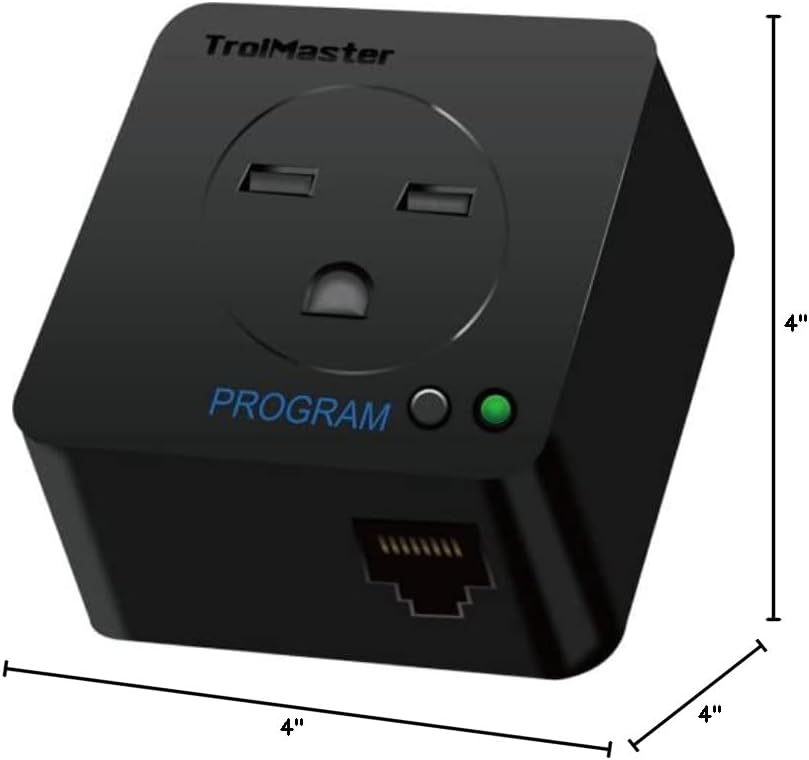
Figure 5: Dimensions of the DSP-2 module.
10. Záruka a podpora
For detailed warranty information, terms, and conditions, please refer to the official TrolMaster website or the documentation provided with your Hydro X control system. In case of technical issues or questions not covered in this manual, please contact TrolMaster customer service directly. When contacting support, please have your product model (DSP-2) and purchase information readily available.
TrolMaster Official Webmísto: www.trolmaster.com
Ask a question about this manual
Ask about setup, troubleshooting, compatibility, parts, safety, or missing instructions. Manuals+ will review the question and use this page’s manual context to help answer it.