
Zavedení
This manual provides essential information for setting up, operating, maintaining, and troubleshooting your HP M27fw 27-inch Full HD (FHD) monitor. Please read these instructions carefully before using your monitor to ensure optimal performance and safety.
Obsah balení
Ověřte, zda jsou v balení přítomny všechny komponenty:
- HP M27fw 27-inch FHD Monitor
- Stojan na monitor (základna a krk)
- Napájecí adaptér a napájecí kabel
- 1 HDMI 1.4 Cable (with HDCP support)
- 1 VGA Cable
- Dokumentace (Stručný návod k instalaci, Záruční informace)
Nastavení
1. Sestavení stojanu monitoru
- Opatrně vyjměte komponenty monitoru a stojanu z obalu.
- Připevněte krk stojanu k panelu monitoru. Ujistěte se, že bezpečně zacvakne na místo.
- Attach the stand base to the stand neck. Tighten any screws if provided, ensuring a stable connection.
2. Připojení monitoru
Před připojením se ujistěte, že je počítač a monitor vypnutý.
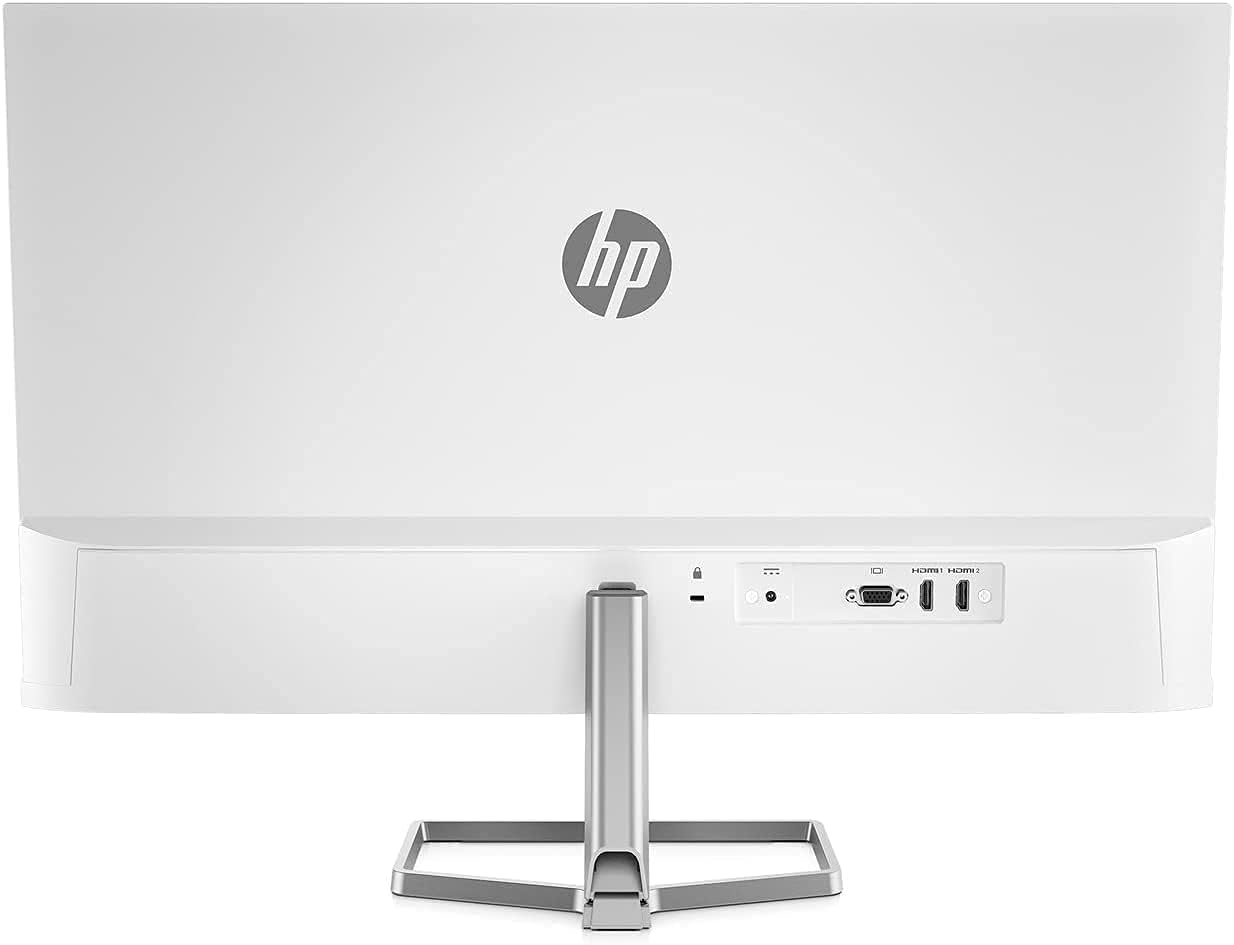
- Připojte video kabel: Connect one end of the HDMI or VGA cable to the corresponding port on your computer's graphics card. Connect the other end to the HDMI or VGA input port on the back of the HP M27fw monitor.
- Připojte napájecí kabel: Connect the power adapter to the monitor's power input port, then plug the power cord into a grounded electrical outlet.
- Zapnutí: Power on your computer, then press the power button on the monitor.
Obsluha monitoru
Zapnutí/vypnutí
Stisknutím tlačítka napájení, které se nachází v pravém dolním rohu rámečku monitoru, jej zapnete nebo vypnete.
Ovládací prvky OSD (On-Screen Display)
The OSD menu allows you to adjust various display settings. Buttons for OSD navigation are typically located on the bottom right bezel.
- Jas: Adjusts the display's luminance.
- Výstup: Zavře nabídku OSD.
- Informace: Displays monitor information such as resolution and refresh rate.
- Řízení: Accesses power-saving options and other system settings.
- Řízení výkonu: Manages power-related functions.
- Ovládání vstupu: Selects the active video input source (HDMI or VGA).
- Ovládání menu: Navigates through OSD options.
- Obraz: Adjusts image-specific settings like sharpness and aspect ratio.
- Barva: Modifies color temperature, contrast, and other color-related settings.
Key Display Features
- Full HD (FHD) Resolution: Enjoy crisp visuals at 1920 x 1080 pixels.
- Obnovovací frekvence 75Hz: Provides smoother motion compared to standard 60Hz displays.
- AMD FreeSync: Synchronizes the monitor's refresh rate with your graphics card's frame rate to reduce screen tearing and stuttering. Ensure your graphics card supports AMD FreeSync for this feature to function.
- Režim slabého modrého světla: Reduces blue light emissions to minimize eye strain during extended use without significantly affecting color quality.
- Antireflexní displej: Minimizes reflections for better viewza různých světelných podmínek.

Nastavení monitoru
Nastavení sklonu
The HP M27fw monitor allows for tilt adjustment to optimize your viewing angle. Gently hold both sides of the monitor panel and tilt it forwards or backwards to your desired position.

Údržba
Čištění monitoru
- Před čištěním vždy vypněte monitor a odpojte napájecí kabel.
- Lehce používejte měkký hadřík, který nepouští vlákna dampened with water or a non-abrasive screen cleaner to wipe the display surface.
- Pro monitor casinPoužijte měkký, suchý hadřík. Nepoužívejte agresivní chemikálie ani abrazivní materiály.
Obecná péče
- Nepokládejte na monitor ani na jeho kabely těžké předměty.
- Nevystavujte monitor přímému slunečnímu záření, nadměrnému teplu nebo vlhkosti.
- Zajistěte dostatečné větrání v okolí monitoru.
Odstraňování problémů
Pokud narazíte na problémy s monitorem, podívejte se na následující běžná řešení:
- Bez napájení:
- Ujistěte se, že je napájecí kabel bezpečně připojen k monitoru i k funkční elektrické zásuvce.
- Verify the power adapter is correctly connected to the monitor.
- Stiskněte tlačítko napájení na monitoru, abyste se ujistili, že je zapnutý.
- Žádný signál / Prázdná obrazovka:
- Check that the video cable (HDMI or VGA) is firmly connected to both the monitor and your computer.
- Ujistěte se, že je počítač zapnutý a není v režimu spánku.
- Use the monitor's OSD menu (Input Control) to select the correct input source.
- Pokud je k dispozici, vyzkoušejte jiný videokabel nebo port na počítači/monitoru.
- Image Issues (e.g., Vertical Line, Flickering, Distortion):
- Zkontrolujte všechna kabelová spojení, zda nejsou uvolněná nebo poškozená.
- Ensure your computer's display resolution and refresh rate are set correctly (e.g., 1920x1080 at 75Hz).
- If using AMD FreeSync, ensure it is enabled in both the monitor's OSD and your graphics card settings.
- If a persistent line or distortion appears, try connecting the monitor to a different computer or using a different video cable to rule out external factors. If the issue persists, the monitor may require service.
- Barvy jsou nesprávné:
- Adjust color settings (Color, Contrast, Brightness) through the OSD menu.
- Ujistěte se, že máte aktuální ovladače grafické karty.
Specifikace
| Funkce | Specifikace |
|---|---|
| Značka | HP |
| Číslo modelu | M27fw |
| Velikost obrazovky | 27 palce |
| Rezoluce | FHD 1920 x 1080 pixelů |
| Poměr stran | 16:9 |
| Obnovovací frekvence | 75 Hz |
| Doba odezvy | 5 milisekund |
| Typ zobrazení | LED |
| Popis povrchu obrazovky | Glossy (Anti-Glare) |
| Jas | 300 cd/m² |
| Kontrastní poměr | 1000:1 |
| Viewúhel | 170 stupňů |
| Pixel Pitch | 0.311 mm |
| Technologie připojení | hdmi, vga |
| Total Number of HDMI Ports | 1 |
| Adaptivní synchronizace | AMD FreeSync |
| Další funkce | Anti Glare Screen, Low Blue Light Mode, On-Screen Controls |
| Barva | Bílý |
| Rozměry položky (D x Š x V) | 1.35 cm H x 23.93 cm Š x 14.01 cm V (bez stojanu) |
| Hmotnost | 7.05 lb (without stand) |
| Montáž VESA | Not VESA mount compatible |
Záruka a podpora
Your HP M27fw monitor is covered by a limited warranty. For detailed warranty information, please refer to the documentation included in your package or visit the official HP support website. For technical assistance, troubleshooting, or service inquiries, contact HP customer support.
Podpora HP Webmísto: www.hp.com/support