
Zavedení
This manual provides essential information for setting up, operating, maintaining, and troubleshooting your HP 2021 15.6-inch Full HD Laptop. This device is equipped with an Intel Celeron N4020 Processor, 8GB DDR4 RAM, and a 256GB Solid State Drive, designed for everyday computing tasks.
Co je v krabici
Carefully unpack your new HP laptop and ensure all components are present.
- Notebook HP 15
- 45 W napájecí adaptér Smart AC
- Documentation (Setup poster)

Image: Contents of the HP laptop box, showing the laptop, AC adapter, and setup poster.
Nastavení
1. První zapnutí a nabíjení
Before first use, connect the AC power adapter to the laptop's power port and then to a wall outlet. Allow the battery to charge sufficiently before disconnecting the power adapter.
2. Windows 10 S Mode Setup
Follow the on-screen prompts to complete the initial Windows 10 S mode setup. This includes selecting your region, keyboard layout, connecting to a Wi-Fi network, and signing in with or creating a Microsoft account.
3. Activating Microsoft Office 365
Váš notebook obsahuje roční předplatné Microsoft Office 365. Aktivace:
- Spusťte libovolnou aplikaci sady Office (např. Word, Excel).
- Start activation by signing in with your Microsoft account. Create one if you do not have one.
- Klikněte na tlačítko „Aktivovat Office“.
- Sign in to your account and follow the prompts.
- Complete steps 1, 2, and 3 as indicated.
- Click "Refresh" once Office is ready.
- Open a document and accept the license agreement.
4. Switching Out of Windows 10 S Mode (Optional)
Windows 10 S mode is designed for security and performance, limiting app installations to the Microsoft Store. If you need to install apps from outside the Microsoft Store, you can switch to regular Windows 10 Home or Pro. This process is irreversible.
- Na počítači se systémem Windows 10 v režimu S otevřete Nastavení > Aktualizace a zabezpečení > Aktivace.
- In the "Switch to Windows 10 Home" or "Switch to Windows 10 Pro" section, select Jděte do obchodu. (Ensure you do not click a "Go to the Store" link in an "Upgrade your edition of Windows" section if present.)
- Na stránce „Přepnout z režimu S“ (nebo podobné), která se zobrazí v obchodě Microsoft Store, vyberte možnost Získat tlačítko.
- After you see a confirmation message on the page, you will be able to install apps from outside of the Microsoft Store.
Obrázek: Boční view of the HP laptop highlighting the SuperSpeed USB Type-C, SuperSpeed USB Type-A, HDMI 1.4b, RJ-45 Ethernet port, headphone/microphone combo, and media card reader.
Návod k obsluze
Klávesnice a touchpad
The laptop features a full-size keyboard with an integrated numeric keypad for enhanced productivity. The precision touchpad supports multi-touch gestures for intuitive navigation.
Připojení periferií
- Zařízení USB: Connect USB devices such as external drives, mice, or keyboards to the SuperSpeed USB Type-A or Type-C ports.
- Externí displej: Use the HDMI 1.4b port to connect an external monitor or projector.
- Síť: Pro kabelové síťové připojení připojte ethernetový kabel k portu RJ-45.
- Zvuk: Plug headphones or an external microphone into the headphone/microphone combo jack.
Webkamera a mikrofon
The integrated HP True Vision 720p HD camera and dual array digital microphones are ready for online meetings and video calls. Ensure appropriate privacy settings are configured in Windows.
Čtečka paměťových karet
Insert compatible SD media cards into the multi-format SD media card reader to access photos and files.

Image: The HP laptop's display area, highlighting the HP True Vision 720p HD Camera, rich 6.5 mm micro-edge Full HD IPS display, Intel UHD Graphics, and tuned stereo speakers.
Údržba
Péče o baterie
To prolong battery life, avoid fully discharging the battery frequently. For optimal performance, use the provided HP 45W Smart AC power adapter. The laptop supports HP Fast Charge, allowing it to charge up to 50% in approximately 45 minutes when powered off.
Čištění notebooku
Použijte měkký hadřík, který nepouští vlákna dampDisplej opláchněte vodou nebo čističem obrazovek. Na klávesnici a šasi použijte měkký, suchý hadřík. Nepoužívejte agresivní chemikálie ani abrazivní materiály.
Aktualizace softwaru
Regularly check for and install Windows updates to ensure your system has the latest security patches and performance improvements. You can find these in Nastavení > Aktualizace a zabezpečení > Windows Update.
Odstraňování problémů
Notebook se nezapíná
- Ujistěte se, že je síťový adaptér bezpečně připojen k notebooku i k funkční zásuvce.
- Ověřte funkčnost elektrické zásuvky zapojením jiného zařízení.
- Pokud je baterie zcela vybitá, může trvat několik minut nabíjení, než se notebook zapne.
Battery Not Holding Charge / Only Works When Plugged In
- Check the battery health status in Windows settings.
- Ensure all drivers, especially power management drivers, are up to date.
- If the issue persists, the battery may require service or replacement. Contact HP Support for assistance.
Žádné Wi-Fi připojení
- Zkontrolujte, zda je v nastavení systému Windows povolena Wi-Fi.
- Restartujte router a modem.
- Ujistěte se, že jsou nainstalovány a aktuální ovladače Wi-Fi.
Problémy se zobrazením
- If the screen is blank, try connecting an external monitor to determine if the issue is with the laptop's display or graphics card.
- Jas displeje upravte pomocí funkčních kláves.
V případě složitějších problémů se obraťte na podporu HP webnebo kontaktujte jejich zákaznický servis.
Specifikace
Below are the key technical specifications for your HP 2021 15.6" FHD Laptop:
| Funkce | Specifikace |
|---|---|
| Značka | HP |
| Název modelu | HP 2021 |
| Velikost obrazovky | 15.6 palce |
| Rozlišení displeje | FHD (1920 x 1080) IPS, Anti-Glare |
| Procesor | Intel Celeron N4020 (up to 2.8 GHz, 2 Cores, 4MB Cache) |
| Paměť RAM | 8GB DDR4 SDRAM |
| Skladování | 256GB SSD (jednotka SSD) |
| Grafika | Grafika Intel UHD |
| Operační systém | Windows 10 S |
| Porty | 1x SuperSpeed USB Type-C, 2x SuperSpeed USB Type-A, 1x HDMI 1.4b, 1x RJ-45, 1x Headphone/Microphone Combo, 1x AC Smart Pin |
| Bezdrátové připojení | Wi-Fi 802.11a/b/g/n/ac, Bluetooth |
| Webvačka | Kamera HP True Vision 720p HD s integrovanými duálními digitálními mikrofony |
| Baterie | 3-Cell, 41 WHr, Integrated Lithium Ion |
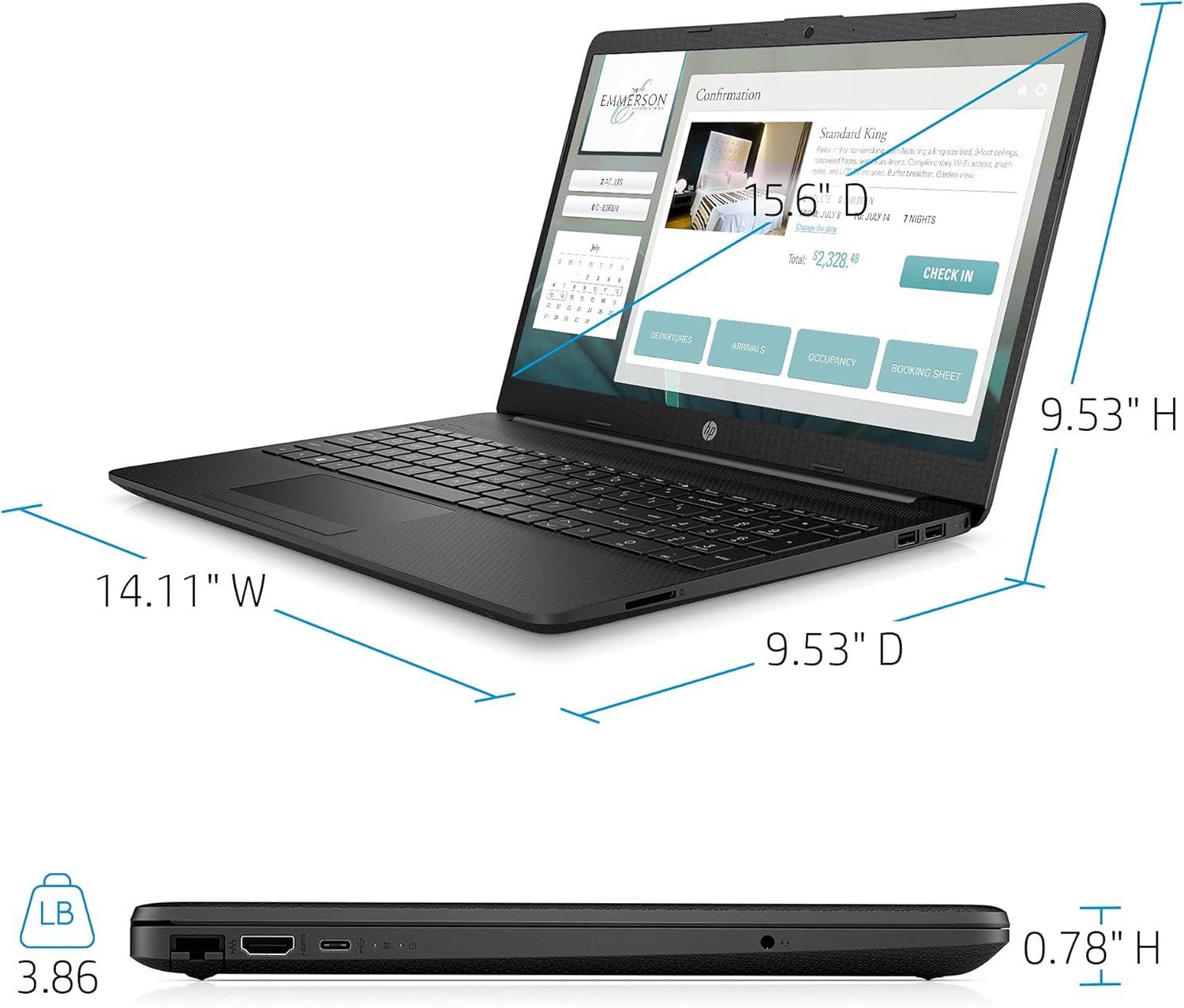
| Hmotnost | 3.86 libry |
| Barva | Černý |

Image: Physical dimensions of the HP laptop (14.11" W x 9.53" D x 0.78" H) and weight (3.86 lbs).
Informace o záruce
Your HP 2021 15.6" FHD Laptop comes with a limited manufacturer's warranty. Please refer to the documentation included in the box for specific terms, conditions, and duration of your warranty. Keep your proof of purchase for warranty claims.
Podpora
Pro další pomoc, technickou podporu nebo servisní dotazy navštivte oficiální stránky podpory HP website or contact HP customer service directly. You can find contact information and resources on the HP webmísto: