
1. Úvod
This instruction manual provides detailed information on the setup, operation, maintenance, and troubleshooting for your Aibecy withzoom 1080P 3X Optical Zoom Webcam. Please read this manual thoroughly before using the product to ensure proper functionality and to prevent damage.
2. Konec produktuview
2.1 Klíčové vlastnosti
- 1080P Full HD Video Resolution
- Objektiv s 3x optickým zoomem
- 355° Horizontal Rotation and 90° Vertical Rotation
- Provoz dálkového ovládání
- USB připojení
- Compatible with Windows, Mac, Linux, and Chromebook operating systems
- Infrared (IR) support
2.2 Obsah balení
Ověřte, zda jsou v balení přítomny všechny položky:
- Aibecy withzoom Webvačka
- Dálkové ovládání
- Napájecí adaptér
- USB kabel
- Montážní konzola
- Šrouby pro instalaci

Obrázek 1: Obsah balení
2.3 Schéma produktu

Obrázek 2: Přední strana View a Komponenty
- Objektiv HD: Nahrává video ve vysokém rozlišení.
- 355° Rotating Gimbal: Allows for wide-angle coverage and precise positioning.
- IR Infrared Receiver: Přijímá signály z dálkového ovladače.
- Indikátor napájení: Zobrazuje stav napájení zařízení.
- Remote Indicator: Lights up when a remote control signal is received.
3. Průvodce nastavením
3.1 Způsoby instalace
The Aibecy withzoom webcam offers flexible installation options:
- Umístění stolu: Place the camera on a flat surface such as a desk or conference table.
- Držák na strop: Use the included mounting bracket and screws to attach the camera to the ceiling. Ensure the image flip function is enabled if mounting upside down.
- Držák držáku: Attach the camera to a tripod or other compatible bracket using the screw hole at the bottom.

Figure 3: Installation Options
3.2 Připojení fotoaparátu
Follow these steps to connect your webvačka:
- Připojení napájení: Connect the AC power adapter to the camera's 12V power input port and plug it into a power outlet.
- USB připojení: Connect the USB cable from the camera's USB port to an available USB port on your computer (Windows, Mac, Linux, or Chromebook). The camera is plug-and-play and does not require driver software.
- Optional RS232/RS422 Connection: If advanced control via RS232 or RS422 is required, connect the appropriate cable from the camera to your control device.

Obrázek 4: Schéma zapojení
Once connected, open your video conferencing software (e.g., Zoom, Skype, Microsoft Teams) and select the Aibecy withzoom camera as your video input device.
4. Návod k obsluze
4.1 Základní obsluha
- Zapnutí: After connecting the power adapter, the camera will automatically power on. The Power Indicator light will illuminate.
- Vypnout: Disconnect the power adapter from the camera.
4.2 Používání dálkového ovladače
The included remote control allows for easy adjustment of camera functions.

Obrázek 5: Webcam and Remote Control
- Camera Selection Buttons: If multiple cameras are connected, use these buttons to select the camera you wish to control.
- Řízení rychlosti otáčení: Adjust the pan/tilt speed for smoother movements.
- Ovládání otáčení/naklánění/přiblížení (PTZ): Use the directional arrows to pan (left/right) and tilt (up/down) the camera. Use the zoom in/out buttons to adjust the optical zoom.
- Preset Function Area: Save and recall specific camera positions and zoom levels using the preset buttons.
4.3 Camera Movement and Zoom
The camera supports wide-range movement for comprehensive coverage:
- Horizontální rotace: The camera head can rotate 355 degrees horizontally.
- Vertikální rotace: The camera head can tilt 90 degrees vertically.
- Optický zoom: Utilize the 3X optical zoom to focus on specific areas without loss of image quality.
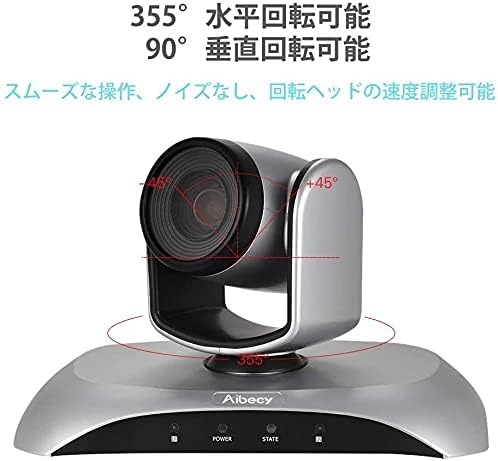
Figure 6: Camera Rotation Capabilities
4.4 Image Flip Function
If the camera is mounted upside down (e.g., on a ceiling), you can use the image flip function to correct the video orientation.

Figure 7: Image Flip Function in Use
Refer to the remote control instructions for the specific button to activate or deactivate the image flip function.
5. Údržba
Správná údržba zajistí dlouhou životnost a optimální výkon vašeho webvačka.
- Čištění: K čištění těla fotoaparátu používejte měkký, suchý hadřík. Na objektiv použijte speciální hadřík a roztok na čištění objektivů. Nepoužívejte abrazivní čisticí prostředky ani rozpouštědla.
- Skladování: Pokud fotoaparát delší dobu nepoužíváte, skladujte jej na chladném a suchém místě mimo dosah přímého slunečního záření a extrémních teplot.
- Zacházení: Zabraňte pádu fotoaparátu na zem nebo jeho vystavení silným nárazům.
6. Řešení problémů
If you encounter issues with your Aibecy withzoom webcam, refer to the table below for common problems and solutions.
| Problém | Možná příčina | Řešení |
|---|---|---|
| No image or video output | Power not connected; USB cable loose; Incorrect camera selected in software. | Ensure power adapter is securely connected. Check USB cable connection. Select the Aibecy withzoom camera in your video conferencing software settings. |
| Dálkové ovládání nefunguje | Batteries low/dead; Obstruction between remote and camera; Remote not pointed at IR receiver. | Replace remote control batteries. Ensure a clear line of sight to the camera's IR receiver. Point the remote directly at the camera. |
| Image is upside down | Camera mounted upside down and image flip not activated. | Activate the image flip function using the remote control. |
| Špatná kvalita videa | Insufficient lighting; Dirty lens; Network bandwidth issues. | Ensure adequate lighting in the room. Clean the camera lens. Check your internet connection speed. |
7. Technické specifikace
| Funkce | Specifikace |
|---|---|
| Značka | Aibecy |
| Číslo modelu | withzoom |
| Rozlišení záznamu videa | 1080p |
| Optický zoom | 3X |
| Horizontální rotace | 355° |
| Vertikální rotace | 90° |
| Technologie připojení | USB |
| Kompatibilní zařízení | Windows, Mac, Linux, Chromebook |
| Speciální funkce | Remote Control, Infrared |
| Stabilizace obrazu | Žádný |
| Rozměry balení | 29.7 x 22.4 x 19.9 cm |
| Hmotnost položky | 1.51 kg |
8. Informace o podpoře
For further assistance or inquiries not covered in this manual, please refer to the official Aibecy support channels or contact your retailer. Keep your purchase receipt for warranty purposes.