
1. Úvod
The BlueRigger Digital Optical Audio Splitter 1x3 (Model TS301) is an active Toslink splitter designed to distribute a single optical audio source to three separate output devices. This device supports various audio formats including Dolby Digital 5.1 (AC-3), DTS 5.1, and PCM/LPCM 2.0, with sampling rates up to 96 kHz. It is ideal for home theater systems, allowing multiple audio devices to share a single digital optical audio signal without signal degradation.
This active splitter regenerates and enhances the signal strength, ensuring consistent audio quality across all connected outputs. Unlike passive splitters, it requires external power to operate effectively.
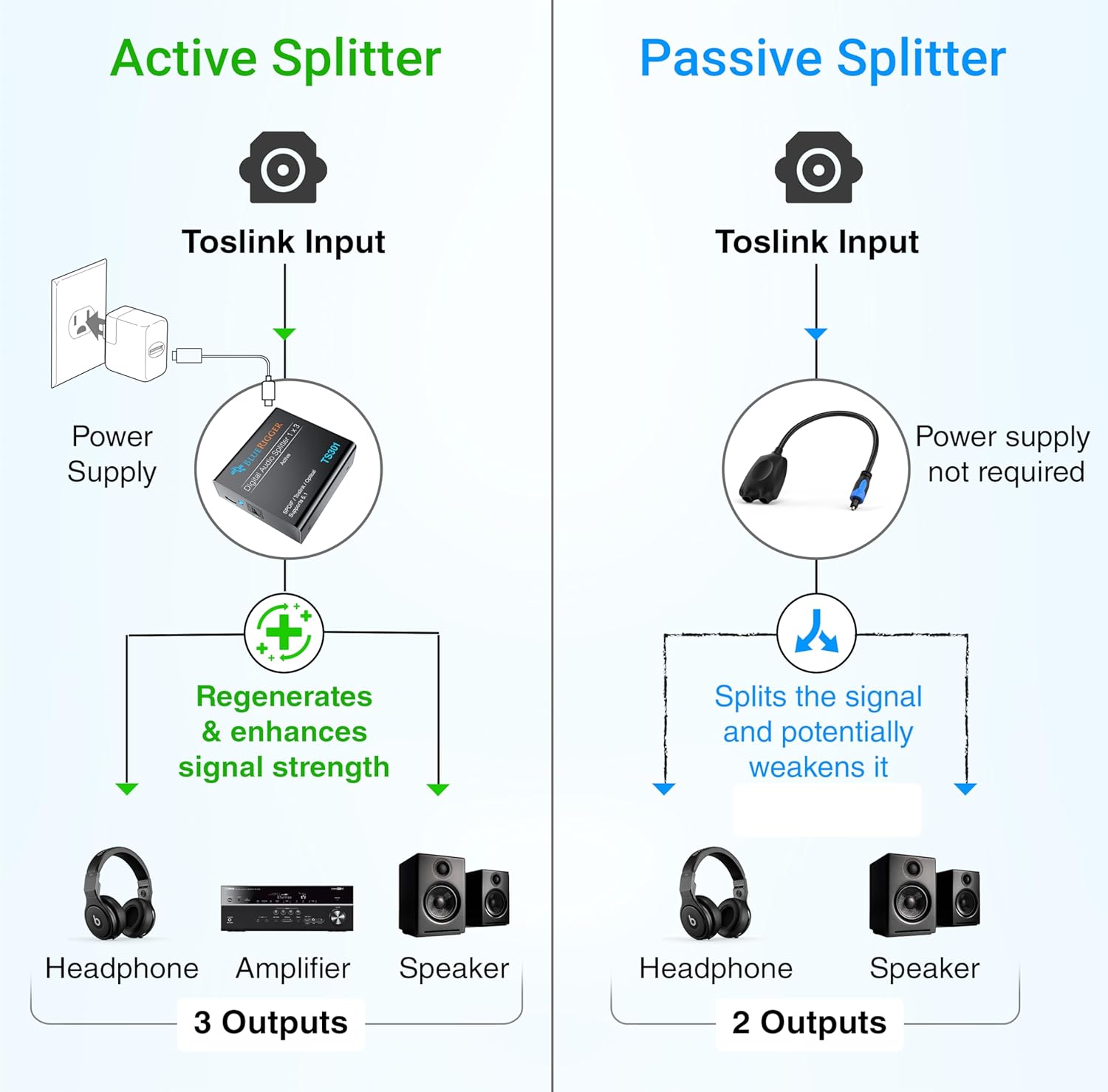
Figure 1: Comparison of Active vs. Passive Splitters. Active splitters regenerate and enhance the signal, while passive splitters may weaken it.
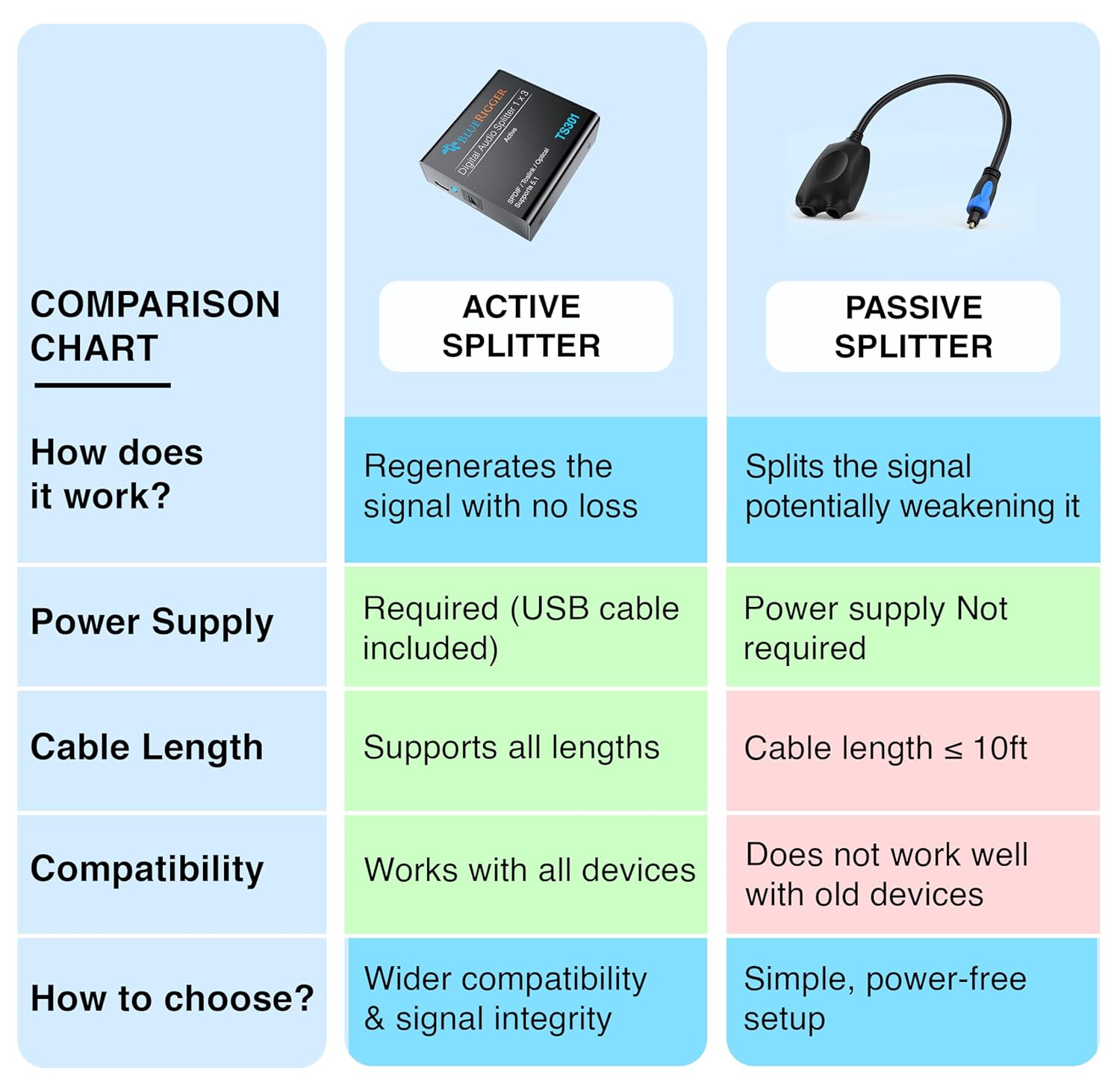
Figure 2: Detailed comparison chart highlighting how active splitters regenerate signals with no loss, require power, support all cable lengths, and offer wider compatibility.
2. Vlastnosti
- Active 1x3 Optical Splitter: Splits one optical audio source to three output devices simultaneously.
- Plug and Play: Simple connection with no complex setup required. All outputs function concurrently.
- Široká kompatibilita: Compatible with soundbars, CD/DVD players, home theater systems, speakers, recorders, receivers, HDTVs, Apple TV, cable boxes, gaming consoles (Xbox 360, Xbox One, PS4, PS3), Bluetooth transmitters, and DAC audio converters.
- Podpora formátů zvuku: Supports Dolby Digital 5.1 (AC-3), DTS 5.1, and PCM/LPCM 2.0.
- Vysoce věrný zvuk: Features low-jitter optical fiber for clear audio transmission.
- Odolná konstrukce: Built with a robust PVC outer layer, metal housing, and 24K gold-plated connectors for optimal signal transfer and longevity.
- Regenerace signálu: Actively amplifies and regenerates the optical signal to prevent loss over longer cable runs or multiple connections.

Figure 3: Internal components highlighting the durable construction, including a smart IC chip, nickel-plated connectors, and metal housing.
3. Obsah balení
- BlueRigger Digital Optical Audio Splitter 1x3 (Model TS301)
- USB Power Cable (AC adapter not included)
- Uživatelská příručka
4. Pokyny k nastavení
Follow these steps to connect your BlueRigger Digital Optical Audio Splitter:
- Připojení napájení: Connect the provided USB power cable to the splitter's power input. Plug the other end of the USB cable into a compatible USB power source (e.g., a USB port on your TV, a USB wall adapter, or a computer USB port). Note: An AC adapter is not included.
- Vstupní připojení: Connect your digital optical audio source (e.g., HDTV, game console, Blu-ray player) to the splitter's single optical input port labeled "IN" using a Toslink cable.
- Výstupní připojení: Connect your three desired audio output devices (e.g., soundbar, A/V receiver, headphones via Bluetooth transmitter) to the splitter's three optical output ports labeled "OUT1", "OUT2", and "OUT3" using Toslink cables.
- Zabezpečená připojení: Ensure all Toslink cables are fully inserted into their respective ports until you hear a click, indicating a secure connection. Loose connections can result in signal loss or intermittent audio.
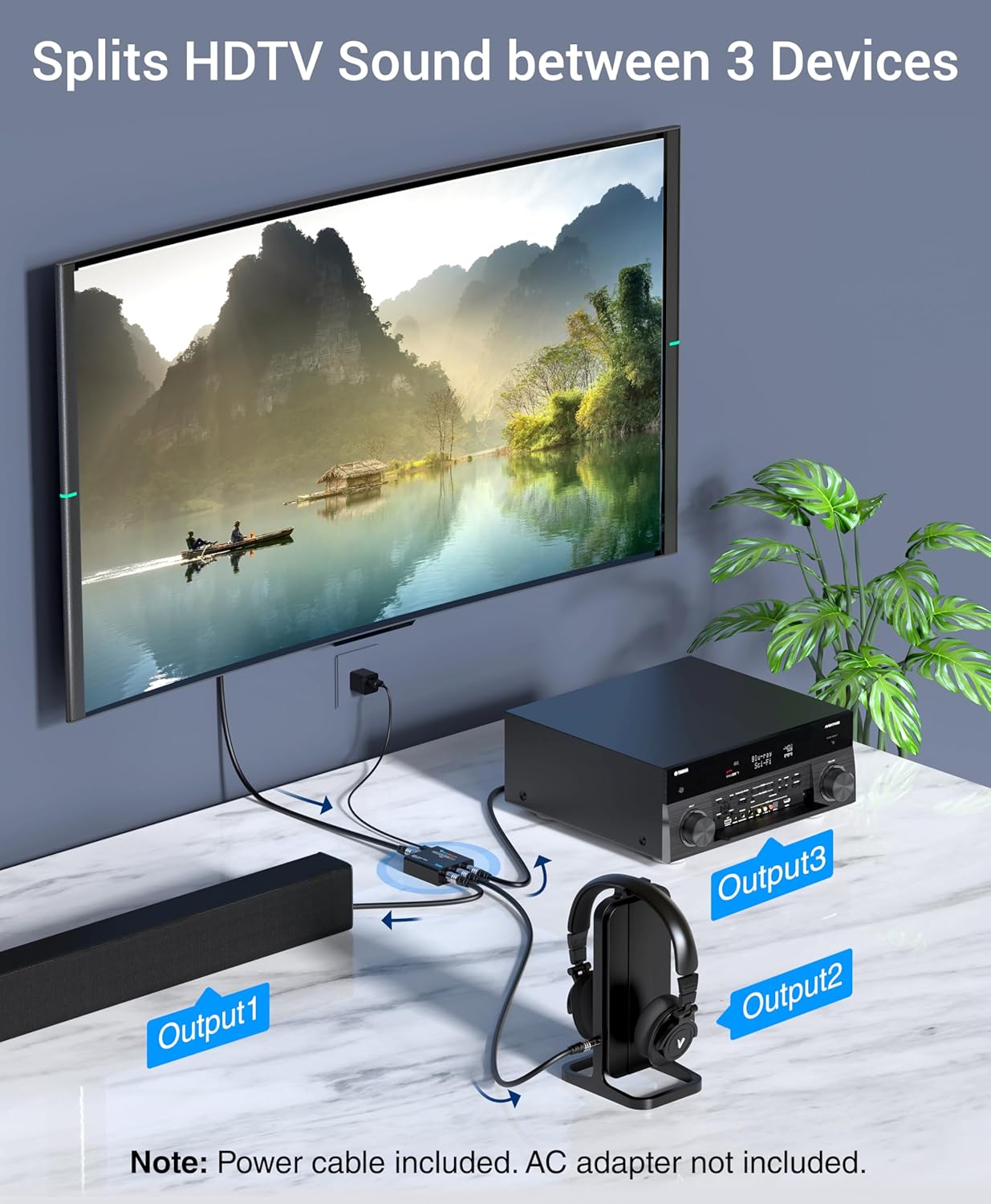
Obrázek 4: Přample setup demonstrating how the splitter connects an HDTV to three output devices: a soundbar, headphones, and an A/V receiver.
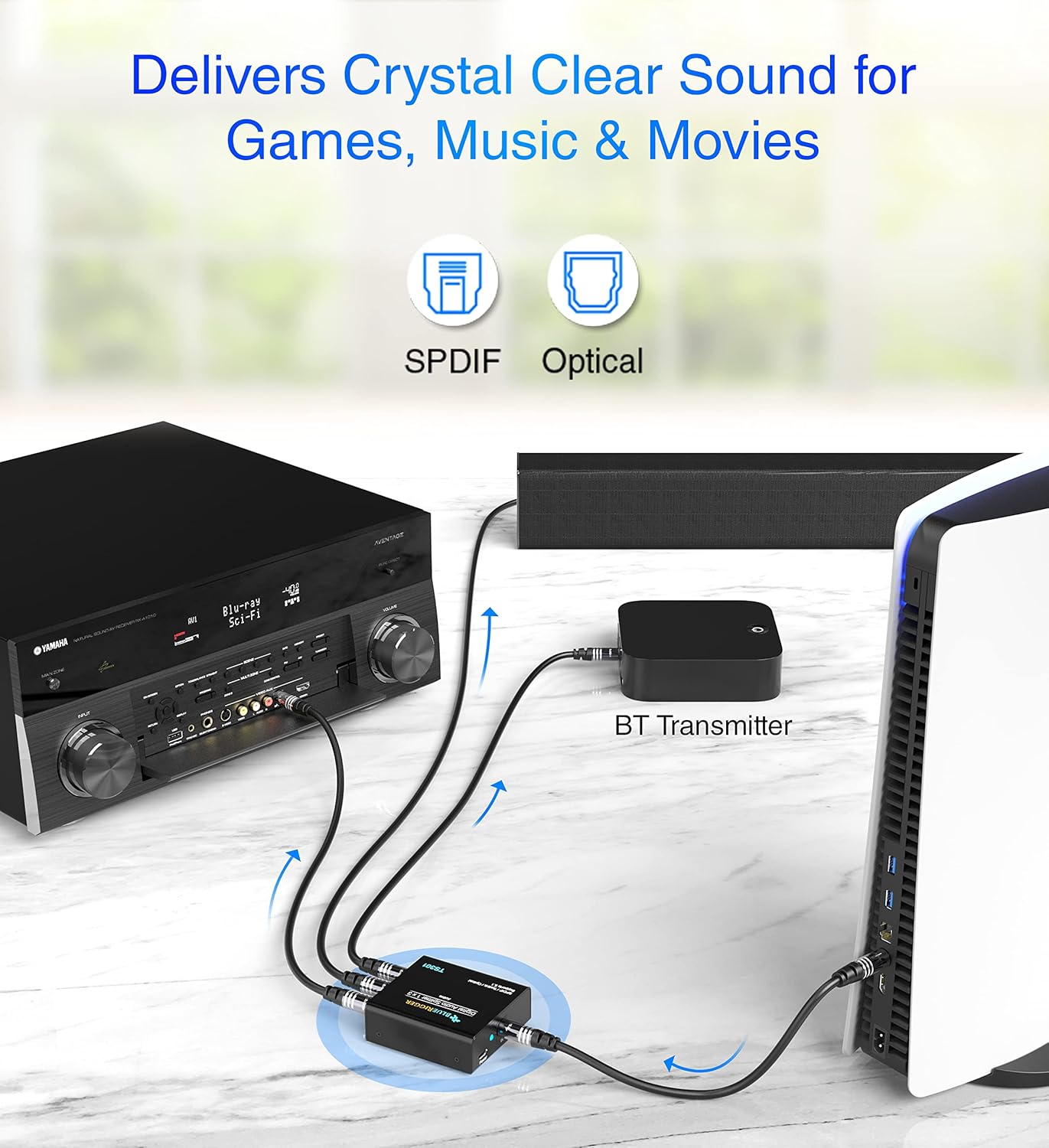
Obrázek 5: Přample setup for gaming, showing a PS5 connected to an A/V receiver and headphones through the splitter.
Video 1: An official BlueRigger video demonstrating the setup and functionality of the 1x3 Digital Optical Audio Splitter.
5. Návod k obsluze
Once all connections are secure and the splitter is powered, the device will automatically distribute the optical audio signal from your source to all three connected output devices. All three outputs can operate simultaneously.
- Zdroj zvuku: Ensure your audio source (e.g., TV, game console) is configured to output audio via its digital optical (Toslink) port.
- Výstupní zařízení: Verify that your receiving devices (soundbar, receiver, headphones) are set to accept input from their respective digital optical ports.
- Ovládání hlasitosti: Adjust volume levels directly on your output devices. The splitter does not control audio volume.

Figure 6: The splitter enables multiple users to listen to audio simultaneously, such as with headphones, without disturbing others.
Video 2: An official BlueRigger video demonstrating the functionality of the Toslink Audio Splitter TS301.
6. Údržba
To ensure the longevity and optimal performance of your BlueRigger Digital Optical Audio Splitter, follow these maintenance guidelines:
- Čištění: K čištění vnější strany zařízení používejte měkký, suchý hadřík. Nepoužívejte tekuté čisticí prostředky ani abrazivní materiály.
- Péče o přístav: Keep the optical ports free from dust and debris. Use protective caps when not in use.
- Správa kabelů: Avoid sharp bends or kinks in optical cables, as this can damage the fiber optic strands and lead to signal loss.
- Prostředí: Store and operate the splitter in a cool, dry environment, away from direct sunlight, heat sources, and excessive moisture.
7. Řešení problémů
If you encounter issues with your BlueRigger Digital Optical Audio Splitter, refer to the following troubleshooting tips:
- Žádný audio výstup:
- Ensure the splitter is properly powered. The power indicator LED should be illuminated.
- Verify all Toslink cables are securely connected to both the splitter and the audio devices. A loose connection is a common cause of no audio.
- Check the audio output settings on your source device (e.g., TV, game console) to ensure it is set to output digital optical audio.
- Confirm your receiving devices are set to the correct optical input.
- Test with different Toslink cables to rule out a faulty cable.
- Intermittent Audio or Static:
- Check for loose Toslink cable connections. Re-insert cables firmly.
- Ensure the audio format being transmitted is supported by the splitter and your receiving devices (Dolby Digital 5.1, DTS 5.1, PCM/LPCM 2.0). The splitter does ne support Dolby Digital Plus, Dolby TrueHD, DTS-HD, or uncompressed 7.1-channel PCM.
- Verify that the optical cables are not damaged or bent sharply.
- LED Indicator is Off:
- Ensure the USB power cable is correctly connected to the splitter and a working USB power source.
- Zkuste jiný zdroj napájení USB nebo kabel.
- Unwanted Device Activation (e.g., speakers turning on):
- Some active splitters may pass a weak signal even when the source is off, potentially activating sensitive audio equipment. If this is an issue, consider disconnecting the splitter's power when not in use, or using a passive splitter if your setup allows for it (passive splitters may weaken the signal and are generally suitable for shorter cable runs and fewer outputs).
8. Specifikace
| Funkce | Detail |
|---|---|
| Značka | BlueRigger |
| Model | TS301 |
| Typ rozhraní | Optické (Toslink) |
| Vstupní porty | 1 x Toslink Female |
| Výstupní porty | 3 x Toslink Female |
| Režim zvukového výstupu | Stereo, prostorový zvuk |
| Podporované zvukové formáty | Dolby Digital 5.1 (AC-3), DTS 5.1, PCM/LPCM 2.0 |
| Max Sampsazba ling | 96 kHz |
| Unsupported Audio Formats | Dolby Digital Plus, Dolby TrueHD, DTS-HD, uncompressed 7.1-channel PCM |
| Napájení | USB Powered (cable included, AC adapter not included) |
| Materiál | Hliník |
| Hmotnost položky | 0.15 kg |
| UPC | 618952286535 |

Figure 7: The splitter offers wide compatibility with numerous input sources like TVs, game consoles, and Blu-ray players, and output devices such as soundbars, receivers, and headphones.
9. Záruka a podpora
BlueRigger provides a Doživotní záruka for this product. For technical assistance, troubleshooting, or warranty claims, please contact BlueRigger customer support. Refer to the official BlueRigger webkonkrétní kontaktní údaje naleznete na webových stránkách nebo v nákupní dokumentaci.