
1. Úvod
The Sonoro Easy is a compact and portable digital radio designed to provide powerful sound for various occasions. It features FM, DAB+, and Bluetooth connectivity, along with an AUX input for external devices. Its small footprint allows for easy placement in any room, and the intuitive controls ensure straightforward operation. The integrated LED night light and USB charging port add to its versatility, making it an ideal companion for your bedroom, kitchen, or on the go.
2. Nastavení
2.1 Vybalení
Carefully remove the Sonoro Easy radio from its packaging. Ensure all components are present:
- Sonoro Easy Digital Radio
- Napájecí adaptér
- Uživatelská příručka (tento dokument)
2.2 Zapnutí
The Sonoro Easy can be powered via the included mains adapter or by batteries for portable use.
Napájení ze sítě:
- Connect the power adapter to the "12V - 2.5A" DC input port on the rear of the radio.
- Zapojte napájecí adaptér do vhodné zásuvky.
- Stiskněte tlačítko Moc button on the front panel to turn on the device.
Napájení baterie:
The radio supports alkaline or NiMH rechargeable batteries (not included). The battery compartment is located on the bottom of the unit.
- Otevřete kryt bateriového prostoru.
- Vložte požadované baterie a dbejte na správnou polaritu.
- Bezpečně zavřete kryt bateriového prostoru.
- Stiskněte tlačítko Moc tlačítko pro zapnutí zařízení.

Figure 1: Rear panel connections including power input and antenna.
2.3 Initial Setup and Antenna
Upon first power-on, the radio may perform an initial scan for DAB+ stations. Extend the telescopic antenna for optimal reception for both FM and DAB+ radio.

Figure 2: Front display and controls of the Sonoro Easy radio.
3. Návod k obsluze
3.1 Základní ovládací prvky
The Sonoro Easy features intuitive controls located on the top and front panels.
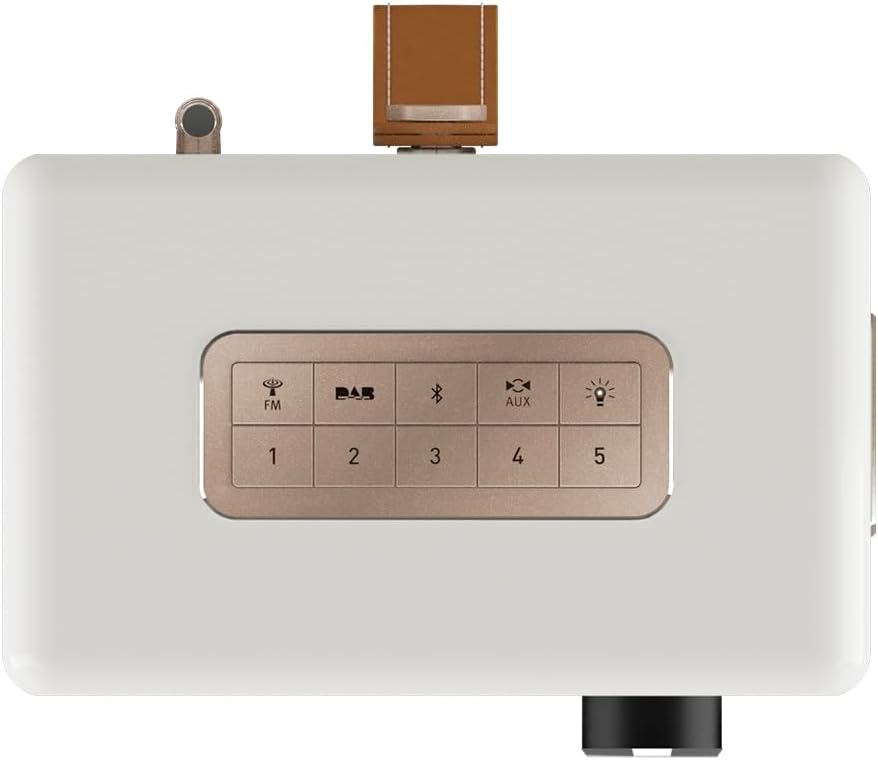
Figure 3: Top panel controls including preset and function buttons.
- Vypínač: Zapíná nebo vypíná rádio.
- Otočný knoflík: Používá se pro ovládání hlasitosti, navigaci v menu a výběr.
- Přednastavená tlačítka (1–5): Uložte si a vyvolejte své oblíbené rozhlasové stanice.
- Function Buttons (FM, DAB, Bluetooth, AUX, Night Light): Vyberte požadovaný provozní režim.
3.2 Radio Modes (DAB+ / FM)
DAB+ rádio:
- Stiskněte tlačítko DAB button to enter DAB+ mode.
- The radio will automatically scan for available stations.
- Use the rotary knob to scroll through the station list and press to select.
- Chcete-li stanici uložit jako předvolbu, stiskněte a podržte jedno z tlačítek Přednastavená tlačítka (1–5) until the display confirms.
FM rádio:
- Stiskněte tlačítko FM pro vstup do režimu FM.
- Use the rotary knob to manually tune to a frequency or press and hold to auto-scan for the next available station.
- Chcete-li stanici uložit jako předvolbu, stiskněte a podržte jedno z tlačítek Přednastavená tlačítka (1–5) until the display confirms.
3.3 Připojení Bluetooth
- Stiskněte tlačítko Bluetooth button to activate Bluetooth pairing mode. The display will show "Pairing".
- On your mobile device, enable Bluetooth and search for "Sonoro Easy".
- Select "Sonoro Easy" from the list of available devices to connect.
- Po připojení můžete streamovat zvuk ze zařízení do rádia.
3.4 Vstup AUX
- Connect an external audio device (e.g., MP3 player) to the "AUX IN" port on the rear of the radio using a 3.5mm audio cable (not included).
- Stiskněte tlačítko AUX tlačítko pro výběr režimu vstupu AUX.
- Ovládejte přehrávání z externího zařízení.
3.5 Budík a časovač vypnutí
The Sonoro Easy features a dual alarm function and a sleep timer.
- Nastavení budíků: Access the alarm settings through the menu (usually by pressing the rotary knob and navigating). Follow on-screen prompts to set alarm time, source (buzzer, FM, DAB+), and volume.
- Časovač vypnutí: The sleep timer allows the radio to turn off automatically after a set period. This function is typically accessed via the menu.
- Funkce odložení: When an alarm sounds, pressing the rotary knob or a designated snooze button will temporarily pause the alarm.
3.6 Night Light and USB Charging
- Noční světlo: Stiskněte tlačítko Noční světlo button (often represented by a light bulb icon) to activate the integrated LED night light on the rear of the unit. This provides subtle background illumination.
- USB nabíjení: The USB port (5V - 2.1A) on the side of the radio can be used to charge compatible smartphones or other small devices. Connect your device using its charging cable.
4. Údržba
4.1 Čištění
To maintain the appearance of your Sonoro Easy radio:
- Před čištěním se ujistěte, že je zařízení vypnuté a odpojené ze zásuvky.
- K otření povrchů použijte měkký, suchý hadřík, který nepouští vlákna.
- Pro odolné skvrny lehce otřeteampen the cloth with water. Avoid abrasive cleaners, solvents, or chemical sprays.
4.2 Skladování
When not in use for extended periods, store the radio in a cool, dry place away from direct sunlight and extreme temperatures. If using batteries, remove them to prevent leakage.
5. Řešení problémů
| Problém | Možná příčina | Řešení |
|---|---|---|
| Žádné napájení / Rádio se nezapne. | Power adapter not connected or faulty. Batteries depleted or incorrectly inserted. | Check power adapter connection and wall outlet. Replace or recharge batteries, ensuring correct polarity. |
| Poor radio reception (DAB+ / FM). | Anténa není vysunutá. Slabý signál v oblasti. Rušení od jiné elektroniky. | Plně vysuňte teleskopickou anténu. Zkuste přemístit rádio. Přesuňte se dál od jiných elektronických zařízení. |
| Zařízení Bluetooth se nemůže připojit. | Radio not in pairing mode. Device too far away. Bluetooth disabled on source device. | Ensure radio is in Bluetooth pairing mode. Move device closer to the radio. Enable Bluetooth on your source device. |
| Z AUX vstupu nejde zvuk. | AUX cable not connected properly. Radio not in AUX mode. Volume too low on radio or source device. | Check AUX cable connection. Select AUX mode on the radio. Increase volume on both the radio and the external device. |
| Displej je příliš jasný nebo příliš tmavý. | Je třeba upravit nastavení jasu displeje. | Jas displeje upravte v nastavení nabídky rádia. |
6. Specifikace
| Funkce | Detail |
|---|---|
| Značka | Sonoro |
| Číslo modelu | 88f59bc4-6f28-4e95-95de-ba49a597f237 |
| Barva | Bílá matná |
| Technologie ladění | DAB+, FM |
| Konektivita | Bluetooth, AUX In, USB (charging) |
| Speciální funkce | Portable, Dual Alarm, Sleep Timer, Snooze, Dimmable Display, LED Night Light, USB Charging Port |
| Zdroj napájení | Mains (12V - 2.5A), Battery (Alkaline or NiMH, not included) |
| USB výstup | 5V - 2.1A (for charging external devices) |
| Rozměry (D x Š x V) | 18.6 cm x 15.6 cm x 11.8 cm |
| Reproduktor | 3" Full-range speaker with Bass Reflex tube |
| Materiál | Hand-polished wooden cabinet |
7. Záruka a podpora
7.1 Záruka na produkt
The Sonoro Easy Digital Radio comes with a 2letá záruka výrobce od data nákupu. Tato záruka se vztahuje na vady materiálu a zpracování při běžném používání. Uschovejte si prosím doklad o koupi pro případ uplatnění záruky.
Záruka se nevztahuje na:
- Škody způsobené nehodou, zneužitím, nesprávným použitím, povodní, požárem, zemětřesením nebo jinými vnějšími příčinami.
- Škody způsobené používáním výrobku mimo povolené nebo zamýšlené použití popsané v této příručce.
- Damage caused by service performed by anyone who is not an authorized representative of Sonoro.
- Products or parts that have been modified to alter functionality or capability without the written permission of Sonoro.
7.2 Zákaznická podpora
For technical assistance, warranty claims, or further information, please contact Sonoro customer support. Contact details can typically be found on the official Sonoro webmístě nebo na obalu produktu.
Please visit the official Sonoro website for the most up-to-date support information and contact options.