
Zavedení
This manual provides essential instructions for setting up, operating, maintaining, and troubleshooting your Nyko 86158 Core Wireless Controller for Xbox One. Please read this manual thoroughly before use to ensure optimal performance and longevity of your device.
Obsah balení
Ověřte, zda jsou v balení obsaženy všechny níže uvedené položky:
- Nyko 86158 Core Wireless Controller
- Bezdrátový přijímač USB
- USB nabíjecí kabel
- Uživatelská příručka (tento dokument)
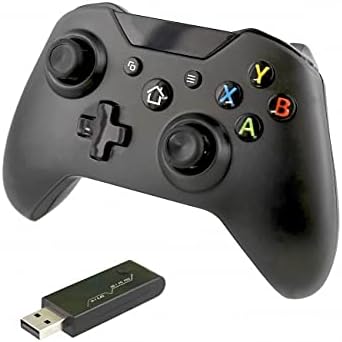
Image: Nyko 86158 Core Wireless Controller shown alongside its USB wireless receiver dongle. This illustrates the main components included in the package.

Obrázek: Detail view of the USB wireless receiver dongle. This dongle is essential for establishing a wireless connection between the controller and the Xbox One console or PC.

Image: The USB charging cable provided with the controller. This cable is used to recharge the controller's internal battery.
Rozložení ovladače
Familiarize yourself with the buttons and features of your Nyko Core Wireless Controller.
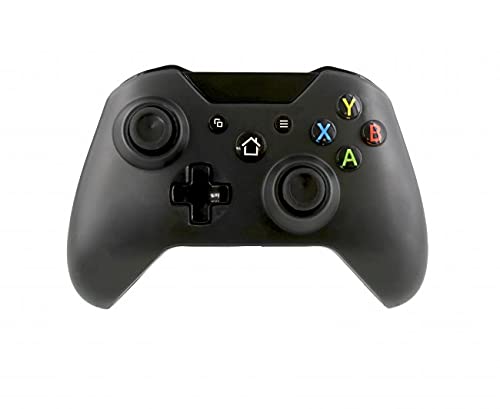
Obrázek: Přední strana view of the Nyko 86158 Core Wireless Controller, showing the two analog sticks, D-pad, A/B/X/Y buttons, View button, Menu button, Xbox button, and Share button.
- Levá analogová páčka: Pro ovládání pohybu a kamery.
- Pravá analogová páčka: Pro ovládání a zaměřování kamery.
- D-Pad: Directional input for menu navigation and specific game actions.
- Tlačítka A/B/X/Y: Tlačítka primárních akcí.
- View Tlačítko: Accesses additional in-game information or menus.
- Tlačítko nabídky: Opens game menus or system options.
- Tlačítko Xbox: Powers on the controller, accesses the Xbox Guide, or returns to the home screen.
- Tlačítko Sdílet: Captures screenshots or video clips (functionality may vary by console/game).

Obrázek: Nahoře view of the Nyko 86158 Core Wireless Controller, highlighting the Left and Right Bumpers (LB, RB), Left and Right Triggers (LT, RT), and the micro-USB charging port located at the front.
- Left Bumper (LB) / Right Bumper (RB): Ramenní tlačítka pro různé herní akce.
- Left Trigger (LT) / Right Trigger (RT): Analog triggers for precise input, often used for acceleration or aiming.
- Micro-USB port: Used for charging the controller.

Obrázek: Zpět view of the Nyko 86158 Core Wireless Controller, showing the battery compartment cover. This is where the batteries are inserted or the rechargeable battery pack is housed.
Pokyny pro nastavení
1. Napájení regulátoru
The Nyko 86158 Core Wireless Controller requires batteries to operate wirelessly. It is compatible with standard AA batteries or a rechargeable battery pack (sold separately).
- Vyhledejte přihrádku na baterie na zadní straně ovladače.
- Zatlačte na západku a vysuňte kryt baterie.
- Insert two (2) AA batteries, ensuring correct polarity (+/-). If using a rechargeable pack, insert it as directed by the pack's instructions.
- Nasaďte kryt baterie.
2. Connecting to Xbox One
To connect your wireless controller to an Xbox One console:
- Insert the USB Wireless Receiver Dongle into an available USB port on your Xbox One console.
- Turn on your Xbox One console.
- Stiskněte a podržte Tlačítko Xbox on the controller until it powers on. The Xbox button will flash.
- The controller will automatically attempt to pair with the USB receiver. Once connected, the Xbox button on the controller will glow solid.
- If the controller does not connect automatically, press the small pairing button on the USB receiver dongle, then press and hold the Tlačítko Xbox on the controller until it pairs.
3. Connecting to PC (Optional)
The controller can also be used with a PC. Ensure your PC has an available USB port for the wireless receiver.
- Insert the USB Wireless Receiver Dongle into an available USB port on your PC.
- The PC should automatically install the necessary drivers. This may take a few moments.
- Stiskněte a podržte Tlačítko Xbox on the controller until it powers on.
- The controller will connect to the receiver. The Xbox button will glow solid once connected.
Návod k obsluze
Zapnutí/vypnutí
- Zapnout: Stiskněte a podržte Tlačítko Xbox until the controller vibrates and the light turns on.
- Vypnout: Stiskněte a podržte Tlačítko Xbox for 5-10 seconds until the controller powers down. The controller will also automatically turn off after a period of inactivity to conserve battery life.
Nabíjení ovladače
If using a rechargeable battery pack (not included) or if the controller has a built-in rechargeable battery:
- Connect the small end of the USB Charging Cable to the micro-USB port on the front of the controller.
- Connect the larger end of the USB Charging Cable to an available USB port on your Xbox One console or a USB wall adapter (5V, 1A recommended).
- The indicator light on the controller (usually the Xbox button) will show charging status (e.g., flashing while charging, solid when fully charged).
- Po dokončení nabíjení kabel odpojte.
Údržba
- Čištění: K čištění ovladače používejte měkký, suchý hadřík. Nepoužívejte agresivní chemikálie ani abrazivní materiály.
- Skladování: Regulátor skladujte na chladném a suchém místě mimo dosah přímého slunečního záření a extrémních teplot.
- Péče o baterie: If not using the controller for an extended period, remove the AA batteries to prevent leakage.
- Vyhněte se kapkám: Chraňte ovladač před pády a nárazy, které by mohly poškodit vnitřní součásti.
Odstraňování problémů
Ovladač se nezapíná
- Ujistěte se, že jsou baterie vloženy správně se správnou polaritou.
- Replace old batteries with new ones, or fully charge the rechargeable battery pack.
Controller Not Connecting to Xbox One/PC
- Ensure the USB Wireless Receiver Dongle is securely plugged into an active USB port.
- Vyzkoušejte jiný port USB.
- Ujistěte se, že je ovladač zapnutý.
- Re-attempt the pairing process: press the pairing button on the dongle, then press and hold the Xbox button on the controller.
- Restartujte konzoli Xbox One nebo počítač.
Vstupní zpoždění nebo výpadky
- Ensure the controller is within range of the USB receiver (typically up to 30 feet/9 meters).
- Minimalizujte rušení od jiných bezdrátových zařízení (např. Wi-Fi routerů, bezdrátových telefonů).
- Ujistěte se, že má ovladač dostatečné nabití baterie.
Specifikace
| Značka | Nyko |
| Číslo modelu | 86158 |
| Kompatibilní zařízení | Xbox One, PC |
| Typ ovladače | Bezdrátový herní ovladač |
| Technologie připojení | Wireless (2.4GHz via USB dongle) |
| Zdroj napájení | Batteries (AA or rechargeable pack) |
| Rozměry (D x Š x V) | 8.3 x 18.4 x 15.2 cm (přibližně 3.27 x 7.24 x 5.98 palce) |
| UPC | 743840861584 |
| ASIN | B09BD8813T |
Záruka a podpora
For warranty information or technical support, please refer to the documentation included with your purchase or visit the official Nyko webUschovejte si doklad o koupi pro případ reklamace.