
Bytech BYOPCA103BK
Uživatelská příručka k nabíjecímu kabelu BYTECH 3 v 1
Model: BYOPCA103BK | Brand: Bytech
Zavedení
The BYTECH 3-in-1 Charging Cable (Model BYOPCA103BK) is a versatile USB cable designed for charging and syncing a wide range of electronic devices. It features a standard USB Type-A connector on one end and a multi-connector head on the other, providing Lightning, USB Type-C, and Micro USB compatibility. This cable offers a convenient solution for users with multiple device types, ensuring high-speed charging and data transfer.
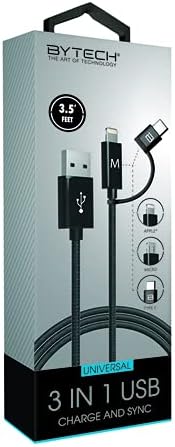
Image: The BYTECH 3-in-1 Charging Cable, showcasing its universal compatibility with various device types.
Nastavení a připojení
Using the BYTECH 3-in-1 Charging Cable is straightforward. Follow these steps to connect your devices:
- Identify the USB-A End: Locate the standard USB Type-A connector. This end typically connects to a power adapter (wall charger), a computer's USB port, or a power bank.
- Připojení ke zdroji napájení/počítači: Insert the USB Type-A end firmly into a compatible USB port on your charging device or computer.
- Select the Appropriate Device Connector: The other end of the cable features three integrated connectors:
- Blesk: For Apple iPhone, iPad, and iPod devices.
- USB Type-C: For newer Android smartphones, tablets, laptops, and other USB-C enabled devices.
- Micro USB: For older Android smartphones, tablets, power banks, and various other electronic gadgets.
- Připojte se k vašemu zařízení: Carefully insert the chosen connector into the charging/data port of your electronic device. Ensure it is inserted correctly to avoid damage.
- Ověřit připojení: Vaše zařízení by mělo indikovat, že se nabíjí nebo je připojeno k přenosu dat.
Návod k obsluze
This cable supports both charging and data synchronization, depending on the connected device and power source.
Nabíjení
- Connect the USB-A end to a compatible USB wall adapter, car charger, or power bank.
- Connect the appropriate device connector (Lightning, USB-C, or Micro USB) to your smartphone, tablet, or other compatible device.
- The cable is designed for high-speed charging, ensuring efficient power delivery to your device.
Synchronizace dat
- Connect the USB-A end to a USB port on your computer (PC or Mac).
- Connect the appropriate device connector to your smartphone or tablet.
- Your computer should recognize the connected device, allowing you to transfer files, photos, videos, and other data. Follow your device's specific instructions for data transfer.
Údržba a péče
To ensure the longevity and optimal performance of your BYTECH 3-in-1 Charging Cable, please follow these maintenance guidelines:
- Vyvarujte se ohýbání: Kabel nadměrně neohýbejte ani nekrimpujte, zejména v blízkosti konektorů, mohlo by dojít k poškození vnitřních vodičů.
- Správné odpojení: Při odpojování od zařízení nebo zdroje napájení vždy tahejte za konektor, nikoli za samotný kabel.
- Udržujte v suchu: Protect the cable from moisture and liquids. Do not use it in wet environments.
- Jemně čistěte: If necessary, wipe the cable and connectors with a soft, dry cloth. Avoid using harsh chemicals or abrasive materials.
- Skladování: Store the cable in a cool, dry place, away from direct sunlight and extreme temperatures. Coiling it loosely can prevent tangles and damage.
- Pravidelně kontrolujte: Periodically check the cable and connectors for any signs of wear, fraying, or damage. Discontinue use if damage is observed.
Odstraňování problémů
If you encounter issues with your BYTECH 3-in-1 Charging Cable, try the following solutions:
- Zařízení se nenabíjí:
- Ujistěte se, že jsou oba konce kabelu pevně připojeny.
- Zkuste jiný napájecí adaptér nebo port USB.
- Test the cable with a different device to rule out a device-specific issue.
- Check if the correct connector (Lightning, USB-C, Micro USB) is being used for your device.
- Pomalé nabíjení:
- Ensure your power adapter provides sufficient output (e.g., 5V/2A or higher for faster charging).
- Během nabíjení se vyhněte nadměrnému používání zařízení.
- Zavřete aplikace na pozadí v zařízení.
- Problémy s přenosem dat:
- Ensure the USB-A end is connected to a computer's data-enabled USB port, not just a charging port.
- Check your device's settings to ensure it's set to "File Transfer" or "MTP" mode, not just "Charging."
- Zkuste restartovat zařízení i počítač.
- Poškození kabelu: If the cable appears frayed, bent, or damaged, discontinue use immediately and replace it.
Specifikace
| Funkce | Detail |
|---|---|
| Značka | Bytech |
| Název modelu | 3 v 1 |
| Číslo modelu položky | BYOPCA103BK |
| Typ konektoru | USB Type-A, USB Type-C, Lightning |
| Typ kabelu | USB |
| Kompatibilní zařízení | Notebook, osobní počítač, tablet, smartphone |
| Speciální funkce | Vysoká rychlost |
| Doporučená použití | Nabíjení elektronických zařízení |
| Barva | Černý |
| Pohlaví konektoru | Muž k muži |
| Tvar | Byt |
| Počet kolíků | 8 |
| Vnitřní/venkovní použití | Krytý |
| Počet položek | 1 |
| Typ zákaznického balíčku | coiled in protective tubing |
| Maximální objemtage | 5 voltů |
| Vnější materiál | Plastic/Rubber |
| Výrobce | BYTECH |
| UPC | 805112034765 |
| Rozměry balení | 7 x 5 x 3 palce |
| Hmotnost položky | 1 libry |
| ASIN | B09BBK4X64 |
| Datum první dostupnosti | 27. července 2021 |
Záruka a podpora
For warranty information or technical support regarding your BYTECH 3-in-1 Charging Cable, please refer to the manufacturer's official webnebo se obraťte na jejich zákaznický servis. Uschovejte si účtenku jako doklad o koupi pro případné reklamace.
Manufacturer: BYTECH
Další pomoc získáte na adrese www.bytechintl.com (napřample link, actual link not provided in input).
Ask a question about this manual
Ask about setup, troubleshooting, compatibility, parts, safety, or missing instructions. Manuals+ will review the question and use this page’s manual context to help answer it.