
Zavedení
Thank you for choosing the Hiseeu 12-inch LCD Wireless Security Camera System. This system provides high-definition surveillance with easy setup and advanced features for both indoor and outdoor use. This manual will guide you through the installation, operation, and maintenance of your security system to ensure optimal performance and longevity.

Image: The Hiseeu 12-inch LCD Wireless Security Camera System, showing the NVR monitor and four cameras.
Obsah balení
Po obdržení pečlivě zkontrolujte obsah balení. Pokud některé položky chybí nebo jsou poškozené, kontaktujte zákaznickou podporu.
- 12-inch LCD NVR (with 3TB HDD pre-installed)
- Wireless 5MP Cameras (4 units, including 2 PTZ cameras)
- Napájecí adaptéry pro NVR a kamery
- HDMI kabel
- USB myš
- LAN kabel
- Montážní šrouby a hmoždinky
- Varovné nálepky
- Uživatelská příručka (tento dokument)

Image: An illustration of the complete package contents, including the NVR, cameras, cables, and accessories.
Průvodce nastavením
1. Zapnutí
- Connect the power adapter to the NVR and plug it into an electrical outlet. The NVR will power on automatically.
- Connect each camera to its respective power adapter and plug them into electrical outlets.

Image: A camera connected to its power adapter and plugged into a wall outlet.

Image: The NVR monitor connected to its power adapter.
2. Camera Pairing (Automatic)
The cameras and NVR are pre-paired at the factory. Once both the NVR and cameras are powered on, the cameras will automatically connect to the NVR and display video on the integrated 12-inch LCD monitor.

Image: An illustration demonstrating the simple wireless connection between the cameras and the NVR.
3. NVR Connection (Optional for Remote Access)
Pro místní viewing and recording, an internet connection is not required. However, to enable remote viewing via smartphone or PC, connect the NVR to your router using the provided LAN cable.

Image: The NVR connected to a Wi-Fi router using a LAN cable.
4. Remote Access Setup (EseeCloud App)
Download the "EseeCloud" app from your smartphone's app store or the PC software from the official Hiseeu website. Follow the in-app instructions to add your NVR system using its unique ID or QR code for remote monitoring.

Image: A smartphone displaying live camera feeds through the EseeCloud app.

Image: A smartphone screen showing a QR code for easy device pairing with the EseeCloud app.

Image: Live camera feeds displayed across various devices including a desktop monitor, tablet, and smartphone.
Návod k obsluze
1. Živě View
Once powered on, the NVR's integrated LCD monitor will display live feeds from all connected cameras. You can switch between single-camera view a mřížka s více kamerami view using the NVR's interface or the EseeCloud app.
2. Nahrávání
- Nepřetržité nahrávání: The system is configured for 24/7 continuous recording by default, utilizing the 3TB HDD. With H.265+ compression, it can store over 90 days of footage. Older data is automatically overwritten when the HDD is full.
- Záznam detekce pohybu: The system supports AI human motion detection. When motion is detected, the system can trigger recording and send push notifications to your smartphone via the EseeCloud app.
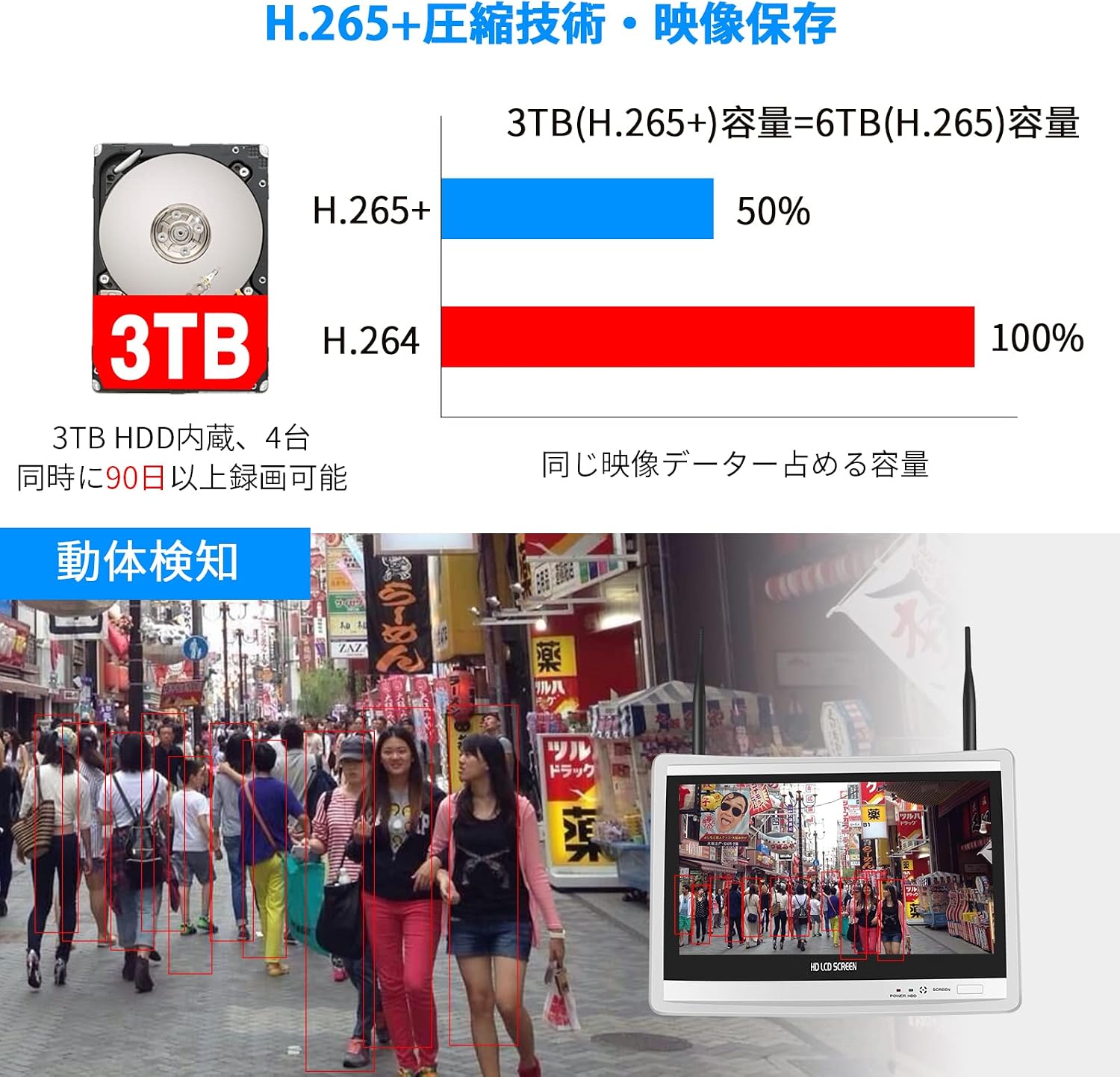
Image: A graphic illustrating the efficiency of H.265+ compression and a scene highlighting motion detection zones.

Image: A visual representation of H.265+ compression allowing for over 90 days of continuous 24-hour recording on a 3TB HDD.

Image: An illustration showing the AI human motion detection feature tracking a person's movement around a property.

Image: A smartphone screen displaying a push notification from the EseeCloud app, indicating an event.
3. Přehrávání
Přístup zaznamenán footage through the NVR interface or the EseeCloud app. You can search for specific events by time or motion detection triggers.
4. Obousměrný zvuk
The cameras feature built-in microphones and speakers, enabling two-way communication. Use the EseeCloud app to speak through the camera and listen to audio from the camera's location.

Image: A woman using her smartphone to communicate with a delivery person via the camera's two-way audio feature.

Obrázek: Bývalý/áample of two-way audio in action, showing a person at a gate communicating with someone inside.
5. PTZ Control (for PTZ Cameras)
The system includes two PTZ (Pan-Tilt-Zoom) cameras. These cameras offer 355° horizontal rotation and 90° vertical tilt, providing nearly 360° coverage. Control the camera's movement remotely via the NVR interface or the EseeCloud app.

Image: A PTZ camera illustrating its pan (355°) and tilt (90°) capabilities for wide area coverage.
6. Režimy nočního vidění
The cameras are equipped with IR-CUT functionality and offer multiple night vision modes, including infrared night vision and full-color night vision, ensuring clear images up to 25 meters even in complete darkness.

Image: A comparison of different night vision modes: smart mode, infrared night vision, and full-color night vision.
Údržba
1. Čištění
Regularly clean the camera lenses and NVR screen with a soft, dry cloth to ensure clear image quality. Avoid using harsh chemicals or abrasive materials.
2. Aktualizace firmwaru
Periodically check the Hiseeu official website or the EseeCloud app for available firmware updates. Keeping your system updated ensures optimal performance, security, and access to new features.
3. HDD Management
The 3TB HDD automatically overwrites old footage. No manual management is typically required. If you wish to back up specific footage, use the NVR's export function to a USB drive.
Odstraňování problémů
- Žádný obraz na obrazovce: Ensure both the NVR and all cameras are properly powered on. Check all cable connections. If using an external monitor, ensure the HDMI cable is securely connected.
- Kamery se nepřipojují: The cameras are pre-paired. If a camera loses connection, try restarting both the camera and the NVR. Ensure cameras are within range of the NVR's wireless signal.
- Vzdálený ViewNefunguje: Verify that the NVR is connected to your router via LAN cable and has internet access. Check your router's internet connection. Ensure the EseeCloud app is updated and the device is correctly added.
- Špatná kvalita obrazu: Clean the camera lens. Ensure there are no obstructions. Check the camera's resolution settings in the NVR or app.
- Problémy s obousměrným zvukem: Ensure the microphone and speaker settings are enabled in the app. Check for any physical obstructions around the camera's mic/speaker.
Specifikace
| Funkce | Specifikace |
|---|---|
| Značka | Hiseeu |
| Číslo modelu | 8WK-12V-4HBC23-3T |
| Technologie připojení | Bezdrátový |
| Rozlišení záznamu videa | 1920p (5 Megapixels) |
| Speciální funkce | Waterproof, AI Motion Detection, Two-Way Audio, Night Vision |
| Počet kanálů | 8 (rozšiřitelné až na 10) |
| Maximální kapacita paměti | 3 TB (HDD included) |
| Zdroj napájení | Elektrický kabel |
| Kompatibilní zařízení | TV, Monitor, PC, Smartphone |
| Typ objektivu | Širokoúhlý (3.6 mm) |
| Formát signálu | Digitální |
| Rozměry produktu | 26 x 33 x 27.5 cm |
| Doporučené použití | Venkovní, Vnitřní |
| Hodnocení voděodolnosti | IP66 |
Záruka a podpora
Your Hiseeu Wireless Security Camera System comes with a 12-month warranty. In case of initial defects, a free exchange is possible within 30 days of purchase.
For any questions, technical assistance, or warranty claims, please contact Hiseeu customer support via email or LINE. Refer to the contact information provided in your package or on the official Hiseeu webmísto.
We are committed to providing reliable products and excellent customer service. Your satisfaction is our priority.