
1. Úvod
This manual provides detailed instructions for the installation, operation, and maintenance of your HARFO D02 Smart Deadbolt. The HARFO D02 is an advanced 4-in-1 keyless entry door lock designed for enhanced security and convenience in homes and offices. It offers multiple unlocking methods including fingerprint, passcode, access card, and traditional key.
Please read this manual carefully before installation and use to ensure proper functionality and to maximize the lifespan of your smart deadbolt. Keep this manual for future reference.
2. Konec produktuview a funkce
The HARFO D02 Smart Deadbolt combines modern design with robust security features, providing a versatile access solution.
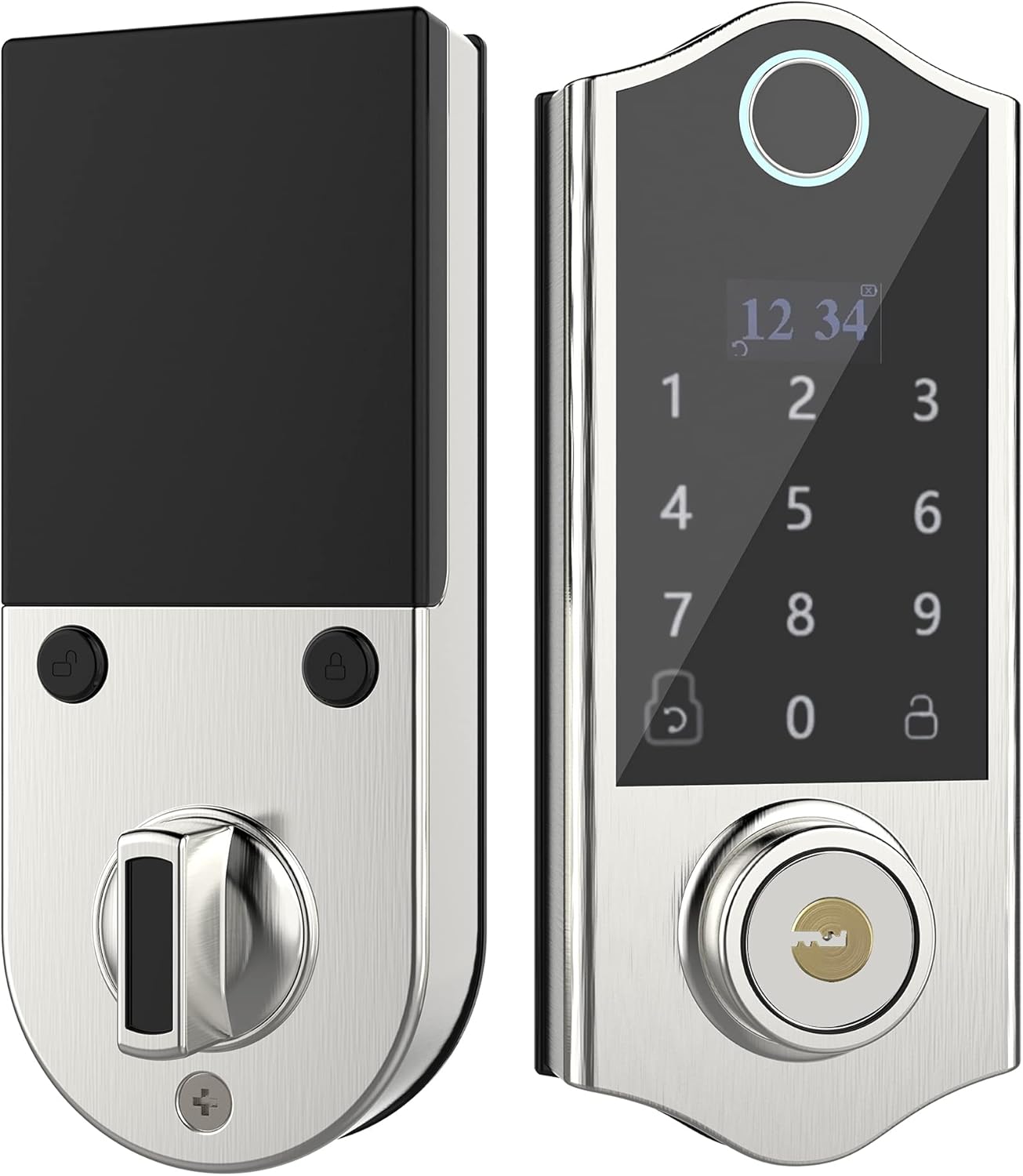
Obrázek: Přední a zadní strana view of the HARFO D02 Smart Deadbolt, showcasing its sleek silver finish and integrated keypad and fingerprint sensor on the exterior unit, and the thumb-turn on the interior unit.
Klíčové vlastnosti:
- 4 metod odemykání v 1: Fingerprint, Passcode, Access Card, and Mechanical Key.
- Intuitive OLED Display: Provides clear visual guidance for programming and operation.
- Hlasový průvodce: Assists users through the setup and programming process.
- Advanced Fingerprint Sensor: Fast and secure recognition system.
- Anti-peep Touchscreen: Supports virtual passwords to prevent unauthorized viewing of your code.
- Hidden Backup Key Hole: Provides traditional key access for emergencies.
- Micro USB Emergency Power: Allows temporary power supply in case of battery depletion.
- Automatické zamykání: Configurable auto-lock feature (5-20 seconds).
- High User Capacity: Podporuje až 300 uživatelů.
- Adjustable for Left & Right Doors: Easily configured to fit various door orientations.

Image: A visual representation of the four unlocking methods: entering a password on the keypad, swiping an access card, using a fingerprint, and inserting a physical key.

Image: An infographic detailing various features of the HARFO D02 lock, including its voice guide, OLED display, advanced fingerprint sensor, anti-peep touchscreen, and emergency power options.
3. Specifikace
| Specifikace | Hodnota |
|---|---|
| Značka | HARFO |
| Model | D02 |
| Typ zámku | Klávesnice Deadbolt |
| Speciální funkce | Fingerprint, Touchscreen, Voice Guide, OLED Display |
| Barva | Stříbro |
| Rozsah tloušťky dveří | 1 3/8 inch to 2 3/16 inch (35mm-55mm) |
| Zdroj napájení | 4 x 1.5V AA Dry Batteries (not included) |
| Nouzové napájení | Micro USB |
| Hmotnost položky | 1 libra |
| Rozměry balení | 9.25 x 7.64 x 4.02 palce |
| Protokol připojení | Wi-Fi (for potential future features, not for direct app control) |

Image: Detailed dimensions of the HARFO D02 Smart Deadbolt, including overall height (168mm / 6-3/5"), and depth measurements for the exterior and interior units, along with the compatible door thickness range of 35-55mm (1-3/8" ~ 2-3/16").
4. Instalační průvodce (Nastavení)
The HARFO D02 Smart Deadbolt is designed for easy installation without the need for drilling additional holes for standard door preparations.
4.1 Před instalací:
- Ensure your door thickness is within the supported range: 1 3/8 inch to 2 3/16 inch (35mm-55mm).
- Připravte si potřebné nástroje: křížový šroubovák.
- Nevkládejte baterie, dokud není zámek zcela nainstalován.
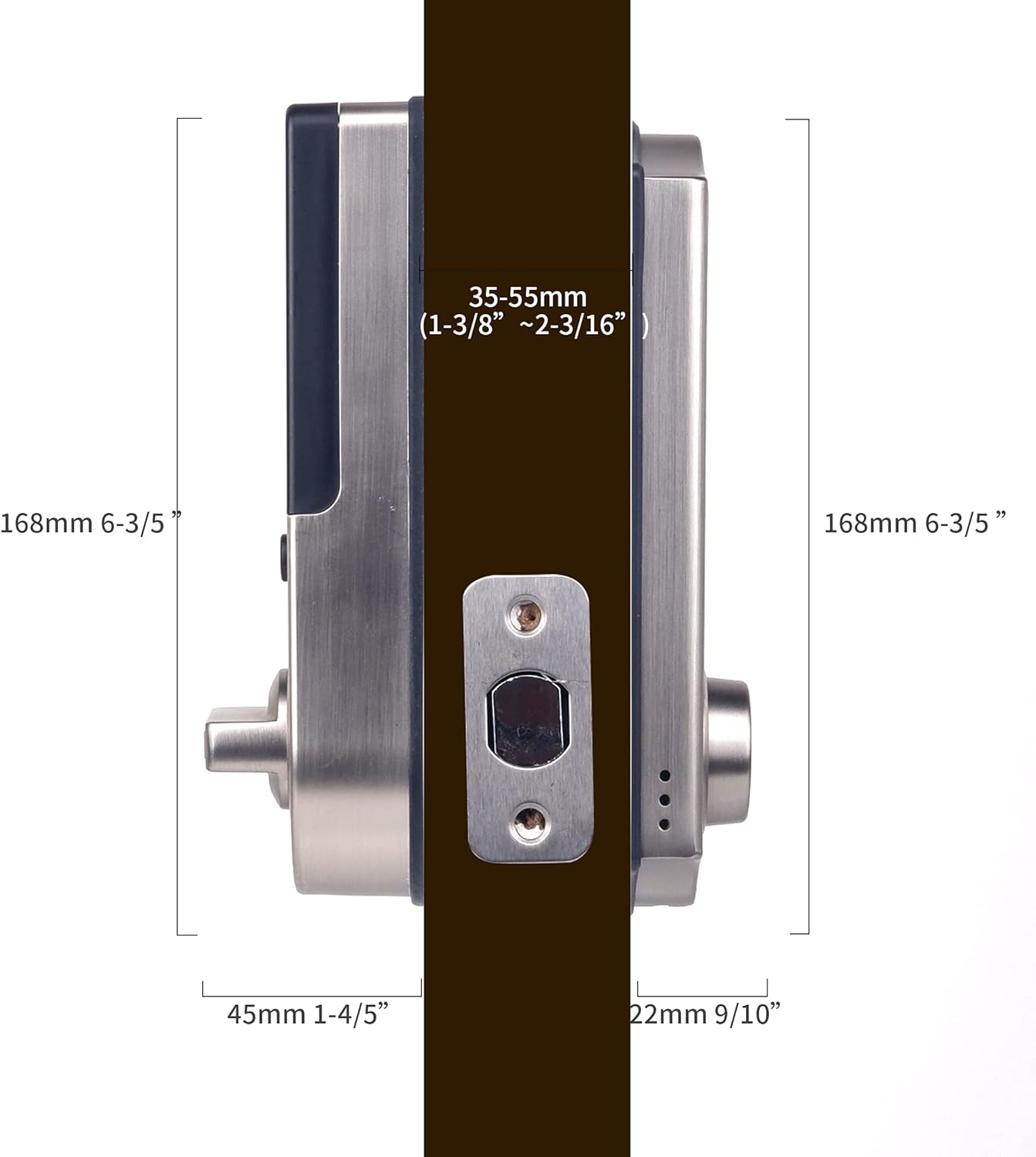
Image: A visual demonstrating the straightforward installation process of the HARFO D02 Smart Deadbolt, emphasizing that no additional drilling is required.
4.2 Adjusting for Left or Right Handed Doors:
The HARFO D02 is compatible with both left-handed and right-handed doors. You will need to adjust the rotary knob and the 'L/R Button' on the interior unit to match your door's orientation.
- Locate the rotary knob and the L/R button on the interior assembly.
- Follow the instructions provided by the voice guide during initial setup or refer to the detailed steps in the full user manual for specific adjustment procedures.
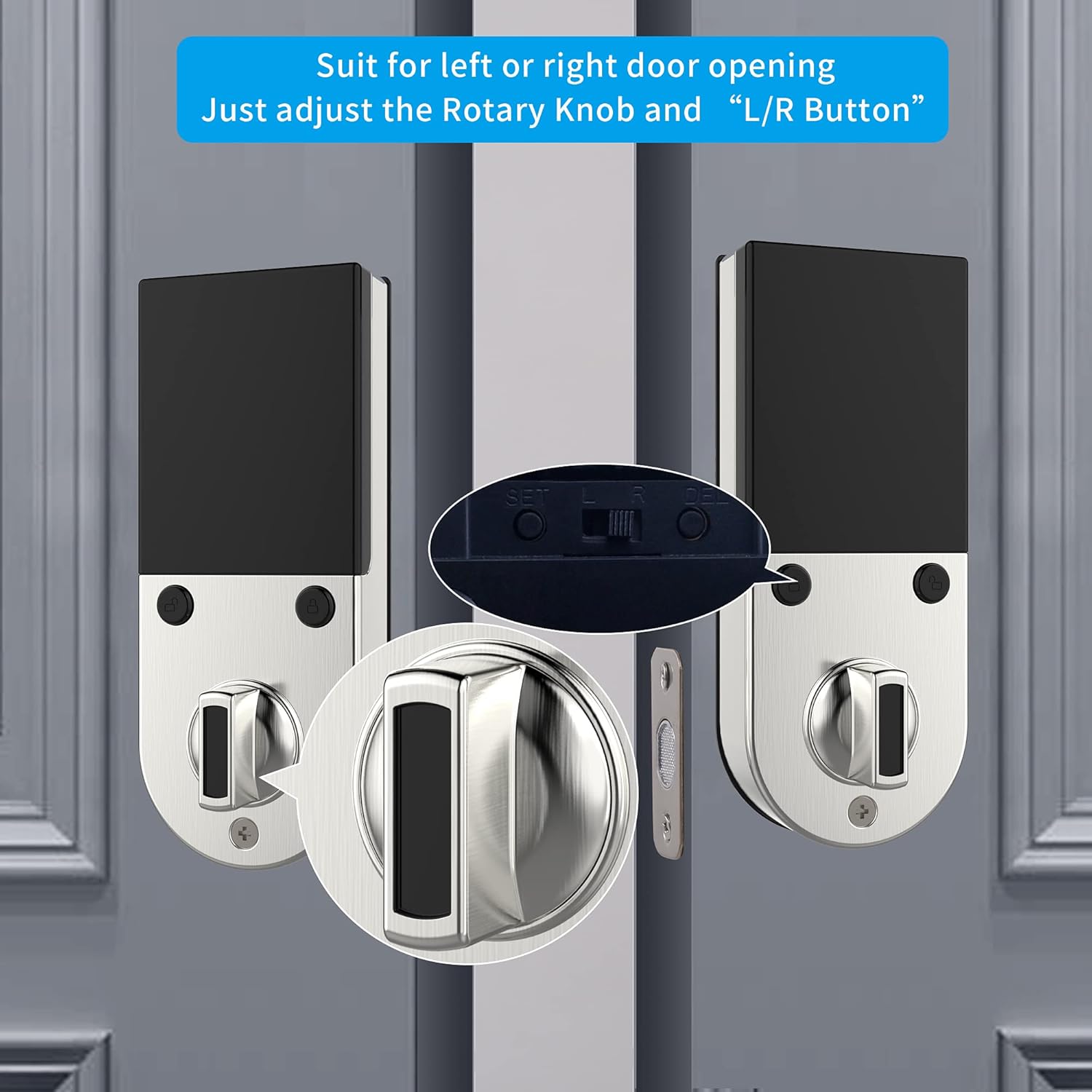
Obrázek: Detailní záběr view illustrating the rotary knob and the L/R button on the interior side of the lock, which are used to configure the deadbolt for either left-handed or right-handed door installations.
4.3 Postup instalace:
- Nainstalujte západku závory do okraje dveří.
- Install the exterior assembly, ensuring the spindle passes through the latch.
- Install the mounting plate on the interior side.
- Připojte kabel z vnější sestavy k vnitřní sestavě.
- Připevněte vnitřní sestavu k montážní desce.
- Insert 4 AA dry batteries into the battery compartment.
- Perform the door handing identification process as prompted by the voice guide.
For a detailed visual guide, please refer to the installation video provided by HARFO (if available on the product page or manufacturer's webstránky).
5. Návod k obsluze
The HARFO D02 Smart Deadbolt offers multiple convenient ways to lock and unlock your door.
5.1 Initial Setup and Programming:
Upon first power-up, the lock will guide you through the initial setup using its OLED display and voice prompts. This includes setting the master code and performing door handing identification.
- Follow the voice guide to set up your master passcode. This code is essential for all programming functions.
- The voice guide will prompt you to register fingerprints, passcodes, and access cards for regular users.
5.2 Unlocking the Door:
- otisk: Přiložte zaregistrovaný prst na snímač otisků prstů. Zámek se po úspěšném rozpoznání odemkne.
- přístupový kód: Zadejte registrovaný přístupový kód na klávesnici na dotykové obrazovce a poté stiskněte klávesu „#“.
- Přístupová karta: Present your registered access card to the card reader area on the lock.
- Mechanický klíč: Insert the physical key into the hidden keyhole and turn to unlock.
- Virtuální heslo: Pro zvýšení zabezpečení můžete zadat náhodné číslice před nebo za skutečný přístupový kód. Napříkladample, if your passcode is 123456, you can enter **123456** or 7891234560. This prevents others from guessing your code by observing finger movements.

Image: A visual explanation of the virtual password feature, showing how random digits can be added before or after the actual passcode to obscure it from onlookers.
5.3 Locking the Door:
- Automatické zamykání: The lock can be set to automatically lock after a configurable delay (5-20 seconds) once the door is closed.
- Ruční zamykání: Press and hold the '#' key on the keypad, or use the thumb-turn on the interior unit.

Image: An icon representing the automatic locking feature, indicating a configurable delay of 5 to 20 seconds before the deadbolt automatically engages.
5.4 Emergency Access:
- Záložní klíč: Always keep at least one physical key in a safe place outside your home for emergency access.
- Micro USB Emergency Power: If the batteries are completely drained, connect a standard Micro USB power bank to the Micro USB port located on the bottom of the exterior unit to temporarily power the lock and gain entry.

Obrázek: Detailní záběr view highlighting the hidden backup keyhole and the Micro USB port on the exterior unit of the HARFO D02 Smart Deadbolt, used for emergency access and power.
6. Údržba
6.1 Výměna baterie:
The HARFO D02 Smart Deadbolt requires 4 x 1.5V AA dry batteries. Rechargeable batteries are not recommended as their typical voltage (1.2V) may not provide optimal performance.
- The lock will provide a low battery warning via the OLED display and voice prompt when batteries are running low. Replace all four batteries promptly when this warning appears.
- To replace batteries, remove the battery cover on the interior unit, replace old batteries with new ones, and reattach the cover.

Image: A visual icon representing a low battery warning, prompting the user to replace the batteries in the smart deadbolt.
6.2 Čištění:
- Otřete povrch zámku měkkým, suchým hadříkem.
- Nepoužívejte abrazivní čisticí prostředky, rozpouštědla nebo agresivní chemikálie, protože by mohly poškodit povrchovou úpravu a elektronické součástky.
- Keep the fingerprint sensor and touchscreen clean and free of debris for optimal performance.
7. Řešení problémů
If you encounter issues with your HARFO D02 Smart Deadbolt, please refer to the following common solutions:
| Problém | Možná příčina | Řešení |
|---|---|---|
| Lock does not respond / No power. | Drained batteries. | Replace all 4 AA dry batteries. Use Micro USB emergency power to gain entry if needed. |
| Otisk prstu nebyl rozpoznán. | Prst je špinavý/mokrý, snímač je znečištěný nebo otisk prstu není správně zaregistrován. | Ensure finger and sensor are clean and dry. Try a different registered finger. Re-register fingerprint if issue persists. |
| Passcode not working. | Zadán nesprávný přístupový kód nebo přístupový kód není zaregistrován. | Verify the correct passcode. Ensure you are pressing '#' after the code. Try using the virtual password feature. Re-register passcode if necessary. |
| Lock does not lock/unlock smoothly. | Misalignment of lock components or door frame. Incorrect door handing setting. | Check door and frame alignment. Ensure the deadbolt latch moves freely. Verify the L/R button setting is correct for your door. |
| Voice guide is unclear or not working. | Volume setting too low or a temporary glitch. | Adjust volume settings (refer to full manual). Remove and reinsert batteries to reset the lock. |
If the problem persists after trying these solutions, please contact HARFO customer support for further assistance.
8. Záruka a podpora
HARFO stands behind the quality of its products. For specific warranty information regarding your D02 Smart Deadbolt, please refer to the warranty card included with your product or visit the official HARFO webmísto.
Zákaznická podpora:
If you have any questions, require technical assistance, or need to report an issue, please contact HARFO customer support through the following channels:
- Webmísto: Visit the official HARFO webweb s nejčastějšími dotazy, zdroji podpory a kontaktními formuláři.
- E-mail: Refer to your product packaging or the HARFO webweb s e-mailovou adresou zákaznické podpory.
- Telefon: Check the HARFO website for available customer service phone numbers.
Please have your product model (D02) and purchase information ready when contacting support to ensure efficient service.