
1. Úvod
Děkuji za nákupasing the Kimwood Bluetooth Headset. This manual provides detailed instructions on how to set up, operate, and maintain your headset. Please read this manual carefully before use to ensure optimal performance and longevity of your device.

Figure 1.1: Kimwood Bluetooth Headset with its charging case.
2. Bezpečnostní informace
- Nevystavujte sluchátka extrémním teplotám, vlhkosti ani korozivním látkám.
- Zabraňte pádu sluchátek na zem nebo jejich vystavení silným nárazům.
- Do not disassemble or modify the headset. This will void the warranty and may cause damage.
- Uchovávejte sluchátka mimo dosah dětí a domácích zvířat.
- Používejte pouze dodaný nabíjecí kabel a kompatibilní napájecí adaptér.
3. Obsah balení
Zkontrolujte prosím balení, zda neobsahuje následující položky:
- Kimwood Bluetooth Headset
- Nabíjecí pouzdro
- Nabíjecí kabel USB typu C.
- Uživatelská příručka

Obrázek 3.1: Obsah balení.
4. Konec produktuview
Familiarize yourself with the components of your Kimwood Bluetooth Headset:
| Žádný. | Komponent | Funkce |
|---|---|---|
| 1 | Vypínač/multifunkční tlačítko | Power On/Off, Play/Pause, Answer/End Call, Voice Assistant |
| 2 | Zvýšení hlasitosti/další skladba | Increase volume, skip to next track (long press) |
| 3 | Snížit hlasitost/předchozí stopa | Decrease volume, go to previous track (long press) |
| 4 | Mikrofon | Picks up your voice for calls |
| 5 | Nabíjecí port (typ C) | Connects to charging cable |
| 6 | LED indikátor | Shows power, pairing, and charging status |
5. Nastavení
5.1 Nabíjení headsetu a pouzdra
Před prvním použitím plně nabijte sluchátka a jejich nabíjecí pouzdro.
- Connect the USB Type-C cable to the charging port on the case.
- Připojte druhý konec kabelu ke zdroji napájení USB (např. počítači, nástěnnému adaptéru).
- Digitální displej na nabíjecím pouzdře zobrazí procentuální stav baterietage. When fully charged, it will display "100".
- Place the headset into the charging case. The headset will automatically begin charging.
The charging case has a 500mAh battery, and the earphone has a 100mAh battery. A full charge takes approximately 1.5 hours.

Figure 5.1: Charging the headset and case.
5.2 Párování se zařízením Bluetooth
The headset supports Bluetooth 5.1 for stable and automatic connections.
- Take the headset out of the charging case. It will automatically power on and enter pairing mode (LED indicator will flash blue).
- Na svém zařízení (chytrý telefon, tablet, počítač) povolte Bluetooth.
- Hledat available Bluetooth devices and select "VYK-B26" from the list.
- Once connected, the LED indicator on the headset will stop flashing and remain solid blue. A voice prompt will confirm the connection.
After the initial pairing, the headset will automatically connect to the last paired device when taken out of the case.

Figure 5.2: Automatic pairing process.
5.3 Nošení headsetu
The ear-hook design allows for comfortable wear on either the left or right ear. The microphone and ear hook can be rotated to fit your preference.
- Upravte ušní háček tak, aby bezpečně seděl kolem ucha.
- Rotate the microphone arm up to 180 degrees and the ear hook up to 360 degrees to find the optimal position for comfort and clear voice pickup.

Figure 5.3: Adjusting the headset for left or right ear use.
6. Návod k obsluze
6.1 Zapnutí/vypnutí
- Zapnutí: Take the headset out of the charging case, or long-press the Multi-function Button for 3 seconds.
- Vypnout: Place the headset back into the charging case, or long-press the Multi-function Button for 5 seconds.
6.2 Funkce volání
- Přijmout/ukončit hovor: Krátce stiskněte multifunkční tlačítko.
- Odmítnout hovor: Long press the Multi-function Button for 2 seconds.
- Ztlumit/zapnout mikrofon: During a call, long press the Volume Up or Volume Down button for approximately 3 seconds.

Figure 6.1: Mute function and unidirectional microphone for clear calls.
6.3 Přehrávání hudby
- Přehrát/pozastavit: Krátce stiskněte multifunkční tlačítko.
- Další skladba: Krátce stiskněte tlačítko pro zvýšení hlasitosti.
- Předchozí skladba: Krátce stiskněte tlačítko pro snížení hlasitosti.
6.4 Ovládání hlasitosti
- Zvýšení hlasitosti: Krátce stiskněte tlačítko pro zvýšení hlasitosti.
- Snížit hlasitost: Krátce stiskněte tlačítko pro snížení hlasitosti.
6.5 Hlasový asistent
Activate your device's voice assistant (Siri, Google Assistant, etc.) directly from the headset.
- Aktivovat Voice Assistant: While the headset is connected and in standby mode, long press the Multi-function Button for 2 seconds.
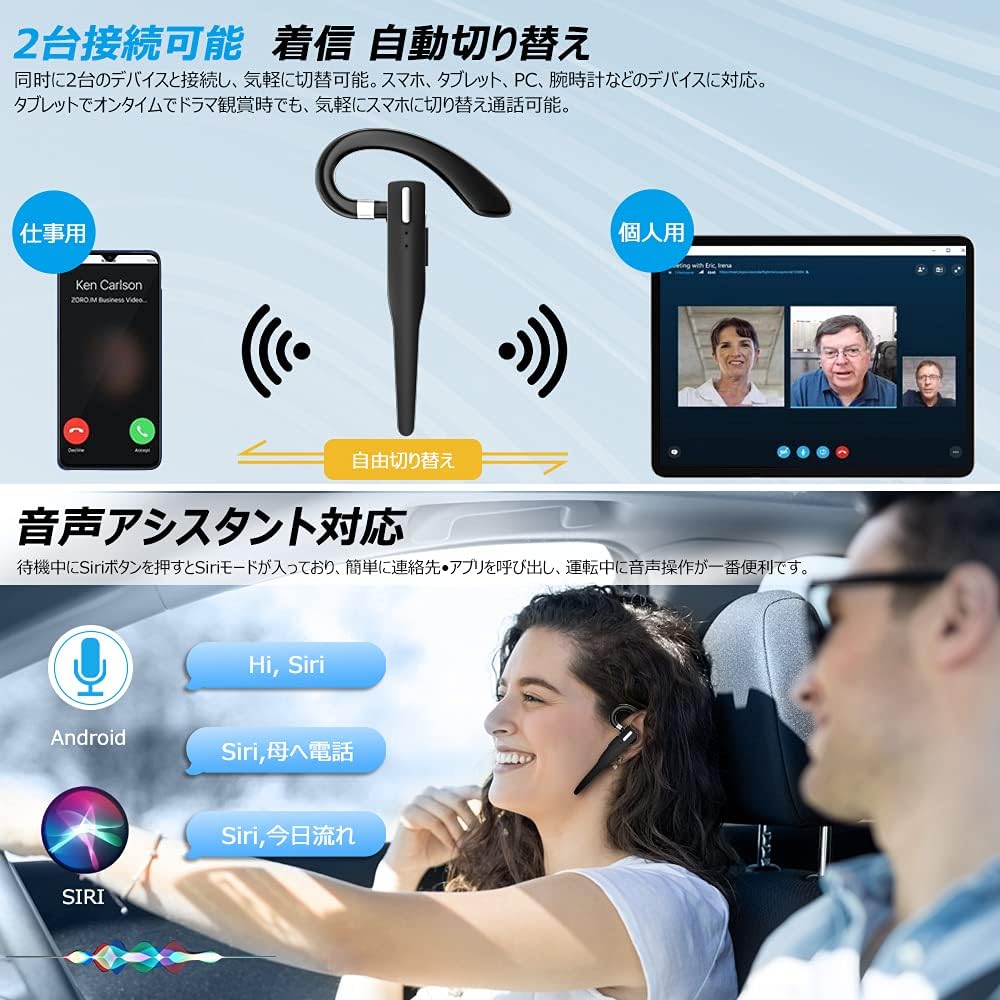
Figure 6.2: Multi-device connectivity and voice assistant features.
6.6 Připojení více zařízení
The headset can connect to two Bluetooth devices simultaneously, allowing for seamless switching between them.
- Spárujte sluchátka s prvním zařízením, jak je popsáno v části 5.2.
- Turn off Bluetooth on the first device. The headset will re-enter pairing mode.
- Spárujte sluchátka s druhým zařízením.
- Turn on Bluetooth on the first device. The headset should now be connected to both devices.
- The headset will automatically switch audio output to the device that is actively playing media or receiving a call.
7. Údržba
7.1 Čištění
- Otřete sluchátka a nabíjecí pouzdro měkkým, suchým hadříkem, který nepouští vlákna.
- Nepoužívejte agresivní chemikálie, čisticí rozpouštědla ani silné čisticí prostředky.
7.2 Skladování
- When not in use, store the headset in its charging case to protect it from dust and damage.
- Přístroj skladujte na chladném a suchém místě, mimo dosah přímého slunečního záření a extrémních teplot.

Figure 7.1: The compact charging case provides convenient storage.
8. Řešení problémů
Pokud se setkáte s problémy s náhlavní soupravou, podívejte se na následující běžné problémy a jejich řešení:
| Problém | Možná příčina | Řešení |
|---|---|---|
| Sluchátka se nezapínají. | Slabá baterie. | Charge the headset and charging case. |
| Nelze spárovat se zařízením. | Bluetooth na zařízení je vypnutý; sluchátka nejsou v režimu párování; příliš daleko od zařízení. | Ensure Bluetooth is on; take headset out of case to enter pairing mode; keep within 10 meters. |
| Žádný zvuk nebo nízká hlasitost. | Volume too low; headset not connected; sound output set to another device. | Increase volume on headset and device; re-pair headset; check device's audio output settings. |
| Mikrofon nefunguje. | Microphone muted; incorrect audio input settings on device. | Unmute microphone (long press Volume Up/Down); check device's audio input settings. |
| Connection unstable or drops. | Rušení; příliš daleko od zařízení; slabá baterie. | Move closer to device; avoid strong electromagnetic interference; charge headset. |
9. Specifikace
| Funkce | Detail |
|---|---|
| Model | VYK-B26 |
| Verze Bluetooth | 5.1 |
| Potlačení hluku | CVC8.0 |
| Kapacita baterie sluchátek | 100 XNUMX mAh |
| Kapacita baterie nabíjecího pouzdra | 500 XNUMX mAh |
| Doba hovoru | Až 12 hodin |
| Doba přehrávání hudby | Až 12 hodin |
| Celková doba používání (s pouzdrem) | Až 72 hodin |
| Pohotovostní doba | Až 400 hodin |
| Doba nabíjení | Přibl. 1.5 hodin |
| Nabíjecí port | USB Type-C |
| Hodnocení voděodolnosti | IPX7 (odolnost proti potu) |
| Kompatibilita | iOS, Android, Windows (Bluetooth-enabled devices) |

Figure 9.1: Advanced Bluetooth 5.1 and CVC8.0 Noise Cancelling features.
10. Záruka a podpora
Kimwood products are designed for reliability and performance. For warranty information and technical support, please refer to the contact details provided on the product packaging or visit the official Kimwood webstránky. Uschovejte si prosím doklad o koupi pro případ reklamace.