1. Konec produktuview
This manual provides detailed instructions for the Generic HW22 Smart Watch Series 6. This device features a 45mm full touch screen, Bluetooth connectivity, and water resistance, designed to enhance your daily activities and health monitoring.
Klíčové vlastnosti:
- Dlouhá výdrž baterie: Equipped with a 210mAh battery. A full charge takes approximately 2-3 hours, providing up to 10 days of normal use and 45 days of standby time.
- Více sportovních režimů: Features nine distinct sports modes including walking, running, hiking, cycling, treadmill, fitness, mountaineering, spinning, and yoga. The watch records and displays real-time data during your workout. It also supports GPS sports mode when connected to your phone, allowing for real-time tracking of your routes.
- Chytrá upozornění: Once connected to your phone via Bluetooth, the smartwatch will vibrate to alert you of incoming calls, SMS messages, and notifications from various social media applications (e.g., Facebook, Twitter, Instagram, Skype, WhatsApp, LinkedIn, Messenger). This ensures you do not miss important communications. Note: Some Samsung phone models may have compatibility limitations.

Image 1.1: The HW22 Smart Watch Series 6 displayed on a user's wrist, showing the watch face.
2. Průvodce nastavením
2.1 Co je v krabici
Upon unboxing your HW22 Smart Watch, verify that all components are present:
- HW22 Smart Watch (with Black Silicone Band)
- Nabíjecí kabel
- Uživatelská příručka (tento dokument)

Image 2.1: The HW22 Smart Watch, its packaging, and the charging cable laid out.
2.2 Počáteční nabíjení
- Připojte nabíjecí kabel k nabíjecímu portu na zadní straně chytrých hodinek.
- Zapojte USB konec nabíjecího kabelu do standardního USB napájecího adaptéru (není součástí balení) nebo do USB portu počítače.
- Allow the watch to charge completely before first use. The screen will indicate charging status. A full charge typically takes 2-3 hours.
2.3 Instalace a párování aplikace
To unlock the full functionality of your HW22 Smart Watch, you need to connect it to your smartphone via a companion application.
- Stáhněte si aplikaci: Scan the QR code provided in the watch's quick start guide (if available) or search for the recommended app (e.g., 'WearFit Pro' or similar, as per product packaging) in your phone's app store (Google Play Store for Android, Apple App Store for iOS).
- Povolit Bluetooth: Ujistěte se, že je na vašem smartphonu povoleno Bluetooth.
- Otevřete aplikaci: Launch the installed app on your phone and follow the on-screen instructions to create an account or log in.
- Spárujte zařízení: Within the app, navigate to the 'Device' or 'Add Device' section. The app will search for available smartwatches. Select 'HW22' from the list of found devices.
- Potvrdit spárování: Výzva k párování se může zobrazit na telefonu i hodinkách. Potvrďte párování na obou zařízeních.
- Udělení oprávnění: Pro plnou funkčnost udělte aplikaci potřebná oprávnění (např. oznámení, poloha, kontakty).
3. Návod k obsluze
3.1 Základní navigace
- Dotyková obrazovka: Přejetím prstem doleva/doprava, nahoru/dolů můžete procházet nabídky a ciferníky. Klepnutím vyberete možnost.
- Boční tlačítko: Typically used to return to the home screen, turn the screen on/off, or access the app menu. A long press might power the device on/off.
3.2 sportovních režimů
The HW22 Smart Watch offers various sports modes to track your physical activity.
- From the main watch face, swipe to find the 'Sports' or 'Workout' icon and tap to enter.
- Select your desired activity (e.g., Running, Cycling, Yoga).
- Tap 'Start' to begin tracking. The watch will display real-time data such as duration, calories burned, heart rate, and distance.
- To use GPS tracking, ensure your phone is connected and its GPS is active. The watch app will record your route.
- To pause or end a workout, swipe or press the side button as indicated on the screen.
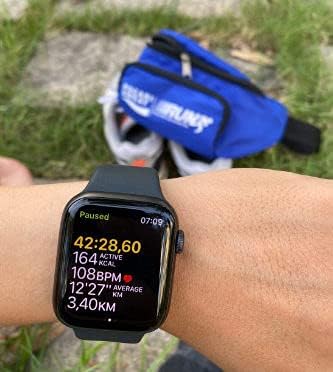
Image 3.1: The HW22 Smart Watch showing active fitness data, including duration, calories, heart rate, and distance.
3.3 Chytrá oznámení
Once paired with your smartphone, the watch will alert you to incoming calls and messages.
- Ensure the companion app is running in the background on your phone and Bluetooth is active.
- Configure which app notifications you wish to receive on your watch through the settings in the companion app.
- When a notification arrives, the watch will vibrate and display the message or caller ID.
4. Údržba
4.1 Čištění chytrých hodinek
Pravidelné čištění pomáhá udržovat vzhled a funkčnost hodinek.
- Tělo hodinek: Wipe the watch body with a soft, lint-free cloth. If necessary, slightly damphadřík vodou. Nepoužívejte agresivní chemikálie ani abrazivní materiály.
- Silikonový pásek: The silicone band can be cleaned with mild soap and water. Rinse thoroughly and dry completely before reattaching to the watch or wearing.
- Ensure the charging contacts on the back of the watch are clean and dry for optimal charging.
4.2 Voděodolnost
The HW22 Smart Watch is water resistant. However, it is important to understand its limitations:
- It is designed to withstand splashes, rain, and brief immersion (e.g., washing hands).
- Avoid wearing the watch during swimming, showering with hot water, or diving, as steam and high water pressure can compromise the seals.
- If the watch gets wet, dry it thoroughly with a soft cloth before charging or operating.
4.3 Péče o baterii
- Vyhněte se extrémním teplotám, které mohou snížit výkon baterie.
- Nenechávejte hodinky delší dobu zcela vybité.
- Používejte pouze dodaný nabíjecí kabel.
5. Řešení problémů
If you encounter issues with your HW22 Smart Watch, refer to the following common solutions:
5.1 Hodinky se nezapínají
- Ujistěte se, že jsou hodinky plně nabité. Připojte je k nabíječce alespoň na 30 minut.
- Stiskněte a podržte boční tlačítko po dobu 10–15 sekund pro pokus o nucený restart.
5.2 Nelze spárovat s telefonem
- Ujistěte se, že máte v telefonu i hodinkách povoleno Bluetooth.
- Ensure the watch is within Bluetooth range (typically 10 meters or 33 feet).
- Restartujte telefon i hodinky.
- Vymažte mezipaměť Bluetooth v telefonu (pokud je k dispozici) a zkuste spárování zopakovat.
- Verify that you have downloaded the correct companion app for the HW22 Smart Watch.
- Note: Some Samsung phone models may have compatibility issues, preventing successful pairing or full functionality.
5.3 Nezobrazování oznámení
- Zkontrolujte nastavení oznámení v doprovodné aplikaci a ujistěte se, že jsou oznámení aplikací pro hodinky povolena.
- Ensure the companion app is running in the background on your phone and has all necessary permissions granted.
- Verify that your phone's notification settings allow the companion app to display notifications.
- Ujistěte se, že hodinky nejsou v režimu „Nerušit“.
5.4 Inaccurate Fitness Data
- Ujistěte se, že hodinky máte pevně nasazené na zápěstí, asi na šířku jednoho prstu nad zápěstní kostí.
- Calibrate your personal information (height, weight, age) accurately in the companion app.
- For GPS tracking, ensure your phone's GPS is active and you are in an open area with good satellite reception.
6. Specifikace
| Funkce | Detail |
|---|---|
| Název značky | Obecný |
| Název modelu | HW22 |
| Operační systém | Android Wear, Watch OS |
| Rozměry produktu | 4.5 x 3.85 x 1.28 cm |
| Hmotnost položky | 231 gramů |
| Bezdrátová komunikace | Bluetooth |
| Technologie připojení | Bluetooth |
| GPS | Integrated GPS system |
| Speciální funkce | Water Resistant, Smart, Bluetooth, GPS, Drop Resistant |
| Technologie displeje | LCD |
| Rozhraní zařízení | Dotyková obrazovka |
| Rozlišení obrazovky | 240 x 240 |
| Barva | Černý |
| Kapacita baterie | 210 XNUMX mAh |
| Kapacita paměti | 64 MB |
| Tvar položky | Obdélníkový |
| Velikost obrazovky | 1.7 palců |
| První dostupný termín | 17. července 2021 |
7. Záruka a podpora
7.1 Informace o záruce
Specific warranty details for the Generic HW22 Smart Watch Series 6 may vary depending on your region and retailer. Please refer to the warranty card included with your product or contact your point of purchase for precise warranty terms and conditions.
7.2 Zákaznická podpora
For further assistance, technical support, or inquiries not covered in this manual, please contact the retailer or manufacturer's customer service. Contact information can typically be found on the product packaging or the official webstránky značky.


