
Zavedení
This manual provides essential information for setting up, operating, and maintaining your NiPoGi Mini PC Stick T6 PRO 6-128. Please read it carefully before using the device to ensure optimal performance and longevity. The NiPoGi Mini PC Stick is a compact and powerful micro desktop computer designed for various tasks, including web browsing, media consumption, office work, and light gaming.
Obsah balení
Ověřte, zda jsou v balení přítomny všechny položky:
- 1 x NiPoGi Mini PC Stick
- 1 x napájecí adaptér
- 1 x prodlužovací kabel HDMI
- 1 x Uživatelská příručka
- 1 x montážní držák VESA
Konec produktuview
The NiPoGi Mini PC Stick T6 PRO 6-128 is a highly portable and efficient computing solution. Its compact design allows it to be easily carried for travel or business. It features a robust cooling system and a variety of connectivity options.

Obraz: Nadview of the NiPoGi Mini PC Stick, highlighting its various ports including USB 3.0, HDMI, and Ethernet, along with the power button.
Klíčové vlastnosti:
- Operační systém: Pre-installed Windows 10 Pro (upgradeable to Windows 11).
- Procesor: Intel Celeron J4125 Quad-Core (up to 2.7 GHz).
- Paměť: 6GB DDR4 RAM.
- Skladování: 128GB eMMC.
- Grafika: Intel UHD Graphics 600 with 4K UHD @60Hz support via HDMI 2.0.
- Konektivita: Dual-Band Wi-Fi (2.4G/5G), Gigabit Ethernet, Bluetooth 4.2.
- Porty: 2x USB 3.0 ports, 1x HDMI port, 1x Gigabit Ethernet port.
- Speciální vlastnosti: Supports Wake on LAN, PXE, Auto Power On, RTC Wake.

Obraz: The compact size of the Mini PC Stick, measuring approximately 4.7 x 1.9 x 0.7 inches (12 x 5 x 1.8 cm).
Chladicí systém:
The device incorporates a built-in fan designed for rapid heat dissipation and low noise operation, ensuring stable performance during extended use.
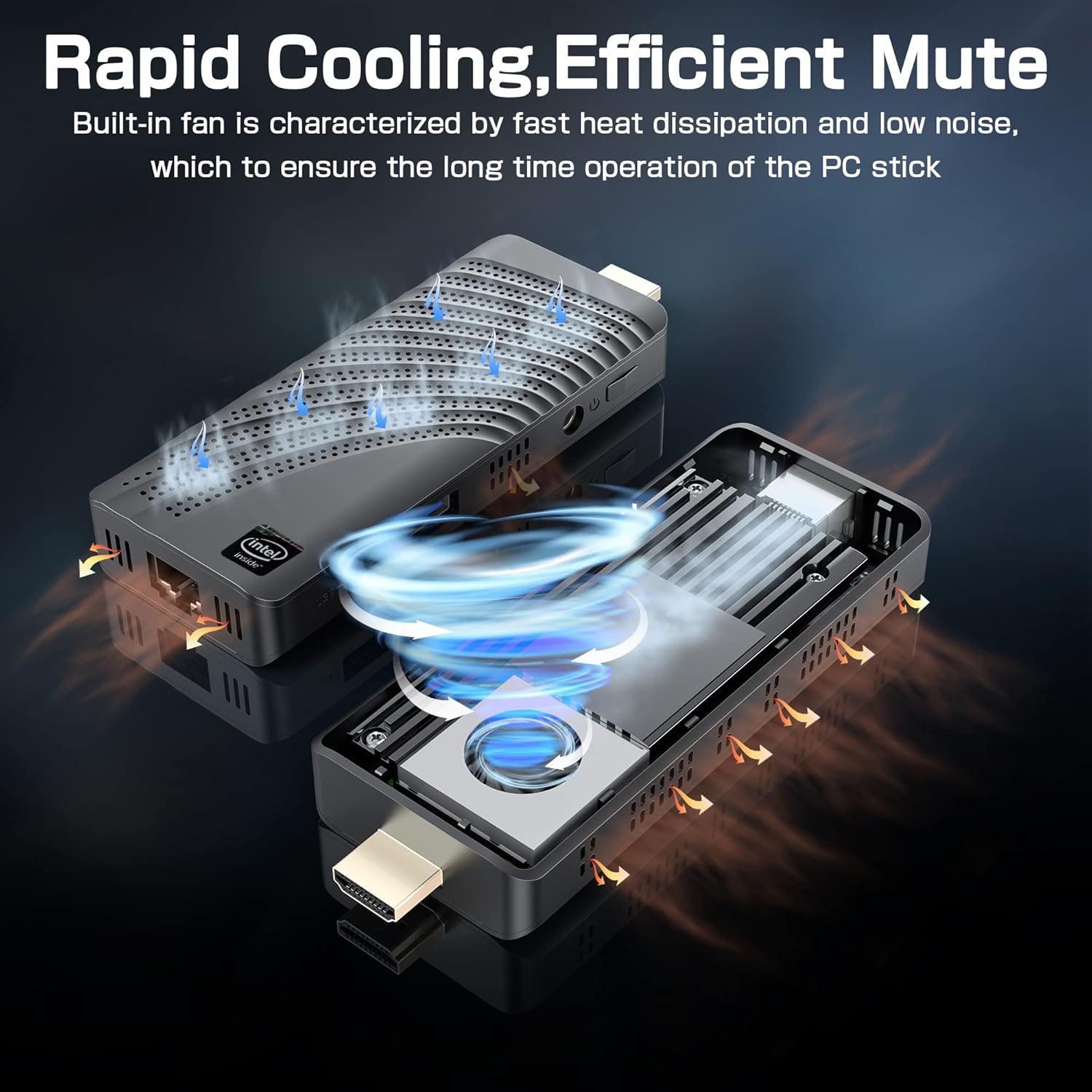
Obraz: An illustration showing the internal fan design and airflow for efficient cooling within the Mini PC Stick.
Průvodce nastavením
Follow these steps to set up your NiPoGi Mini PC Stick:
- Připojení k displeji: Plug the Mini PC Stick directly into an HDMI port on your monitor or TV. If space is limited, use the provided HDMI extension cable.

Obraz: A visual guide demonstrating how to connect the Mini PC Stick to a monitor using the HDMI port, with an option to use an extension cable.
- Připojte napájení: Connect the power adapter to the DC-in port on the Mini PC Stick and then plug it into a power outlet.
- Připojení periferií: Connect your USB keyboard and mouse to the available USB 3.0 ports. Alternatively, pair Bluetooth devices (keyboard, mouse, speakers) after initial setup.
- Zapnutí: Press the power button on the side of the Mini PC Stick. The device will boot up, and the Windows 10 Pro operating system will load.
- Počáteční nastavení Windows: Postupujte podle pokynů na obrazovce a dokončete nastavení systému Windows 10 Pro, včetně jazyka, regionu, síťového připojení a vytvoření uživatelského účtu.
Návod k obsluze
Síťové připojení:
- Wi-Fi: The Mini PC Stick supports dual-band 2.4G/5G Wi-Fi. During Windows setup or via network settings, connect to your preferred wireless network.
- Ethernet: For a stable wired connection, plug an Ethernet cable into the Gigabit Ethernet port on the device.

Obraz: Icons representing Dual-band WiFi and Gigabit Ethernet connectivity options for the Mini PC Stick.
Zařízení Bluetooth:
The Mini PC Stick features Bluetooth 4.2, allowing connection to various peripherals such as keyboards, mice, and speakers. Access Bluetooth settings in Windows to pair new devices.

Obraz: The Mini PC Stick demonstrating its Bluetooth 4.2 compatibility with over 10 types of devices, including monitors, TVs, speakers, and various input devices.
4K UHD Output:
The device supports 4K UHD resolution at 60Hz via its HDMI 2.0 port, providing a clear and smooth visual experience for compatible displays.

Obraz: A visual representation of the advanced image decoding and processing techniques, showcasing smooth and natural 4K HD picture quality.
Pokročilé funkce:
- Wake on LAN: Allows the device to be powered on remotely over a network.
- Spouštění PXE: Umožňuje bootování ze síťového serveru.
- Automatické zapnutí: Configures the device to automatically power on when connected to power.
- Probuzení v reálném čase: Schedules the device to wake up at a specific time.
These features can typically be configured in the BIOS settings. Refer to the Windows documentation for specific instructions on accessing and modifying these settings.
Údržba
- Čištění: Use a soft, dry cloth to clean the exterior of the device. Avoid liquid cleaners. Ensure ventilation holes are free from dust to maintain optimal cooling.
- Aktualizace softwaru: Regularly check for and install Windows updates to ensure system stability, security, and performance.
- Podmínky prostředí: Operate the Mini PC Stick in a well-ventilated area, away from direct sunlight, heat sources, and excessive moisture.
Odstraňování problémů
Bez displeje:
- Ensure the HDMI cable is securely connected to both the Mini PC Stick and the display.
- Verify that the display is set to the correct HDMI input source.
- Pokud je to možné, zkuste jiný kabel HDMI nebo displej.
Bez napájení:
- Check if the power adapter is correctly plugged into the device and a working power outlet.
- Ujistěte se, že bylo stisknuto tlačítko napájení.
- Zkuste jinou zásuvku.
Problémy s připojením k síti:
- Wi-Fi: Check if Wi-Fi is enabled in Windows settings. Restart your router. Ensure you are within range of your Wi-Fi network.
- Ethernet: Verify the Ethernet cable is properly connected. Check your router/modem status.
Pomalý výkon:
- Zavřete nepotřebné aplikace běžící na pozadí.
- Ujistěte se, že zařízení má dostatečné větrání a nepřehřívá se.
- Run Windows updates and disk cleanup.
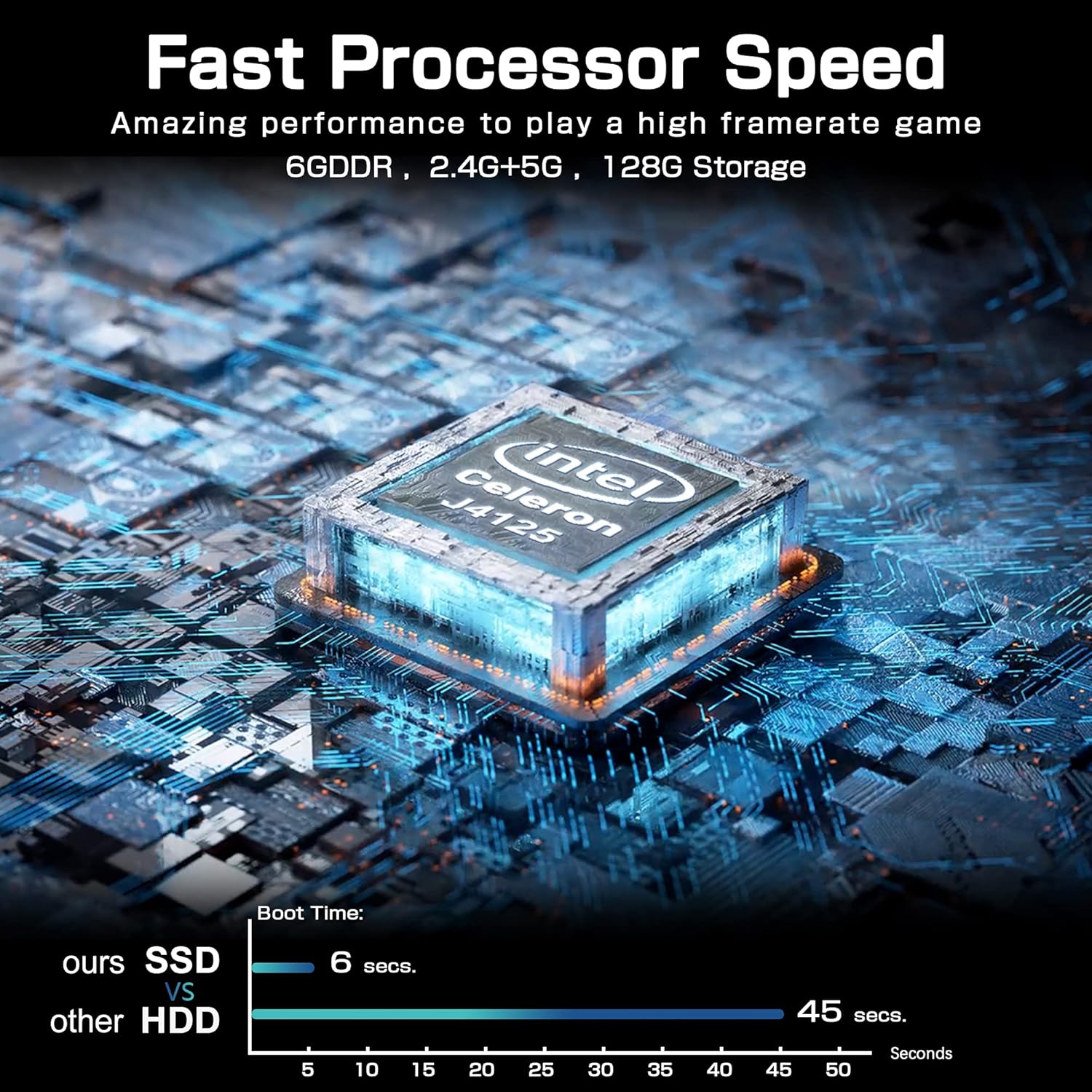
Obraz: A comparison chart illustrating the fast boot time of the Mini PC Stick (6 seconds) compared to traditional HDD systems (45 seconds).
Specifikace
Detailed technical specifications for the NiPoGi Mini PC Stick T6 PRO 6-128:
| Funkce | Specifikace |
|---|---|
| Značka | NiPoGi |
| Číslo modelu | T6 PRO 6-128 |
| Operační systém | Windows 10 Pro |
| Model CPU | Intel Celeron J4125 |
| Rychlost CPU | 2.7 GHz (Burst) |
| Počet procesorů | 4 |
| Grafický koprocesor | Grafická karta Intel UHD Graphics 600 |
| Velikost nainstalované paměti RAM | 6 GB |
| Technologie paměti RAM | DDR4 SDRAM |
| Kapacita úložiště | 128 GB eMMC |
| Rozhraní pevného disku | USB 3.0 |
| Video výstupní rozhraní | HDMI |
| Celkový počet portů HDMI | 1 |
| Celkový počet portů USB | 2 |
| Technologie připojení | Ethernet, WiFi Built-in, Bluetooth, USB |
| Bezdrátový typ | 802.11a/b/g/n/ac (dvoupásmové Wi-Fi) |
| Bluetooth | Bluetooth 4.2 |
| Maximální rozlišení displeje | 3840 x 2160 (4K UHD) |
| Rozměry produktu (D x Š x V) | 10 x 4 x 3 cm (3.94 x 1.57 x 1.18 palce) |
| Hmotnost položky | 390 gramů (0.86 lb) |
| Speciální funkce | Auto Power On, Wake On LAN, PXE, RTC Wake |
Záruka a podpora
For warranty information and technical support, please refer to the documentation included with your product or visit the official NiPoGi webwebu. Konkrétní záruční podmínky se mohou lišit v závislosti na regionu a prodejci.