
Konec produktuview
The EWO'S XRT140 Universal Remote Control is designed as a direct replacement for various VIZIO Smart TV remotes. This product has been professionally inspected and tested to ensure it functions and appears like new. It offers seamless control over your VIZIO Smart TV, providing a reliable and user-friendly experience.

Obrázek: Přední a boční view of the EWO'S XRT140 Universal Remote Control, showcasinjeho ergonomický design a rozložení tlačítek.
Průvodce nastavením
The EWO'S XRT140 remote control is designed for immediate use with compatible VIZIO Smart TVs. No pairing or programming is required.
Instalace baterie
- Najděte přihrádku na baterie na zadní straně dálkového ovladače.
- Vysuňte kryt přihrádky na baterie.
- Insert two (2) 1.5V AAA batteries, ensuring the positive (+) and negative (-) terminals align correctly with the indicators inside the compartment.
- Bezpečně zavřete kryt bateriového prostoru.
Once batteries are installed, the remote is ready to operate your VIZIO Smart TV.
Ovládání dálkového ovladače
This section details the functions of the buttons on your EWO'S XRT140 Universal Remote Control.
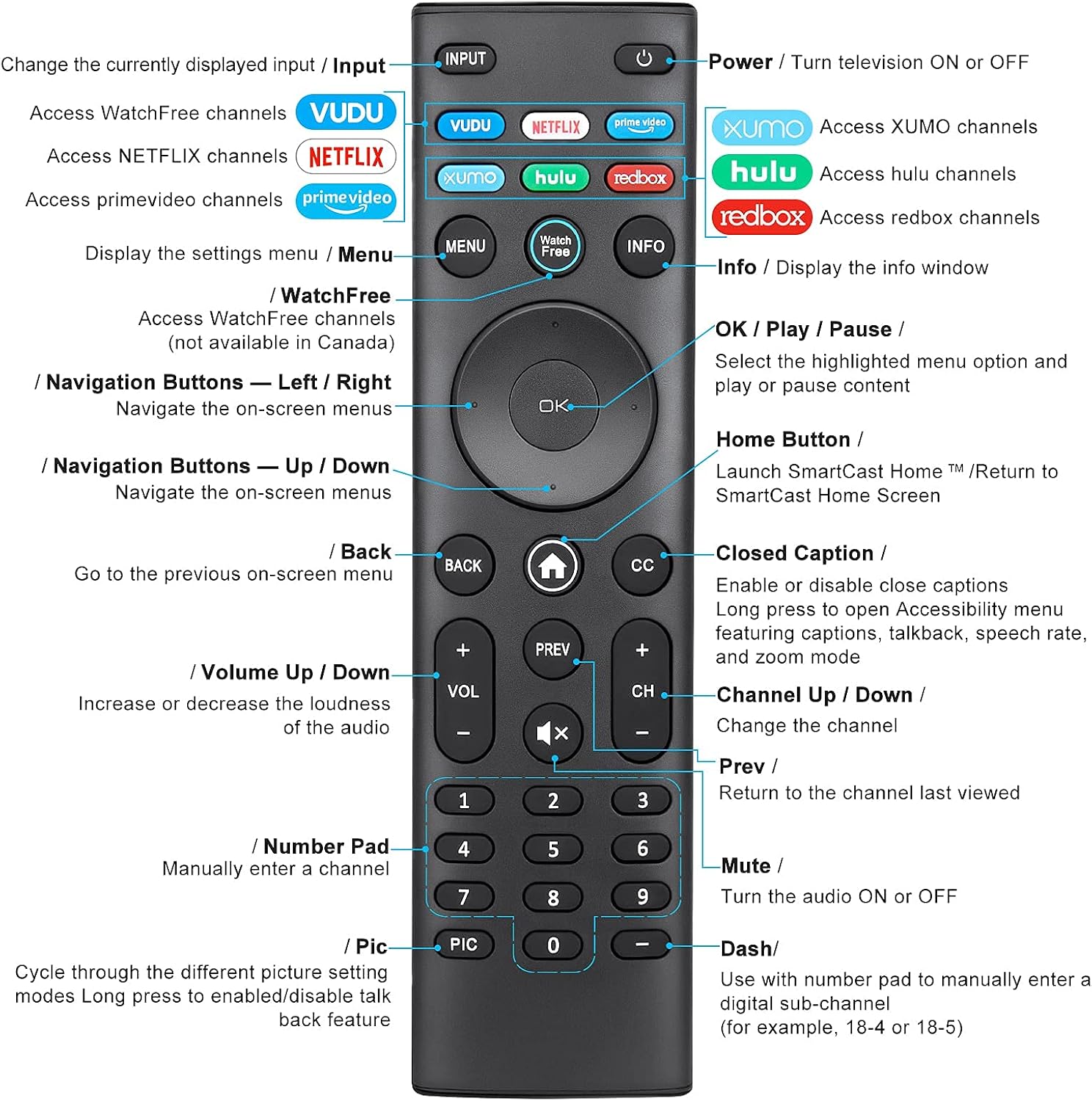
Image: Detailed diagram of the EWO'S XRT140 remote control, labeling each button with its corresponding function.
Funkce tlačítek:
- VSTUP: Change the currently displayed input source.
- VÝKON (⏻): Turn the television ON or OFF.
- VOODOO: Access VUDU channels.
- NETFLIX: Access Netflix channels.
- prime video: Access Prime Video channels.
- XUMO: Access XUMO channels.
- hulu: Access Hulu channels.
- redbox: Access Redbox channels.
- JÍDELNÍ LÍSTEK: Display the settings menu.
- WatchFree: Access WatchFree channels (Note: May not be available in all regions, e.g., Canada).
- INFO: Display the info window.
- OK / Přehrát / Pozastavit: Select the highlighted menu option and play or pause content.
- Navigační tlačítka (nahoru/dolů/vlevo/vpravo): Pohyb v nabídkách na obrazovce.
- Home Button (⌂): Launch SmartCast Home or return to the SmartCast Home Screen.
- ZADNÍ: Go to the previous on-screen menu.
- Skryté titulky (CC): Enable or disable closed captions. Long press to open Accessibility menu featuring captions, talkback, speech rate, and zoom mode.
- VOL +/- (Zvýšení/Snížení hlasitosti): Zvyšte nebo snižte hlasitost zvuku.
- PŘEDCHOZÍ: Return to the channel last viewvyd.
- CH +/- (Kanál nahoru/dolů): Změňte kanál.
- ZTLUMIT (🔇): Turn the audio ON or OFF.
- Numerická klávesnice (0-9): Manually enter a channel number.
- PIC: Cycle through different picture setting modes. Long press to enable/disable talk back feature.
- DASH (-): Use with the number pad to manually enter a digital sub-channel (e.g., 18-4 or 18-5).
Klíčové vlastnosti
- Okamžitá odpověď: This remote control boasts a quick transmission and response time of 0.2 seconds, ensuring minimal delay between your command and the TV's action.
- Odolná tlačítka: The buttons are rigorously tested to support over 150,000 clicks, providing long-lasting reliability.
- Rozšířený rozsah: The remote transmits a signal effectively over long distances, up to 12 meters (40 feet), allowing for flexible viewpozice.
- Prémiový design: Upgraded with a high-end glossy finish, the remote is made from durable ABS material, making it safe for use by children.
- Vyhrazená tlačítka zkratek: Features 7 convenient shortcut buttons for popular streaming services like VUDU, Netflix, Prime Video, XUMO, Hulu, and Redbox, plus a WatchFree button for quick access.
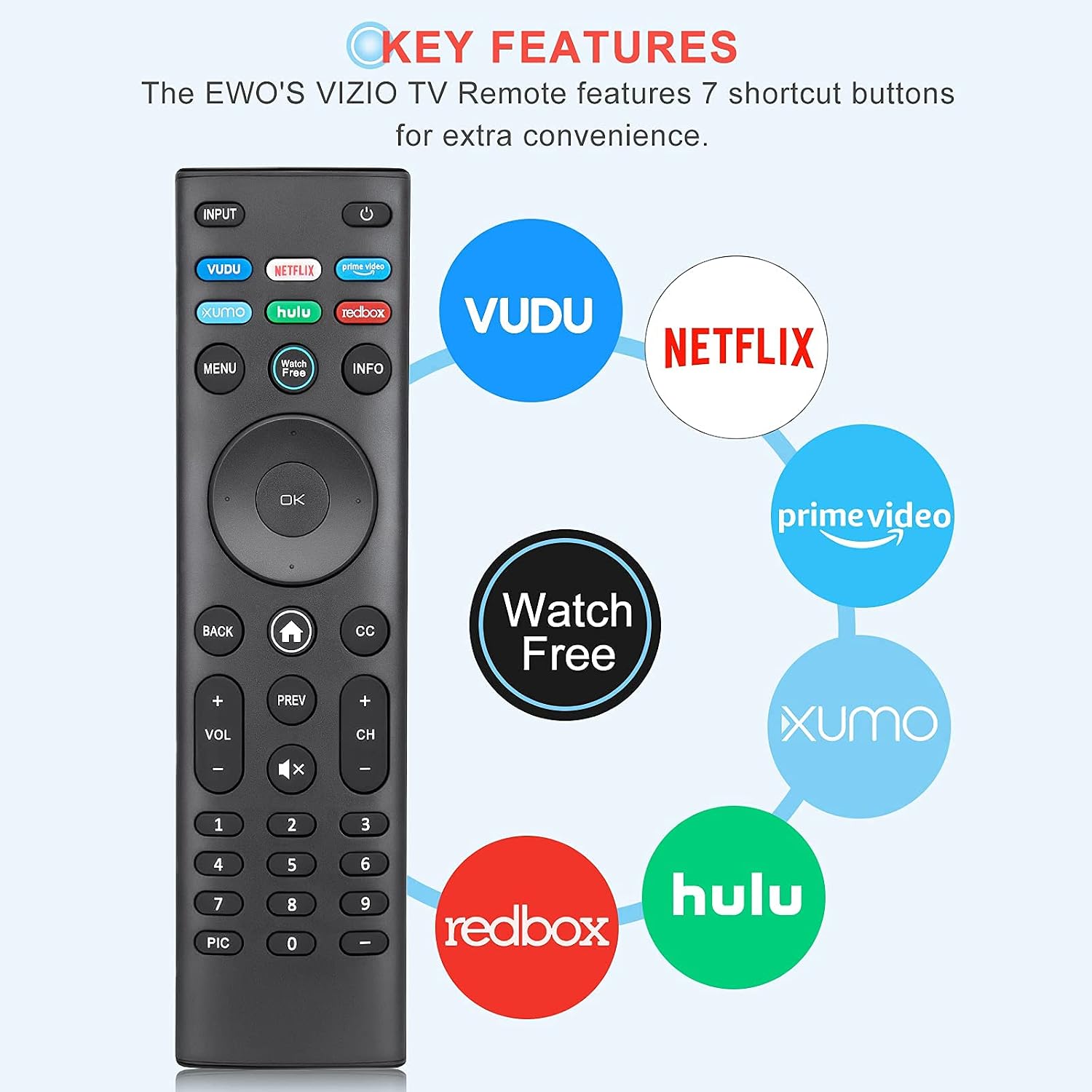
Image: The EWO'S XRT140 remote control with its 7 shortcut buttons for streaming services highlighted, emphasizing convenience.

Image: A hand holding the EWO'S XRT140 remote, with text indicating its fast response time and high click durability.

Image: An illustration demonstrating the EWO'S XRT140 remote's ability to transmit signals over 40 feet, highlighting its long-distance capability.
Kompatibilita
The EWO'S XRT140 Universal Remote Control is designed for broad compatibility with VIZIO Smart TVs and various VIZIO remote models.
Kompatibilní televizní série VIZIO:
- All VIZIO LED LCD HD UHD HDR Smartcast 4K 3D Smart TVs
- Including D-Series, E-Series, M-Series, P-Series, PX-Series, V-Series, and OLED-Series.

Image: The EWO'S XRT140 remote alongside various VIZIO SmartCast TV models, illustrating its broad compatibility.
Compatible VIZIO Remote Models:
The XRT140 is a universal remote control compatible with, but not limited to, the following VIZIO remote models:
- XRT112
- XRT122
- XRT302
- XRT135
- XRT510
- XRT500
- XRT100
- XRT136
- VR1
- VR2
- VR10
- VR15

Image: The EWO'S XRT140 remote displayed next to several other VIZIO remote models, indicating its universal compatibility.
Údržba
Správná péče a údržba prodlouží životnost vašeho dálkového ovladače.
Čištění:
- Dálkový ovladač otřete měkkým, suchým hadříkem.
- Pro odolnou špínu lehceampOtřete hadřík vodou nebo jemným, neabrazivním čisticím prostředkem. Nestříkejte čisticí prostředek přímo na dálkový ovladač.
- Nepoužívejte agresivní chemikálie, rozpouštědla ani abrazivní čisticí houbičky, protože by mohly poškodit povrch dálkového ovladače nebo jeho vnitřní součásti.
Péče o baterie:
- Vyměňte baterie, když se výkon dálkového ovladače sníží nebo když přestane reagovat.
- Vždy vyměňujte obě baterie současně za nové stejného typu (AAA).
- If the remote will not be used for an extended period (e.g., several weeks or months), remove the batteries to prevent leakage and potential damage to the remote.
Odstraňování problémů
Pokud narazíte na problémy s dálkovým ovladačem, postupujte podle následujících běžných kroků pro řešení problémů:
| Problém | Možná příčina | Řešení |
|---|---|---|
| Dálkový ovladač nereaguje | Vybité nebo nesprávně vložené baterie | Vyměňte baterie za nové 1.5V baterie typu AAA a dbejte na správnou polaritu. |
| Dálkové ovládání funguje přerušovaně | Nízká kapacita baterie; Překážka mezi dálkovým ovladačem a televizorem; Snímač dálkového ovladače na televizoru je zablokován. | Replace batteries. Ensure a clear line of sight between the remote and the TV's IR sensor. Remove any objects blocking the TV's sensor. |
| Nefunkční konkrétní tlačítka | Dirt or debris under the button; Button malfunction. | Clean the remote surface around the button. If the issue persists, the button may be faulty. |
| Remote range is reduced | Low battery power; Interference from other electronic devices. | Replace batteries. Move other electronic devices away from the TV or remote. |
Specifikace produktu
| Specifikace | Detail |
|---|---|
| Značka | EWO'S |
| Model | XRT140 |
| Kompatibilní zařízení | Televize (chytré televizory VIZIO) |
| Maximální dosah | 40 stop (přibližně 12 metry) |
| Typ baterie | 2 x AAA (nejsou součástí balení) |
| Hmotnost položky | 2.39 unce |
| Rozměry balení | 8.19 x 3.66 x 0.83 palce |
| ASIN | B098YWCB68 |
| UPC | 656942198109 |
| Datum první dostupnosti | 8. července 2021 |
Záruka a podpora
As an Amazon Renewed product, the EWO'S XRT140 Universal Remote Control is backed by the Amazon Renewed Guarantee. This ensures that the product has been professionally inspected and tested to work and look like new.
If you are not satisfied with your purchase, renewed products are eligible for replacement or refund under the Amazon Renewed Guarantee. Please refer to the Amazon Renewed program terms and conditions for specific details regarding returns, replacements, and refunds.
For further assistance or inquiries, please contact Amazon customer support or refer to the Amazon Renewed Store for more information.
Amazon Renewed Store Link: Navštivte obnovený obchod Amazonu