
Zavedení
The Poly DA75 is a versatile USB-A/USB-C digital adapter designed to connect Poly Quick Disconnect (QD) headsets to computers. It ensures clear audio quality for call center environments, supporting both USB-A and USB-C connections for compatibility with various systems. This adapter is engineered to work seamlessly with platforms such as Avaya, Genesys, and Cisco, providing a reliable audio solution for professionals.
Mezi klíčové vlastnosti patří:
- Univerzální konektivita: Equipped with both USB-A and USB-C connectors on the cable for broad compatibility with new and legacy equipment.
- Intelligent Headset Recognition: Automatically adjusts audio performance to the specific Poly Quick Disconnect headset for optimized call quality.
- Acoustic Protection: Incorporates features to manage safe volume levels, protecting user hearing.
- Integrace platformy: Fully compatible with leading call center platforms including Avaya, Genesys, and Cisco.
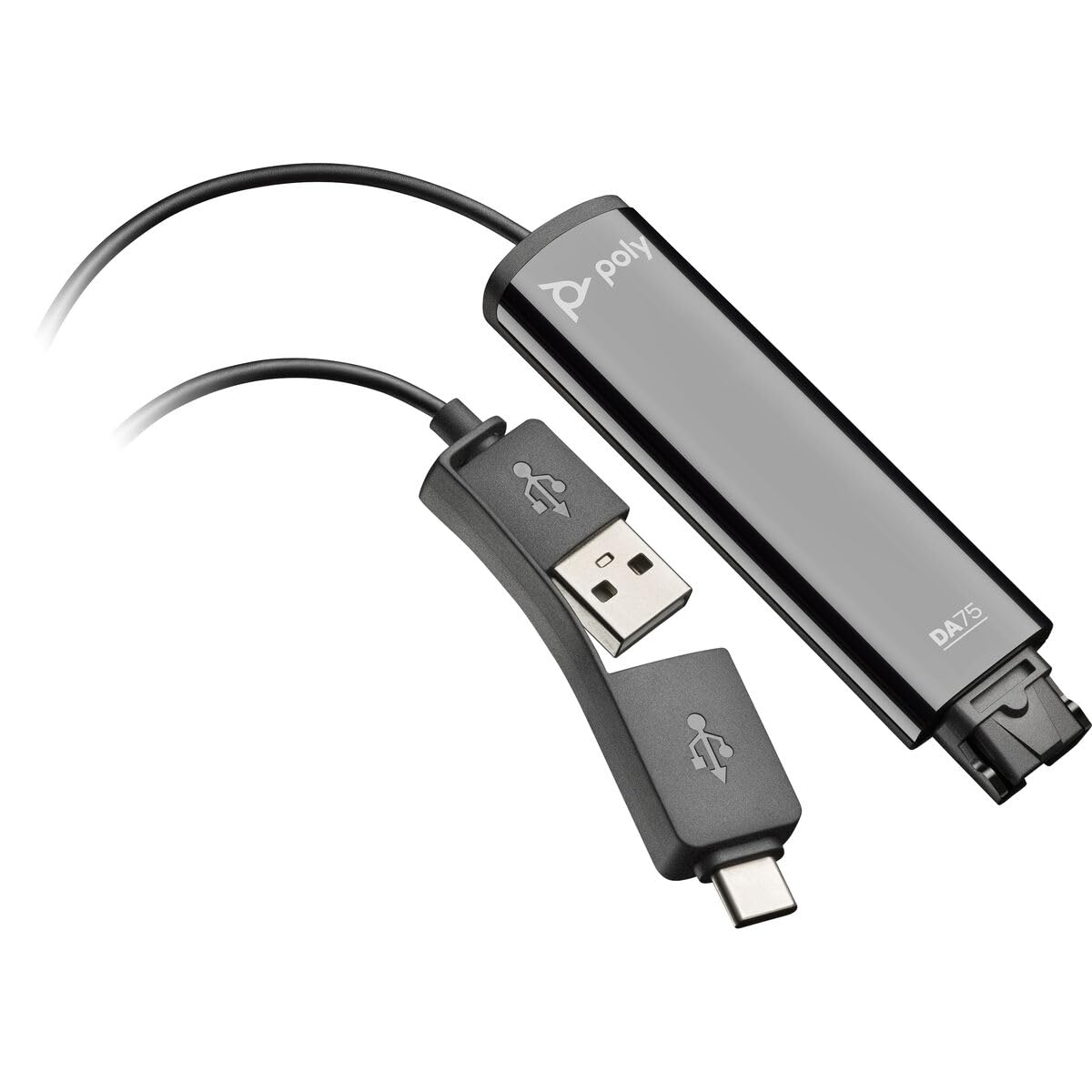
Image: The Poly DA75 USB-A/USB-C Digital Adapter, showing its dual USB-A and USB-C connectors and the Quick Disconnect port for headsets.
Co je v krabici
The Poly DA75 package typically includes the following items:
- Poly DA75 USB-A/USB-C Digital Adapter
- Dokumentace (Stručný průvodce, Bezpečnostní informace)
Note: Headsets are sold separately and are not included with the DA75 adapter.
Nastavení
Follow these steps to set up your Poly DA75 Digital Adapter:
- Připojení headsetu: Connect your Poly Quick Disconnect (QD) headset to the QD port on the Poly DA75 adapter. Ensure the connection is secure.
- Připojení k počítači:
- If your computer has a USB-A port, use the USB-A connector on the DA75 cable.
- If your computer has a USB-C port, use the USB-C connector on the DA75 cable.
Plug the appropriate USB connector into an available USB port on your computer.
- Instalace ovladače: The DA75 is a plug-and-play device. Your operating system (Windows, macOS) should automatically detect the device and install the necessary drivers. This process may take a few moments.
- Ověření rozpoznání zařízení:
- Windows: Přejít na Settings > System > Sound or Ovládací panely > Zvuk. The Poly DA75 should appear as an audio input and output device.
- MacOS: Přejít na System Settings > Sound. The Poly DA75 should appear as an input and output device.
Select the Poly DA75 as your default communication device for both playback and recording.
- Konfigurační software: If you are using communication software (e.g., Avaya, Genesys, Cisco, Microsoft Teams, Zoom), ensure that the Poly DA75 is selected as the audio device within the application's settings.
Návod k obsluze
The Poly DA75 adapter facilitates audio communication through your connected Poly QD headset. Its operation is primarily managed through your computer's operating system and communication software.
- Uskutečňování/přijímání hovorů: Use your communication software to initiate or answer calls. The audio will be routed through your connected Poly QD headset via the DA75 adapter.
- Ovládání hlasitosti: Adjust the listening volume using your computer's system volume controls or the volume controls within your communication application.
- Ztlumení mikrofonu: Mute and unmute your microphone using the controls provided by your communication software.
- Audio Optimization: The DA75 automatically optimizes audio for your specific Poly QD headset. No manual adjustments are typically required for audio profiles.
Údržba
To ensure the longevity and optimal performance of your Poly DA75 Digital Adapter, follow these maintenance guidelines:
- Čištění: Gently wipe the adapter with a soft, dry, anti-static cloth. Do not use liquid cleaners or abrasive materials.
- Skladování: Adaptér skladujte na chladném a suchém místě mimo dosah přímého slunečního záření a extrémních teplot.
- Zacházení: Neohýbejte ani nekruťte kabel nadměrně, zejména v blízkosti konektorů, abyste předešli jeho vnitřnímu poškození.
- Konektivita: Ensure the Quick Disconnect (QD) connection and USB connections are clean and free of debris before connecting.
Odstraňování problémů
If you encounter issues with your Poly DA75 Digital Adapter, refer to the following troubleshooting steps:
| Problém | Možná příčina | Řešení |
|---|---|---|
| Žádný zvuk z náhlavní soupravy |
|
|
| Mikrofon nefunguje |
|
|
| Adapter not recognized by computer |
|
|
Specifikace
| Funkce | Detail |
|---|---|
| Číslo modelu | 218266-01 |
| Značka | POLY |
| Typ konektoru | USB-A, USB-C (dual connector) |
| Kompatibilní zařízení | Poly Quick Disconnect (QD) Headsets |
| Specifická použití | PC, Call Center Platforms (Avaya, Genesys, Cisco) |
| Barva | Černý |
| Rozměry položky (D x Š x V) | 0.98 x 0.39 x 2.95 palce |
| Hmotnost položky | 30 gramů |
| Počet portů | 2 (USB-A/USB-C to QD) |
| UPC | 197029650054, 017229175112 |
Záruka a podpora
Informace o záruce: The Poly DA75 Digital Adapter comes with a 2letá omezená záruka výrobceTato záruka se vztahuje na vady materiálu a zpracování při běžném používání. Uschovejte si prosím doklad o koupi pro případ uplatnění záruky.
Technická podpora: For technical assistance, product inquiries, or warranty service, please contact Poly customer support. Visit the official Poly website for the most up-to-date support contact information, FAQs, and additional resources.
Online zdroje: Podpora Poly Webmísto


