
Zavedení
Thank you for choosing the Continu.us R230D2 Master TV Remote. This remote control is specifically designed to provide comprehensive control over RCA and Continu.us brand televisions, including access to commercial menus. Its intuitive layout ensures ease of use for all essential TV functions.

Obrázek 1: Přední strana view of the R230D2 Master TV Remote, showing all buttons.
Nastavení
Before using your new remote, you will need to install batteries.
Instalace baterie
- Najděte přihrádku na baterie na zadní straně dálkového ovladače.
- Posuňte kryt přihrádky na baterie dolů a zvedněte jej.
- Vložte dvě (2) baterie typu AA a ujistěte se, že kladný (+) a záporný (-) pól se shodují s označením uvnitř přihrádky.
- Nasaďte kryt přihrádky na baterie tak, že jej zasunete zpět na místo, dokud bezpečně nezacvakne.

Obrázek 2: Zpět view of the R230D2 Master TV Remote, illustrating the battery compartment.
První použití
The R230D2 Master TV Remote is pre-programmed for RCA and Continu.us televisions and typically requires no code entry or complex synchronization. Simply point the remote at your television and press the MOC button. If the TV responds, the remote is ready for use.
Návod k obsluze
This section details the functions of the buttons on your R230D2 remote control.
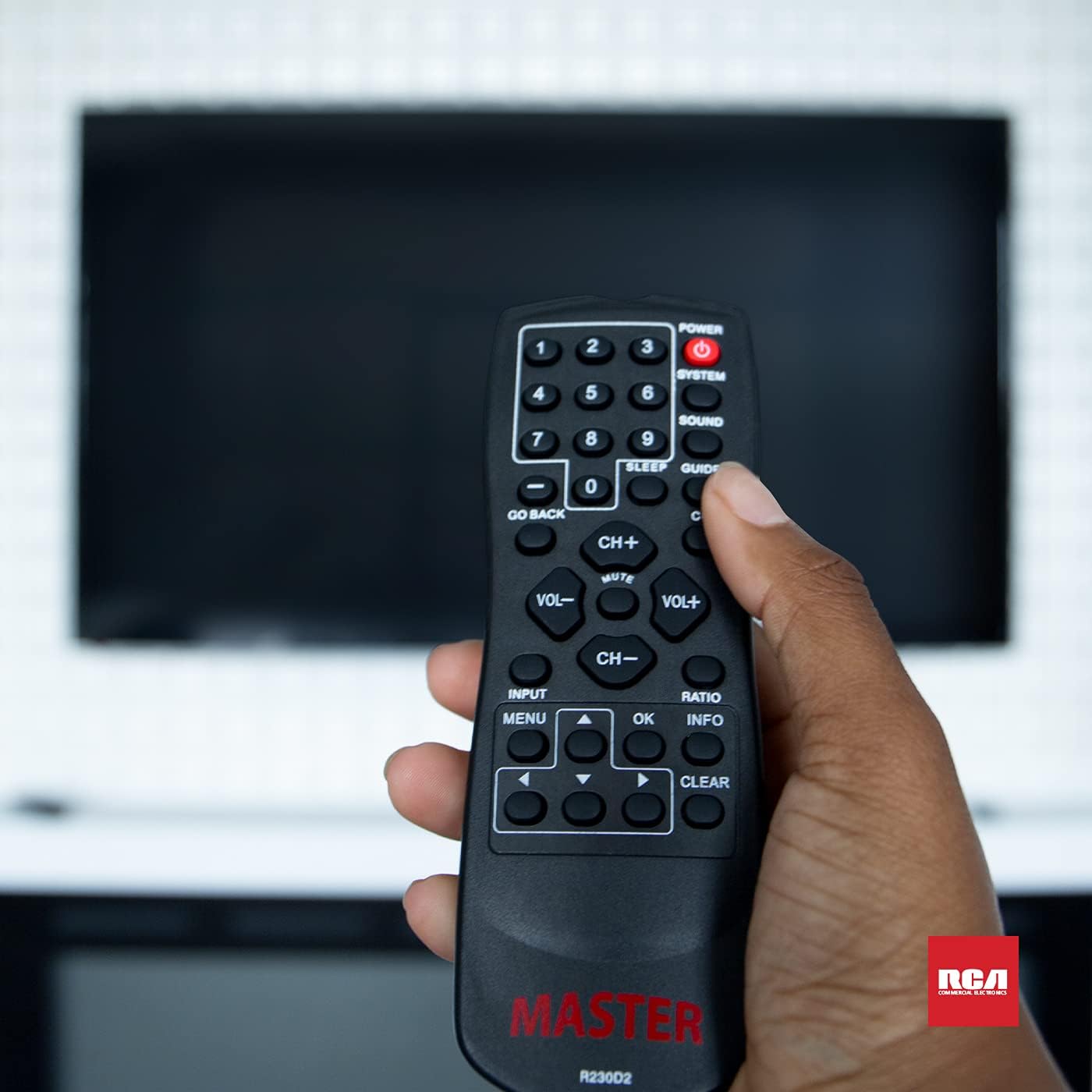
Figure 3: Using the R230D2 Master TV Remote with a television.
- MOC: Zapíná nebo vypíná televizi.
- SYSTÉM: Accesses system-specific functions or menus.
- ZVUK: Adjusts sound modes or settings.
- PRŮVODCE: Zobrazuje elektronického programového průvodce (EPG).
- SPÁT: Sets a timer for the TV to automatically turn off.
- CC (Skryté titulky): Zapíná nebo vypíná skryté titulky.
- Jděte ZPĚT: Návrat na předchozí kanál nebo obrazovku nabídky.
- Číselná tlačítka (0-9): Directly input channel numbers.
- CH+ / CH-: Přepíná kanály nahoru nebo dolů.
- VOL+ / VOL-: Increases or decreases volume.
- ZTLUMIT: Ztlumí nebo zapne zvuk televizoru.
- VSTUP: Selects the input source (e.g., HDMI 1, AV).
- MENU: Opens the television's main menu.
- OK: Confirms a selection or enters a submenu.
- INFO: Zobrazuje informace o aktuálním programu nebo vstupu.
- POMĚR: Upraví poměr stran obrazovky.
- JASNÝ: Clears input or exits certain functions.
- Navigační šipky (nahoru, dolů, vlevo, vpravo): Procházení nabídek a možností.
Accessing Commercial Menus
The R230D2 remote is designed to access commercial menus on compatible RCA and Continu.us televisions. The specific button or sequence to access these menus may vary by TV model. Typically, this function is integrated within the SYSTÉM or MENU buttons, or a combination thereof. Refer to your television's specific user manual for detailed instructions on accessing its commercial menu features.
Údržba
Pro zajištění dlouhé životnosti a optimálního výkonu vašeho dálkového ovladače dodržujte tyto jednoduché pokyny pro údržbu:
- Čištění: Dálkový ovladač otřete měkkým, suchým hadříkem. V případě odolné nečistoty lehceampOtřete hadřík vodou nebo jemným, neabrazivním čisticím prostředkem. Nepoužívejte agresivní chemikálie ani neponořujte dálkový ovladač do kapaliny.
- Výměna baterie: Replace batteries when the remote's response becomes sluggish or stops working. Always replace both batteries at the same time with new AA batteries. Do not mix old and new batteries, or different types of batteries.
- Skladování: Dálkový ovladač skladujte na chladném a suchém místě mimo dosah přímého slunečního záření, extrémních teplot a vysoké vlhkosti.
- Vyhněte se kapkám: Chraňte dálkový ovladač před fyzickými nárazy, protože pády mohou poškodit vnitřní součásti.
Odstraňování problémů
If you encounter issues with your R230D2 remote, try the following solutions:
- Dálkové ovládání nereaguje:
- Zkontrolujte, zda jsou baterie vloženy správně se správnou polaritou.
- Vyměňte baterie za nové.
- Ujistěte se, že mezi dálkovým ovladačem a infračerveným senzorem televizoru nejsou žádné překážky.
- Ujistěte se, že se nacházíte v dosahu infračerveného přijímače televizoru.
- TV Not Turning On/Off:
- Confirm the TV is plugged into a working power outlet.
- Try turning the TV on/off using its physical power button.
- Nefunkční specifické funkce:
- Some functions may require the TV's menu to be open or a specific input selected.
- Ujistěte se, že dálkový ovladač míří přímo na televizor.
- Remote Still Not Working:
- Pokud dálkový ovladač nedávno upadl nebo byl vystaven vlhkosti, mohlo dojít k jeho vnitřnímu poškození.
- Pro další pomoc kontaktujte zákaznickou podporu.
Specifikace
| Funkce | Detail |
|---|---|
| Značka | Pokračovat.us |
| Číslo modelu | R230D2 |
| Kompatibilní zařízení | RCA and Continu.us Televisions |
| Technologie připojení | Infračervený |
| Zdroj napájení | 2 AA baterií (nejsou součástí balení) |
| Hmotnost položky | 1.76 unce |
| Rozměry produktu | 6 x 2 x 1 palce |
| Maximální počet podporovaných zařízení | 1 |
Záruka a podpora
Continu.us products are designed and tested to high standards. We pride ourselves on offering excellent customer support.
Zákaznická podpora
If you require assistance with your R230D2 Master TV Remote, our support and technical team are available to help. Please reach out via phone or email for any pressing issues or questions.
For the most up-to-date contact information, please visit the official Continu.us webwebu nebo se podívejte na obal produktu.
Informace o záruce
Specific warranty details for the R230D2 remote are typically provided with the product packaging or can be found on the Continu.us official webstránky. Uschovejte si prosím doklad o koupi pro případ reklamace.