
Zavedení
This manual provides comprehensive instructions for the safe and efficient use of your Tronsmart Apollo Air TWS Bluetooth Earphones. Please read this manual thoroughly before using the product and retain it for future reference.
Bezpečnostní informace:
- Do not expose the earphones or charging case to extreme temperatures, humidity, or corrosive environments.
- Zabraňte pádu, nárazům nebo rozebírání zařízení.
- Uchovávejte mimo dosah dětí a domácích zvířat.
- Používejte pouze dodané nebo certifikované nabíjecí kabely.
- Dlouhodobé vystavení vysokým úrovním hlasitosti může způsobit poškození sluchu.
Konec produktuview
Obsah balení
- Tronsmart Apollo Air TWS Bluetooth Earphones (Left and Right)
- Nabíjecí pouzdro
- USB nabíjecí kabel
- Špunty do uší (různé velikosti)
- Uživatelská příručka (tento dokument)
Identifikace součásti
Familiarize yourself with the main components of your Tronsmart Apollo Air earphones and charging case.
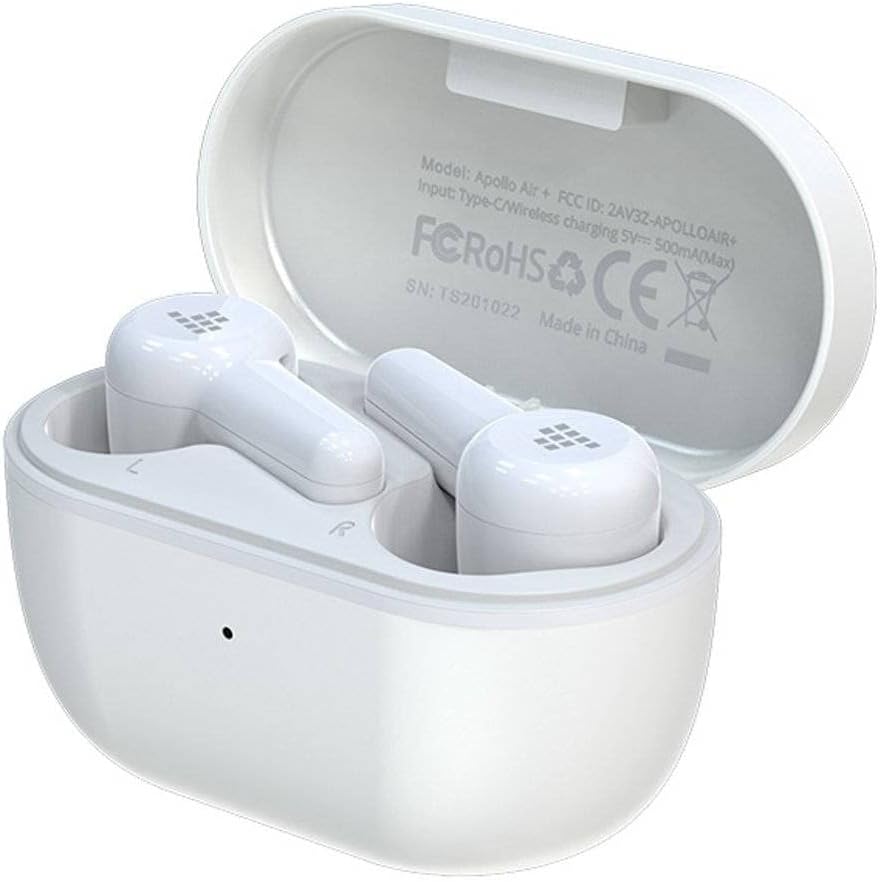
Image: Tronsmart Apollo Air TWS Earphones placed inside their open charging case. The case lid displays model information and certifications.

Image: Tronsmart Apollo Air TWS Earphones. One earbud is shown outside the charging case, highlighting its design and the charging contacts within the case.

Obrázek: Detailní záběr view of the two Tronsmart Apollo Air TWS Earbuds, showcasing their ergonomic shape, ear tips, and touch control areas.
Nastavení
Nabíjení sluchátek a pouzdra
- Nabíjení pouzdra: Connect the provided USB charging cable to the charging port on the case and to a USB power adapter (not included) or a computer's USB port. The indicator light on the case will show charging status.
- Nabíjení sluchátek: Place the earphones into the charging case. Ensure they are correctly seated in their respective slots (L for left, R for right). The earphones will automatically begin charging. The indicator lights on the earphones will show charging status.
- Fully charge the earphones and case before first use.
Párování pomocí Bluetooth
- Počáteční párování: Open the charging case. The earphones will automatically enter pairing mode, indicated by flashing lights (refer to product for specific light patterns).
- Na svém zařízení (chytrém telefonu, tabletu atd.) povolte Bluetooth a vyhledejte dostupná zařízení.
- Select "Tronsmart Apollo Air" from the list of found devices.
- Po připojení hlasový pokyn nebo kontrolka potvrdí úspěšné spárování.
- Opětovné spárování: If the earphones do not connect automatically, ensure Bluetooth is enabled on your device and the earphones are charged. You may need to manually select "Tronsmart Apollo Air" from your device's Bluetooth menu.
Ovládání sluchátek
Zapnutí/vypnutí
- Zapnutí: Open the charging case, or take the earphones out of the case. They will power on automatically.
- Vypnout: Vložte sluchátka zpět do nabíjecího pouzdra a zavřete víko. Automaticky se vypnou.
- Manuální vypnutí: (If supported) Long press the touch control area on both earbuds for approximately 5 seconds until the indicator light turns off.
Touch Controls (General)
The Tronsmart Apollo Air earphones feature touch-sensitive controls. Specific functions may vary slightly, but common operations include:
- Přehrát/pozastavit: Jediným klepnutím na jedno sluchátko.
- Další skladba: Dvakrát klepněte na pravé sluchátko.
- Předchozí skladba: Dvakrát klepněte na levé sluchátko.
- Přijmout/ukončit hovor: Jediným klepnutím na jedno sluchátko.
- Odmítnout hovor: Dlouze stiskněte libovolné sluchátko po dobu 2 sekund.
- Aktivovat Voice Assistant: Trojitě klepněte na kterékoli sluchátko.
- Ovládání hlasitosti: (If supported) Long press on the right earbud to increase volume, long press on the left earbud to decrease volume.
Note: Refer to the quick start guide included in your package for precise touch control mappings if different from above.

Image: A smartphone screen showing an equalizer application with various sound presets (e.g., Default, Deep Bass, Hi-Fi, Rock, Vocal). The Tronsmart Apollo Air earphones and charging case are visible in the background, suggesting compatibility with audio customization apps.
Údržba
Čištění
- Sluchátka a nabíjecí pouzdro jemně otřete měkkým, suchým hadříkem, který nepouští vlákna.
- Nepoužívejte abrazivní čisticí prostředky, alkohol ani chemická rozpouštědla.
- Sejměte ušní nástavce a v případě potřeby je očistěte samostatně jemným mýdlem a vodou. Před opětovným nasazením se ujistěte, že jsou zcela suché.
- Ensure charging contacts on both the earphones and case are clean and free of debris.
Skladování
- Pokud sluchátka nepoužíváte, vždy je uchovávejte v nabíjecím pouzdře, abyste je chránili a udrželi je nabité.
- Přístroj skladujte na chladném a suchém místě, mimo dosah přímého slunečního záření a extrémních teplot.
Odstraňování problémů
If you encounter issues with your Tronsmart Apollo Air earphones, please refer to the following common solutions:
Sluchátka se nespárují ani nepřipojují
- Ensure both earphones are charged and taken out of the charging case.
- Vypněte a zapněte Bluetooth na vašem zařízení.
- Delete "Tronsmart Apollo Air" from your device's Bluetooth list and attempt to re-pair.
- Try resetting the earphones (refer to product-specific reset instructions if available, otherwise, place them back in the case, close, then reopen).
Žádný zvuk nebo nízká hlasitost
- Zkontrolujte úroveň hlasitosti na připojeném zařízení i na sluchátkách.
- Ujistěte se, že máte sluchátka správně nasazená v uších.
- Ověřte, zda jsou sluchátka připojena ke správnému zvukovému výstupu na vašem zařízení.
- Clean any debris from the earphone speaker grilles.
Problémy s nabíjením
- Ujistěte se, že je nabíjecí kabel bezpečně připojen k pouzdru i ke zdroji napájení.
- Ověřte, zda je zdroj napájení funkční.
- Vyčistěte nabíjecí kontakty na sluchátkách a uvnitř pouzdra.
- Zkuste jiný nabíjecí kabel USB nebo napájecí adaptér.
Specifikace
| Funkce | Detail |
|---|---|
| Značka | Tronsmart |
| Název modelu | Apollo Air |
| Číslo modelu položky | 372452 |
| Konektivita | Bluetooth, bezdrátové připojení |
| Barva | Bílý |
| Form Factor | In-Ear, Basic Case |
| Materiál | Pryž |
| Hmotnost položky | 100 g |
| Rozměry produktu | 10 x 5 x 3 cm |
| Úroveň odolnosti proti vodě | Není odolný vůči vodě |
| Kompatibilní modely telefonů | Please check description (Generally compatible with most Bluetooth-enabled devices) |

Image: Technical diagram illustrating the precise dimensions of the Tronsmart Apollo Air charging case and individual earbuds in millimeters and inches.
Záruka a podpora
Tronsmart products are designed and manufactured to the highest quality standards. For detailed warranty information, please refer to the warranty card included with your purchase or visit the official Tronsmart webmísto.
For technical support, troubleshooting assistance, or to inquire about replacement parts, please contact Tronsmart customer service through their official channels. Contact information can typically be found on the product packaging or the official Tronsmart webmísto.