
Zavedení
This manual provides detailed instructions for the installation, operation, and maintenance of your Xigmatek Aquarius Plus Black ATX PC Case. Please read this manual thoroughly before beginning installation to ensure proper setup and safe use of your new PC case.
The Xigmatek Aquarius Plus Black is a mid-tower gaming PC case designed to accommodate ATX, Micro-ATX, and Mini-ITX motherboards. It features excellent cooling potential with support for up to 10 x 120mm fans, including 7 pre-installed ARGB 120mm AY120 fans. The case also offers ample space for a 360mm graphics card, a 158mm CPU cooler, and includes 4 drive bays (2 x 3.5" and 2 x 2.5"/3.5"). Its aesthetic design includes two seamless tempered glass panels and three dust filters for protection.
Bezpečnostní informace
- Před instalací nebo demontáží jakýchkoli součástí vždy odpojte napájecí kabel ze zásuvky.
- Handle all components with care to prevent damage from electrostatic discharge (ESD). Consider using an anti-static wrist strap.
- Avoid placing the PC case in direct sunlight, near heat sources, or in areas with high humidity.
- Zajistěte dostatečné větrání kolem skříně, abyste zabránili přehřátí.
- Uchovávejte malé díly a obalové materiály mimo dosah dětí.
- Do not attempt to modify the case structure. Unauthorized modifications may void your warranty and pose safety risks.
Obsah balení
Ověřte, zda jsou v balení přítomny všechny položky:
- Xigmatek Aquarius Plus Black ATX PC Case
- 7 x 120mm ARGB AY120 Fans (pre-installed)
- Sada příslušenství (šrouby, distanční sloupky, stahovací pásky)
- Uživatelská příručka (tento dokument)
Vlastnosti
- Design střední věže: Podporuje základní desky formátů ATX, Micro-ATX a Mini-ITX.
- Pokročilé chlazení: Pre-installed with 7 x 120mm ARGB AY120 fans; supports up to 10 x 120mm fans.
- Panely z tvrzeného skla: Two seamless tempered glass panels for a clear view vnitřních součástí.
- Ampúložiště: 4 drive bays (2 x 3.5" HDD, 2 x 2.5"/3.5" SSD/HDD).
- Vůle komponent: Supports graphics cards up to 360mm and CPU coolers up to 158mm.
- Filtrace prachu: Three dust filters included to protect internal components.
- Přední I / O: 1 x USB 2.0, 3 x USB 3.0 ports.
Nastavení a instalace
Follow these steps to install your PC components into the Xigmatek Aquarius Plus case.
1. Příprava případu
Carefully remove the tempered glass side panels by unscrewing the thumb screws at the rear of the case. Place the panels on a soft, flat surface to prevent scratches.

Image: The bare chassis of the Xigmatek Aquarius Plus, showing its internal structure before component installation.
2. Install the Motherboard
- Identify the correct standoff positions for your ATX, Micro-ATX, or Mini-ITX motherboard. The case may have pre-installed standoffs or require you to install them using the provided accessory kit.
- Place the motherboard I/O shield into the rear opening of the case.
- Carefully align your motherboard with the standoffs and I/O shield, then gently lower it into place.
- Secure the motherboard with the appropriate screws from the accessory kit. Do not overtighten.

Obrázek: Interní view of the Xigmatek Aquarius Plus case, illustrating the motherboard tray and fan placement.
3. Install Storage Drives
The case supports 2 x 3.5" HDDs and 2 x 2.5"/3.5" SSDs/HDDs.
- Locate the drive bays. Typically, 3.5" bays are found in a cage near the power supply shroud, and 2.5" mounts are on the back of the motherboard tray.
- For 3.5" drives, slide the drive into the bay and secure it with screws.
- For 2.5" drives, mount them to the designated trays or screw points on the motherboard tray.
4. Install the Power Supply Unit (PSU)
The Xigmatek Aquarius Plus supports bottom-mounted PSUs.
- Zasuňte zdroj do určené přihrádky ve spodní zadní části skříně.
- Secure the PSU to the case with screws from the rear.
- Route the necessary power cables through the cable management cutouts to the motherboard and other components.
5. Install Expansion Cards (e.g., Graphics Card)
The case has 4 expansion slots.
- Odstraňte potřebné kryty rozšiřujících slotů ze zadní strany skříně.
- Insert your graphics card or other expansion card into the appropriate PCIe slot on your motherboard.
- Kartu připevněte k pouzdru šroubem.
6. Connect Front I/O Cables
Connect the front panel cables (USB 2.0, USB 3.0, HD Audio, Power Switch, Reset Switch, Power LED, HDD LED) to their corresponding headers on your motherboard. Refer to your motherboard manual for exact header locations.
7. Správa kabelů
Utilize the cable management cutouts and tie-down points behind the motherboard tray to route and secure cables. This improves airflow and aesthetics.
8. Reattach Panels
Once all components are installed and cables are managed, carefully reattach the tempered glass side panels and secure them with the thumb screws.
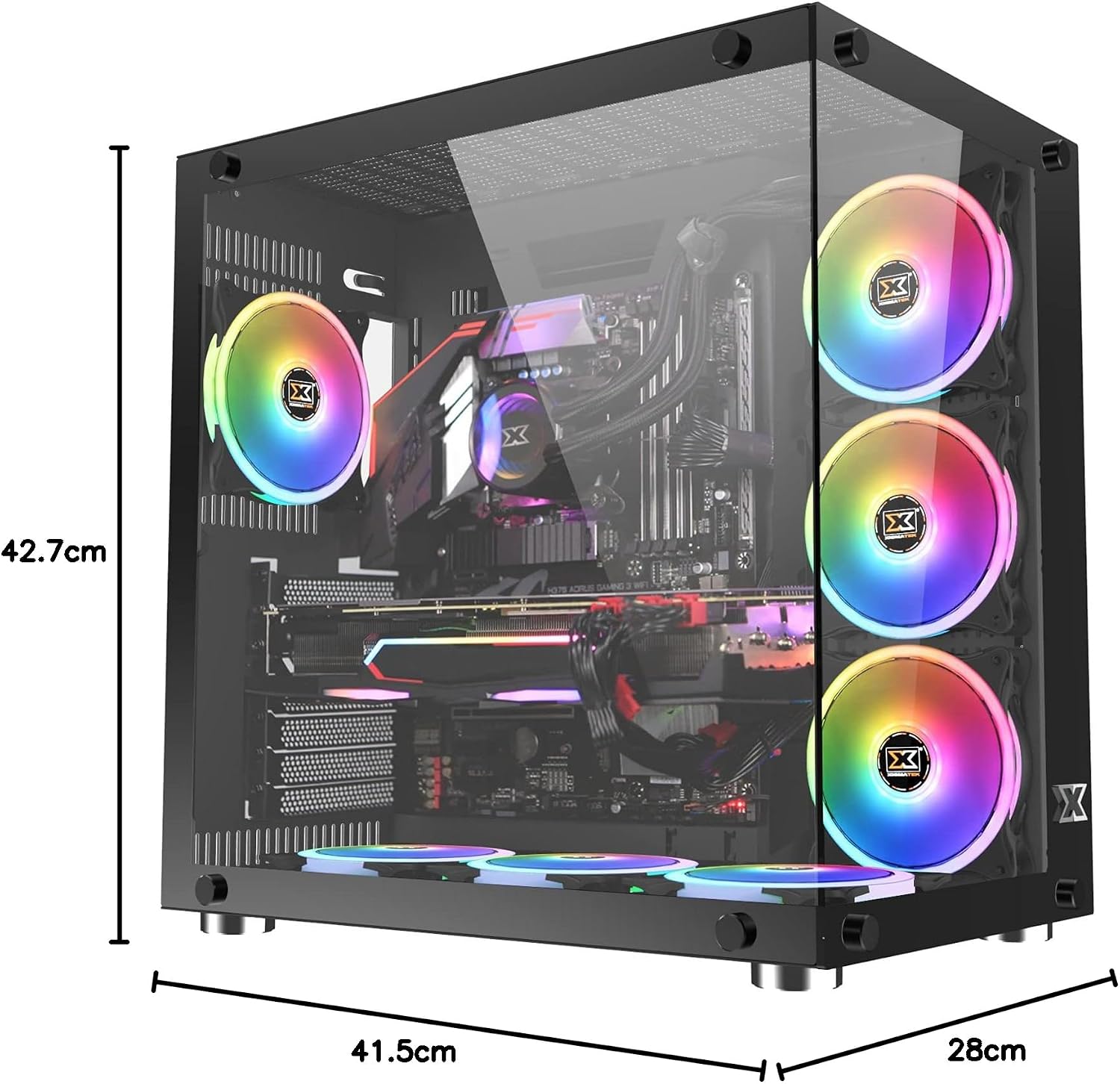
Image: The Xigmatek Aquarius Plus case fully assembled with internal components, showcasing its dimensions (41.5cm D x 28cm W x 42.7cm H).
Návod k obsluze
After successful installation, connect your peripherals (monitor, keyboard, mouse) and power cable to the PSU. Press the power button on the front panel to start your system.
ARGB Fan Control
The pre-installed ARGB fans are typically connected to a fan controller or directly to an ARGB header on your motherboard. Refer to your motherboard's manual or the fan controller's instructions for details on how to customize the lighting effects and fan speeds.
Údržba
Pravidelná údržba pomáhá zajistit optimální výkon a dlouhou životnost komponent vašeho počítače.
- Prachové filtry: The Xigmatek Aquarius Plus includes three dust filters. Regularly remove and clean these filters to prevent dust buildup inside the case. Use compressed air or a soft brush.
- Vnitřní čištění: Periodically open the case and use compressed air to remove dust from fans, heatsinks, and other components. Ensure the system is powered off and unplugged before cleaning.
- Panely z tvrzeného skla: Clean the tempered glass panels with a soft, lint-free cloth and a glass cleaner designed for electronics. Avoid abrasive materials.
Odstraňování problémů
Pokud narazíte na problémy, zvažte následující běžné kroky pro řešení potíží:
- Systém se nezapíná:
- Check if the power cable is securely connected to the PSU and the wall outlet.
- Ujistěte se, že je vypínač zdroje napájení v poloze „ON“.
- Ověřte, zda je kabel vypínače na předním panelu správně připojen ke konektoru základní desky.
- Confirm all internal power cables (24-pin ATX, CPU, GPU) are properly seated.
- Fans Not Spinning/ARGB Not Lighting Up:
- Zkontrolujte připojení napájení ventilátoru k základní desce nebo řadiči ventilátoru.
- Verify ARGB connections to the motherboard or controller.
- Ensure fan controller is powered (if applicable).
- USB porty nefungují:
- Confirm the front panel USB cables are correctly connected to the motherboard's USB headers.
For more complex issues, consult the manuals for your individual PC components (motherboard, GPU, PSU) or contact Xigmatek customer support.
Specifikace
| Název modelu | Aquarius Plus Black |
| Číslo modelu | EN46423 |
| Typ pouzdra | Střední věž |
| Kompatibilita základní desky | ATX, Micro ATX, Mini ITX |
| Rozměry (D x Š x V) | 41.5 cm x 28 cm x 42.7 cm |
| Hmotnost | 7 kg |
| Materiál | Tvrzené sklo, ocel |
| Rozšiřující sloty | 4 |
| Drive Bays | 2 x 3.5" HDD, 2 x 2.5"/3.5" SSD/HDD |
| Předinstalované ventilátory | 7 x 120mm ARGB AY120 Fans |
| Maximální podpora ventilátorů | Až 10 x 120 mm ventilátorů |
| Maximální délka GPU | 360 mm |
| Maximální výška chladiče CPU | 158 mm |
| Montáž zdroje | Dno |
| Přední I / O porty | 1 2.0 x USB, 3 x USB 3.0 |
| Způsob chlazení | Vzduch |
| Osvětlení | RGB (on fans) |
Záruka a podpora
For warranty information and technical support, please refer to the official Xigmatek webnebo se obraťte na místního prodejce. Uschovejte si doklad o koupi pro případ reklamace.