
1. Úvod
This manual provides detailed instructions for the installation, operation, and maintenance of your Athom Smart Wall Switch. This device is designed to integrate seamlessly with Apple HomeKit, offering convenient control via Siri voice commands, remote access, and scheduling features. It supports both no-neutral line and neutral line electrical systems, making it versatile for various installations.
2. Bezpečnostní informace
- Před instalací, demontáží nebo údržbou vždy vypněte napájení jističem.
- Instalaci by měl provést kvalifikovaný elektrikář nebo by měla být provedena v souladu s místními elektrotechnickými předpisy.
- Neovládejte spínač mokrýma rukama.
- Ensure the switch is installed in a dry environment, away from moisture and extreme temperatures.
- Verify correct wiring connections to prevent damage to the switch or connected appliances.
3. Obsah balení
Zkontrolujte prosím balení, zda neobsahuje následující položky:
- Athom Smart Wall Switch (3-Key)
- Uživatelská příručka
- Capacitor (for no-neutral line installations)
- Montážní šrouby

Image: Contents of the Athom Smart Wall Switch package, including the switch, manual, capacitor, and screws.
4. Konec produktuview
The Athom Smart Wall Switch features a sleek glass panel with three touch-sensitive buttons for manual control. A Wi-Fi indicator is located on the top left of the panel. The rear of the switch houses the wiring terminals for electrical connection.
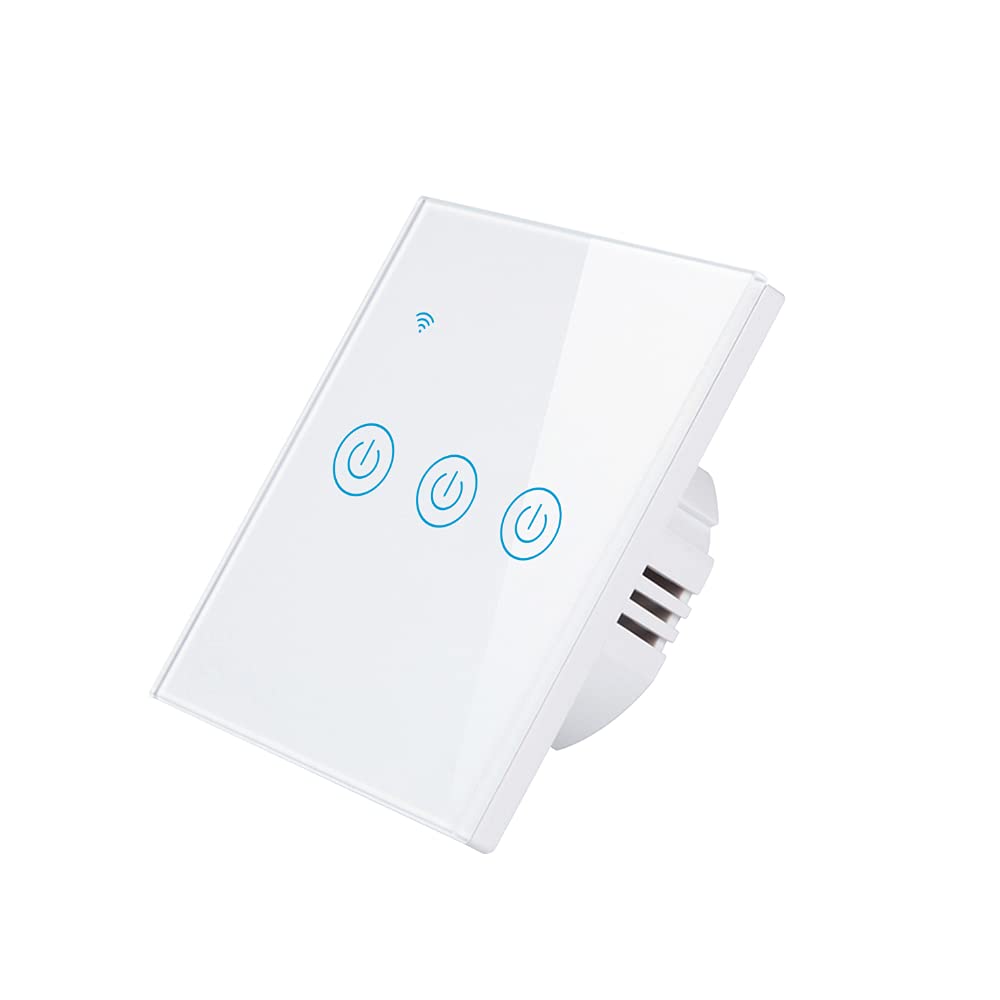
Obrázek: Přední strana view of the Athom Smart Wall Switch, showing the three touch-sensitive buttons and Wi-Fi indicator.

Image: Display of multiple Athom Smart Wall Switches, highlighting compatibility with Apple HomeKit.
5. Nastavení a instalace
5.1 Schémata zapojení
The Athom Smart Wall Switch supports both no-neutral line and neutral line installations. Please identify your home's wiring configuration before proceeding.
5.1.1 No Neutral Line Mode
This mode is common in older installations where a neutral wire is not present at the switch box. A capacitor must be installed across the light fixture for proper operation.

Image: Detailed wiring diagram illustrating the connection for the Athom Smart Wall Switch when a neutral line is not available, including capacitor installation across the bulb.
5.1.2 Neutral Line Mode
For installations where a neutral wire is available in the switch box, connect the Live (L) wire to the 'L' terminal, the Neutral (N) wire to the 'N' terminal, and the Load wires (L1, L2, L3) to their respective terminals. The capacitor is not required in this mode.
5.2 kroky instalace
- Vypnout napájení: Vyhledejte jistič a vypněte napájení spínače, který vyměňujete. Ověřte, zda je napájení vypnuté pomocí regulátoru hlasitosti.tage tester.
- Demontáž starého spínače: Carefully remove the existing wall plate and switch. Disconnect the wires.
- Zapojení inteligentního přepínače: Connect the wires to the Athom Smart Wall Switch according to the appropriate wiring diagram (Section 5.1). Ensure all connections are secure.
- Namontujte spínač: Gently push the wired switch into the wall box and secure it with the provided mounting screws.
- Instalace nástěnné desky: Připevněte novou nástěnnou desku.
- Obnovit napájení: Znovu zapněte napájení na jističi.
- Pair with HomeKit: Follow the instructions in Section 6.1 to pair your switch with Apple HomeKit.
6. Návod k obsluze
The Athom Smart Wall Switch offers multiple control methods:
6.1 Apple HomeKit and Siri Voice Control
The switch is designed for direct integration with Apple HomeKit without requiring a separate app or registration. To add the switch to HomeKit:
- Ensure your iPhone, iPad, or iPod Touch is connected to the same 2.4GHz Wi-Fi network as the switch.
- Otevřete aplikaci Apple Home.
- Klepněte na ikonu „+“ v pravém horním rohu a vyberte „Přidat příslušenství“.
- Scan the HomeKit setup code located on the switch or in the manual.
- Follow the on-screen prompts to assign the switch to a room and give it a name.
Once added, you can control the switch using Siri. For example, řekněte: „Hej Siri, rozsviť světlo v obýváku.“
6.2 Dálkové ovládání
After successfully adding the switch to Apple HomeKit, you can control it remotely using the Home app on your Apple devices. Ensure your Home Hub (e.g., Apple TV, HomePod, or iPad) is set up and online to enable remote access.
6.3 Časový harmonogram a plánování
Utilize the Apple Home app to set up schedules and automations for your smart switch. You can configure lights or appliances to turn on or off at specific times, or based on other conditions like sunrise/sunset or sensor triggers.
7. Údržba
- Čištění: Gently wipe the switch's glass panel with a soft, dry cloth. Avoid using abrasive cleaners or solvents.
- Aktualizace firmwaru: Periodically check for firmware updates through the Apple Home app to ensure optimal performance and security.
- Podmínky prostředí: Ensure the switch is not exposed to excessive heat, cold, or humidity, which can affect its lifespan and functionality.
8. Řešení problémů
- Přepínač nereaguje:
- Zkontrolujte, zda je zapnutý jistič.
- Ověřte, zda jsou všechna kabelová připojení bezpečná.
- If in no-neutral mode, ensure the capacitor is correctly installed across the light fixture.
- Try resetting the switch by turning off power at the breaker for 10 seconds, then turning it back on.
- Cannot Connect to HomeKit:
- Ujistěte se, že vaše Wi-Fi síť používá frekvenci 2.4 GHz. Přepínač nepodporuje sítě 5 GHz.
- Check that your iPhone/iPad is connected to the same 2.4GHz Wi-Fi network.
- Během párování se přibližte k Wi-Fi routeru.
- If the issue persists, try resetting the switch to factory defaults (refer to specific reset procedure if available, otherwise power cycle).
- Lights Flicker (No Neutral Mode):
- This often indicates an issue with the capacitor installation or a low-wattage bulb. Ensure the capacitor is correctly wired across the light fixture.
- Some very low-wattage LED bulbs may still flicker; consider using a compatible bulb or a neutral line installation if possible.
9. Specifikace
| Značka | Athom |
| Model | Smart Wall Switch 3-Key EU Dual Mode |
| svtage | 220-240 V AC, 50-60 Hz |
| Load per Gang | 5-200W |
| Rozměry | 86 x 86 x 35 mm |
| Provozní režim | Vypnuto, chytrý přepínač |
| Aktuální hodnocení | 10 Amps |
| Provozní svtage | 240 voltů |
| Typ konektoru | Bezdrátový |
| Hodnocení mezinárodní ochrany | IP54 |
| Počet pozic | 3 |
| Typ ovladače | Apple HomeKit |
| Kontrolní metoda | Vzdálený |
| Protokol připojení | Wi-Fi (2.4 GHz b/g/n) |
| Požadavek na rozbočovač | Žádný |
| Pracovní teplota | -20 °C až 50 °C |
| Certifikace | CE, RoHS |
10. Záruka a podpora
For warranty information and technical support, please refer to the documentation provided with your purchase or visit the official Athom webUschovejte si účtenku jako doklad o koupi pro případ reklamace.