
1. Úvod
Thank you for choosing the Truman TM 1000 HD Receiver. This manual provides detailed instructions for the proper installation, operation, and maintenance of your new satellite receiver. Please read this manual thoroughly before using the device to ensure optimal performance and safety.
2. Bezpečnostní informace
- Ensure the receiver is placed on a stable, flat surface to prevent falls.
- Nevystavujte zařízení dešti, vlhkosti ani extrémním teplotám.
- Neblokujte ventilační otvory, aby nedošlo k přehřátí.
- Během bouřek nebo pokud přístroj delší dobu nepoužíváte, odpojte napájecí kabel.
- Nepokoušejte se přijímač otevírat ani opravovat sami. Veškerý servis svěřte kvalifikovanému personálu.
- The device features automatic low current protection for the signal input.
3. Obsah balení
Zkontrolujte prosím balení, zda neobsahuje následující položky:
- Truman TM 1000 HD Receiver
- Dálkové ovládání
- Napájecí adaptér
- Uživatelská příručka (tento dokument)
- Note: A Wi-Fi adapter is not included and must be purchased separately if wireless connectivity is desired.
4. Konec produktuview
The Truman TM 1000 HD Receiver is a high-definition satellite receiver designed to provide a rich viewing experience. It supports various resolutions and offers multiple features for channel management and media playback.
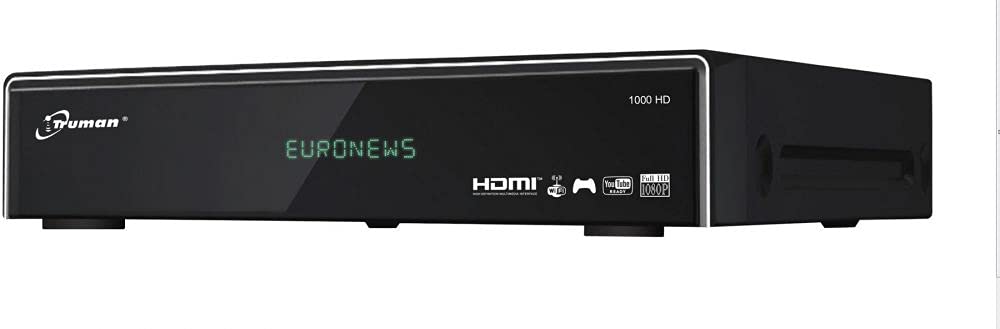
Obrázek 4.1: Přední view of the Truman TM 1000 HD Receiver. This image shows the compact design of the receiver, featuring a front panel display and control buttons, indicating its readiness for integration into a home entertainment system.
Klíčové vlastnosti:
- Full HD support: 1080p, 1080i, 720p, 576p, 480p, 576i, 480i.
- Podporuje až 6000 kanálů.
- USB port pro viewing and recording media.
- Simultaneous recording of one channel and viewing of another.
- Picture-in-picture (PIP) functionality for up to 16 channels.
- Automatic search for frequencies and satellites.
- Multi-language and user-friendly menu interface.
- Ethernet (LAN) port for network connectivity.
- Wi-Fi support (requires external Wi-Fi adapter).
- Elektronický programový průvodce (EPG).
5. Nastavení
5.1 Připojení přijímače
- Připojení satelitní antény: Connect the coaxial cable from your satellite dish LNB to the "LNB IN" port on the back of the receiver.
- Připojení TV: Connect an HDMI cable from the "HDMI OUT" port on the receiver to an available HDMI input on your television.
- Připojení napájení: Connect the power adapter to the "DC IN" port on the receiver, then plug the adapter into a wall outlet.
- Síťové připojení (volitelné):
- Ethernet: Connect an Ethernet cable from your router to the "LAN" port on the receiver.
- Wi-Fi: If using a Wi-Fi adapter (not included), plug it into an available USB port on the receiver.
- Zařízení USB (volitelné): For recording or media playback, insert a USB storage device into an available USB port.
5.2 První zapnutí
- Zapněte televizor a vyberte správný vstupní zdroj HDMI.
- Power on the Truman TM 1000 HD Receiver.
- Follow the on-screen instructions for initial setup, which typically includes language selection, time zone, and satellite/channel scanning.
- Perform an automatic satellite search to find available frequencies and channels.
6. Návod k obsluze
6.1 Basic Channel Operations
- Výběr kanálu: Použijte CH+ / CH- buttons on the remote control to change channels, or enter the channel number directly.
- Ovládání hlasitosti: Použijte VOL+ / VOL- tlačítka pro nastavení hlasitosti.
- Přístup do menu: Stiskněte tlačítko MENU tlačítko pro přístup do hlavní nabídky s nastaveními a funkcemi.
- Elektronický programový průvodce (EPG): Stiskněte tlačítko EPG tlačítko na view the program schedule.
6.2 Nahrávání a přehrávání
To record programs, ensure a USB storage device is connected to the receiver.
- Okamžité nahrávání: While watching a channel, press the REC na dálkovém ovladači spusťte nahrávání. Stiskněte ZASTÁVKA pro ukončení nahrávání.
- Plánované nahrávání: Use the EPG to select a program and schedule a recording.
- Přehrávání: Access the media player through the main menu or a dedicated button (if available) to browse and play recorded content or other media filez vašeho USB zařízení.
- Simultaneous Operations: The receiver supports recording one channel while watching another channel from the same transponder.
6.3 Network Features (LAN/Wi-Fi)
If connected to a network, the receiver may offer additional features such as firmware updates, internet applications, or media streaming.
- Nastavení sítě: Go to the "Network Settings" in the main menu.
- Ethernet: If using a wired connection, ensure the cable is connected. The receiver should obtain an IP address automatically.
- Wi-Fi: If using a Wi-Fi adapter, select your network from the list, enter the password, and connect.
7. Údržba
- Čištění: K čištění vnější strany přijímače používejte měkký, suchý hadřík. Nepoužívejte tekuté čisticí prostředky ani abrazivní materiály.
- Větrání: Ensure the ventilation slots are clear of dust and obstructions to prevent overheating.
- Aktualizace firmwaru: Periodically check for firmware updates through the receiver's menu (if available) to ensure optimal performance and access to new features.
8. Řešení problémů
| Problém | Možná příčina | Řešení |
|---|---|---|
| Žádná síla | Odpojený napájecí kabel; problém se zásuvkou. | Zkontrolujte připojení napájecího kabelu; zkuste jinou zásuvku. |
| Žádný signál / hláška „Žádný signál“ | LNB cable disconnected; satellite dish misalignment; incorrect satellite settings. | Check LNB cable connection; ensure dish is correctly aligned; verify satellite settings in the menu. |
| Žádný obraz na televizi | Na televizoru byl vybrán nesprávný vstup HDMI; vadný kabel HDMI. | Select the correct HDMI input on your TV; try a different HDMI cable. |
| Dálkové ovládání nefunguje | Dead batteries; obstruction between remote and receiver. | Vyměňte baterie; zajistěte nerušený výhled na infračervený senzor přijímače. |
| Nelze se připojit k Wi-Fi | No Wi-Fi adapter; incorrect password; network issue. | Ensure a compatible Wi-Fi adapter is connected; re-enter Wi-Fi password; check router. |
9. Specifikace
| Funkce | Popis |
|---|---|
| Značka | Trumane |
| Model | TM 1000 HD |
| Podpora rozlišení videa | 1080p, 1080i, 720p, 576p, 480p, 576i, 480i |
| Kapacita kanálu | Až 6000 kanálů |
| Konektivita | USB, Ethernet (LAN), Wi-Fi (external adapter required) |
| Záznam | PVR function via USB (record one, watch another on same transponder) |
| více-view | Picture-in-picture up to 16 channels |
| Funkce vyhledávání | Automatic frequency and satellite search |
| Jazyk nabídky | Vícejazyčná podpora |
| Ochrana | Automatic low current protection for signal input |
| EPG | Elektronický programový průvodce |
10. Záruka a podpora
For warranty information, please refer to the warranty card included with your product or contact your local dealer. For technical support or service inquiries, please visit the official Truman webnebo kontaktujte jejich oddělení zákaznických služeb.
Poznámka: Konkrétní záruční podmínky a kontaktní údaje podpory se mohou lišit v závislosti na regionu.