
Zavedení
This manual provides essential instructions for the proper use and maintenance of your Easytry123 replacement remote control. This remote is designed to be compatible with various Hisense Smart 4K UHD LED TV models. Please read this manual thoroughly before operating the remote control.
Konec produktuview
The Easytry123 replacement remote control is an ergonomic, button-controlled device utilizing infrared technology for seamless interaction with compatible Hisense televisions. It features dedicated buttons for power, volume, channel control, navigation, and quick access to popular streaming services.



Nastavení
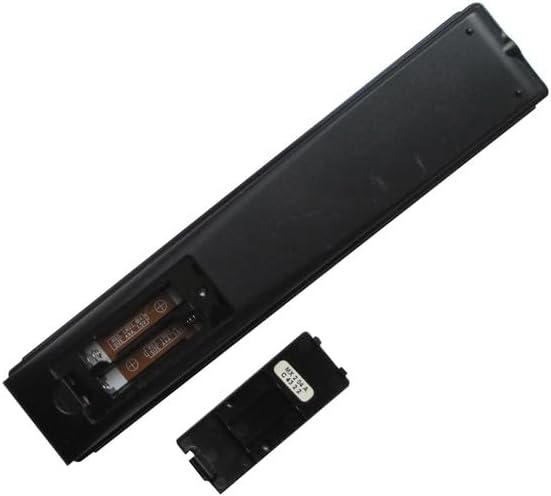
Instalace baterie
- Najděte přihrádku na baterie na zadní straně dálkového ovladače.
- Slide the battery cover downwards or press the latch and lift to open. (Refer to Figure 3 and Figure 4)
- Vložte dvě (2) baterie typu AAA a ujistěte se, že kladný (+) a záporný (-) pól správně odpovídají označením uvnitř přihrádky.
- Replace the battery cover by sliding it back into position until it clicks securely. (Refer to Figure 5)
No additional setup or coding is required for this replacement remote control. It is designed to work directly with compatible Hisense TV models once batteries are installed.
Návod k obsluze
This remote control operates using infrared (IR) signals. Ensure there is a clear line of sight between the remote's IR emitter (located at the top front) and your television's IR receiver.
- Vypínač: Stiskněte tlačítko Moc button (usually red, top right) to turn the TV on or off.
- Ovládání hlasitosti: Použijte VOL+ a OBJEM - tlačítka pro nastavení hlasitosti zvuku.
- Ovládání kanálů: Použijte CH ^ a CH v buttons to change TV channels.
- Navigační podložka: The central circular pad with directional arrows (Nahoru dolu vlevo vpravo) and a central OK/Enter button is used to navigate menus and select options.
- Tlačítko Zpět: Stiskněte tlačítko Zadní button (left arrow) to return to the previous screen or menu.
- Tlačítko Domů: Stiskněte tlačítko Domov button (house icon or circle) to access the TV's main smart interface.
- Tlačítka zkratek aplikací: Dedicated buttons for services like Sling, Google Play, Fandango teďa Tikilive provide quick access to these applications.
- Tlačítko Google Assistant: The button with the Google Assistant logo (colored dots) activates voice commands if your TV supports this feature.
- Input/123 Button: This button (often labeled '123' or with an input icon) allows you to switch between different input sources (HDMI, AV, etc.).
- Tlačítko ztlumení: The button with a crossed-out speaker icon mutes or unmutes the TV audio.
- Ovládání přehrávání: Tlačítka jako Přehrát/Pozastavit, Přetočit zpěta Rychle vpřed are used for media playback.
- Skryté titulky (CC): Zapíná nebo vypíná skryté titulky.
- NRT (No Remote Timer): Functionality may vary by TV model.
- MTS (Vícekanálový televizní zvuk): Allows selection of audio tracks (e.g., stereo, SAP).
Údržba
- Čištění: Dálkový ovladač otírejte měkkým, suchým hadříkem. Nepoužívejte tekuté čisticí prostředky ani abrazivní materiály.
- Péče o baterie: Replace batteries when the remote's response becomes sluggish or stops working. Remove batteries if the remote will not be used for an extended period to prevent leakage.
- Skladování: Dálkový ovladač skladujte na chladném a suchém místě mimo dosah přímého slunečního záření a extrémních teplot.
Odstraňování problémů
- Dálkové ovládání nereaguje:
- Ujistěte se, že nové baterie AAA jsou správně vloženy se správnou polaritou.
- Zkontrolujte, zda se mezi dálkovým ovladačem a infračerveným přijímačem televizoru nenacházejí nějaké překážky.
- Namiřte dálkový ovladač přímo na televizor.
- Try replacing the batteries with a fresh set.
- Některé funkce nefungují:
- This is a replacement remote and may not support all advanced functions of your original TV remote.
- Ověřte, zda je model vašeho televizoru uveden jako kompatibilní s tímto dálkovým ovladačem.
- Rušení: Strong light sources or other infrared devices can sometimes interfere with the remote's signal.
Specifikace
| Značka | Easytry123 |
| Kompatibilní zařízení | Television (Various Hisense Smart 4K UHD LED TV Models) |
| Technologie připojení | Infračervený |
| Typ ovladače | Ovládání tlačítkem |
| Speciální funkce | Ergonomický |
| Jsou vyžadovány baterie | 2 AAA baterie |
Důležité poznámky
- Toto je náhradní dálkový ovladač a je not a universal remote control.
- The replacement item may not work with all functions as the original remote. Some advanced or specific features of your original remote might not be supported.
- To je snadné použití and does not require a manual or batteries to be included in the package.
- Existuje no need for setup or code programming; it works directly with compatible models.
- Vždy ensure our remote matches the model number of your unit for optimal compatibility.
Záruka a podpora
Specific warranty information for this product is not provided in this manual. For any issues or support inquiries, please refer to the seller or retailer from whom the product was purchased. Ensure you retain your proof of purchase for any potential warranty claims.