
Konec produktuview
The Poly Sync 60 USB/Bluetooth smart speakerphone is designed to provide clear audio for small to medium conference rooms. It features powerful twin speakers and a six-microphone array that focuses on voices while reducing background noise. This allows for natural conversations, even when multiple participants speak simultaneously. The device offers versatile connectivity options, including USB-A, USB-C, and Bluetooth, enabling connection to PCs, Macs, and smartphones. It is powered by an AC adapter, eliminating the need for battery charging during use. For larger spaces, two units can be wirelessly paired to expand voice pickup coverage.
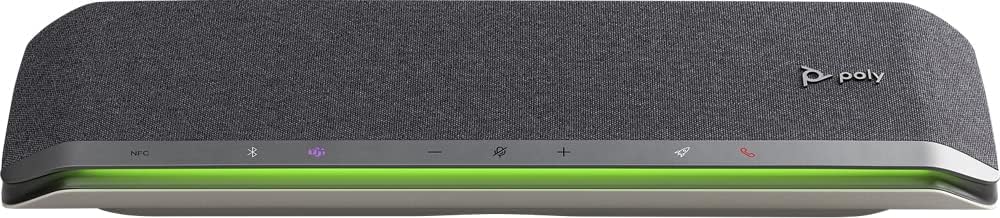
Obrázek: Přední strana view of the Poly Sync 60 Smart Speakerphone, showing the speaker grille, control buttons, and an illuminated LED light bar.
Obsah balení
- Poly Sync 60 Speakerphone
- Main power supply with global pin adapters
- USB cable with USB-A and USB-C connectors
Klíčové vlastnosti
- Pokročilý zvuk: Six-microphone steerable array for echo and noise reduction, ensuring clear voice pickup.
- Duální reproduktory: High-performance speakers deliver rich, clear audio for all participants.
- AC napájení: Operates continuously via AC power, eliminating battery concerns.
- Schopnost řetězu Daisy: Wirelessly pair two units for extended coverage in larger meeting spaces.
- Flexibilní konektivita: Connects to computers via combined USB-A/USB-C cable and to smartphones via Bluetooth.
- USB Video Camera Support: Connect a USB video camera to the speakerphone for combined audio and video with a single cable to the computer.
- Mobile Device Charging: Two USB ports allow charging of up to two mobile phones simultaneously.
- Microsoft Teams Certified: Includes a dedicated Teams button for instant access to the Teams application.
Průvodce nastavením
1. Připojení napájení
Connect the provided main power supply to the Poly Sync 60 and plug it into a wall outlet. The device requires AC power for operation.
2. Připojení k počítači (PC/Mac)
Use the integrated USB cable to connect the Poly Sync 60 to your computer. The cable supports both USB-A and USB-C ports. Once connected, the device should be recognized automatically by your operating system.
3. Connecting to a Smartphone (Bluetooth)
- Stiskněte a podržte Tlačítko Bluetooth on the Poly Sync 60 until the LED indicator flashes blue.
- On your smartphone, navigate to the Bluetooth settings and select "Poly Sync 60" from the list of available devices.
- Po spárování bude LED indikátor svítit modře.
4. Daisy Chain Two Units (Optional)
For expanded audio coverage, two Poly Sync 60 units can be wirelessly paired. Refer to the official Poly support documentation for detailed instructions on how to enable this feature.
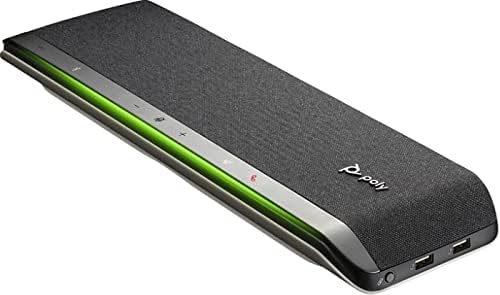
Obrázek: Boční view of the Poly Sync 60 Smart Speakerphone, highlighting the USB ports for charging mobile devices and connecting a video camera.
Návod k obsluze
Základní ovládací prvky
- Zvýšení/Snížení hlasitosti: Použijte + a - tlačítky pro nastavení hlasitosti reproduktoru.
- Ztlumit/Zapnout: Stiskněte tlačítko microphone icon button to mute or unmute the microphone. The LED indicator will change color to show mute status.
- Příjem/ukončení hovoru: Stiskněte tlačítko phone icon button přijmout nebo ukončit hovor.
- Tlačítko Microsoft Teams: Stiskněte tlačítko Teams icon button to launch or interact with the Microsoft Teams application (if certified version).
Nabíjení mobilních zařízení
Connect your mobile phone or other USB-powered device to one of the two USB ports on the Poly Sync 60 to charge it during a meeting.
Údržba a péče
- Clean the Poly Sync 60 with a soft, dry, lint-free cloth.
- Do not use abrasive cleaners, solvents, or strong chemicals, as these may damage the device.
- Nevystavujte zařízení extrémním teplotám, vlhkosti nebo přímému slunečnímu záření.
- Pokud reproduktor nepoužíváte, uložte jej na chladném a suchém místě.
Odstraňování problémů
- Žádný zvuk/nefungující mikrofon:
- Ensure the device is powered on and the AC adapter is securely connected.
- Verify that the speakerphone is not muted (check the mute button LED).
- Check the volume levels on both the Poly Sync 60 and your connected computer/smartphone.
- Confirm that the Poly Sync 60 is selected as the audio input/output device in your computer's sound settings or conferencing application.
- Problémy s připojením (USB):
- Zkuste připojit kabel USB k jinému portu v počítači.
- Restartujte počítač.
- Problémy s připojením (Bluetooth):
- Ensure Bluetooth is enabled on your smartphone and the Poly Sync 60 is in pairing mode.
- Unpair and then re-pair the device from your smartphone's Bluetooth settings.
- Ujistěte se, že žádná jiná zařízení Bluetooth nezpůsobují rušení.
- Echo or Background Noise:
- Place the speakerphone centrally in the room, away from walls or highly reflective surfaces.
- Ensure the room is quiet and free from excessive background noise.
Technické specifikace
| Funkce | Specifikace |
|---|---|
| Název modelu | Synchronizovat 60 |
| Číslo modelu položky | 216873-01 |
| Typ reproduktoru | Multimédia |
| Technologie připojení | Bluetooth, USB |
| Technologie bezdrátové komunikace | Bluetooth |
| Dosah Bluetooth | 3 metrů |
| Zdroj napájení | Elektrický kabel |
| Maximální výstupní výkon reproduktoru | 60 wattů |
| Režim zvukového výstupu | Stereo |
| Konfigurace kanálů prostorového zvuku | 2.0 |
| Kontrolní metoda | Stiskněte tlačítko |
| Rozměry produktu | 1.5"H x 15.5"Š x 4.8"V |
| Hmotnost položky | 2.2 libry (1000 gramů) |
| Doporučená použití | Office work, remote work, conference calls, personal entertainment, charging mobile devices |
| Typ montáže | Stolní držák |
| Výrobce | Poly |
| UPC | 017229172517, 197029590572 |
Informace o záruce
The Poly Sync 60 Smart Speakerphone comes with a full manufacturer's warranty. For detailed information regarding warranty terms, duration, and claim procedures, please refer to the official Poly webwebu nebo v záruční dokumentaci dodané s vaším nákupem.
Podpora
For further assistance, product updates, software downloads, or detailed guides, please visit the official Poly support website. You can also contact Poly customer service for technical support or service inquiries.
Oficiální polygrafie Webmísto: www.poly.com