
Zavedení
Welcome to your new SMARTY 2.0 Smart Watch SW022I. This manual provides detailed instructions to help you set up, operate, and maintain your device, ensuring you get the most out of its features. Please read this manual carefully before using your smartwatch.
Nastavení
1. Počáteční nabíjení
Before first use, fully charge your smartwatch. Connect the charging cable to the charging port on the watch and to a standard USB power adapter. The watch display will indicate charging status.
2. Instalace a párování aplikace
To unlock the full potential of your SMARTY 2.0 Smart Watch, download the official SMARTY app on your smartphone. The app is available for both iOS and Android devices.
- Scan the QR code provided in the watch packaging or search for 'SMARTY' in your phone's app store.
- Nainstalujte si aplikaci a vytvořte si účet nebo se přihlaste.
- Ujistěte se, že je na vašem smartphonu povoleno Bluetooth.
- Open the SMARTY app and follow the on-screen instructions to pair your watch. The app will guide you through the pairing process, typically involving selecting your watch from a list of nearby devices.
3. Výběr jazyka
After pairing, you can select your preferred language directly on the watch or through the app settings. Navigate to the 'Settings' menu on your watch, then 'Language', and choose from the available options.
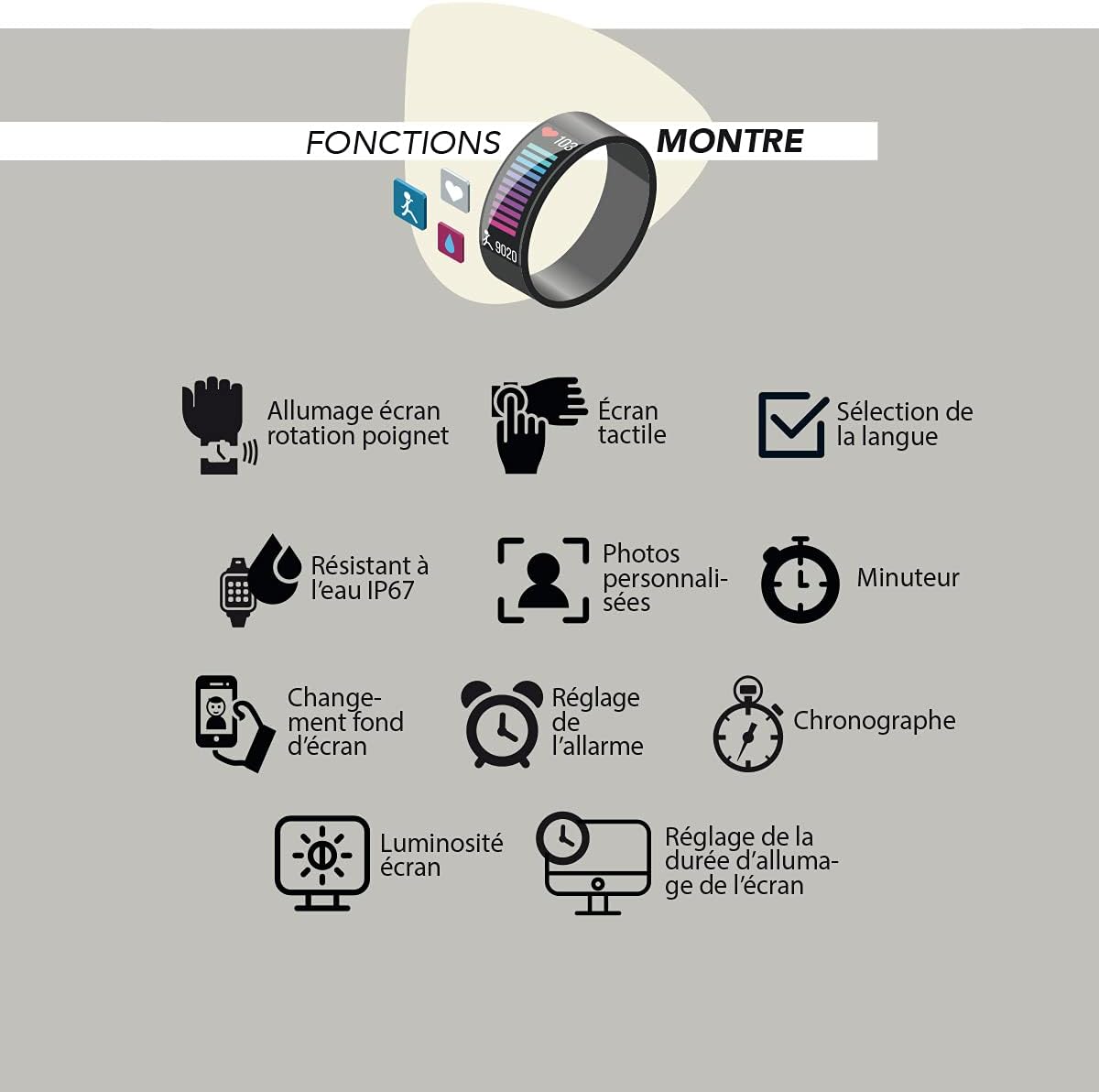
Image: The smartwatch display showing various functions including language selection, touch screen, and wrist rotation activation.
4. Customizing Watch Face
Personalize your watch by changing the watch face. This can be done through the SMARTY app or directly on the watch. The watch supports custom photos as watch faces.
Návod k obsluze
Základní navigace
- Dotyková obrazovka: Přejetím prstem doleva, doprava, nahoru nebo dolů můžete procházet nabídky a funkce. Klepnutím vyberete.
- Rotace zápěstí: Enable 'Screen on wrist rotation' in settings to automatically wake the screen when you raise your wrist.
Funkce hodinek
- Časovač: Access the timer function to set countdowns.
- Chronograf: Use the stopwatch feature for timing events.
- Nastavení budíku: Set and manage alarms through the watch or the app.
- Jas obrazovky: Adjust the screen brightness for optimal visibility in different lighting conditions.
- Screen On Duration: Nastavte, jak dlouho zůstane obrazovka aktivní po probuzení.
Monitorování zdraví
Your smartwatch is equipped with various sensors to monitor your health and well-being.

Image: An illustration of the smartwatch's health and well-being functions, including sleep control, general well-being, heart rate, anti-stress, blood oxygen (O2), blood pressure, programmable pressure test, and programmable cardiac test.
- Ovládání spánku: Sleduje vaše spánkové vzorce a kvalitu spánku.
- Srdeční frekvence: Sleduje váš tep po celý den.
- Blood Oxygen (O2): Měří hladinu saturace krve kyslíkem.
- Krevní tlak: Poskytuje měření krevního tlaku.
- Anti-stress: Features designed to help manage stress levels.
- Programmable Tests: Conduct programmable blood pressure and cardiac tests.
Mobile Functions
Connect your smartwatch to your smartphone for enhanced functionality.

Image: An illustration of the smartwatch's mobile functions, including finding the watch, music control, message notifications, call notifications, Bluetooth calling, and remote photo/selfie control.
- Upozornění na zprávy: Receive alerts for incoming messages.
- Upozornění na hovory: Get notified of incoming calls.
- Bluetooth volání: Make and receive calls directly from your watch when connected via Bluetooth.
- Ovládání hudby: Ovládejte přehrávání hudby na svém smartphonu.
- Najít hodinky: Use your phone to locate your watch if it's misplaced nearby.
- Remote Photo - Selfie: Používejte hodinky jako dálkové ovládání fotoaparátu telefonu.
Sport and Fitness Tracking
Track your physical activities and monitor your fitness progress.

Image: An illustration of the smartwatch's sport functions, including pedometer/distance, calorie consumption, sedentary reminder, water consumption reminder, route tracking, weather, and specific sport modes like walking, running, climbing, and cycling, with metrics for BPM, calories, and time.
- Krokoměr a vzdálenost: Counts your steps and calculates distance covered.
- Spotřeba kalorií: Odhaduje spálené kalorie během aktivit.
- Sportovní režimy: Dedicated modes for Walking, Running, Climbing, and Cycling, tracking metrics like heart rate (BPM), calories, and time.
- Sledování trasy: Tracks your route during outdoor activities.
- Sedavé připomenutí: Připomíná vám, abyste se po obdobích nečinnosti hýbali.
- Připomenutí spotřeby vody: Nabádá vás k pravidelnému pití vody.
- Počasí: Zobrazuje aktuální informace o počasí.
Údržba
Vodotěsnost (IP67)
Your SMARTY 2.0 Smart Watch is rated IP67 water resistant. This means it is protected against dust ingress and can withstand immersion in water up to 1 meter for up to 30 minutes. It is suitable for daily use, such as washing hands or light rain. However, it is not recommended for swimming, diving, or exposure to high-pressure water.
Čištění
Chcete-li hodinky vyčistit, jemně otřete displej a řemínek měkkým hadříkem.amp hadříkem. Nepoužívejte agresivní chemikálie ani abrazivní materiály, protože by mohly zařízení poškodit. Před nabíjením se ujistěte, že jsou nabíjecí kontakty čisté a suché.
Nabíjení
Charge your watch regularly to ensure continuous operation. Use only the provided charging cable. Avoid exposing the watch to extreme temperatures during charging.
Odstraňování problémů
- Hodinky se nezapínají: Ujistěte se, že jsou hodinky plně nabité. Připojte je k nabíječce alespoň na 30 minut.
- Nelze spárovat se smartphonem:
- Ujistěte se, že je v telefonu povoleno Bluetooth.
- Ujistěte se, že jsou hodinky v dosahu vašeho telefonu.
- Restartujte hodinky i chytrý telefon.
- Try unpairing and re-pairing the device through the SMARTY app.
- Nepřesné zdravotní údaje: Ensure the watch is worn snugly on your wrist, not too tight or too loose. Clean the sensors regularly. Note that the watch is not a medical device and readings are for reference only.
- Nezobrazují se oznámení: Check app permissions on your smartphone to ensure the SMARTY app has access to notifications. Verify notification settings within the SMARTY app.
- Krátká výdrž baterie: Reduce screen brightness, shorten screen on duration, and disable unnecessary features or continuous monitoring if not required.
Specifikace
| Funkce | Detail |
|---|---|
| Číslo modelu | SW022I |
| Značka | SMARTY |
| Rozměry | 24 x 2 x 1.1 cm |
| Hmotnost | 160 g |
| Tvar | Obdélníkový |
| Voděodolnost | IP67 |
| První dostupný termín | 29. května 2021 |
Informace o záruce
Specific warranty details for the SMARTY 2.0 Smart Watch SW022I are typically provided with your purchase documentation. Please refer to the warranty card or contact your retailer for information regarding warranty coverage and terms.
Zákaznická podpora
For further assistance, technical support, or inquiries not covered in this manual, please contact SMARTY customer support. Refer to your product packaging or the official SMARTY webstránky pro kontaktní údaje.