
ALINX FAN8060 Customized Cooling Fan Instruction Manual
Model: FAN8060
1. Úvod
This manual provides essential information for the proper installation, operation, and maintenance of your ALINX FAN8060 Customized Cooling Fan. Please read this manual thoroughly before using the product to ensure safe and efficient performance. The ALINX FAN8060 is a 12V DC, 30W cooling fan designed for various applications requiring efficient heat dissipation.
2. Bezpečnostní pokyny
- Zajistěte napájení objtage matches the fan's rated voltage (12V DC). Connecting to an incorrect voltage may damage the fan or power supply.
- Do not operate the fan in environments with excessive moisture or extreme temperatures.
- Nedotýkejte se lopatek ventilátoru, když je ventilátor v provozu.
- Keep the fan clear of obstructions to ensure proper airflow.
- Před prováděním jakékoli údržby nebo instalace odpojte napájení.
- Tento výrobek není hračka. Uchovávejte mimo dosah dětí.
3. Obsah balení
Po obdržení zkontrolujte obsah balení. Pokud některé položky chybí nebo jsou poškozené, ihned kontaktujte prodejce.
- 1 x ALINX FAN8060 Cooling Fan Unit
- Montážní šrouby (počet se může lišit)
4. Konec produktuview
The ALINX FAN8060 is a compact cooling solution featuring a fan integrated with a heat sink, designed for efficient thermal management in electronic systems. It operates on a 12V DC power supply and has a power rating of 30W.
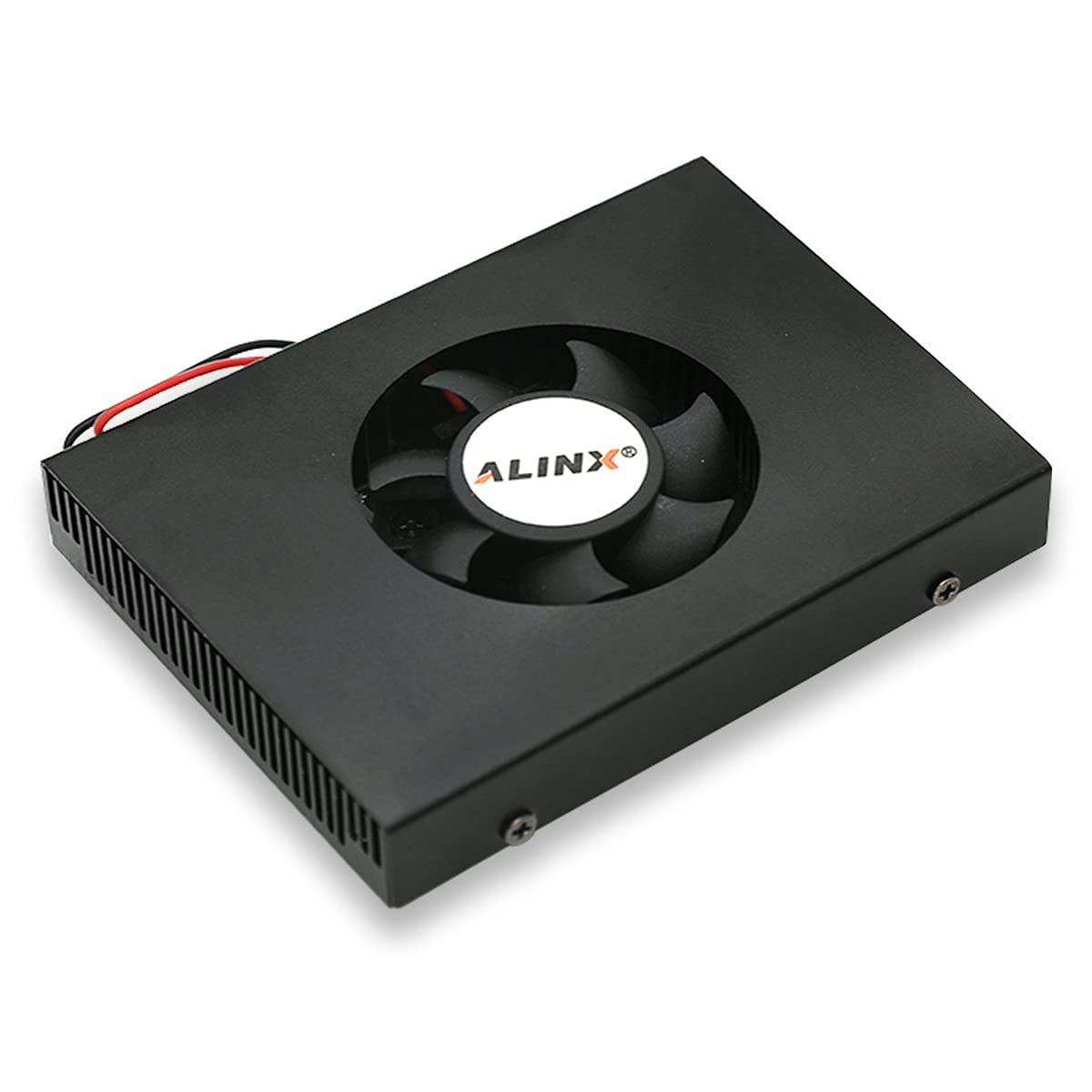
Obrázek 4.1: Horní a boční view of the ALINX FAN8060 Cooling Fan, showcasing its integrated heat sink design.

Figure 4.2: The ALINX FAN8060 Cooling Fan unit, displaying the ALINX logo on the fan blades and a set of included mounting screws.

Figure 4.3: Technical drawing illustrating the side profile and heat sink fin dimensions of the ALINX FAN8060.

Figure 4.4: Technical drawing showing the top-down dimensions of the ALINX FAN8060, including overall length, width, and fan opening diameter.

Figure 4.5: Technical drawing detailing the bottom mounting hole pattern and dimensions for the ALINX FAN8060, including M2.5 screw thread specifications.
5. Nastavení
5.1 Montáž ventilátoru
- Identify the desired mounting location within your system, ensuring adequate clearance for airflow.
- Align the mounting holes on the fan unit with the corresponding holes on your system's chassis or component. Refer to Figure 4.5 for mounting hole dimensions.
- Secure the fan using the provided mounting screws. Do not overtighten the screws to avoid damaging the fan or mounting surface.
5.2 Připojení napájení
- Ensure your system's power is turned off and disconnected from the main power source.
- Connect the fan's power cable to a compatible 12V DC power supply interface. Observe proper polarity (red wire typically positive, black wire typically negative).
- Double-check all connections before restoring power to the system.
6. Návod k obsluze
Once the ALINX FAN8060 is securely mounted and connected to a 12V DC power source, it will begin operating automatically when power is supplied. The fan is designed for continuous operation to provide consistent cooling.
- Verify that the fan blades are spinning freely and quietly after power-up.
- Ensure that the airflow is directed as intended for optimal cooling performance.
7. Údržba
Regular maintenance helps ensure the longevity and optimal performance of your cooling fan.
- Čištění: Periodically inspect the fan blades and heat sink fins for dust accumulation. Disconnect power before cleaning. Use a soft brush, compressed air, or a vacuum cleaner with a narrow attachment to gently remove dust. Do not use liquid cleaners directly on the fan.
- Inspekce: Check for any loose connections or unusual noises during operation. Address any issues promptly.
- Vyhněte se překážkám: Ensure that no cables or other components obstruct the fan's rotation or airflow path.
8. Řešení problémů
Ventilátor se netočí
- Check if the power cable is securely connected to the 12V DC power source.
- Verify that the power source is active and providing 12V DC.
- Ensure correct polarity of the power connection.
- Inspect for any physical obstructions preventing the fan blades from rotating.
Neobvyklý hluk
- Zkontrolujte, zda nejsou uvolněné montážní šrouby.
- Ensure no cables or objects are touching the fan blades.
- Clean any dust or debris from the fan blades and housing.
If issues persist after troubleshooting, contact customer support.
9. Specifikace
| Funkce | Specifikace |
|---|---|
| Model | VENTILÁTOR |
| Značka | ALINX |
| svtage | 12 V DC |
| Wattage | 30 wattů |
| Způsob chlazení | Vzduch |
| Materiál | Měď |
| Maximální rychlost otáčení | 1800 ot./min |
| Položka Množství v balení | 1 |
10. Záruka a podpora
For warranty information and technical support, please refer to the documentation provided at the time of purchase or contact your ALINX product vendor. Keep your purchase receipt as proof of purchase.