
1. Úvod
This manual provides essential information for the proper use and maintenance of your HP USB 2.0 V212W 64GB Flash Drive. Please read these instructions carefully before using the device to ensure optimal performance and longevity.
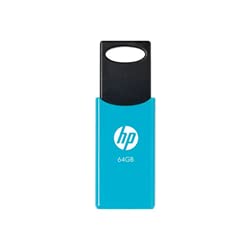
Image of the HP USB 2.0 V212W 64GB flash drive, showcasing its compact and lightweight design.
2. Vlastnosti produktu
- Kapacita úložiště: 64 Gigabytes for ampúložiště dat.
- Rozhraní: USB 2.0 for reliable data transfer. Compatible with USB 3.0 ports.
- Rychlost čtení: Up to 20 MB/s, enabling quick access to your files.
- Design: Lehký a kompaktní pro snadné přenášení.
- Trvanlivost: Engineered for high performance and reliability.
3. Nastavení
- Připojení k počítači: Insert the HP USB 2.0 V212W flash drive into an available USB port on your computer. The device is plug-and-play, requiring no additional drivers for most modern operating systems.
- Rozpoznávání zařízení: Your operating system (Windows, macOS, Linux) will automatically detect the new hardware. A notification may appear, indicating that the device is ready for use. The flash drive will typically appear as a removable disk in 'My Computer' (Windows) or 'Finder' (macOS).
4. Návod k obsluze
4.1. Přenos Files
- Kopírování Files Komu: Open the flash drive's folder. Drag and drop files or folders from your computer into the flash drive's window, or copy and paste them.
- Kopírování FileOd: Drag and drop files or folders from the flash drive's window to a location on your computer, or copy and paste them.
4.2. Safely Removing the Device
To prevent data corruption, always safely remove the flash drive before physically disconnecting it.
- Windows: Click the 'Safely Remove Hardware and Eject Media' icon in the system tray (bottom-right corner of the taskbar), then select the HP USB device. Wait for the 'Safe to Remove Hardware' message before unplugging.
- MacOS: Drag the flash drive icon from the desktop or Finder sidebar to the Trash icon, or right-click (Control-click) the icon and select 'Eject'. Wait for the icon to disappear before unplugging.
- Linux: Right-click the device icon on your desktop or file manager and select 'Eject' or 'Unmount'.
5. Údržba
- Fyzikální péče: Keep the flash drive clean and free from dust and moisture. Avoid exposing it to extreme temperatures or direct sunlight.
- Ochrana dat: Pravidelně zálohujte důležitá data uložená na flash disku na jiné paměťové médium.
- Ochrana konektoru: When not in use, ensure the USB connector is protected from damage.
6. Řešení problémů
- Zařízení nebylo rozpoznáno:
- Try plugging the flash drive into a different USB port on your computer.
- Restartujte počítač.
- Ujistěte se, že máte aktuální operační systém.
- Pomalé přenosové rychlosti:
- Ensure you are using a direct USB port on your computer, not a USB hub.
- Zavřete ostatní aplikace, které mohou využívat systémové prostředky.
- Velké množství malých filese mohou přenášet pomaleji než jeden velký file stejné celkové velikosti.
- Poškození dat:
- Always use the 'Safely Remove Hardware' function before unplugging the drive.
- Neodpojujte disk během file převod.
- If data appears corrupted, try running a disk check utility on your computer.
7. Specifikace
| Funkce | Detail |
|---|---|
| Značka | HP |
| Číslo modelu | V212W (HPFD212LB-64) |
| Kapacita úložiště | 64 GB |
| Rozhraní | USB 2.0 (kompatibilní s USB 3.0) |
| Rychlost čtení | Až 20 XNUMX MB/s |
| Barva | nebesky modrá |
| Hmotnost | 0.02 kg |
| Země původu | Německo |
| ASIN | B096YSHFCZ |
8. Záruka a podpora
Informace o záruce a technickou podporu získáte od oficiálního prodejce HP. website or contact HP customer service directly. Keep your purchase receipt as proof of purchase for warranty claims.
Více informací a podpůrných zdrojů naleznete na oficiálních stránkách HP webmísto: www.hp.com