
1. Úvod
The eKids Fisher-Price Karaoke Machine (Model FP-550) is a portable Bluetooth speaker designed for children, featuring a wired microphone, built-in Mother Goose Club songs, and a USB audio player. This manual provides detailed instructions for safe and optimal use of the device.
2. Konec produktuview
Obsah balení:
- eKids Fisher-Price Karaoke Machine
- Kabelový mikrofon
- Nabíjecí kabel (USB)
Vlastnosti zařízení:
- Přenosný Bluetooth reproduktor
- Real Working Wired Microphone
- 24 Built-in Mother Goose Club Songs
- USB Audio Player for expanded content
- Jack pro sluchátka
- Vestavěná dobíjecí baterie
Přední View
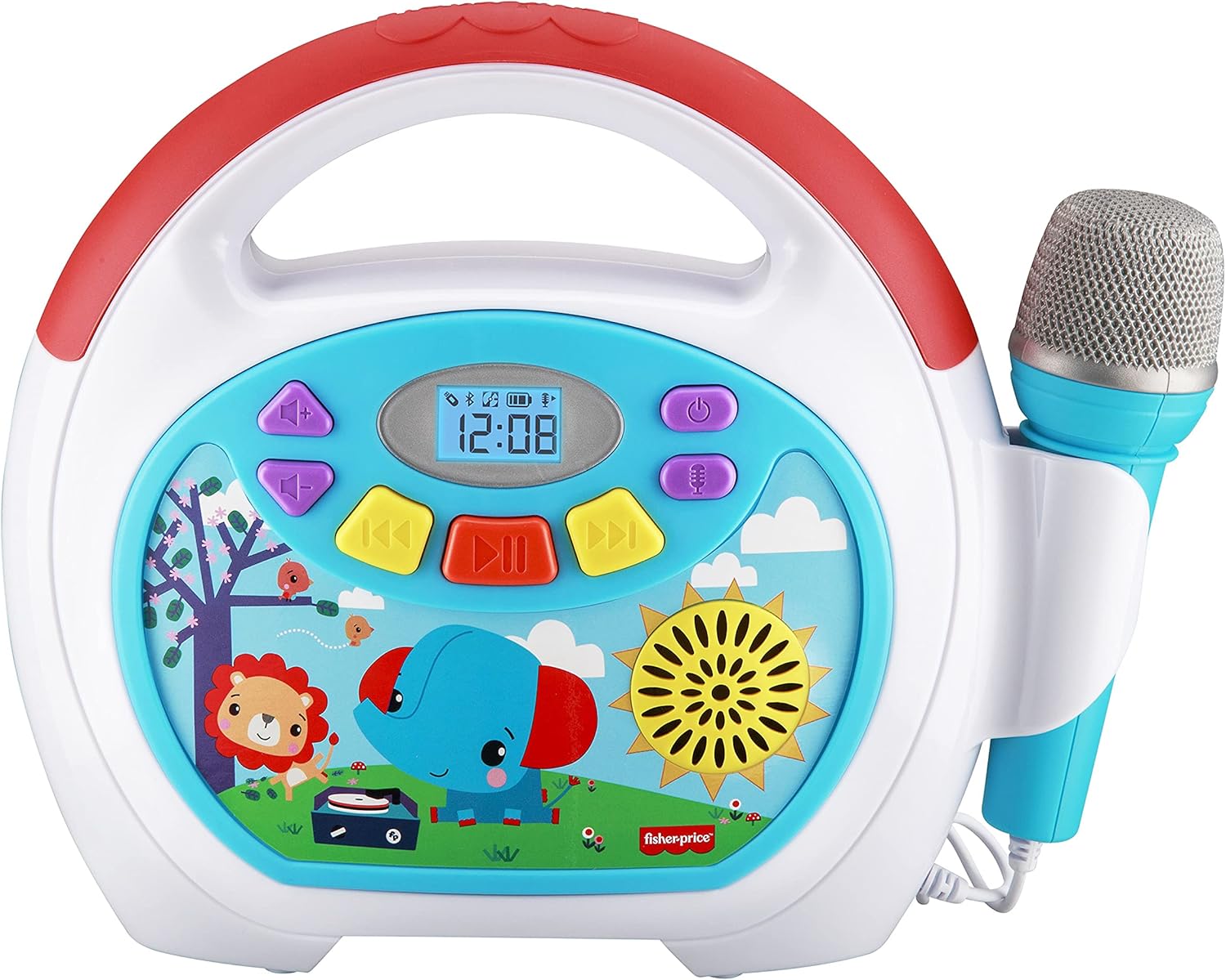
Image 2.1: The front panel displays the power button, volume controls, track navigation, play/pause button, and a digital display. The wired microphone is attached to the side.
Zadní View a Připojení

Image 2.2: The back of the unit features the volume knob, reset button, DC 5V charging port, headphone jack, and a USB-In port for playing audio from a USB drive. A compartment for cord storage is also visible.
3. Nastavení
3.1 Nabíjení zařízení
- Locate the DC 5V charging port on the rear of the karaoke machine.
- Connect the provided charging cable to the port and the other end to a standard USB power adapter (not included) or a computer USB port.
- The charging indicator will illuminate. Allow approximately 2-3 hours for a full charge. The indicator will change or turn off once charging is complete.
Poznámka: The device contains a built-in rechargeable Lithium Ion battery. Ensure the device is fully charged before first use for optimal battery life.
3.2 Připojení mikrofonu
- The wired microphone is permanently attached to the unit.
- Ensure the microphone cable is untangled and positioned comfortably for use.
4. Návod k obsluze
4.1 Zapnutí/vypnutí
- Chcete-li zařízení zapnout, stiskněte a podržte tlačítko Tlačítko napájení () located on the front panel.
- Chcete-li přístroj vypnout, stiskněte a podržte tlačítko Tlačítko napájení znovu.
4.2 Nastavení hlasitosti
- Použijte Knoflík hlasitosti on the rear of the unit to adjust the overall sound output.
- For microphone volume, use the dedicated microphone volume control if available, or adjust the main volume.
4.3 Playing Built-in Songs
- Upon powering on, the device may default to playing built-in songs.
- Použijte Předchozí stopa () a Další stopa () buttons to navigate through the 24 Mother Goose Club songs.
- Stiskněte tlačítko Tlačítko Přehrát/Pozastavit () pro spuštění nebo pozastavení přehrávání.
4.4 Párování Bluetooth

Image 4.1: The karaoke machine supports wireless audio streaming via Bluetooth from compatible devices.
- Ujistěte se, že je karaoke zařízení zapnuté.
- Activate Bluetooth on your external device (e.g., smartphone, tablet).
- Hledat available Bluetooth devices. The karaoke machine will appear as 'eKids FP-550' or similar.
- Select the device name to pair. A confirmation sound may indicate successful pairing.
- Po spárování můžete bezdrátově streamovat zvuk ze zařízení do karaoke systému.
4.5 Přehrávání zvuku z USB

Image 4.2: The USB expansion slot allows playback of songs from a USB drive.
- Vložte USB disk s audio soubory ve formátu MP3 files into the USB-In port on the rear of the unit.
- The device should automatically detect the USB drive and begin playing the audio files.
- Použijte Předchozí stopa a Další stopa tlačítka pro navigaci.
- Stiskněte tlačítko Tlačítko Přehrát/Pozastavit pro spuštění nebo pozastavení přehrávání.
4.6 Používání mikrofonu

Image 4.3: The wired microphone allows users to sing along to music.
- The microphone is active when the unit is powered on.
- Sing into the microphone while playing built-in songs, Bluetooth audio, or USB audio.
- Adjust the main volume knob to control the microphone's output level.
4.7 Používání sluchátek
- To listen privately, plug standard 3.5mm headphones (not included) into the headphone jack on the rear of the unit.
- Audio will be redirected to the headphones, muting the main speaker.
5. Údržba
5.1 Čištění
- Před čištěním vždy zařízení vypněte.
- K otření vnějších povrchů použijte měkký, suchý hadřík.
- Nepoužívejte tekuté čisticí prostředky, abrazivní houbičky ani chemická rozpouštědla, protože by mohla poškodit povrchovou úpravu.
5.2 Skladování
- Přístroj skladujte na chladném a suchém místě mimo dosah přímého slunečního záření a extrémních teplot.
- Ensure the microphone cable is neatly wrapped and stored in the designated compartment on the back to prevent damage.
6. Řešení problémů
| Problém | Možná příčina | Řešení |
|---|---|---|
| Zařízení se nezapne. | Baterie je vybitá. | Nabijte zařízení pomocí dodaného kabelu USB. |
| Z reproduktoru není slyšet žádný zvuk. | Hlasitost je příliš nízká nebo ztlumená. Jsou připojena sluchátka. | Increase the volume using the knob. Disconnect headphones if plugged in. |
| Mikrofon nefunguje. | Hlasitost mikrofonu je příliš nízká. | Ensure the main volume is adequately adjusted. |
| Zařízení Bluetooth se nespáruje. | Device is out of range. Bluetooth is not enabled on external device. | Move devices closer. Ensure Bluetooth is active on your external device and search again. |
| USB audio not playing. | USB drive not properly inserted or contains unsupported file typy. | Ensure USB drive is fully inserted. Verify audio files jsou ve formátu MP3. |
7. Specifikace
- Číslo modelu: FP-550
- Hmotnost položky: 2.35 libry
- Rozměry produktu: 10.72 x 3.64 x 8.67 palce
- Baterie: 1 lithium-iontová baterie (součástí balení)
- Konektivita: Bluetooth, USB
- Zahrnuté komponenty: Mikrofon
- Zdroj napájení: Napájení z baterie
- Barva: Vícebarevná
8. Záruka a podpora
This product is covered by a limited warranty. For specific warranty details, please refer to the documentation included with your purchase or contact eKids customer support. For technical assistance or further inquiries, please visit the official eKids webnebo kontaktujte jejich oddělení zákaznických služeb.
Pro více informací můžete navštívit Obchod eKids na Amazonu.