
1. Úvod
Thank you for choosing the Dacom K6H Pro Bluetooth 5.0 Earphones. This manual provides detailed instructions on how to set up, operate, and maintain your earphones to ensure optimal performance and longevity. Please read this manual thoroughly before using the product.
2. Obsah balení
- Dacom K6H Pro Wireless Earbuds (Left and Right)
- Nabíjecí pouzdro
- Uživatelská příručka
3. Konec produktuview
Familiarize yourself with the components of your Dacom K6H Pro earphones and charging case.
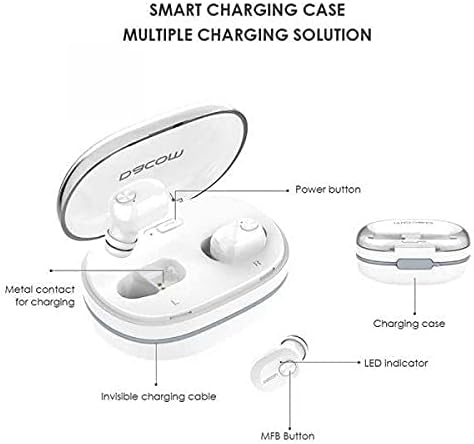
Obrázek 3.1: Diagram illustrating the Dacom K6H Pro earphones and charging case components. The image highlights the power button, metal contacts for charging, invisible charging cable, LED indicator, and Multi-Function Button (MFB) on the earbud.
Klíčové komponenty:
- Nabíjecí pouzdro: Stores and charges the earbuds. Features a power button and metal contacts for earbud charging.
- Invisible Charging Cable: Integrated USB charging cable for convenient power replenishment.
- Earbuds (Left & Right): Each earbud has an LED indicator and a Multi-Function Button (MFB) for control.

Obrázek 3.2: The Dacom K6H Pro wireless earphones, showing both the charging case with one earbud inserted and the other earbud removed, ready for use. The case is open, revealing the earbud compartments.
4. Nabíjení
Ensure your Dacom K6H Pro earphones and charging case are fully charged before first use.
4.1 Nabíjení sluchátek
- Vložte sluchátka do příslušných slotů v nabíjecím pouzdře.
- Zavřete víko nabíjecího pouzdra. Sluchátka se začnou automaticky nabíjet.
- The LED indicator on the earbuds will show charging status (refer to LED indicator section for details).
4.2 Nabíjení pouzdra
The charging case features a hidden, integrated USB charging cable for convenience.
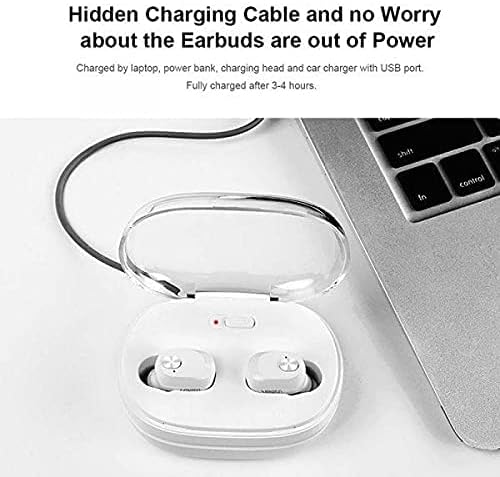
Obrázek 4.1: The Dacom K6H Pro charging case connected to a laptop via its integrated USB charging cable. The earbuds are inside the case, and a red LED indicator on the case is visible, signifying charging in progress.
- Locate the integrated USB charging cable on the charging case.
- Connect the USB cable to a power source such as a laptop, power bank, charging head, or car charger with a USB port.
- The charging case LED indicator will illuminate to show charging status.
- Plné nabití obvykle trvá přibližně 3–4 hodiny.
5. Nastavení a párování
Follow these steps to pair your Dacom K6H Pro earphones with your device.
5.1 Počáteční párování
- Ujistěte se, že jsou sluchátka nabitá.
- Otevřete nabíjecí pouzdro. Sluchátka se automaticky zapnou a přejdou do režimu párování.
- On your smartphone (iPhone or Android) or other Bluetooth-enabled device, go to the Bluetooth settings.
- Hledat available devices and select "Dacom K6H Pro" from the list.
- Po připojení hlasový pokyn potvrdí úspěšné spárování.
5.2 Opětovné připojení
After initial pairing, the earbuds will automatically reconnect to the last paired device when removed from the charging case and the device's Bluetooth is active.
6. Provozní ovládací prvky
The Dacom K6H Pro earphones feature touch controls via the Multi-Function Button (MFB) on each earbud.
- Přehrát/pozastavit: Single tap on either MFB.
- Další skladba: Double tap the MFB on the right earbud.
- Předchozí skladba: Double tap the MFB on the left earbud.
- Přijmout/ukončit hovor: Single tap on either MFB during an incoming call.
- Odmítnout hovor: Press and hold either MFB for 2 seconds during an incoming call.
- Aktivovat Voice Assistant: Triple tap on either MFB.
- Ovládání hlasitosti: Volume is typically controlled via the connected device.
7. Údržba
Správná údržba zajistí dlouhou životnost a výkon vašich sluchátek.
- Čištění: Pravidelně čistěte sluchátka a nabíjecí pouzdro měkkým, suchým hadříkem, který nepouští vlákna. Nepoužívejte agresivní chemikálie ani abrazivní materiály.
- Skladování: Pokud sluchátka nepoužíváte, uložte je do nabíjecího pouzdra, aby byly chráněny před prachem a poškozením.
- Vyhněte se vodě: Sluchátka nejsou vodotěsná. Nevystavujte je vodě, vlhkosti nebo extrémním teplotám.
- Kontakty pro nabíjení: Ensure the metal charging contacts on both the earbuds and the case are clean and free of debris for effective charging.
8. Řešení problémů
If you encounter issues with your Dacom K6H Pro earphones, refer to the following common solutions.
- Sluchátka se nespárují:
- Ujistěte se, že jsou obě sluchátka nabitá.
- Vypněte Bluetooth na zařízení a poté jej znovu zapněte.
- Forget/delete "Dacom K6H Pro" from your device's Bluetooth list and attempt to pair again.
- Vložte sluchátka zpět do pouzdra, zavřete víko, počkejte několik sekund a poté jej otevřete, abyste znovu přešli do režimu párování.
- Funguje pouze jedno sluchátko:
- Ujistěte se, že jsou obě sluchátka nabitá.
- Try resetting the earbuds (refer to manufacturer's specific reset instructions if available, otherwise try placing both in case, closing, and reopening).
- Vyčistěte nabíjecí kontakty na obou sluchátkách i na pouzdře.
- Sluchátka se nenabíjejí:
- Ujistěte se, že je samotné nabíjecí pouzdro nabité.
- Verify the earbuds are correctly seated in the charging case.
- Vyčistěte nabíjecí kontakty na obou sluchátkách i na pouzdře.
- Try a different USB power source for the charging case.
- Špatná kvalita zvuku:
- Ujistěte se, že jsou sluchátka správně usazena v uších.
- Check the audio source and volume levels on your connected device.
- Přesuňte se blíže k připojenému zařízení, abyste předešli rušení.
9. Specifikace
| Značka | Dacom |
| Číslo modelu | K6H Pro |
| Konektivita | Bezdrátové, Bluetooth 5.0 |
| Typ sluchátek | In-Ear |
| Mikrofon | V ceně |
| Kontrola hluku | Aktivní potlačení hluku |
| Typ ovládání | Ovládání médií, dotykové ovládání |
| Funkce kabelu | Without Cable (integrated USB for case) |
| Kompatibilní zařízení | Multi (iPhone & Android) |
| Barva | Bílý |
| Rozměry balení | 17.2 x 10.2 x 3.8 cm |
| Hmotnost položky | 120 g |
10. Záruka a podpora
Dacom products are designed for reliability and performance. For warranty information, please refer to the warranty card included in your product packaging or visit the official Dacom website. For technical support or further assistance, please contact Dacom customer service through the channels provided on their official webmísto.