
Geemarc CL8360
Geemarc CL8360 AmpUživatelská příručka mobilního telefonu Lified
Model: CL8360
Zavedení
The Geemarc CL8360 is an amplified mobile phone designed for ease of use, particularly for seniors. It features enhanced volume, large buttons, and an emergency SOS function to ensure reliable communication.

Image: The Geemarc CL8360 amplified mobile phone, highlighting its key features.
Klíčové vlastnosti:
- Amplified Volume: Up to +35dB with Boost function for clear calls.
- Kompatibilní s naslouchátky: Designed for use with hearing aids in T-position.
- Velká tlačítka: Facilitates easy dialing and navigation.
- SOS tlačítko: For emergency calls and messages to pre-set contacts.
- Fotoaparát: Integrovaný fotoaparát pro pořizování fotografií.
- Bluetooth připojení: Pro připojení k bezdrátovému příslušenství.
- Svítilna: Built-in torch for convenience.

Image: An individual using the Geemarc CL8360 phone, demonstrating its hearing aid compatibility.
Průvodce nastavením
1. Instalace SIM karty a baterie
Before using your phone, you must install a SIM card and the battery.
- Odstraňte zadní kryt telefonu.
- Insert your SIM card into the designated slot, ensuring correct orientation.
- Vložte baterii a zarovnejte kontakty.
- Bezpečně nasaďte zadní kryt.
2. Nabíjení telefonu
It is recommended to fully charge the phone before first use.
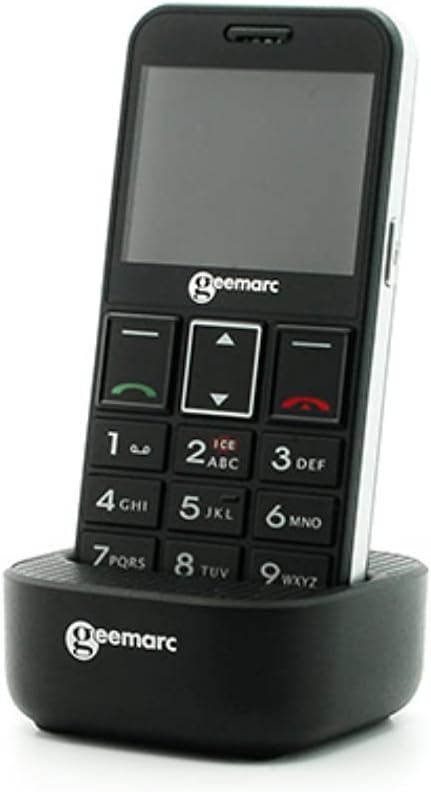
Image: The Geemarc CL8360 phone placed in its charging dock.
- Connect the charging cable to the charging dock.
- Zapojte adaptér do elektrické zásuvky.
- Place the phone firmly into the charging dock. The charging indicator on the phone will illuminate.
- Allow the phone to charge until the battery icon shows full.
3. Zapnutí/vypnutí
- To power on: Press and hold the Power/End Call button (red button) until the screen lights up.
- To power off: Press and hold the Power/End Call button until the power off option appears, then confirm.
Návod k obsluze
Uskutečňování a přijímání hovorů
- Chcete-li zavolat: Dial the number using the large keypad buttons and press the Call button (green button).
- Chcete-li přijmout hovor: Press the Call button (green button) when the phone rings.
- Ukončení hovoru: Stiskněte tlačítko Napájení/Ukončení hovoru (červené tlačítko).
Používání tlačítka SOS
The SOS button is located on the back of the phone and is designed for emergencies.

Image: A hand pressing the red SOS button located on the back of the phone.
- Nastavení tísňových kontaktů: Access the SOS settings in the phone's menu to add emergency contact numbers. You can also record an emergency voice message or text.
- Aktivace SOS: In an emergency, press and hold the SOS button for a few seconds. The phone will automatically call and send an emergency message to your pre-set contacts.
Phonebook and Photo Contacts
Store your important contacts in the phonebook for quick access. The phone supports photo contacts for visual identification.

Image: The phone display showing "Mémoires photo" (Photo Memories) with contact images.
- Navigate to the "Contacts" or "Phonebook" menu.
- Add new contacts with names and numbers.
- Assign photos to contacts for easier recognition.
Zprávy
Send and receive text messages (SMS).

Image: The phone in its charging dock, with the screen showing the "Messages" menu and an envelope icon.
- Access the "Messages" menu to compose new messages or read received ones.
- Use the keypad to type your message.
Camera and Flashlight
- Fotoaparát: Access the camera function from the main menu to take photos.
- Svítilna: Activate the built-in flashlight from the quick access menu or settings for illumination.
Připojení Bluetooth
Connect your phone to other Bluetooth-enabled devices like headsets or car kits.
- Přejděte do nabídky „Nastavení“ a vyberte „Bluetooth“.
- Zapněte Bluetooth a vyhledejte dostupná zařízení.
- Vyberte zařízení, se kterým chcete zařízení spárovat, a postupujte podle pokynů na obrazovce.
Údržba
Čištění telefonu
- K čištění povrchu telefonu použijte měkký, suchý hadřík.
- Avoid using liquid cleaners or abrasive materials, as they may damage the device.
Péče o baterie
- Nevystavujte baterii extrémním teplotám.
- Abyste prodloužili životnost baterie, vyhněte se častému úplnému vybíjení.
- If the phone will not be used for an extended period, charge it partially and store it in a cool, dry place.
Odstraňování problémů
If you encounter issues with your Geemarc CL8360, refer to the following common problems and solutions:
| Problém | Možné řešení |
|---|---|
| Telefon se nezapne | Ensure the battery is correctly installed and fully charged. Press and hold the Power button for several seconds. |
| Nelze uskutečňovat ani přijímat hovory | Check if the SIM card is properly inserted and activated. Verify network signal strength. Contact your service provider if necessary. |
| Špatná kvalita hovoru | Move to an area with better network coverage. Ensure the volume is adjusted correctly, and the Boost function is enabled if needed. |
| Tlačítko SOS nefunguje | Verify that emergency contacts are correctly set up in the SOS settings. Ensure the phone has network coverage. |
| Baterie se rychle vybíjí | Reduce screen brightness, close unused applications, and disable Bluetooth when not in use. Ensure the battery is not old or damaged. |
Pokud problém přetrvává i po vyzkoušení těchto řešení, kontaktujte zákaznickou podporu.
Specifikace
| Funkce | Detail |
|---|---|
| Značka | Geemarc |
| Název modelu | CL8360 |
| Barva | Černý |
| Bezdrátový nosič | Odemčený |
| Technologie připojení | Bluetooth |
| Vstup lidského rozhraní | Tlačítka |
| Amplified Volume | Up to +35dB with Boost function |
| Kompatibilita s naslouchátky | Yes (T-position) |
| ASIN | B095KRKCX7 |
| První dostupný termín | 21. května 2021 |
Informace o záruce
The Geemarc CL8360 mobile phone comes with a 2-letá záruka from the date of purchase. If you encounter any product issues within this period, a repair or replacement will be offered. Please retain your proof of purchase for warranty claims.
Zákaznická podpora
For further assistance, technical support, or warranty claims, please contact your retailer or the Geemarc customer service department. Refer to the contact information provided with your product packaging or visit the official Geemarc webmísto.
Ask a question about this manual
Ask about setup, troubleshooting, compatibility, parts, safety, or missing instructions. Manuals+ will review the question and use this page’s manual context to help answer it.