
1. Úvod
Děkuji za nákupasing the Soundsation MIOMIX 404FXM 6-Channel Mixer. This versatile mixer is designed for a wide range of audio applications, including home recording, live performances, and podcasting. It combines professional audio quality with portability, featuring low-noise preamplifiers, digital effects, a USB media player/recorder, and Bluetooth connectivity. This manual provides essential information for safe operation, setup, and optimal use of your MIOMIX 404FXM mixer.
2. Bezpečnostní pokyny
VAROVÁNÍ: Abyste snížili riziko požáru nebo úrazu elektrickým proudem, nevystavujte toto zařízení dešti ani vlhkosti.
- Před použitím jednotky si pečlivě přečtěte tyto pokyny.
- Uschovejte tento návod pro budoucí použití.
- Dbejte všech varování a dodržujte všechny pokyny.
- Nepoužívejte toto zařízení v blízkosti vody.
- Čistěte pouze suchým hadříkem.
- Nezakrývejte žádné větrací otvory. Nainstalujte v souladu s pokyny výrobce.
- Neinstalujte v blízkosti zdrojů tepla, jako jsou radiátory, tepelné regulátory, kamna nebo jiná zařízení (včetně amplifikátory), které produkují teplo.
- Nepodceňujte bezpečnostní účel polarizované nebo uzemněné zástrčky. Polarizovaná zástrčka má dvě čepele, přičemž jedna je širší než druhá. Zástrčka zemnícího typu má dvě čepele a třetí zemnící kolík. Široká čepel nebo třetí hrot jsou určeny pro vaši bezpečnost. Pokud dodaná zástrčka nepasuje do vaší zásuvky, požádejte elektrikáře o výměnu zastaralé zásuvky.
- Chraňte napájecí kabel před šlapáním nebo přiskřípnutím, zejména u zástrček, zásuvek a v místě, kde vychází z přístroje.
- Používejte pouze nástavce/příslušenství určené výrobcem.
- Odpojte toto zařízení během bouřky s blesky nebo když se delší dobu nepoužívá.
- Veškeré opravy svěřte kvalifikovanému servisnímu personálu. Servis je nutný, pokud bylo zařízení jakýmkoli způsobem poškozeno, například je poškozen napájecí kabel nebo zástrčka, pokud do zařízení vnikla tekutina nebo do něj spadly předměty, zařízení bylo vystaveno dešti nebo vlhkosti, nefunguje normálně. , nebo byla vypuštěna.
3. Obsah balení
Zkontrolujte prosím, zda jsou v balení obsaženy všechny níže uvedené položky:
- Soundsation MIOMIX 404FXM Mixer
- Napájecí adaptér
- Uživatelská příručka
4. Vlastnosti produktu
- 6-channel mixer with digital multi-effect processor.
- Integrated USB player/recorder supporting WAV, MP3, WMA, and FLAC formats.
- Wireless Bluetooth audio streaming.
- 4 Mic/Line channels with low-noise preamps and Combo connectors.
- Selectable Hi-Z inputs for guitars and other high-impedance instruments.
- +48V Phantom Power for condenser microphones.
- Peak indicators on input channels.
- 1 stereo line channel with 6.3mm jacks and +4/-10 dB pad adapter.
- 2-band EQ on channels 1-4.
- 24-bit/48 kHz digital effects processor with 16 presets (Reverb, Delay, Echo, Chorus, etc.) and TAP-Tempo function.
- USB player level control.
- Sluchátkový výstup s ovládáním úrovně.
- XLR main outputs with volume control.
- Stereo VU Meter with 2 x 6 LED bars.
5. Ovládací prvky a funkce
5.1 Přední panel Overview

Image: Front panel of the Soundsation MIOMIX 404FXM mixer, showing all input channels, EQ controls, effect section, USB/Bluetooth media player, and main output controls.
Input Channels (MIC/INST 1-4)
- MIC/INST Input (Combo Jack): Connect XLR microphones or 1/4" instrument/line cables.
- +48V fantomové napájení: Activates phantom power for condenser microphones. Use with caution.
- Přepínač Hi-Z: Engages high impedance input for direct connection of guitars or basses.
- Knoflík GAIN: Upravuje vstupní citlivost připojeného mikrofonu nebo nástroje.
- Knoflík HIGH: Adjusts the high-frequency equalization (treble).
- Knoflík LOW: Adjusts the low-frequency equalization (bass).
- Knoflík FX: Řídí množství signálu odeslaného do interního procesoru digitálních efektů.
- Knoflík PAN: Adjusts the stereo position (left/right) of the channel.
- Knoflík VOL: Adjusts the output volume of the individual channel.
- PK (Peak) LED: Rozsvítí se, když je vstupní signál příliš vysoký, což signalizuje možné ořezávání.
Stereo Line Input (CH 5-6)
- L/Mono, R Inputs (1/4" Jacks): Connect stereo line-level devices (keyboards, CD players, DJ consoles, etc.). The L/Mono input can be used alone for a mono signal.
- +4/-10dB Switch: Adjusts input sensitivity for different line-level devices.
- Knoflík PAN: Upravuje stereo pozici kanálu.
- Knoflík VOL: Adjusts the output volume of the stereo channel.
- PK (Peak) LED: Illuminates when the input signal is too high.
USB & Bluetooth Media Player
- USB port: Connect a USB drive for playing audio files or recording.
- Displej: Zobrazuje aktuální režim, informace o trase a nastavení.
- Up/Rewind Button: Navigates up in menus or rewinds current track.
- Down/Forward Button: Navigates down in menus or fast-forwards current track.
- Play/Pause/Enter Button: Plays/pauses audio or confirms menu selections.
- Tlačítko MENU: Accesses media player menu options (BT streaming, music player, audio recorder, selection).
- MP3 PLAYER LVL Knob: Controls the output level of the USB/Bluetooth media player.
Digital Effects Processor (24-bit/48 kHz)
- Zobrazení efektů: Shows the selected effect number and parameter values.
- Knoflík PROGRAM: Rotates to select one of the 16 built-in digital effects. Press to confirm selection.
- TAP TEMPO tlačítko: Tap multiple times to set the tempo for time-based effects (e.g., Delay).
- Knoflík LEVEL: Adjusts the overall wet/dry mix of the effects.
Output & Monitoring Section
- PHONES Jack (1/4"): Připojte sluchátka pro monitorování.
- PHONES LVL Knob: Upravuje hlasitost výstupu pro sluchátka.
- MAIN OUT L/R (XLR): Balanced XLR outputs for connecting to powered speakers, amplifikátory nebo záznamová zařízení.
- Knoflík MAIN OUT: Ovládá celkovou výstupní hlasitost hlavního mixu.
- VU Meter (LED): Displays the stereo output level of the main mix.
5.2 Zadní panel Overview
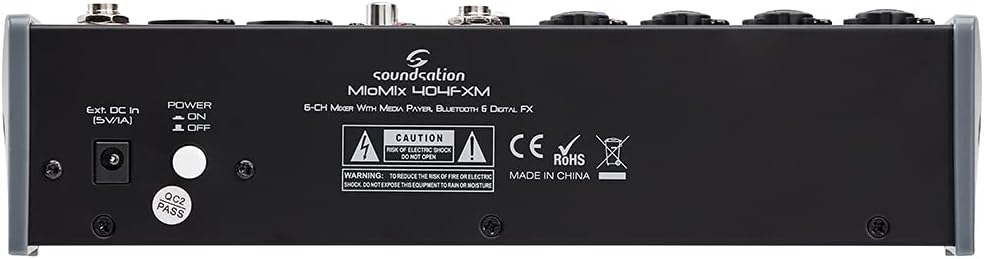
Image: Rear panel of the Soundsation MIOMIX 404FXM mixer, showing the power input, power switch, and main output connections.
- Ext. DC In (5V/1A): Power input for connecting the provided external power adapter.
- POWER ON/OFF Switch: Turns the mixer's power on or off.
- REC OUT L/R (RCA): Unbalanced RCA outputs for connecting to recording devices.
6. Nastavení
- Rozbalte mixér: Carefully remove the MIOMIX 404FXM from its packaging.
- Umístění: Place the mixer on a stable, flat surface, ensuring adequate ventilation around the unit.
- Připojení napájení: Ensure the mixer's POWER switch is in the OFF position. Connect the provided power adapter to the "Ext. DC In (5V/1A)" port on the rear panel, then plug the adapter into a suitable power outlet.
- Počáteční zapnutí: Flip the POWER switch to the ON position. The mixer's indicators should light up, and the display should activate.
- Připojení výstupů: Connect the MAIN OUT XLR outputs to your powered speakers, amplifier, or audio interface. Connect headphones to the PHONES jack for monitoring.
- Připojení vstupů: Connect your microphones, instruments, and line-level devices to the appropriate input channels.
7. Návod k obsluze
7.1 Připojení zdrojů zvuku
- Mikrofony: Connect dynamic microphones via XLR cables to the MIC/INST Combo jacks. For condenser microphones, connect via XLR and activate the +48V Phantom Power switch for the respective channel.
- Instruments (Guitars/Basses): Connect directly using a 1/4" TS cable to the MIC/INST Combo jack and engage the Hi-Z switch for that channel.
- Line-Level Devices (Keyboards, CD Players): Connect using 1/4" TS cables to the MIC/INST Combo jacks (for mono) or to the CH 5-6 L/Mono and R inputs (for stereo). Adjust the +4/-10dB switch on CH 5-6 as needed.
7.2 Adjusting Channel Levels and EQ
- Set all GAIN, VOL, and MAIN OUT knobs to their minimum positions before starting.
- Speak into the microphone or play your instrument. Slowly increase the GAIN knob for the respective channel until the PK LED flashes only occasionally during the loudest parts.
- Adjust the HIGH and LOW EQ knobs to shape the tone of your sound.
- Use the PAN knob to position the sound in the stereo field.
- Slowly increase the channel's VOL knob to blend it into the overall mix.
7.3 Using the USB Media Player/Recorder
- Přehrávání: Insert a USB drive containing WAV, MP3, WMA, or FLAC files into the USB port. The display will show the file list. Use the Up/Down buttons to navigate and Play/Pause/Enter to select and play. Adjust the MP3 PLAYER LVL knob to control its volume in the mix.
- Záznam: In the media player menu (accessed via MENU button), select the 'Audio Recorder' function. Ensure your USB drive has enough free space. Press Play/Pause/Enter to start and stop recording. The mixer records the main stereo mix.
7.4 Připojení Bluetooth
- Press the MENU button on the media player and select 'BT Streaming'. The display will show 'Bluetooth' and indicate it's searching.
- On your smartphone or Bluetooth device, search for available devices and select 'MIOMIX 404FXM'.
- Once paired, you can stream audio from your device to the mixer. Control the volume using your device and the MP3 PLAYER LVL knob on the mixer.
7.5 Použití digitálních efektů
- Turn the FX knob on the desired input channel to send signal to the effects processor.
- Rotate the PROGRAM knob to browse through the 16 available effects. Press the PROGRAM knob to select an effect.
- Adjust the LEVEL knob in the FX section to control the overall amount of effect applied to the mix.
- For time-based effects, use the TAP TEMPO button to synchronize the effect to your music.
7.6 Monitoring and Main Output
- Sluchátka: Connect headphones to the PHONES jack and adjust the PHONES LVL knob for comfortable monitoring.
- Hlavní výstup: Slowly increase the MAIN OUT knob to send the mixed audio to your connected speakers or amplifier. Monitor the VU Meter to ensure levels are not clipping (avoiding red LEDs).
8. Údržba
- Čištění: K čištění povrchu mixéru používejte měkký, suchý hadřík. Nepoužívejte tekuté čisticí prostředky ani rozpouštědla.
- Skladování: Pokud se mixér delší dobu nepoužívá, skladujte jej na chladném a suchém místě, mimo dosah přímého slunečního záření a extrémních teplot.
- Větrání: Ujistěte se, že ventilační otvory nejsou zablokovány, aby nedošlo k přehřátí.
9. Řešení problémů
- Žádný zvukový výstup:
- Check all power connections and ensure the mixer is turned ON.
- Verify that all channel VOL knobs, MAIN OUT knob, and PHONES LVL knob are turned up.
- Ensure your speakers/ampjsou zapnuté a správně připojené.
- Check input source connections and ensure GAIN knobs are set appropriately.
- Zkreslený zvuk:
- Reduce the GAIN knob for the input channel.
- Check if the PK LED is constantly lit; if so, reduce the input level.
- Lower the MAIN OUT volume if the VU Meter is consistently in the red.
- Fantomové napájení nefunguje:
- Ensure the +48V switch is engaged for the specific channel.
- Verify that you are using an XLR cable, as phantom power is only supplied via XLR.
- Bluetooth se nepřipojuje:
- Ensure the mixer's media player is in 'BT Streaming' mode.
- Make sure your device's Bluetooth is enabled and it's searching for devices.
- Zkuste zařízení zrušit a znovu spárovat.
- Problémy s přehráváním/nahráváním z USB:
- Ensure the USB drive is formatted correctly (FAT32 is generally recommended).
- Zkontrolujte, zda je zvuk files are in a supported format (WAV, MP3, WMA, FLAC).
- For recording, ensure the USB drive has sufficient free space.
10. Specifikace
| Funkce | Specifikace |
|---|---|
| Výrobce | Soundsation |
| Číslo modelu | E923E |
| Počet kanálů | 6 |
| Hmotnost položky | 1900 gramů |
| Technologie připojení | USB, Bluetooth |
| Zdroj napájení | Elektrický kabel |
| Typ výstupního konektoru | XLR |
| Zvukový vstup | XLR, 1/4" konektor |
| svtage | 48 voltů (fantomové napájení) |
| Digitální efekty | 16 Presets, 24-bit/48 kHz |
| Podporované formáty zvuku USB | WAV, MP3, WMA, FLAC |
11. Záruka a podpora
Soundsation products are designed and manufactured to the highest quality standards. For information regarding warranty coverage, service, or technical support, please refer to the warranty card included with your product or visit the official Soundsation webUschovejte si účtenku jako doklad o koupi pro případné reklamace.