
1. Úvod
Thank you for choosing the MEDION X64060 Party Speaker. This manual provides essential information for the safe and efficient use of your device. Please read it thoroughly before operating the speaker and keep it for future reference.
The MEDION X64060 is a versatile party speaker designed for various entertainment needs, featuring powerful audio output, integrated DJ and karaoke functions, and dynamic light effects.
2. Bezpečnostní pokyny
- Před použitím si pečlivě přečtěte všechny pokyny.
- Chraňte reproduktor před vodou, vlhkostí a extrémními teplotami.
- Nezakrývejte ventilační otvory.
- Používejte pouze napájecí kabel dodaný se zařízením.
- Nepokoušejte se zařízení opravovat sami. Veškerý servis svěřte kvalifikovanému personálu.
- Ensure the speaker is placed on a stable, level surface to prevent tipping.
- Vyhněte se dlouhodobému vystavení vysoké hlasitosti, abyste předešli poškození sluchu.
3. Obsah balení
Zkontrolujte prosím balení, zda neobsahuje následující položky:
- MEDION X64060 Party Speaker
- 1 x mikrofon
- Napájecí kabel
- Uživatelská příručka (tento dokument)
4. Konec produktuview
Familiarize yourself with the main components and controls of your MEDION X64060 Party Speaker.

Image: Control Panel Overview
This image displays a close-up of the speaker's top control panel, showing various knobs and buttons for audio adjustments, DJ functions, and input selections.

Image: Speaker Dimensions and Connections
This image illustrates the overall dimensions of the speaker (980mm height, 350mm width, 340mm depth) and highlights the available connection ports: 1x USB, 2x Microphone (6.3 mm), 1x Guitar (6.3 mm), 1x Audio Input (3.5 mm), and 1x Audio Input (RCA).
4.1 Přední panel
- Řečníci: Two main speakers with integrated LED lighting.
- Světelné efekty: Dynamic LED lights that synchronize with music.
4.2 Horní ovládací panel
- Vypínač: Zapnutí/vypnutí reproduktoru.
- Ovládání hlasitosti: Main volume, microphone volume (MIC1 VOL, MIC2 VOL), guitar volume (GUITAR VOL), and echo volume (ECHO VOL).
- Ekvalizér (EQ): 5-band equalizer for sound adjustment.
- Voliče vstupu: Buttons for Bluetooth, USB, AUX.
- DJ Functions: Cross-fader, scratch wheel, drum pads (HI-HAT, SNARE, BASS DRUM, CYMBAL, TOM1, TOM2), and record function.
- USB port: Pro přehrávání z USB.
- Vstupy mikrofonu: Two 6.3 mm jack inputs.
- Vstup pro kytaru: One 6.3 mm jack input.
- Vstup AUX: 3.5 mm jack input.
4.3 Zadní panel
- Příkon: Pro připojení napájecího kabelu.
- Audio vstup RCA: Additional audio input.
4.4 Funkce mobility
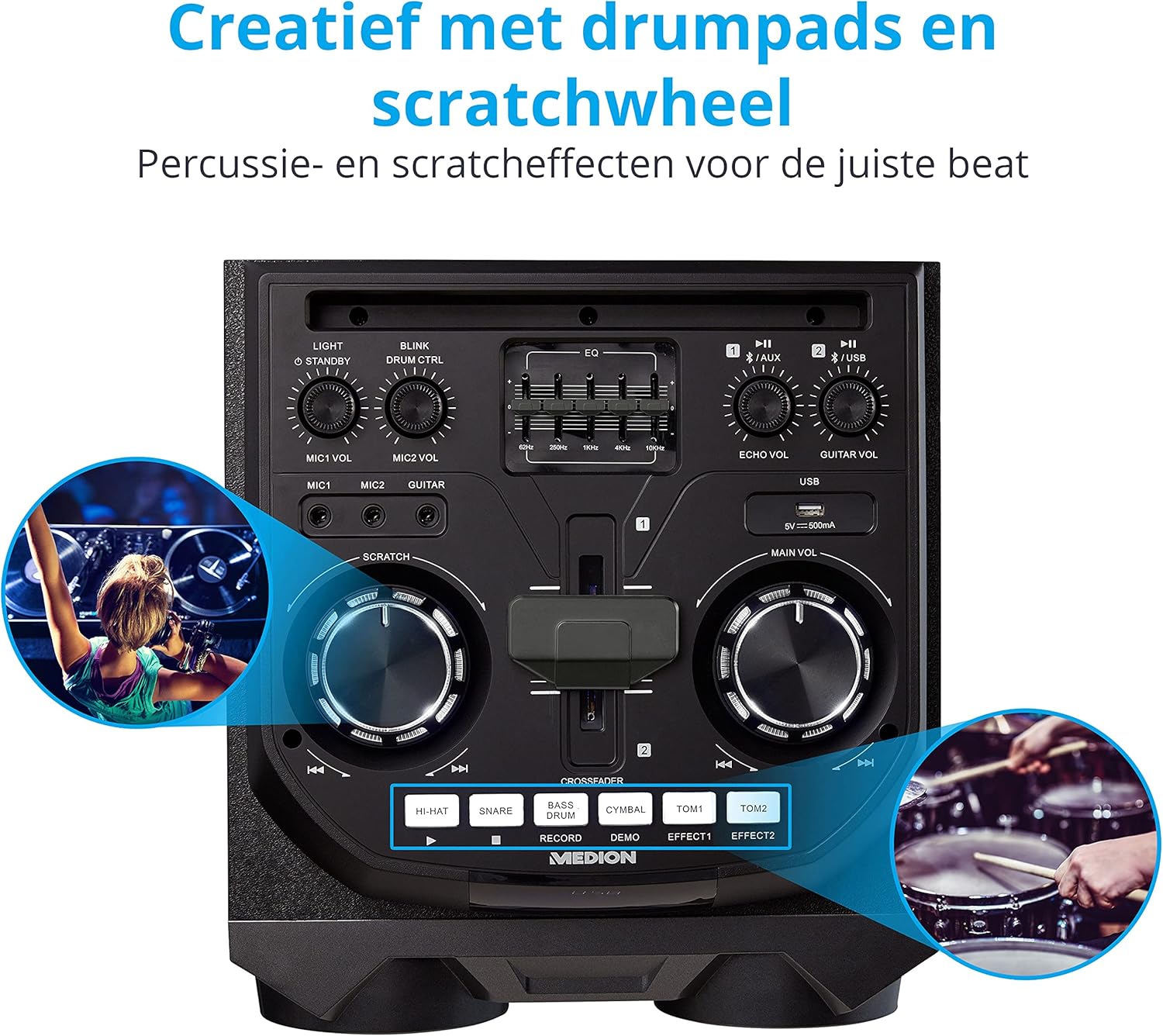
Image: Integrated Wheels for Portability
This image shows the back of the speaker, highlighting the integrated wheels at the bottom, designed for easy transport.
- Integrovaná kola: For easy transportation of the speaker.
- Rukojeti: Ergonomic handles for lifting and moving.
5. Nastavení
5.1 Počáteční umístění
Umístěte reproduktor na stabilní, rovný povrch. Zajistěte dostatečné větrání kolem jednotky. Neumísťujte jej do blízkosti zdrojů tepla nebo na přímé sluneční světlo.
5.2 Připojení napájení
- Connect the supplied power cord to the power input on the rear of the speaker.
- Zapojte druhý konec napájecího kabelu do vhodné zásuvky ve zdi.
- Press the power button on the top control panel to turn on the speaker. The LED lights will illuminate.
5.3 Connecting a Microphone or Guitar
For karaoke or live instrument performance:
- Plug your microphone(s) into the MIC1 or MIC2 6.3 mm jack inputs on the top panel.
- Plug your guitar into the GUITAR 6.3 mm jack input on the top panel.
- Adjust the respective volume knobs (MIC1 VOL, MIC2 VOL, GUITAR VOL) and ECHO VOL to your preference.
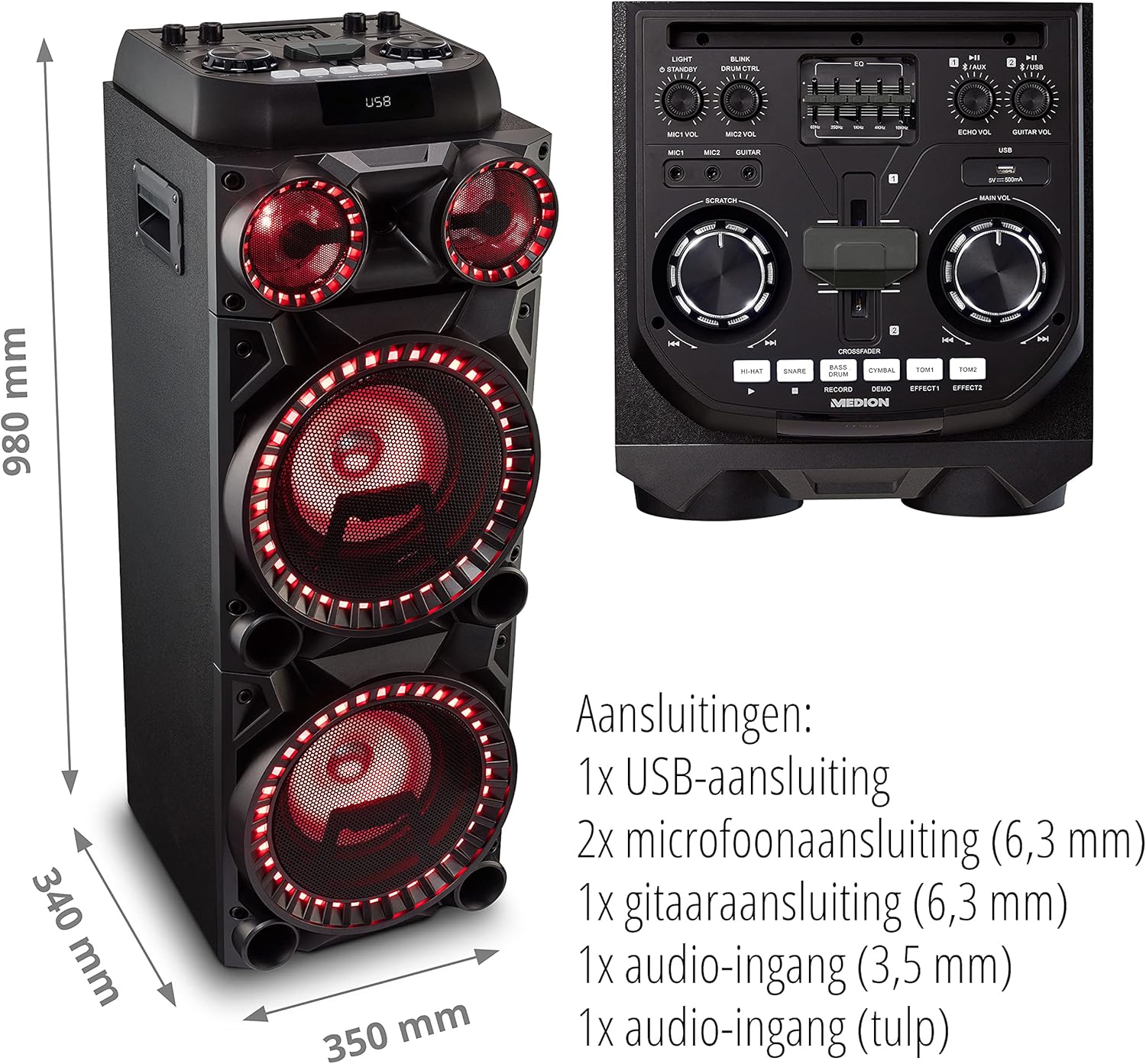
Image: Microphone and Guitar Connection for Karaoke
This image shows individuals enjoying karaoke, demonstrating the use of a microphone connected to the speaker for singing.
6. Návod k obsluze
6.1 Připojení Bluetooth
- Stiskněte tlačítko Bluetooth button on the control panel. The Bluetooth indicator will blink.
- Povolte Bluetooth na svém smartphonu, tabletu nebo jiném audio zařízení.
- Hledat "MEDION X64060" in your device's Bluetooth settings and select it to pair.
- Once connected, the Bluetooth indicator will stop blinking and remain solid. You can now play music wirelessly.

Image: Bluetooth Music Playback
This image shows a smartphone displaying a music application, indicating a wireless Bluetooth connection to the speaker for audio streaming.
6.2 Přehrávání z USB
- Vložte USB flash disk obsahující zvuk filedo USB portu na horním panelu.
- Stiskněte tlačítko USB tlačítko pro výběr režimu USB.
- The speaker will automatically detect and begin playing audio files from the USB drive. Use the playback controls (play/pause, skip track) on the control panel.
6.3 Vstup AUX
- Connect an external audio device (e.g., MP3 player, laptop) to the 3.5 mm AUX input or the RCA audio input on the rear panel using an appropriate audio cable (not included).
- Stiskněte tlačítko AUX tlačítko pro výběr režimu AUX.
- Play audio from your connected device. The speaker will output the sound.
6.4 Funkce DJ
The MEDION X64060 includes various DJ features for creative sound mixing.

Image: DJ Function Controls
Tento obrázek poskytuje detailní view of the DJ control section, including the cross-fader, scratch wheel, and various drum pads.
- Cross-fader: Use the cross-fader to smoothly transition between different audio sources or effects.
- Scratch Wheel: Manipulate the scratch wheel for classic DJ scratch effects.
- Bubnové podložky: Stiskněte tlačítko HI-HAT, SNARE, BASS BUBEN, ČINEL, TOM1a TOM2 pads to add drum sound effects to your music.
- Funkce záznamu: Použijte ZÁZNAM button to record your drum pad sequences.
6.5 Funkce karaoke
Connect a microphone as described in section 5.3. Play your chosen karaoke track via Bluetooth, USB, or AUX. Adjust the microphone and echo volumes for the desired effect.
6.6 Světelné efekty
The speaker features dynamic LED light effects that respond to the music. These lights automatically activate when the speaker is on. There may be a dedicated button (e.g., "LIGHT" or "BLINK") to control or cycle through different light modes, refer to the control panel for specific options.

Image: Dynamic Blue Light Effects
This image showcases the speaker with its blue LED lights illuminated, demonstrating the atmospheric light effects.

Image: Dynamic Red Light Effects
This image shows the speaker with its red LED lights illuminated, highlighting another color option for the atmospheric light effects.
7. Údržba
7.1 Čištění
- Před čištěním vždy odpojte reproduktor ze zásuvky.
- K otření vnějších povrchů použijte měkký, suchý hadřík.
- Nepoužívejte tekuté čisticí prostředky, aerosoly ani abrazivní materiály, protože by mohly poškodit povrchovou úpravu nebo vnitřní součásti.
7.2 Skladování
When not in use for extended periods, store the speaker in a cool, dry place, away from direct sunlight and extreme temperatures. Cover the unit to protect it from dust.
8. Řešení problémů
| Problém | Možná příčina | Řešení |
|---|---|---|
| Žádná síla | Power cord not connected properly; Power outlet not working. | Ensure the power cord is securely plugged into both the speaker and a working wall outlet. Test the outlet with another device. |
| Žádný zvuk | Volume too low; Incorrect input selected; Device not paired (Bluetooth); Cable not connected (AUX/Guitar/Mic). | Increase the main volume and individual input volumes. Select the correct input source (Bluetooth, USB, AUX). Re-pair Bluetooth device. Check all cable connections. |
| Připojení Bluetooth se nezdařilo | Reproduktor není v režimu párování; Zařízení je příliš daleko; Rušení. | Ensure the speaker is in Bluetooth pairing mode (blinking indicator). Move your device closer to the speaker. Avoid obstacles and other wireless devices. |
| Microphone/Guitar not working | Volume too low; Cable faulty; Incorrect input. | Increase MIC/GUITAR VOL. Check microphone/guitar cable. Ensure the instrument is properly connected. |
9. Specifikace
| Značka | STŘEDNÍ |
| Číslo modelu | X64060 | MD44060 |
| Výstupní výkon | 2 x 100 W RMS (2 x 1000 W max. music output power) |
| Technologie připojení | Bluetooth 5.0, USB, AUX (3.5mm, RCA) |
| Audio vstupy | 2 x Microphone (6.3 mm), 1 x Guitar (6.3 mm), 1 x AUX (3.5 mm), 1 x RCA |
| Ekvalizér | 5-pásmový |
| Barva | Černý |
| Materiál | Plast |
| Rozměry produktu (D x Š x V) | 38.8 x 35 x 101 cm |
| Hmotnost položky | 15 kg |
| Typ montáže | Stojící na podlaze |
| Zdroj napájení | Elektrický kabel |
| Kompatibilní zařízení | Notebook, Smartphone |
10. Záruka a podpora
For warranty information and technical support, please refer to the warranty card included with your product or visit the official MEDION webUschovejte si doklad o koupi pro případné reklamace.
Zákaznický servis MEDION: For assistance, please contact MEDION customer support through their official channels. Contact details can typically be found on the MEDION webmístě nebo na obalu produktu.