
Saooer BLUE 20A
Saooer 20A Solar Charge Controller User Manual
Model: BLUE 20A
Zavedení
This manual provides essential information for the safe and efficient operation of your Saooer 20A Solar Charge Controller. This intelligent regulator is designed to manage the working of solar panels and batteries in a solar system, featuring dual USB ports for mobile device charging. It is compatible with 12V and 24V systems and includes multiple protection functions to ensure system efficiency and prolong battery lifespan.

Obrázek 1: Přední strana view of the Saooer 20A Solar Charge Controller.
Bezpečnostní pokyny
- Ensure all connections are correct before powering on the controller. Incorrect wiring can damage the device or connected components.
- The controller is designed for indoor use or in a protected environment. Avoid exposure to direct sunlight, high temperatures, or moisture.
- Nepokoušejte se rozebírat ani opravovat ovladač sami. Servis svěřte kvalifikovanému personálu.
- Uchovávejte mimo dosah dětí.
- This controller is only suitable for lead-acid batteries: OPEN, AGM, GEL. Do not use with other battery types like Lithium-ion or LiFePO4, as this may cause damage or safety hazards.
- Always connect the battery first, then the solar panel, and finally the load. When disconnecting, reverse the order: disconnect the load, then the solar panel, and finally the battery.
Vlastnosti produktu
- Automatický systémový objemtage Identifikace: Automaticky detekuje napětí systému 12V/24Vtage.
- PWM Charging: Efficient Pulse Width Modulation charging mode.
- Duální USB porty: Provides 5V/2A output for charging mobile devices.
- LCD displej: Clear display of status and data, allowing for convenient mode switching and parameter configuration.
- Více ochranných funkcí: Includes short-circuit protection, open-circuit protection, reverse protection, and over-load protection.
- Nastavitelné parametry: User-adjustable charge and discharge parameters.
- Teplotní kompenzace: Automatic temperature compensation for optimal charging.
Nastavení a instalace
Follow these steps carefully to install your solar charge controller. Incorrect installation can lead to damage or malfunction.
- Příprava zapojení: Ensure all wires are properly stripped and have appropriate connectors if necessary. Use wires of sufficient gauge for your system's current.
- Připojte baterii: Connect the battery to the charge regulator first. Observe correct polarity (+ to + and - to -). The controller will automatically recognize the battery voltage (12V nebo 24V).
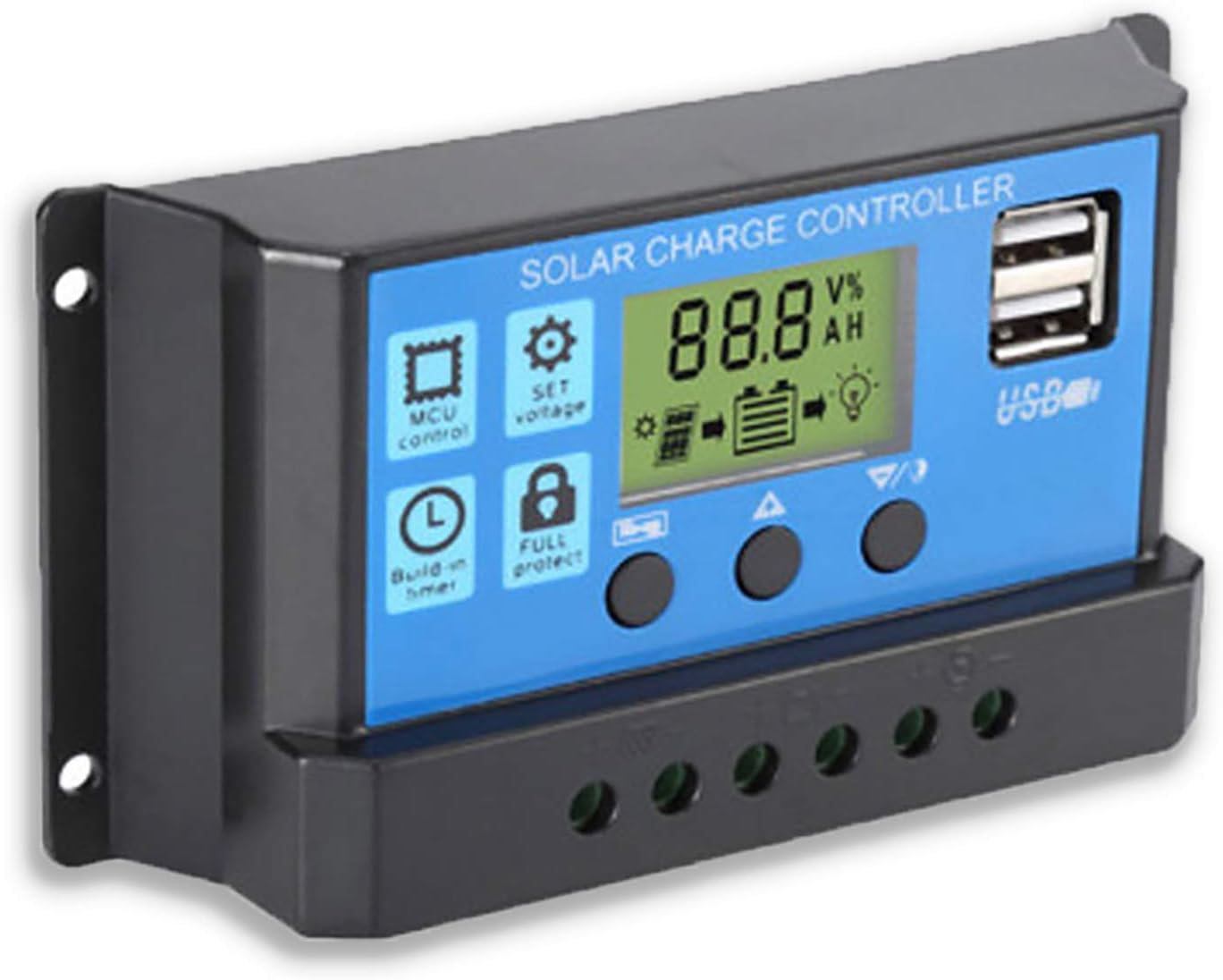
Obrázek 2: Strana view showing the connection terminals for battery, solar panel, and load.
- Připojte solární panel: Connect the solar panel to the solar charge controller. Ensure correct polarity.
- Připojení zátěže: Connect the consumer or load to the charge controller regulator. Ensure correct polarity.
Důležitá poznámka: Always connect the battery first, then the solar panel, and finally the load. When disconnecting the controller, please remove the solar panel, then the load, and finally the battery. This sequence helps the controller recognize the battery voltage correctly and prevents damage.
Návod k obsluze
LCD displej a tlačítka

Obrázek 3: Úhlové view showing the LCD display and control buttons.
The controller features an LCD display and three buttons for operation:
- Tlačítko nabídky: Used to cycle through display modes and enter parameter setting mode.
- Tlačítko nahoru: Used to increase values or navigate upwards in menus.
- Tlačítko dolů: Used to decrease values or navigate downwards in menus.
Režimy zobrazení
Press the Menu button to cycle through the following display modes:
- Baterie Voltage (V)
- Solární panel svtage (V)
- Zatěžovací proud (A)
- Battery Temperature (°C)
- Nabíjecí proud (A)
- Vybíjecí proud (A)
- Load Working Mode (24H, 0-23H, 0H)
Nastavení parametrů
To enter parameter setting mode, press and hold the Menu button for 5 seconds. Use the Up and Down buttons to adjust values, and the Menu button to confirm and move to the next parameter. Press and hold Menu again to exit setting mode.
| Parametr | Popis | Default (12V) | Range (12V) |
|---|---|---|---|
| B01/B02/B03 | Battery Type Selection (B01=Lead-acid, B02=Lithium Ion, B03=LiFePO4) | B01 | N/A |
| Charge Off Voltage | svtage at which charging stops | 14.4V | 13.0 V - 15.0 V |
| Vybití Objem opětovného připojenítage | svtage at which load reconnects after low voltage odpojit | 12.6V | 11.0 V - 13.5 V |
| Zastavení vypouštění Objemtage | svtage at which load disconnects to protect battery | 10.7V | 9.0 V - 11.5 V |
| Load Working Time | Timer for load output (24H, 0-23H, 0H) | 24H | N/A |
Note: For 24V systems, multiply the 12V values by two.
Údržba
- Pravidelná kontrola: Pravidelně kontrolujte těsnost a korozi všech kabelových spojů.
- Čistota: Udržujte ovladač čistý a bez prachu. K čištění používejte suchý hadřík.
- Větrání: Zajistěte dostatečné větrání kolem regulátoru, aby nedošlo k přehřátí.
- Stav baterie: Monitor baterie voltage and health regularly. Replace batteries as needed.
Odstraňování problémů
| Problém | Možná příčina | Řešení |
|---|---|---|
| Ovladač se nezapíná / LCD displej je prázdný | Baterie není připojena nebo je přepólována; Vybitá baterietage příliš nízké. | Check battery connections and polarity. Ensure battery has sufficient charge. |
| Solární panel nenabíjí baterii | Solar panel not connected or reverse polarity; Insufficient sunlight; Damaged solar panel. | Check solar panel connections and polarity. Ensure panel is in direct sunlight. Test solar panel output. |
| Zatížení nefunguje | Load not connected or reverse polarity; Battery voltage too low (low voltage disconnect); Overload protection activated. | Check load connections and polarity. Charge battery. Reduce load or check for short circuit. |
| USB porty se nenabíjejí | Baterie voltage too low; Device not compatible; Faulty USB cable. | Ensure battery is charged. Try a different device or cable. |
| Ovladač se zahřívá | Přetížení; Špatné větrání. | Reduce load. Ensure controller has adequate airflow and is not in an enclosed space. |
Specifikace
| Funkce | Detail |
|---|---|
| Model | MODRÁ 20A |
| System Voltage | 12V / 24V Auto |
| Max. nabíjecí/vybíjecí proud | 20A |
| USB výstup | Dual USB, 5V/2A (Max) |
| Kompatibilita typu baterie | Lead-acid (OPEN, AGM, GEL) |
| Rozměry produktu | 5.12 x 2.76 x 1.5 palce (přibližně 133 mm x 70 mm x 38 mm) |
| Hmotnost položky | 5 unce |
| Zobrazit | LCD |
| Provozní teplota | -35°C až +60°C |

Obrázek 4: Rozměry solárního regulátoru nabíjení.
Záruka a podpora
For warranty information or technical support, please contact the manufacturer, Saooer, through their official channels. Refer to your purchase documentation for specific warranty terms and contact details.
Výrobce: Saooer
ASIN: B095764VB7
UPC: 605832982977
Můžete navštívit Saooer Store on Amazon pro více informací nebo kontaktujte podporu.
Ask a question about this manual
Ask about setup, troubleshooting, compatibility, parts, safety, or missing instructions. Manuals+ will review the question and use this page’s manual context to help answer it.