
Tronsmart Apollo Air

Tronsmart Apollo Air True Wireless Earbuds
Uživatelská příručka
Zavedení
This manual provides detailed instructions for the proper use, setup, and maintenance of your Tronsmart Apollo Air True Wireless Earbuds. Please read this manual thoroughly before using the product to ensure optimal performance and longevity.

Image: Tronsmart Apollo Air True Wireless Earbuds in their open charging case, showcasinelegantní černý design.
Obsah balení
Prosím, ověřte, zda jsou v balení přítomny všechny položky:
- Tronsmart Apollo Air True Wireless Earbuds (Left and Right)
- Nabíjecí pouzdro
- Nabíjecí kabel USB typu C.
- Různé velikosti náušníků (S, M, L)
- Uživatelská příručka (tento dokument)
- Rychlý průvodce
Nastavení
1. Nabíjení sluchátek a pouzdra
Before first use, fully charge the earbuds and the charging case. The charging case can be charged via the included USB Type-C cable.
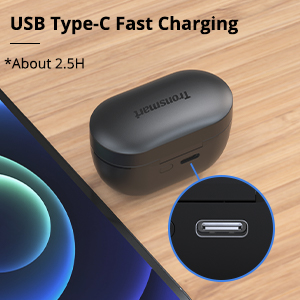
Image: Close-up of the USB Type-C charging port on the Tronsmart Apollo Air charging case, indicating fast charging capability.
- Připojte kabel USB typu C k nabíjecímu portu na pouzdře a ke zdroji napájení.
- Kontrolka na pouzdře bude ukazovat stav nabíjení.
- Plné nabití pouzdra trvá přibližně 2.5 hodiny.
- Sluchátka se nabíjejí automaticky po vložení do nabíjecího pouzdra.
2. Párování s vaším zařízením
The earbuds utilize Bluetooth 5.2 technology for a stable and fast connection.

Image: A smartphone displaying a Bluetooth connection icon next to the Tronsmart Apollo Air earbuds and charging case, highlighting Bluetooth 5.2 technology.
- Otevřete nabíjecí pouzdro a sluchátka se automaticky přepnou do režimu párování (kontrolky budou blikat).
- Na svém zařízení (chytrém telefonu, tabletu atd.) povolte Bluetooth.
- Hledat "Tronsmart Apollo Air" in the list of available Bluetooth devices.
- Select "Tronsmart Apollo Air" to connect. Once connected, you will hear a confirmation tone, and the indicator lights will stop flashing.

Image: A smartphone screen showing "Connection successful" for "Tronsmart Apollo Air" in Bluetooth settings, next to the earbuds and case.
Návod k obsluze
Dotykové ovládání
The Tronsmart Apollo Air earbuds feature intuitive touch controls for various functions:
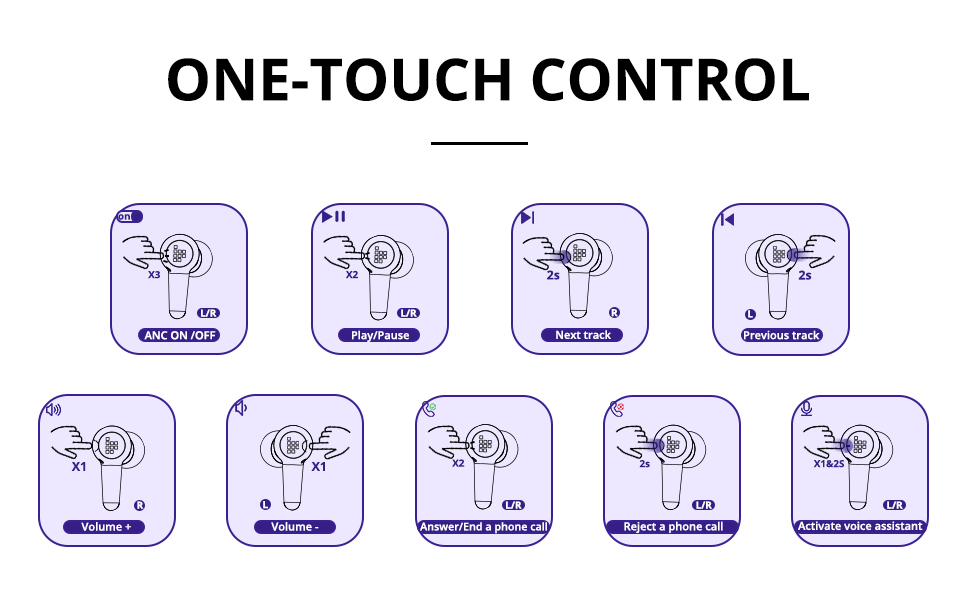
Image: A comprehensive diagram illustrating various touch control gestures on the earbuds for functions like ANC on/off, play/pause, track navigation, volume control, call management, and voice assistant activation.
- ANC ON/OFF: Triple tap (L/R earbud).
- Přehrát/pozastavit: Double tap (L/R earbud).
- Další skladba: Tap and hold 2 seconds (R earbud).
- Předchozí skladba: Tap and hold 2 seconds (L earbud).
- Hlasitost +: Single tap (R earbud).
- Objem -: Single tap (L earbud).
- Answer/End a Phone Call: Double tap (L/R earbud).
- Odmítnout telefonní hovor: Tap and hold 2 seconds (L/R earbud).
- Aktivovat Voice Assistant: Tap and hold 2 seconds (L/R earbud).
Aktivní potlačení hluku (ANC) a režim okolního zvuku
The earbuds offer different listening modes to suit your environment:
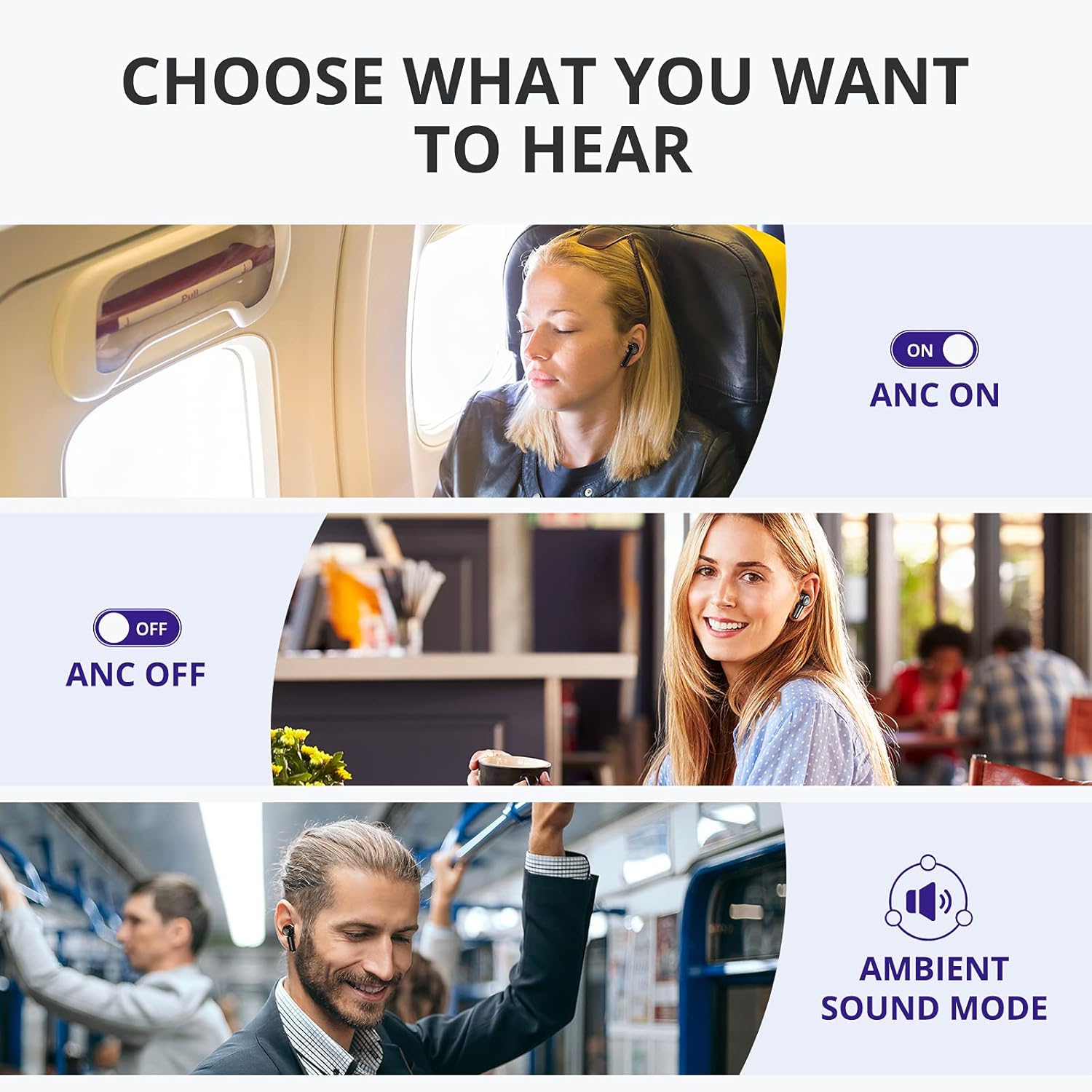
Image: Visual representation of three listening modes: ANC On for blocking noise, ANC Off for normal listening, and Ambient Sound Mode for hearing surroundings.
- ANC zapnuto: Blocks out ambient noise, providing a more immersive audio experience. Ideal for noisy environments like public transport or offices.
- ANC vypnuto: Standardní režim poslechu bez aktivního potlačení hluku.
- Režim okolního zvuku: Allows you to hear your surroundings while still enjoying your audio. Useful for awareness in urban environments or when interacting with others.
Switch between modes by triple tapping either earbud.

Image: A woman on a bus wearing the earbuds, with a graphic illustrating how the earbuds block out up to 35 dB of noise for tranquility.
Uskutečňování a přijímání hovorů
The earbuds are equipped with 6 microphones and cVc 8.0 technology for clear calls.

Obrázek: Explodoval view of the earbud highlighting the placement of six microphones (Feedforward Mic, Feedback Mic, Talk Mic) for crystal-clear calls.
- Přijmout/ukončit hovor: Dvakrát klepněte na kterékoli sluchátko.
- Odmítnout hovor: Klepněte a podržte jedno sluchátko po dobu 2 sekund.
Údržba
Čištění a péče
To ensure the longevity and optimal performance of your earbuds, follow these care instructions:
- Otřete sluchátka a nabíjecí pouzdro měkkým, suchým hadříkem, který nepouští vlákna.
- Nepoužívejte abrazivní čisticí prostředky, alkohol ani chemická rozpouštědla.
- Udržujte nabíjecí kontakty na sluchátkách i pouzdře čisté a bez nečistot.
- Když sluchátka nepoužíváte, uložte je do jejich nabíjecího pouzdra, abyste je ochránili a udrželi nabitá.
Odolnost proti vodě a potu
The Tronsmart Apollo Air earbuds are IP45 rated, meaning they are resistant to dust and splashes of water from any direction. This makes them suitable for workouts and light rain.

Image: A man exercising in a gym, wearing the earbuds, with an overlay indicating IP45 dust and sweat resistance, assuring durability during physical activity.
Important: The charging case is NOT waterproof. Do not expose the charging case to water or moisture.
Odstraňování problémů
If you encounter issues with your Tronsmart Apollo Air earbuds, please refer to the following common solutions:
| Problém | Možné řešení |
|---|---|
| Sluchátka se nepárují/nepřipojují |
|
| Žádný zvuk nebo nízká hlasitost |
|
| Active Noise Cancellation (ANC) not effective or hissing sound |
|
| Sluchátka se nenabíjejí |
|
| Jedno sluchátko nefunguje |
|
Specifikace
Key technical specifications for the Tronsmart Apollo Air True Wireless Earbuds:

Image: Detailed dimensional drawing of the Tronsmart Apollo Air earbuds and their charging case, showing measurements in millimeters and inches.
| Funkce | Detail |
|---|---|
| Značka | Tronsmart |
| Název modelu | Apollo Air |
| Technologie připojení | Bezdrátové připojení Bluetooth 5.2 |
| Kontrola hluku | Aktivní potlačení hluku |
| Úroveň odolnosti proti vodě | IP45 (pouze sluchátka do uší) |
| Doba přehrávání (na jedno nabití) | Až 5 hodin |
| Doba hraní (s nabíjecím pouzdrem) | Až 20 hodin |
| Nabíjecí port | USB Type-C |
| Mikrofony | 6 (with cVc 8.0 technology) |
| Kontrolní metoda | Dotek |
| Materiál | Plast, silikon |
| Hmotnost položky | 5.3 unce |
| Rozměry balení | 7.13 x 3.43 x 1.5 palce |
Záruka a podpora
For warranty information and technical support, please refer to the warranty card included in your product packaging or visit the official Tronsmart website. You may also contact Tronsmart customer service directly for assistance with product issues or inquiries.
Tronsmart Official Webmísto: www.tronsmart.com
Ask a question about this manual
Ask about setup, troubleshooting, compatibility, parts, safety, or missing instructions. Manuals+ will review the question and use this page’s manual context to help answer it.